
Workflow automation for law firms is the use of specialized software to replace manual, repetitive legal and administrative tasks with rule-based or AI-driven processes. Firms that implement legal workflow automation software reduce administrative time by up to 40% and increase billable hours by an average of 30%. Those numbers represent real revenue recovery, not theoretical efficiency gains. The four operational areas driving the most value in 2026 are automated client intake, jurisdictional calendar management, document generation from templates, and task escalation for overdue work. For managing partners and operations directors at mid-market firms, the question is no longer whether to automate. The question is where to start and how to measure the return.
What is workflow automation for law firms?
Legal workflow automation, also called legal process automation, is the practice of mapping a firm’s repeatable processes into software that executes steps automatically, routes tasks to the right people, and flags exceptions without human intervention. The term “workflow automation” is the common search phrase, but the industry standard term is legal process automation or legal operations automation. Both describe the same outcome: fewer manual handoffs, fewer missed deadlines, and more attorney time spent on billable work.
The distinction from generic business automation matters. Generic tools lack the specialized compliance logic, document handling rules, and jurisdictional calendar calculations that legal work requires. A general-purpose workflow tool cannot calculate a response deadline based on court rules in a specific jurisdiction. A legal-specific platform can.
The core value proposition is straightforward. Attorneys and paralegals spend a significant portion of their day on tasks that do not require legal judgment: chasing signatures, sending status updates, reformatting documents, and manually entering matter data. Automating those tasks returns that time to the timesheet.

What are the main features of legal workflow automation software?
Legal workflow automation software covers the full matter lifecycle, from the moment a potential client contacts the firm to the final file closure. The features that deliver the most measurable value fall into six categories.
- Visual no-code workflow builders. Legal operations teams design and modify workflows without writing code or waiting for IT. Mid-market firms prioritize no-code tools because they give legal staff direct control over process changes.
- Automated client intake and matter triage. Intake forms capture structured data, classify the matter type, assign it to the right practice group, and trigger the opening checklist automatically.
- Jurisdictional calendar and deadline management. The system calculates deadlines based on court rules for the relevant jurisdiction and pushes them to attorney calendars without manual entry.
- Document generation with conditional templates. A matter type triggers the correct template. Variable fields populate from the matter record. The attorney receives a draft ready for review, not a blank page.
- Task assignment and escalation automation. Automated task assignment routes work to the right person based on role, workload, or matter type. Overdue tasks escalate automatically to supervisors.
- Integration with document management and Outlook/Office. The workflow engine connects to the firm’s document management system and Microsoft 365 so that files, emails, and calendar entries stay synchronized.
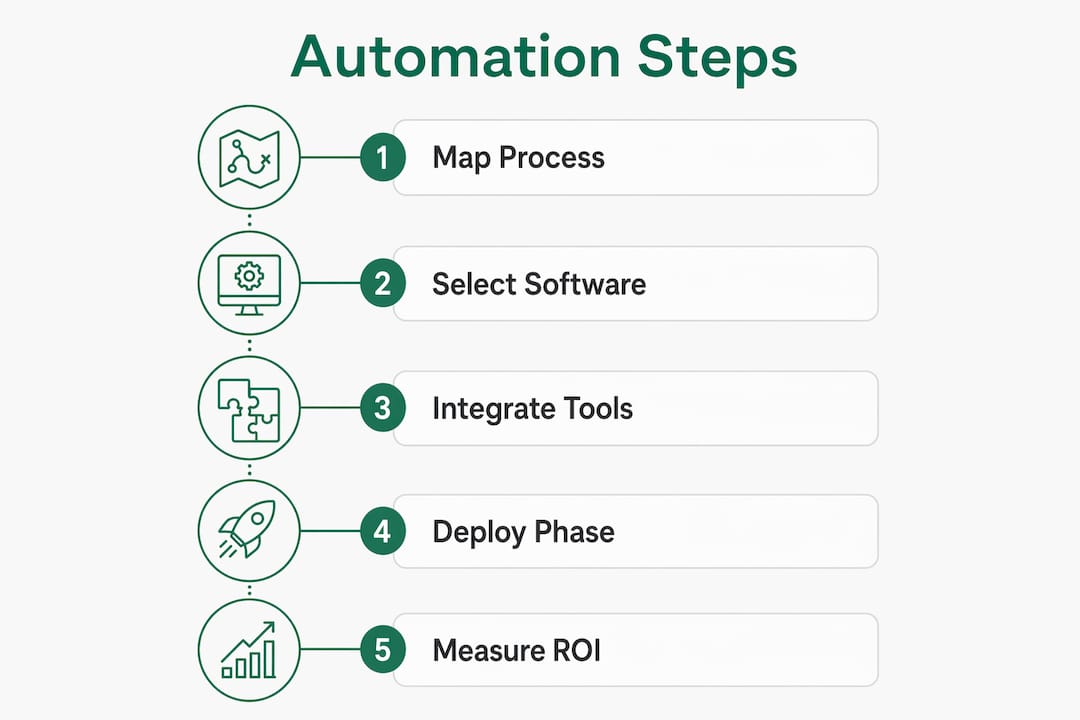
Pro Tip: Before selecting a platform, map your three highest-volume matter types end to end on paper. Every step you cannot describe clearly is a step the software cannot automate reliably.
The integration point deserves emphasis. Native integration with document and calendar systems is as important as the workflow engine itself. Firms that skip integration end up with attorneys maintaining parallel manual processes, which defeats the purpose of automation entirely.
How does AI enhance workflow automation in legal firms?
Agentic AI represents the leading edge of legal workflow automation in 2026. Agentic AI workflows handle end-to-end legal tasks autonomously within secure firm environments, replacing reactive administrative functions with proactive, self-executing processes. The shift from rule-based automation to AI-driven automation is significant because AI can handle unstructured inputs, not just structured form data.
Practical AI applications that drive measurable value include:
- Document data extraction. AI reads incoming contracts, court filings, or client documents and extracts key dates, parties, and obligations into the matter record automatically.
- Structured brief generation. AI applications in legal workflows generate structured summaries of incoming documents for attorney review, cutting the time spent reading raw source material.
- Conditional document drafting. AI selects the correct clauses based on matter type, jurisdiction, and client profile, producing a first draft that attorneys refine rather than write from scratch.
- Case file validation. The system checks whether all required documents are present in the matter file and triggers a request for missing items without attorney involvement.
- Audit trail generation. Every automated action is logged with a timestamp and actor, creating a compliance record that supports both internal governance and external audits.
The critical design principle is the human-in-the-loop gate. Human-in-the-loop frameworks stop automation at critical legal decision points and require attorney review before the process continues. Routine steps run automatically. Judgment calls require a human. That balance is what makes AI-driven legal automation compliant and defensible.
Pro Tip: Build human-in-the-loop gates into your AI workflows from day one. Retrofitting attorney review checkpoints into a fully automated process is far harder than designing them in at the start.
Microsoft 365 Copilot fits directly into this model. When integrated into legal workflows through a consulting engagement like those Gozera delivers, Copilot handles drafting, summarization, and email triage inside the tools attorneys already use, without requiring them to switch platforms or learn new interfaces.
What are the best practices for adopting legal workflow automation?
The technology is rarely the hardest part of a legal automation project. Mapping informal, unwritten workflows into standardized formats is consistently the greatest implementation hurdle. Most law firms have never documented how a matter actually moves through the office. Senior attorneys carry the process in their heads. Junior staff learn by watching. Automation requires that knowledge to be explicit, written, and agreed upon.
Automation projects fail most often because firms underestimate the culture shift required. Attorneys who have practiced a certain way for 20 years resist having software dictate their process. That resistance is not irrational. It reflects legitimate concern about accountability and quality. The answer is not to override that concern but to design workflows that give attorneys visibility and control at the points that matter.
Four practices separate successful implementations from failed ones:
- Start with high-volume, low-complexity processes. Client intake, standard contract generation, and routine calendaring are the right starting points. They affect every matter, they are well-understood, and they produce visible time savings quickly.
- Standardize before you automate. A process that varies by attorney cannot be automated reliably. Agree on the standard process first, then build the workflow.
- Integrate or expect workarounds. Attorneys will revert to email and spreadsheets the moment the automated system creates friction. Integration with Microsoft 365 and the firm’s document management system removes that friction.
- Empower legal ops with no-code tools. Legal operations staff who can modify workflows without IT support respond faster to process changes and sustain adoption over time.
The firms that achieve the strongest ROI treat automation as an ongoing practice, not a one-time project. They assign ownership of each workflow to a specific person, review performance quarterly, and adjust based on what the data shows.
How to select workflow software for law firms and measure ROI
Selecting the right platform starts with a clear picture of the firm’s current process gaps. Decision-makers should evaluate platforms across five dimensions.
| Evaluation criterion | What to look for |
|---|---|
| Legal-specific compliance logic | Jurisdictional deadline calculation, matter-type templates, and audit trail generation built in |
| No-code configurability | Legal ops staff can build and modify workflows without developer support |
| Microsoft 365 integration | Native connection to Outlook, Teams, SharePoint, and Word without custom middleware |
| AI capabilities | Document extraction, conditional drafting, and agentic task handling within the platform |
| Vendor support model | Ongoing customization support and a clear roadmap for AI feature development |
Phased deployment targeting high-volume workflows avoids overreach and produces measurable early wins. A firm that automates client intake in month one has a concrete time-savings number to show partners before expanding to document generation in month three. That evidence builds internal support for broader adoption.
Measuring ROI requires a baseline. Before deploying any automation, record how long each target process takes, how many errors occur, and how much attorney time the process consumes per month. After deployment, measure the same metrics. The difference is your return.
Pro Tip: Track billable hour recovery, not just time saved. A paralegal who saves two hours per day on administrative tasks is only generating ROI if those two hours move to billable work. Confirm that shift in your time-tracking data.
Generic business automation platforms do not belong in this evaluation. They lack the legal compliance logic, document handling rules, and jurisdictional calendar features that legal-specific platforms provide. The cost of building those capabilities on top of a generic tool exceeds the cost of buying a purpose-built solution.
Gozera’s approach to Copilot adoption for law firms addresses exactly this gap. Rather than deploying Microsoft 365 Copilot as a standalone tool, Gozera integrates it into rebuilt legal workflows, measures actual usage through telemetry, and demonstrates ROI through recovered billable time.
Key Takeaways
Legal workflow automation delivers measurable ROI only when firms combine purpose-built software, standardized processes, AI-driven task handling, and human oversight at critical decision points.
| Point | Details |
|---|---|
| Start with high-volume processes | Automate client intake and calendaring first to generate visible time savings before expanding. |
| Require native integrations | Connect automation to Microsoft 365 and document management systems to prevent manual workarounds. |
| Use human-in-the-loop gates | Build attorney review checkpoints into AI workflows from the start, not as an afterthought. |
| Measure billable hour recovery | Track whether saved administrative time converts to billable work, not just total hours saved. |
| Standardize before automating | Document and agree on the standard process before building any workflow in software. |
The cultural shift nobody talks about
The firms I have seen succeed with legal automation share one trait: they treated the process mapping phase as seriously as the software selection phase. Every managing partner I have spoken with underestimated how much institutional knowledge lived in people’s heads rather than in documented procedures. When that knowledge finally gets written down, attorneys often discover that their “standard” process has five different versions running simultaneously across the firm.
AI tools like Microsoft 365 Copilot accelerate the automation payoff significantly, but only when they are integrated into actual workflows rather than handed to attorneys as a standalone chat interface. The firms that see the strongest productivity gains are the ones that rebuilt their intake, drafting, and review processes around Copilot’s capabilities, not the ones that simply gave everyone a license and hoped for adoption.
The human-in-the-loop principle is not a limitation of current AI. It is the correct design for legal work. Attorneys are accountable for their advice in ways that software never will be. The goal of automation is to remove the work that does not require that accountability, not to replace the judgment that does. Firms that internalize that distinction build automation programs that attorneys actually trust and use.
The next frontier is agentic AI handling multi-step legal processes end to end, with attorneys reviewing outputs rather than managing steps. That shift is already happening in early-adopter firms. Mid-market firms that build the foundational workflow infrastructure now will be positioned to adopt agentic capabilities as they mature, without starting over.
— Mad
How Gozera helps law firms get real ROI from Copilot
Law firms that invest in Microsoft 365 Copilot licenses without a structured adoption plan consistently see low utilization and no measurable return. Gozera specializes in fixing exactly that problem.
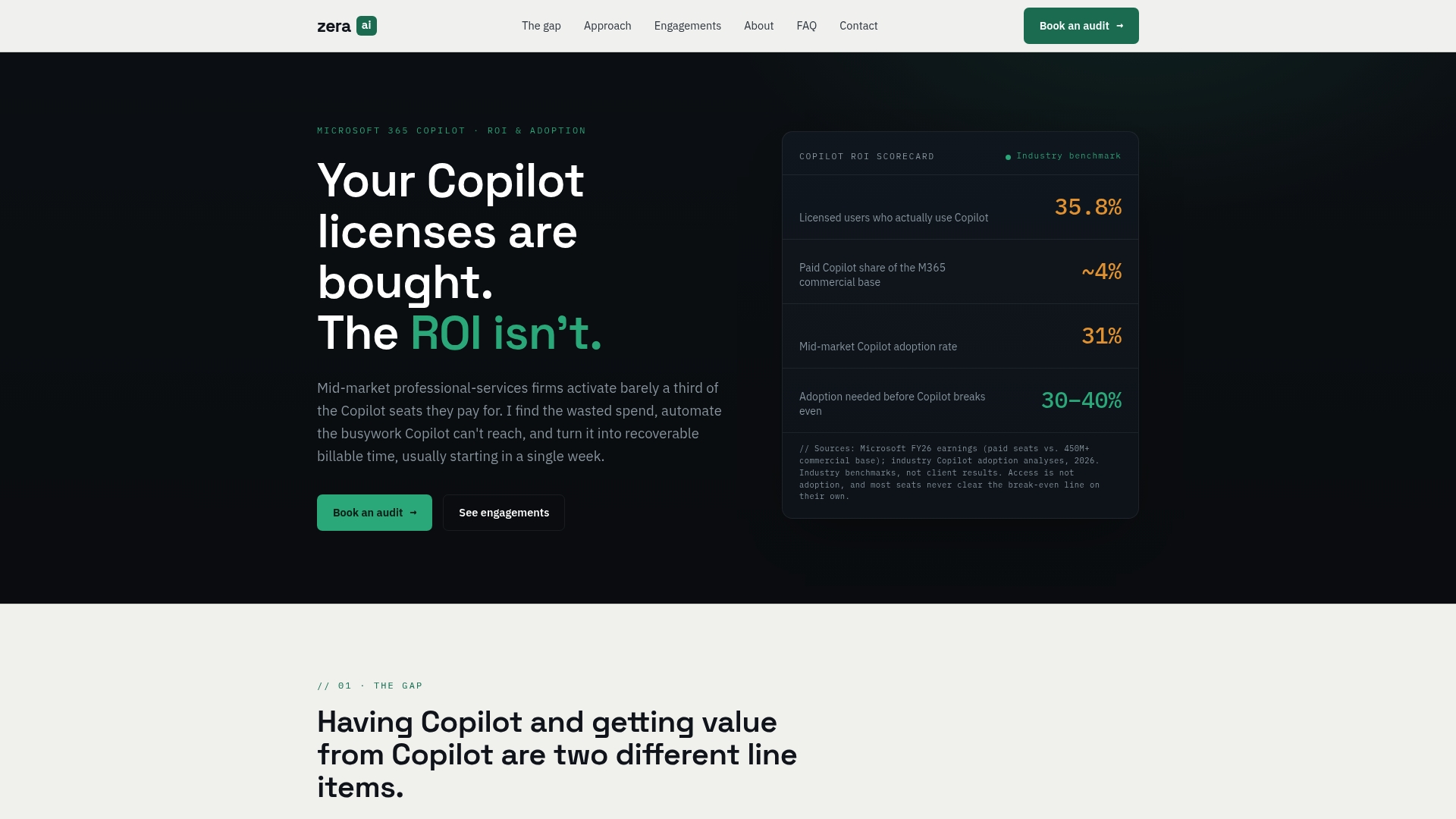
Gozera measures actual Copilot usage through telemetry, identifies dormant licenses, and rebuilds legal workflows around the platform’s AI capabilities. The result is recovered billable time and a clear ROI number that managing partners can present to the partnership. Gozera’s engagements are designed to produce measurable outcomes quickly, without lengthy change management programs. If your firm’s Copilot licenses are sitting idle, Gozera can show you exactly why and build the workflows that change that.
FAQ
What is legal workflow automation?
Legal workflow automation is the use of software to execute repeatable legal and administrative tasks automatically, including client intake, deadline calculation, document generation, and task escalation. It replaces manual handoffs with rule-based or AI-driven processes that run without attorney intervention.
How much time can law firms save with workflow automation?
Firms that implement legal workflow automation software reduce administrative time by up to 40% and increase billable hours by an average of 30%, based on 2026 industry data. Actual results depend on which processes are automated and how completely they are integrated into existing systems.
What processes should a law firm automate first?
Client intake, standard contract generation, and jurisdictional calendar management are the highest-value starting points. They are high-volume, well-understood, and produce measurable time savings without requiring complex legal judgment.
Does Microsoft 365 Copilot work for legal workflow automation?
Microsoft 365 Copilot handles drafting, summarization, and email triage within the tools attorneys already use, making it a strong fit for legal workflows when integrated properly. Gozera’s consulting engagements rebuild legal processes around Copilot’s capabilities to ensure adoption and measurable ROI.
What is a human-in-the-loop gate in legal automation?
A human-in-the-loop gate is a checkpoint in an automated workflow where the process pauses and requires attorney review before continuing. It ensures that AI handles routine steps while attorneys retain control over decisions that require legal judgment and professional accountability.