
Enablement wins. If you’re deciding where to put your budget and attention for a Microsoft 365 Copilot rollout, a sustained enablement program produces measurable behavior change and recoverable ROI. One-off training rarely does. That said, short, role-targeted training still belongs in the mix, specifically during pilot onboarding or when a team needs urgent upskilling on a new workflow. The boundary is simple: training transfers knowledge; enablement converts that knowledge into daily habits that show up in your telemetry.
Two frameworks anchor this distinction. The Microsoft Adoption Framework treats Copilot rollouts as people-change programs, not software deployments. Activation-led programs built on that framework have increased everyday AI use substantially in pilots, with some programs reporting large sustained increases over control groups, according to practitioner data from Cognician. Training completion rates, by contrast, rarely predict those outcomes.
- Prioritize enablement when you want sustained daily use and measurable ROI.
- Use targeted training for pilot onboarding, urgent upskilling, or new-hire ramp.
- Combine both in a hybrid model for the first 90 days, then shift the budget toward ongoing enablement.
Table of Contents
- What’s the difference between Copilot training and enablement?
- Why one-off training often fails to move the needle
- What does an effective Copilot enablement program actually include?
- How do you design a Copilot enablement program from pilot to scale?
- How do you measure Copilot adoption and ROI in a mid-market firm?
- Weeks 0–12 checklist: quick wins and red flags
- How Gozera turns Copilot licenses into measurable ROI
- Key Takeaways
- What actually moves the needle in a Copilot rollout
- Gozera’s Copilot adoption consulting for mid-market firms
- Useful sources and further reading
What’s the difference between Copilot training and enablement?
These two terms get used interchangeably, and that confusion is exactly why so many Copilot rollouts stall after the launch event.
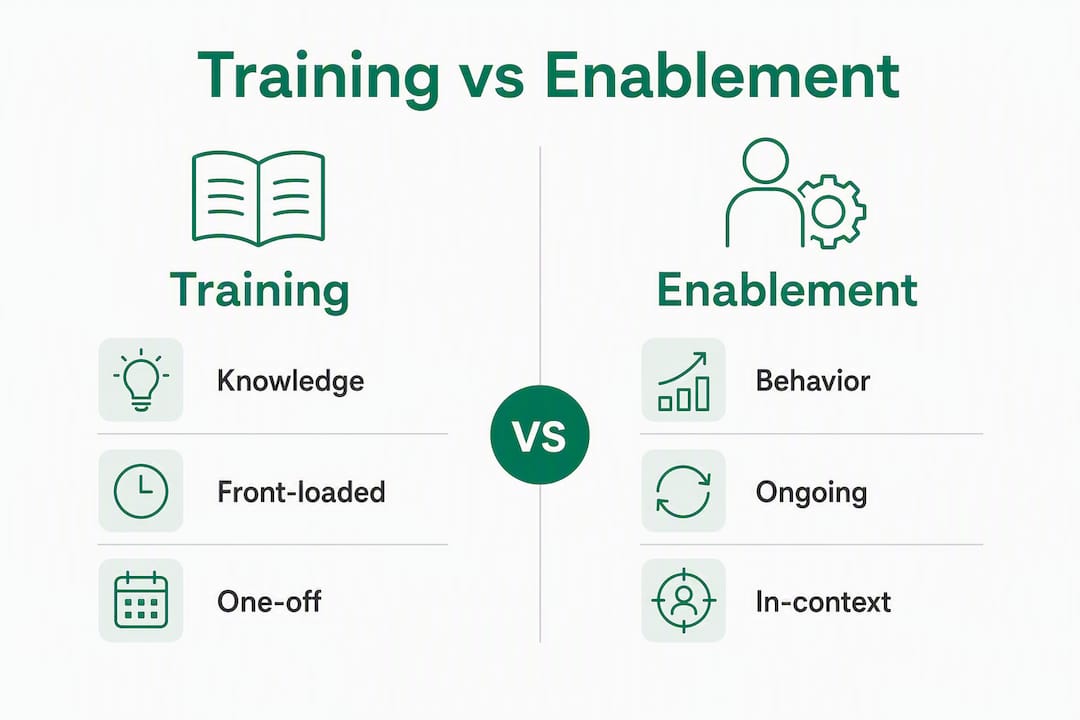
Training is front-loaded and content-led. Think workshops, LMS modules, one-off certification courses, or a vendor-delivered “Copilot 101” session. The unit of change is knowledge. You measure it by completion rates and quiz scores. Typical deliverables: a recorded webinar, a SharePoint learning path, a certification badge.
Enablement is ongoing and behavior-led. It embeds Copilot into the way people actually work through nudges, in-app guidance, playbooks, champions, and workflow templates. The unit of change is behavior. You measure it by daily active use, repeat rates on trained workflows, and time saved per task. Typical deliverables: a prompt library, a champions program, monthly office hours, and a telemetry dashboard.
| Dimension | Training | Enablement |
|---|---|---|
| Unit of change | Knowledge | Behavior |
| Timing | Front-loaded, event-based | Continuous, in-context |
| Measurement focus | Completion rate, quiz score | DAU/WAU, workflow repeat rate |
| Typical deliverables | Workshops, LMS modules, certs | Playbooks, champions, nudges, templates |
| ROI signal | Attendance | Active weekly use, billable time recovered |
When to choose training only: your pilot group is technically confident, the use case is narrow and well-defined, and you need fast ramp in under two weeks.
When to invest in full enablement: you’re rolling out to 50+ users across multiple roles, licenses are already deployed but underused, or you need to demonstrate ROI to partners or a CFO within 90 days.
Hybrid approach: run a short role-based training sprint in weeks 1–2, then shift immediately to an enablement cadence (champions, nudges, office hours, measurement) for the remainder of the quarter.
Why one-off training often fails to move the needle
The most common Copilot failure pattern isn’t a bad tool. It’s a good tool deployed like a software update.
Licenses go live. An IT team sends a “Copilot is now available” email. A vendor runs a 90-minute workshop. Completion rates hit 80%. Then nothing changes. Six weeks later, fewer than 20% of users have opened Copilot in the past week. That gap between training completion and sustained use is the core problem, and it’s structural, not motivational.
Practitioner data from Cognician shows that activation-led programs produce measurable behavior change in 2–4 weeks in targeted pilots, while traditional LMS-based training metrics rarely reflect real workflow value at all. The mechanism is straightforward: training gives people knowledge they can’t immediately apply because there’s no in-work reinforcement, no manager accountability, and no role-specific context telling them which Copilot feature to use on which task today.
Stat to watch: Everyday AI use rose from 54% to 76% in activation pilots, with some programs reporting sustained increases exceeding 200% over control groups. Training-only cohorts in the same studies showed minimal sustained gains.
Four failure patterns show up repeatedly in mid-market rollouts:
- No role mapping. Licenses deployed to everyone with the same generic training, regardless of whether a partner, associate, or analyst has different high-value use cases.
- Training as a single event. One workshop, no follow-up, no reinforcement loop.
- No in-work support. Users finish training and return to their desks with no prompt library, no template, and no one to ask.
- Missing workflow-level measurement. The only metric tracked is license count or training completion, not whether anyone is actually using Copilot to draft proposals or summarize client calls.
Signals that training has already failed in your firm:
- Weekly active Copilot use is below 40% of licensed seats.
- Champions are fielding all the questions because managers aren’t engaged.
- Users report they “tried it once” but don’t know what to use it for.
- No one can name a specific workflow where Copilot saved measurable time.
What does an effective Copilot enablement program actually include?
A program that moves the needle has six components. Budget and staff for all of them, or expect partial results.

Role mapping and use-case prioritization. Start by identifying who benefits most from Copilot and on which tasks. In a law firm, that’s associates drafting matter summaries and partners reviewing contracts. In an accounting practice, it’s staff preparing client reports and managers reviewing workpapers. Microsoft’s enablement framework structures this across four phases: Get Ready, Launch, Onboard, and Optimize. Role mapping happens in Get Ready and drives everything downstream.
In-app and in-context support. Embedded prompts, guided quests, and workflow templates placed inside the tools people already use. The goal is zero friction between “I need to do X” and “here’s how Copilot helps me do X right now.” This is where professional-services workflow templates for proposal drafting, client summaries, and matter intake pay off immediately.
Playbooks and templates. Role-specific playbooks that show, step by step, how to use Copilot for the three or four tasks that matter most to each job function. Generic “here’s what Copilot can do” documentation doesn’t drive adoption. A one-page prompt card for a paralegal doing matter intake does.
Champions and manager accountability. Champions are peer advocates who model Copilot use, share wins, and field questions. They work best when managers reinforce the behavior by asking about Copilot use in team meetings and tracking it in their own KPIs. Without manager accountability, champions burn out.
Ongoing channels. Monthly office hours, a community of practice channel in Teams, a curated prompt library updated with real examples from your own workflows. These keep the program alive past week four.
Activation mechanics. Small, guided daily challenges (5–10 minutes) beat long workshops for habit formation. A “use Copilot to summarize today’s longest email” challenge repeated for five days builds a habit that a two-hour workshop never will.
Pro Tip: Design your first activation challenge around a task every participant does every single day. The lower the friction, the higher the completion, and the faster the habit forms.
How do you design a Copilot enablement program from pilot to scale?
The 90-day window is the right planning unit. Here’s how to structure it.
Readiness assessment (pre-pilot, weeks -2 to 0). Audit your Microsoft 365 tenant for data governance gaps, sensitivity labels, and SharePoint permissions before Copilot touches live documents. Identify your pilot cohort: 15–30 users across two or three roles with high-value use cases and managers willing to participate. Pull baseline telemetry now so you have a before-state to compare against. The Microsoft 365 Copilot implementation guide covers the governance checklist in detail.
Pilot design (weeks 1–4). Run role-based scenarios using real documents and real workflows, not demo data. Assign a short activation challenge each week. Measure daily active use and workflow repeat rates, not just satisfaction scores. Hold a weekly 30-minute debrief with champions to surface friction points fast.
Rollout (weeks 5–8). Expand to the full user group with role-specific playbooks already refined from the pilot. Launch the champions program formally. Begin manager reporting: each manager receives a weekly one-page summary of their team’s Copilot use by workflow.
Scale and sustain (weeks 9–12). Run a governance checkpoint: which licenses are dormant, which workflows are producing the most time savings, and where do you need to build small automations to close gaps Copilot can’t cover natively? Reallocate dormant licenses. Start the optimization retainer cadence.
| Phase | Weeks | Owner | Key Output | Leading KPI |
|---|---|---|---|---|
| Readiness | -2 to 0 | IT + Operations | Baseline telemetry report, governance checklist | Data readiness score |
| Pilot | 1–4 | L&D + Champions | Role playbooks, activation challenges | Weekly active use % |
| Rollout | 5–8 | Line managers + L&D | Manager dashboards, expanded playbooks | Workflow repeat rate |
| Scale | 9–12 | IT + Consulting partner | License optimization, automation gaps closed | Recoverable billable hours |
How do you measure Copilot adoption and ROI in a mid-market firm?
Measure at four layers, in order of increasing business impact.

Usage: daily and weekly active users (DAU/WAU) as a share of licensed seats. This is your leading indicator. Below 40% WAU at week eight means the enablement program needs adjustment, not more training.
Adoption of trained use cases: what percentage of users are using Copilot for the specific workflows you targeted? A firm that trained on proposal drafting should be able to show that Copilot is being used in Word for that task at a measurable rate.
Productivity: time saved per task, measured by comparing before-and-after task completion times for specific workflows. A partner who spent 45 minutes drafting a client summary now spends 12 minutes reviewing and editing a Copilot draft. That’s 33 minutes recovered per instance.
Business outcomes: recoverable billable hours and revenue impact. This is the number that gets a CFO’s attention.
A simple model for a 100-person professional-services firm: if 60 users save an average of 30 minutes per day on Copilot-assisted tasks, that’s 30 hours per day across the firm. At a blended billable rate of $200/hour and a 50% recoverability assumption (not every saved minute becomes a billed minute), that’s $3,000 per day in recoverable billable time, or roughly $750,000 annually. Training vendors have cited substantial three-year ROI ranges in client marketing materials, though those figures depend heavily on assumptions and firm-specific recoverability rates. Build your own model using your actual billing rates and realistic recoverability percentages.
Pro Tip: Track recoverable billable time at the workflow level, not the license level. A CFO who sees “60 licenses active” is unimpressed. A CFO who sees “33 minutes recovered per client summary, across 40 matters per week” starts asking how to expand the program.
Measure business value at the workflow level, not just license counts or prompt volumes, to make the ROI case to partners and CFOs.
Weeks 0–12 checklist: quick wins and red flags
Week 0: readiness
- Pull baseline telemetry from Microsoft 365 admin center (active users, app usage, SharePoint permissions).
- Complete data governance and sensitivity-label audit.
- Select pilot cohort (15–30 users, 2–3 roles, engaged managers).
- Define three target workflows per role with measurable before-states.
Weeks 1–4: pilot and activation
- Deliver role-based training sprint (max 90 minutes, real documents only).
- Launch week-one activation challenge (one specific daily task, 5–10 minutes).
- Stand up champions channel in Teams.
- Run weekly pilot debrief; log friction points and prompt failures.
Weeks 5–8: role-based enablement
- Distribute refined role playbooks to full user group.
- Launch manager reporting cadence (weekly one-pager per team).
- Open monthly office hours (30 minutes, open Q&A format).
- Publish prompt library with real examples from pilot workflows.
Weeks 9–12: measure and scale
- Pull telemetry comparison: baseline vs. current WAU and workflow repeat rates.
- Identify dormant licenses and reallocate or remediate.
- Close automation gaps with lightweight tools where Copilot alone isn’t enough.
- Present ROI report to leadership: time saved, billable hours recovered, next-quarter plan.
Quick wins to capture early:
- Prompt libraries for the three most common document types (proposals, summaries, intake forms).
- A manager-led live demo in a team meeting, using a real current project.
- License reallocation: move seats from non-users to high-value roles immediately.
- A “Copilot win of the week” post in the champions channel to build social proof.
Red flags that signal course correction:
- WAU below 40% at week six despite training completion above 70%.
- Champions fielding more than 80% of user questions (managers aren’t engaged).
- No manager has referenced Copilot use in a team meeting by week four.
- Prompt library hasn’t been updated since launch (no one owns it).
- Users are using Copilot for low-value tasks (formatting, spell-check) but not for the target workflows.
How Gozera turns Copilot licenses into measurable ROI
Gozera’s methodology for mid-market professional-services firms follows a structured sequence that produces results before the 90-day mark.
The engagement model:
- Baseline telemetry audit: — pull actual usage data from the Microsoft 365 tenant to identify dormant licenses, underused features, and the workflows where Copilot is already being used (often without formal enablement).
- Targeted enablement sprints: — role-specific playbooks, activation challenges, and champions setup, built around real client documents and workflows.
- Automation gap-fill: where Copilot alone doesn’t cover a workflow, Gozera builds lightweight automations using Python or n8n to close the gap and capture the full time saving.
Sample outcomes for a 75-person consulting firm:
| Metric | Before engagement | After 90-day sprint |
|---|---|---|
| Target workflows with repeat use | 0 tracked | 4 workflows tracked and measured |
| Estimated recoverable billable hours/week | Not measured | — |
| Dormant licenses reallocated | Unknown | 12 licenses moved to high-value roles |
Gozera engages in three stages: a fixed-price Copilot adoption audit, an integration sprint, and an optional ongoing optimization retainer. The audit alone typically surfaces enough dormant license and workflow data to justify the engagement cost within the first 30 days.
Key Takeaways
Enablement, not one-off training, is what converts Microsoft 365 Copilot licenses into measurable daily use and recoverable billable time for mid-market professional-services firms.
| Point | Details |
|---|---|
| Enablement beats training | Sustained behavior change requires ongoing, in-context support, not a single workshop or LMS module. |
| Measure at the workflow level | Track DAU/WAU, workflow repeat rates, and recoverable billable hours, not just license counts or completion rates. |
| 90-day structure works | A readiness audit, 4-week pilot, rollout, and scale phase fits the mid-market budget and timeline. |
| Manager accountability is the multiplier | Champions programs fail without manager reinforcement; make Copilot use a team-meeting topic from week one. |
| Gozera accelerates the process | Gozera’s telemetry audit, enablement sprints, and automation gap-fill deliver measurable ROI within 90 days for mid-market firms. |
What actually moves the needle in a Copilot rollout
Most Copilot rollouts don’t fail because the tool is bad or the training was poorly designed. They fail because the program stops at knowledge transfer and never reaches behavior change. The firms that see real ROI share three things: they measure actual usage from day one (not just license counts), they make managers accountable for their team’s Copilot adoption, and they use small daily activation mechanics instead of relying on a single launch event to carry the program.
Telemetry is the honest signal. It tells you whether the workshop changed anything, whether the champions are reaching the right people, and whether the workflows you targeted are actually being used. Without it, you’re managing a training program by attendance sheets. With it, you’re managing a productivity program by outcomes.
The firms that skip the measurement infrastructure in week zero almost always end up repeating the enablement work six months later. The ones that build it first spend less time course-correcting and more time scaling what works.
Gozera’s Copilot adoption consulting for mid-market firms
Most mid-market firms have already paid for Copilot licenses. The problem isn’t access. It’s that those licenses are sitting idle while the firm absorbs the cost without the productivity gain.

Gozera delivers a fixed-price Copilot adoption audit that surfaces exactly which licenses are dormant, which workflows are ready for Copilot integration, and where lightweight automation can close the gaps the tool can’t cover alone. A typical engagement produces a baseline telemetry report, a prioritized workflow map, quick-win automations, and a 90-day activation plan, all before a retainer conversation begins. For a 75-person consulting or law firm, that audit typically pays for itself in recovered billable time within the first month of the sprint.
If your Copilot licenses have been live for more than 60 days and you can’t point to a specific workflow where the tool is saving measurable time, that’s the signal to act. Book a discovery call with Gozera at gozera.ai to scope your adoption audit.
Useful sources and further reading
- Explore user enablement strategies for adopting Microsoft 365 Copilot — Microsoft Learn’s official module on the Microsoft 365 Copilot user enablement framework, covering the people-first strategy and the Get Ready / Launch / Onboard / Optimize phases.
- Getting your Microsoft 365 Copilot training right — Microsoft Inside Track’s practitioner account of how Microsoft itself deployed Copilot internally, with guidance on communicating the “why” and building early momentum.
- AI Fluency: Get started with Microsoft Copilot — Microsoft Learn’s foundational module for users new to Copilot; useful as a starting-point training resource for pilot cohorts.
- Onboard and empower your employees to use Microsoft 365 Copilot efficiently — Microsoft Learn’s onboarding phase module, covering how to move users from awareness to active daily use.
- Copilot Workflows for Professional Services: 2026 Guide — Gozera’s guide to role-specific Copilot workflows for law, accounting, and consulting firms.
- ROI of Microsoft Copilot: What Mid-Market Firms Must Know — Gozera’s methodology for converting time saved into recoverable billable hours and building the ROI case for partners and CFOs.