
Copilot workflows are defined as AI-driven automation sequences that coordinate multi-step business processes across tools, data sources, and team members within the Microsoft 365 ecosystem. For mid-market professional services firms, these workflows represent the clearest path from idle Copilot licenses to measurable productivity gains. Microsoft’s plan-to-action loop distinguishes effective automation from simple chat: Copilot moves from generating content to executing coordinated work across emails, meetings, and files. Gozera works with law, accounting, and consulting firms to build exactly these kinds of outcome-driven systems, turning Copilot from a novelty into a billable-time recovery engine.
What are copilot workflows and how do they work?
Copilot workflows are structured automation sequences that combine AI agents with defined triggers and actions to complete complex, repeatable tasks without constant human input. The industry term for the broader category is “agentic process automation,” and Microsoft 365 Copilot implements it through tools like Copilot Studio and Copilot Cowork. Understanding the distinction between these two layers is the first step toward getting real value from your Microsoft 365 investment.
Copilot Studio provides the visual designer where teams build, edit, and automate workflows using AI-driven suggestions for triggers and actions. That means a non-developer can map out a client intake process, a contract review cycle, or a weekly status report without writing a line of code. Copilot Cowork, generally available as of mid-2026, extends this by running long-horizon tasks that span multiple tools and files simultaneously.

The practical result is significant. Copilot Cowork can collapse weeks of manual work into hours by coordinating file comparisons, document drafts, and communication tasks in a single session. One documented case compared nearly 4,000 files across two product versions in a single morning. That kind of throughput is not achievable with prompt-by-prompt interaction.
How agents and workflows combine to automate business processes
The most powerful copilot workflow automation patterns use agents and structured workflows together, not separately. Agents handle ambiguity and judgment. Workflows handle consistency and sequence. Combining the two lets firms automate processes that are too complex for a simple rule-based system but too risky to leave entirely to an AI making unguided decisions.
The two core interaction patterns are:
- Workflows calling agents: A structured workflow reaches a decision point, such as evaluating a vendor proposal or classifying a legal document, and hands off to an agent that reasons through the ambiguity before returning a result.
- Agents invoking workflows: An agent identifies a repeatable subprocess, such as generating a client status email or routing an approval request, and triggers a defined workflow to execute it consistently.
- Human checkpoints embedded in both: Successful automation includes explicit review points where team members can correct course before the next stage runs.
This hybrid approach reduces two common failure modes. Pure workflow automation breaks when inputs vary. Pure agent automation drifts when there are no guardrails. Together, they cover the full range of professional services work: structured enough for compliance, flexible enough for client-specific judgment calls.
Real-world examples span procurement, customer service, and sales quoting. A consulting firm can route vendor evaluations through an agent that scores proposals against defined criteria, then trigger a workflow that formats the output, routes it for approval, and logs the decision. An accounting firm can automate client onboarding by combining a document classification agent with a workflow that populates CRM fields and sends a welcome sequence.
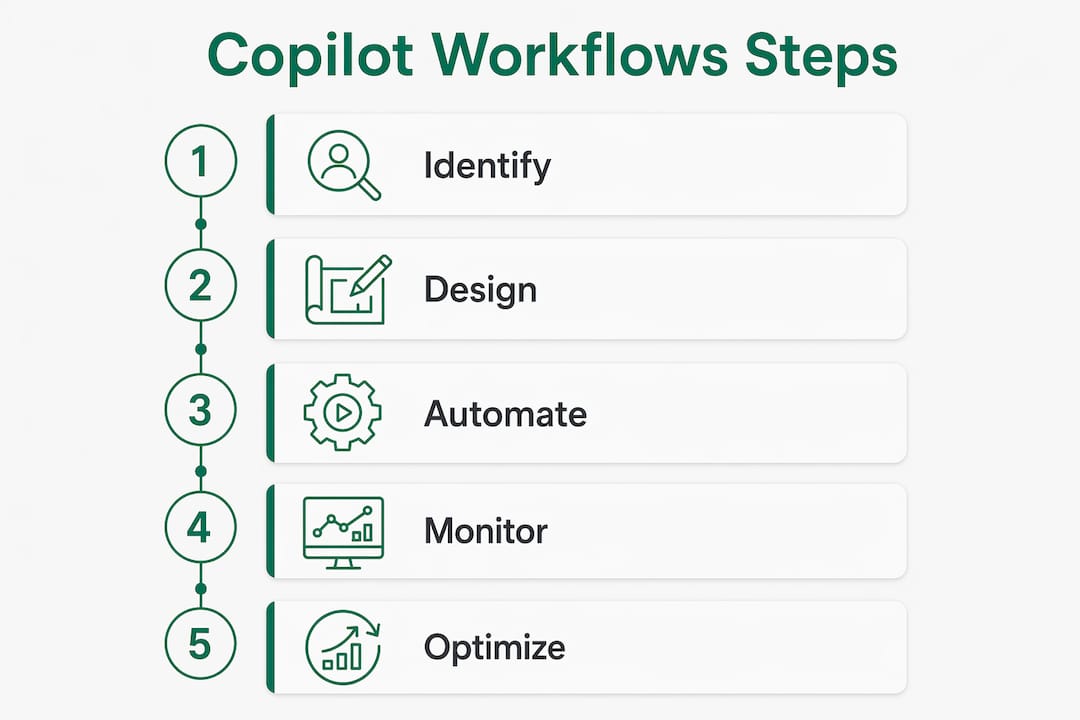
How to design and implement effective automation with Copilot
Building a workflow that actually gets used requires starting with the right process, not the most impressive one. The firms that see the fastest ROI pick one high-frequency, low-variance task and automate it completely before expanding.
- Identify repeatable processes. Map tasks your team performs more than twice a week with predictable inputs and outputs. Meeting prep, status reports, contract summaries, and invoice reviews are strong starting points for mid-market firms.
- Use Copilot Studio’s visual designer. Build the workflow visually, using AI-driven trigger and action suggestions to accelerate development. Test with real data before deploying to the full team.
- Encode team expertise in custom agents. GitHub Copilot CLI custom agents use Markdown files with YAML frontmatter to capture team knowledge as structured, reusable instructions. This turns one expert’s approach into a consistent team standard.
- Embed human review checkpoints. Define at least one point in each workflow where a team member reviews output before the next stage runs. This maintains control without eliminating the time savings.
- Set spending controls from day one. Usage-based billing means costs scale with activity. Configure spending limits and alerts in Copilot Studio before workflows go live.
Pro Tip: Standardize agent naming conventions and store all agent definitions in a centralized, version-controlled directory. This prevents context drift across teams and makes it easy to audit what each agent is authorized to do.
The centralized agent approach also solves a problem most firms discover too late: tribal knowledge locked in one person’s prompt history. When that person leaves or is unavailable, the workflow breaks. Version-controlled Markdown definitions make the knowledge portable and auditable.
How do you measure ROI from copilot workflow automation?
ROI from copilot process automation comes from two sources: time recovered and errors avoided. Both are measurable, but only if you establish a baseline before deploying workflows.
Gozera’s approach starts with telemetry. Before building any workflow, the team measures how long the target process currently takes, how often it produces errors, and which team members are involved. That baseline becomes the benchmark against which workflow performance is measured.
On the cost side, Copilot Credit consumption is driven by four factors: model use, context retrieval, tool calls, and runtime. Each factor is controllable. Choosing a lighter model for low-complexity tasks, limiting context window size, and batching tool calls all reduce per-workflow costs without reducing output quality. The table below maps each cost factor to its primary control lever.
| Cost factor | Control lever | Impact |
|---|---|---|
| Model use | Model selector in Copilot Studio | Largest cost variable; use lighter models for routine tasks |
| Context retrieval | Scope of data sources connected | Narrower scope reduces retrieval cost and latency |
| Tool calls | Workflow design efficiency | Fewer redundant calls lower per-run cost |
| Runtime | Workflow complexity and length | Shorter, focused workflows cost less per execution |
Security and compliance fit into this picture directly. Workflow outputs and prompts flow through existing Microsoft 365 compliance frameworks, including audit logs and data retention policies. For law and accounting firms operating under strict data governance requirements, this means automation does not create a new compliance surface. It runs inside the one you already manage.
The Copilot ROI picture for mid-market firms becomes clearest when you tie workflow outputs to billable time. A workflow that saves a senior associate two hours per week on status reports recovers roughly 100 billable hours per year per person. At standard professional services rates, that number justifies the implementation cost within weeks.
Common copilot workflow automation examples in professional services
The most adopted workflows in mid-market professional services firms fall into five categories. Each maps to a high-frequency task that currently consumes disproportionate senior time.
- Meeting and calendar triage: Copilot Cowork automates schedule reviews, flags conflicts, and prepares agenda summaries before meetings start. Partners and directors recover 30–60 minutes per day that previously went to inbox and calendar management.
- Briefing documents and pitch decks: Workflows pull relevant content from SharePoint, recent emails, and meeting notes to generate first drafts of client-facing documents. Consulting firms use this to cut deck preparation time from half a day to under an hour.
- Research compilation: Multi-source research workflows query internal knowledge bases, connected data sources, and document libraries, then return a cited summary. Legal teams use this for case background research; accounting teams use it for client industry briefings.
- Procurement and vendor evaluation: An agent scores vendor proposals against defined criteria, then a workflow formats the output and routes it through the approval chain. This replaces a process that typically involves three to five people over several days.
- Compliance and security checks: Custom GitHub Copilot CLI agents run structured audits against defined standards, then generate a findings report in a consistent format. Engineering and IT teams use this for release reviews and security assessments.
- Incident response and release notes: Agents pull from incident logs, commit histories, and communication threads to generate structured post-incident reports and release documentation automatically.
The pattern across all of these is the same. A task that required a skilled person to gather, synthesize, and format information now runs as a defined workflow with a human reviewing the output rather than producing it.
Key Takeaways
Copilot workflows deliver measurable ROI when firms combine structured automation with intelligent agents, human checkpoints, and usage-based cost controls from the start.
| Point | Details |
|---|---|
| Define before you build | Identify high-frequency, low-variance processes before designing any workflow. |
| Combine agents and workflows | Use agents for judgment-heavy steps and workflows for consistent, repeatable subprocesses. |
| Embed human checkpoints | Build explicit review points into every workflow to maintain control and catch errors early. |
| Control costs by design | Manage Copilot Credit spend by choosing the right model, limiting context scope, and batching tool calls. |
| Measure against a baseline | Establish time and error benchmarks before deployment so ROI is concrete, not estimated. |
Why most firms are still thinking about this the wrong way
The firms I see getting the most from Copilot are not the ones with the most licenses. They are the ones that stopped treating Copilot as a chat tool and started treating it as a process owner.
The shift sounds simple, but it requires a real change in how teams define work. Most professionals are trained to think in terms of tasks: write this email, summarize this document, prepare this report. Copilot workflows require thinking in terms of outcomes: what does “done” look like, what inputs are needed, and where does a human need to review before the next step runs. That framing is closer to process engineering than to using a search engine.
The firms that get this right tend to have one thing in common: they document the workflow before they build it. They write down the current process, identify the decision points, and define what “good output” looks like at each stage. That documentation becomes the specification for the workflow and the benchmark for measuring whether it is working.
The other pattern I see consistently is that mid-market firms have a structural advantage here that larger organizations do not. A 100-person consulting firm can standardize a workflow across the entire team in a week. A 10,000-person enterprise takes months to clear governance and change management. The firms that move fast and build clean, well-documented workflows in 2026 will have a compounding productivity advantage that is very hard for slower-moving competitors to close.
— Mad
How Gozera helps firms get real results from Copilot
Mid-market professional services firms often have Copilot licenses that sit underused because no one has mapped the right workflows to the right processes.
Gozera specializes in exactly this problem. The team measures actual Copilot usage through telemetry, identifies dormant licenses, and builds tailored workflow automation that connects directly to your firm’s billable processes. Every engagement starts with a baseline measurement and ends with a documented ROI figure. If you are an IT leader, managing partner, or operations director at a firm with 50–500 employees, Gozera’s Copilot adoption consulting gives you a clear path from idle licenses to recoverable billable time, without lengthy change management or expensive infrastructure changes.
FAQ
What are copilot workflows?
Copilot workflows are AI-driven automation sequences within Microsoft 365 that combine structured triggers, actions, and intelligent agents to complete complex, multi-step business processes with minimal manual input.
How does Copilot Studio workflow automation differ from basic Copilot chat?
Copilot Studio workflow automation executes defined, repeatable processes across multiple tools and data sources, while basic Copilot chat responds to individual prompts without coordinating ongoing tasks.
What are the best examples of copilot workflow automation in professional services?
The most common examples include meeting triage and agenda preparation, briefing document generation, multi-source research compilation, vendor evaluation routing, and automated compliance checks.
How do you control costs in copilot process automation?
Copilot Credit costs are driven by model use, context retrieval, tool calls, and runtime. Setting spending limits, choosing lighter models for routine tasks, and narrowing data source scope are the primary cost controls.
How do you measure ROI from Microsoft Copilot workflow automation?
Establish a time and error baseline for the target process before deployment, then compare post-workflow performance against that benchmark. Gozera uses telemetry to track actual usage and ROI at the user and team level.