
A working Copilot acceptable use policy requires four things: mandatory human verification of outputs used in client or regulated work, a hard ban on entering privileged or regulated personal data into prompts, tenant guardrails (DLP rules, sensitivity labels, knowledge exclusions) that enforce those rules technically, and logged training records tied to license access. If your firm hasn’t done this yet, the fastest fix is a tenant configuration and data classification audit this quarter, before another attorney or accountant pastes a client file into a chat window.
TL;DR:
- Staff should strictly map data classification tiers to Copilot permissions to prevent unapproved confidential or privileged information from being processed.
- Technical controls like sensitivity labels, DLP rules, and conditional access are essential to enforce the policy and should be reviewed quarterly for effectiveness.
- Human oversight must include mandatory training, clear prohibited uses, and signed attestations before license activation to ensure responsible AI use.
- Disclosing Copilot involvement in outputs and retaining logs for security reviews are key steps to maintain transparency and compliance.
- Incident response requires swift action to isolate, preserve logs, notify security, and review the breach, with policies regularly updated based on lessons learned.
Table of Contents
- What Should a Copilot Acceptable Use Policy Cover?
- What Uses Should a Copilot Policy Explicitly Ban?
- How Do You Set Data Rules for What Staff Can Input?
- Which Tenant Settings Actually Enforce the Policy?
- How Should Training and Human Oversight Work?
- How Long Should You Keep Copilot Chat Logs?
- What’s the Incident Response Plan for a Copilot Leak?
- What Does a Copy-Ready Copilot Policy Clause Look Like?
- How Do You Roll Out and Enforce the Policy?
- Zera.ai’s Approach to Governance-First Copilot Adoption
- Sources
What Should a Copilot Acceptable Use Policy Cover?
A usable AUP is not a one-page disclaimer. It’s a governance document that assigns responsibility, restricts inputs, and creates a paper trail. The University of Ottawa’s Copilot guidance treats the policy as a full framework mapping data classification to allowed workflows, not a bolt-on notice, and that structure holds up well for professional services firms to adapt it to their own risk profile.
Nine elements belong in every version:
- Scope and audience. Name which employees, contractors, and Microsoft 365 services (Copilot Chat, Word, Teams, Outlook) the policy governs.
- Permitted uses. Drafting first-pass memos, summarizing internal meeting notes, generating boilerplate correspondence.
- Prohibited uses. A specific list, not a vague “use responsibly” line.
- Data input rules. Which classification tiers may touch Copilot and which never do.
- Human-in-the-loop requirements. Who checks outputs before they reach a client or a court filing.
- Training and attestation. Mandatory before license activation.
- Technical controls. DLP, sensitivity labels, conditional access.
- Retention and disclosure rules. How long chat logs live and when Copilot use gets disclosed.
- Enforcement actions. What happens after a violation.
Number your clauses so staff can cite section 4.2 instead of paraphrasing intent. That single habit cuts down on the “I thought that meant something else” excuse during an incident review.
What Uses Should a Copilot Policy Explicitly Ban?
Vague prohibitions get argued with. Specific ones don’t. Microsoft’s own Copilot supplemental terms of use already ban a defined set of behaviors, and your internal policy should restate them in language your staff will actually read.
Ban, without exception:
- Generating content that supports illegal activity, including fraud or forged documents.
- Doxing or attempting biometric identification of any individual.
- Creating non-consensual deepfakes, image manipulation, or impersonation of a real person.
- Producing disinformation, hate speech, or extremist material, even as a “test.”
- Entering anything covered by attorney-client privilege, work product doctrine, or a signed NDA.
The highest-risk moment isn’t the obvious violation. It’s the paralegal who pastes a settlement draft into Copilot Chat to “clean up the tone,” not realizing the tenant may retain that prompt. Redaction has to happen before the paste, not after.
Pro Tip: Build a one-page “never paste this” card with three real (anonymized) examples from your own files. Abstract rules get ignored. A recognizable near-miss gets remembered.
How Do You Set Data Rules for What Staff Can Input?
Map your existing data classification tiers directly to Copilot permissions instead of inventing a parallel system. The University of Ottawa’s approach, and separate Microsoft Learn guidance on enterprise data protection, both point to the same principle: classification should drive machine access, not staff judgment alone.
- Public and internal-general data. Safe for summarization, drafting, and Q&A.
- Internal-sensitive data (unsigned contracts, internal financials). Allowed only in Copilot Chat with company data protection enabled, never in consumer Copilot.
- Confidential and client-privileged data. Excluded from Copilot entirely; route through an approved, access-controlled workflow instead.
A before/after redaction example makes this concrete: “Summarize the deposition of John Smith regarding the Q3 fraud claim” becomes “Summarize the attached deposition regarding a Q3 financial dispute” with the file handled through a locked workspace, not pasted as text.
Pro Tip: When a staff member isn’t sure which tier a document falls into, the rule is simple: don’t input it. Ask, or use the approved workflow. Guessing wrong here is how privilege gets waived.
Which Tenant Settings Actually Enforce the Policy?
Policy language without technical enforcement is a suggestion. Practitioner guidance on Copilot governance is blunt about why: automation bias means staff tend to trust AI outputs by default, so controls that depend purely on memory and good intentions fail more often than admins expect.
Five settings do the real work:
- Sensitivity labels with mandatory labeling so every document carries a machine-readable classification.
- DLP rules blocking uploads of labeled confidential or privileged files into Copilot surfaces.
- Knowledge and Graph exclusions removing sensitive SharePoint and Teams sites from Copilot’s indexed content.
- Conditional access policies in Entra ID restricting Copilot use to managed devices.
- Telemetry and retention settings capturing prompt-level usage for audit review.
| Control | Risk it closes |
|---|---|
| Sensitivity labels | Unlabeled privileged files entering Copilot summaries |
| DLP blocking rules | Client-confidential document uploads |
| Knowledge exclusions | Copilot indexing restricted SharePoint sites |
| Conditional access | Unmanaged personal devices querying tenant data |
| Telemetry logging | Blind spots in high-risk prompt patterns |
Run this checklist quarterly, not once at rollout. Sensitivity labels drift as new document libraries get created, and nobody remembers to re-label them.
How Should Training and Human Oversight Work?
Training that isn’t tied to access is training nobody finishes. GitHub’s own responsible-use guidance for Copilot makes the same point in a different context: the tool should supplement judgment, never replace it, and that only holds if someone is actually reviewing outputs.
- Module one: what Copilot can and cannot see in your tenant.
- Module two: the prohibited-uses list, with real examples from your own practice area.
- Module three: human-in-the-loop checkpoints, specifically for client deliverables, legal filings, financial statements, or anything touching regulated advice.
- Attestation: a signed acknowledgment recorded in your HR or LMS system before Copilot access is provisioned, not after.
Tie the attestation record directly to license assignment. If someone hasn’t signed off, they don’t get a seat. It’s a five-minute integration and it closes the single most common gap auditors find.
How Long Should You Keep Copilot Chat Logs?
University guidance treats most Copilot chats as transitory working material, not permanent records, and recommends saving only the final output in an approved repository.
- Keep prompt and chat logs for a defined window purely for security review, not as a working archive.
- Save finished deliverables, drafts, and any output used in client work in your document management system with normal version control.
- Disclose Copilot involvement in formal documents where accuracy or authorship matters. A simple line, “This draft was prepared with AI assistance and reviewed by [name],” covers most cases.
- For data subject access requests, treat retained prompt logs as discoverable records subject to your existing privacy obligations.
Canadian government guidance on AI use in funded research reinforces the same expectation: transparency and audit trails matter whenever an AI-assisted output feeds a formal decision.
What’s the Incident Response Plan for a Copilot Leak?
Move fast, in a set order, before anyone starts guessing at causes.
- Isolate. Suspend the affected user’s Copilot access immediately, not at end of day.
- Preserve. Pull prompt logs and telemetry before retention windows roll over anything relevant.
- Notify internally. Loop in security and legal within hours, not after an internal investigation wraps.
- Assess client notification. If privileged or client data was exposed, your existing breach notification obligations apply the same way they would to any other data incident.
- Remediate. Revoke or restrict access, tighten the DLP rule that failed, and document what changed.
- Review. Run a post-incident debrief within a week and update the AUP if the gap was policy, not just enforcement.
What Does a Copy-Ready Copilot Policy Clause Look Like?
Legal will still need to review language for your jurisdiction, but starting from real clauses beats starting from a blank page.
- Scope: “This policy governs all use of Microsoft 365 Copilot and Copilot Chat by employees, contractors, and temporary staff across [Firm Name]’s tenant.”
- Permitted use: “Staff may use Copilot for drafting, summarization, and research support using data classified as Public or Internal-General.”
- Prohibited use: “Staff shall not input client-privileged, highly confidential, or regulated personal data into any Copilot interface.”
- Human review: “All Copilot-assisted content used in client deliverables, financial statements, or legal filings requires review and sign-off by a qualified staff member before distribution.”
- Enforcement: “Violations may result in retraining, temporary suspension of Copilot access, or termination of license, at management’s discretion.”
| Role | Allowed workflow | Approval needed |
|---|---|---|
| Associate/staff accountant | Drafting, internal summarization | Manager sign-off on client use |
| Paralegal/analyst | Research support, document formatting | Attorney or senior reviewer |
| Partner/principal | Client communication drafts | Self-review, logged |
| IT administrator | Tenant configuration, audit review | None (policy owner role) |
Regulated practices (securities, healthcare-adjacent consulting) should add a jurisdiction-specific clause and keep legal review notes attached to the policy file, not buried in email.
How Do You Roll Out and Enforce the Policy?
Rollout works best in a sequence, not a single big-bang launch.
- Pilot with one team for two to four weeks while you set a telemetry baseline.
- Measure dormant licenses, high-risk prompt attempts blocked by DLP, and completion rate on training attestation.
- Expand in phases by department, tightening tenant controls as you go rather than loosening them.
- Set a review cadence (quarterly is standard) for the policy itself and the technical guardrails behind it.
Track adoption rate, dormant license reduction, blocked high-risk prompts, incidents per quarter, and recoverable billable time as your core signals. A telemetry-based baseline is what turns “we think adoption is fine” into a number you can defend to a managing partner.
Enforcement should escalate, not jump straight to termination: coaching conversation first, mandatory retraining second, temporary suspension third, full access revocation only after repeated or serious violations.
Zera.ai’s Approach to Governance-First Copilot Adoption
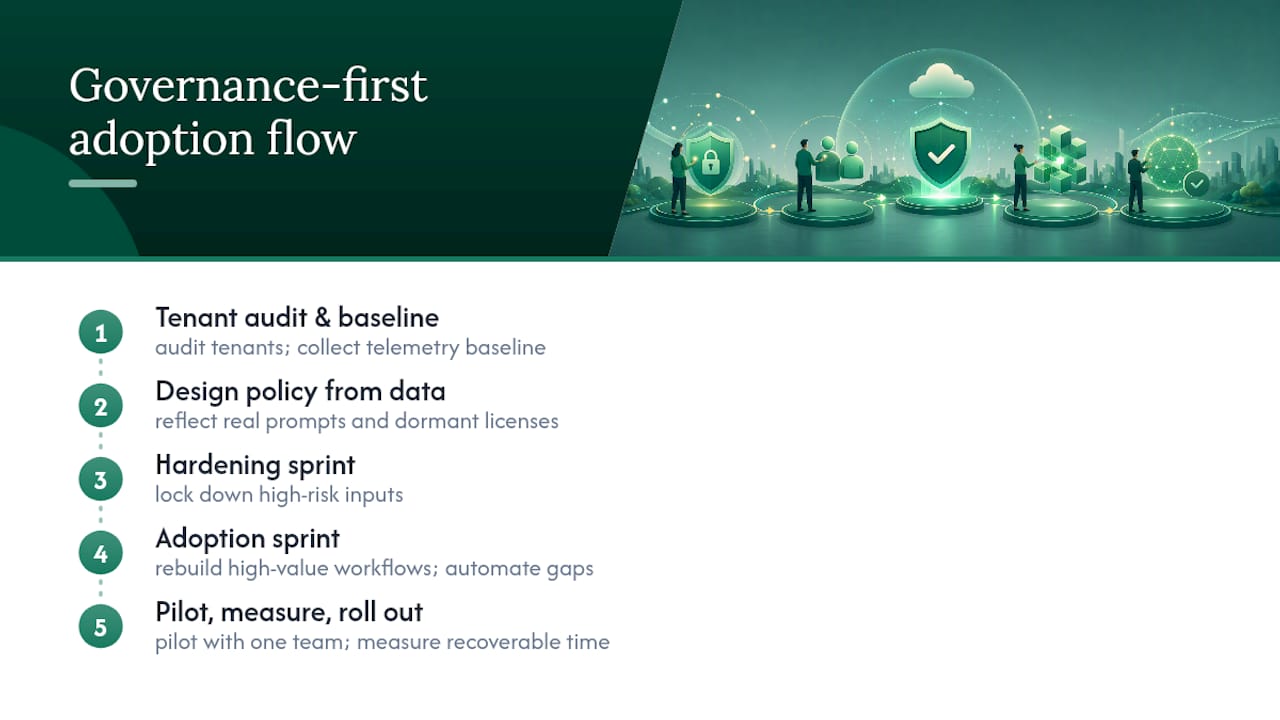
Most AUPs fail quietly. They get written, filed, and ignored because nobody connects the policy to actual usage data. Engagements start with a tenant audit and telemetry baseline before touching a single clause, so the policy reflects real prompt patterns and dormant licenses rather than guesswork. From there, a targeted hardening sprint locks down high-risk inputs, followed by an adoption sprint that rebuilds high-value workflows and automates the gaps with available automation tools. A typical quick win is to pull the dormant-license list, pilot the policy with one advisory team, and measure recoverable billable time before rolling out firmwide.
— Mad
Sources
Start with Microsoft’s Copilot supplemental terms of use, the University of Ottawa’s Copilot guidelines, the NHSmail M365 Copilot Acceptable Use Policy, and Government of Canada AI research guidance. Have legal counsel review any clause you adapt for your jurisdiction before publishing it firmwide, and consider a governance-first implementation approach if you’re building this from scratch rather than retrofitting an existing IT policy.
- Guidelines for acceptable use of Microsoft 365 Copilot and Copilot chat — University of Ottawa
- Copilot supplemental terms of use — Microsoft
- Science