
Yes, a defensible Copilot business case is achievable, and finance will approve it when you bring three things: role-level time-savings estimates, a scoped pilot with defined success criteria, and telemetry-based measurement through the Copilot Dashboard and Business Impact Report.
Here is the short formula that works with CFOs:
- Role-level savings: Identify two or three roles where Copilot affects repeatable, high-frequency tasks. Assign conservative time-savings assumptions (start at 15–30 minutes per user per day for document-heavy roles). Convert to dollars using fully loaded hourly rates.
- Pilot evidence: Run an 8–12 week cohort pilot before committing to a broad rollout. Define success criteria upfront (assisted hours, cycle time, win rate). No pilot data means no credible projection.
- Measurement plan: Commit to monthly telemetry reporting via Copilot Dashboard and Viva Insights. Finance needs checkpoints at months 3, 6, and 12 to make go/no-go decisions.
The payback math is straightforward. Forrester’s guidance shows that as few as four hours of saved time per user per month can justify the license cost under conservative hourly rate assumptions. For a professional-services firm billing at a conservative hourly rate, even a 10% productivity recapture on document work covers the annual license spend many times over.
Pro Tip: Don’t pitch a firm-wide rollout. Lead with a single high-impact pilot in Sales, Finance, or Client Service. One cohort with clean data beats a broad deployment with no measurement.
Key Takeaways
A defensible Copilot business case requires role-level time-savings math, a scoped 8–12 week pilot with defined success criteria, and telemetry-based measurement through Copilot Dashboard and the Business Impact Report.
| Point | Details |
|---|---|
| Three evidence pillars | Role-level savings math, pilot data with defined KPIs, and monthly telemetry reporting are what finance requires. |
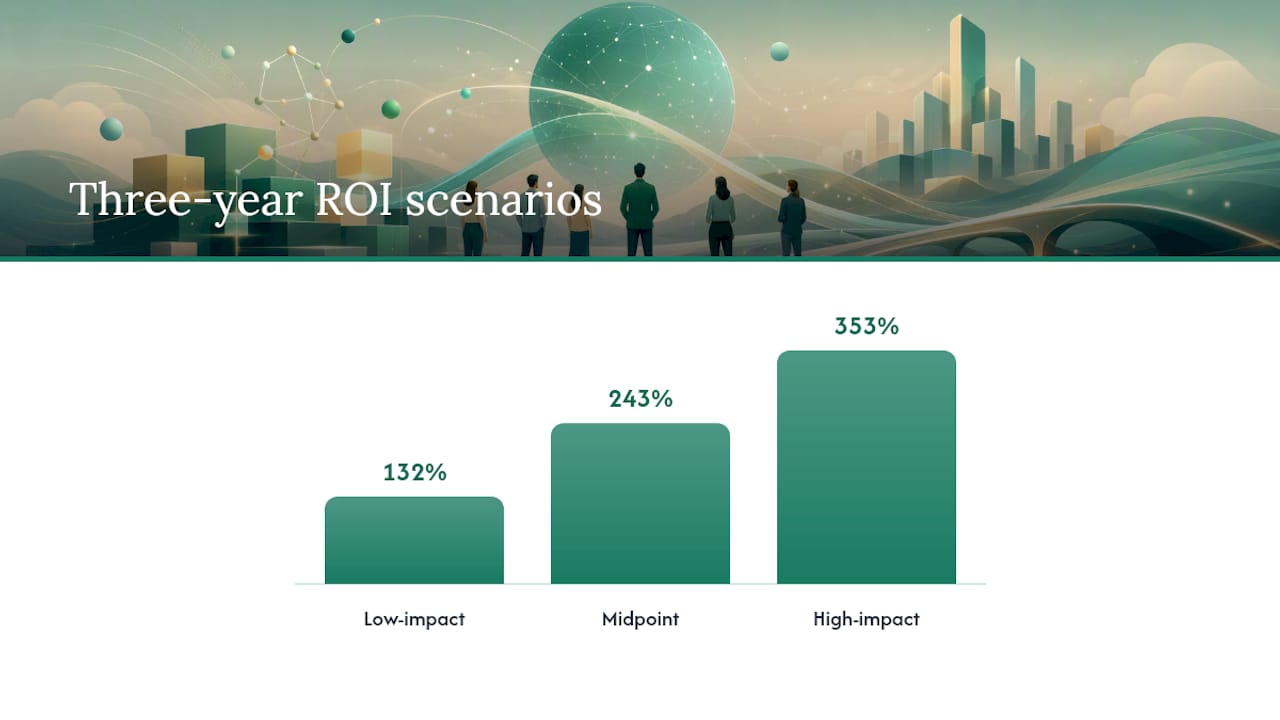
| Forrester ROI range | A Forrester TEI study commissioned by Microsoft projects three-year ROI for Microsoft 365 Copilot in SMBs ranging from 132% (low-impact), 243% (midpoint), to 353% (high-impact); cite the 132% scenario as your CFO anchor. |
| 14 minutes per day | Saving 14 minutes per user per day compounds to roughly 56 hours per year; at a reasonable fully loaded hourly rate, that exceeds license cost per user. |
| Pilot before broad rollout | An 8–12 week cohort of 15–30 users with a strong active-user target produces the credible data finance needs to approve scale. |
| Gozera’s approach | Gozera delivers readiness audits, pilot design, telemetry configuration, and CFO-ready ROI reports for mid-market professional-services firms. |
Table of Contents
- Why Microsoft 365 Copilot matters for mid-market professional services
- What are the highest-impact Copilot use cases by function?
- How do you quantify the value of Copilot for a CFO?
- How do you build a step-by-step business case to win finance approval?
- How should you design a Copilot pilot and measure its impact?
- What governance and compliance controls do US organizations need?
- How do you handle the most common objections to Copilot adoption?
- How Gozera operationalizes a Copilot business case
- A consultant’s perspective on where to start
- Some mid-market firms that struggle with Copilot ROI often encounter the problem: licenses deployed, training delivered, and no measurement in place to show what actually changed. Gozera’s fixed-price consulting engagements are built specifically to close that gap for law firms, accounting practices, consulting firms, and engineering companies with 50–500 employees.
- Sources
Why Microsoft 365 Copilot matters for mid-market professional services
Mid-market professional-services firms carry a structural disadvantage: their revenue is almost entirely people-dependent. Every hour a lawyer, accountant, or consultant spends on internal coordination, formatting, or meeting recaps is an hour not billed. Copilot attacks that gap directly.
The core value pillars for this audience are specific:
- Billable time recovery: Copilot drafts meeting summaries, generates first-pass client reports, and pulls variance analysis from Excel. Partners and senior associates reclaim 30–90 minutes per day on tasks that don’t require their judgment.
- Faster proposal turnaround: Sales and business development teams use Copilot in Word and PowerPoint to compress proposal drafting from days to hours. Faster proposals mean more bids submitted per quarter.
- Lower onboarding friction: New hires get up to speed faster when Copilot can surface relevant precedents, summarize prior client files, and draft initial work product for review.
- Shadow AI containment: Without a sanctioned tool, staff use consumer AI on client data. Microsoft 365 Copilot keeps that activity inside the tenant boundary, under your governance controls.
On the analyst side, a Forrester TEI study commissioned by Microsoft projects three-year ROI for Microsoft 365 Copilot in SMB scenarios ranging from 132% (low-impact), 243% (midpoint), to 353% (high-impact), with high-impact NPV scenarios shown. These are vendor-commissioned projections, not independent audits, so treat them as external benchmarks rather than guarantees. For a mid-market firm, the conservative end of the modeled range (132%) is the number to put in front of a CFO.
Statistic to anchor your deck: The commissioned model’s low-impact scenario still projects 132% three-year ROI. That is the floor, not the ceiling, and it is the number worth defending in a finance meeting.
The business outcomes that matter most for professional services map cleanly to Copilot’s strengths: billable hours recovered from administrative work, faster proposal and report cycles, fewer internal review rounds, and reduced outsourcing of routine document production.
What are the highest-impact Copilot use cases by function?
Picking the right pilot use case is the single biggest variable in whether your business case holds up. The following table maps priority use cases by function to the KPI each affects and the easiest measurement approach.
| Function | Priority use case | KPI impacted | How to measure |
|---|---|---|---|
| Sales | Draft follow-up emails and proposals in Copilot for Word/Teams | Win rate, proposal cycle time | CRM deal velocity, time-to-proposal |
| Finance | Variance analysis summaries in Excel, board pack drafts | Monthly close cycle time, analyst hours | Close calendar, hours logged per close |
| Legal | Contract review first-pass, clause flagging in Word | Review cycle time, attorney hours per matter | Matter management system, time entries |
| HR | Job description drafts, onboarding document generation | Time-to-hire, onboarding completion rate | HRIS, onboarding checklist completion |
| Operations | Meeting recap generation, status report drafts in Teams | Meeting follow-up time, project update frequency | Teams telemetry, project management tool |
Microsoft’s Scenario Library provides stepwise playbooks for each function, including example prompts and KPI definitions. The Finance scenario alone walks through defining the opportunity, gathering financial data, producing forecasts, and testing the business case, which is a ready-made pilot task list.
A few principles for selecting your first pilot use case:
- Data cleanliness matters. Copilot’s accuracy depends on the quality of documents and SharePoint content it can access. Start with a team whose files are organized and consistently named.
- Repeatability beats novelty. Choose a task the team does at least weekly. One-off projects don’t produce enough data to measure impact in an 8–12 week window.
- Measurable KPI required. If you can’t baseline the metric before the pilot starts, you can’t prove the outcome after it ends. Sales follow-ups and finance close cycles both have clean baselines.
For a law firm, contract review first-pass is often the fastest win. For an accounting practice, variance summary generation during close week is the clearest time-saver. For a consulting firm, proposal drafting is where the hours are.
How do you quantify the value of Copilot for a CFO?
The core metrics the Copilot Analytics whitepaper defines are Copilot assisted hours (total time Copilot contributed to completed tasks) and Copilot assisted value (those hours converted to dollars at the user’s fully loaded rate). These two figures are the backbone of any ROI model.
Sample calculation template
Start with this structure:
- Users in scope: Number of licensed users in the pilot cohort.
- Active user rate: Percentage who use Copilot at least three times per week (target 60–70% for a well-run pilot).
- Average time saved per active user per day: Conservative assumption, 15–30 minutes for document-heavy roles.
- Annual hours saved: Active users × daily minutes saved × 220 working days ÷ 60.
- Dollar value: Annual hours saved × fully loaded hourly rate.
- Net benefit: Dollar value minus annual license cost minus implementation and change management cost.
Statistic to use in your model: Practitioner analysis shows that 14 minutes of saved time per user per day translates to roughly 56 hours per year per user. At a $100 fully loaded hourly rate, that is $5,600 in recovered capacity per user annually, against a license cost well below that figure.
Conservative, midpoint, and upside scenarios
These figures use the Forrester-modeled range as context. The conservative scenario is what you defend in front of finance. The upside is what you show to demonstrate ceiling.
The biggest sensitivity drivers in any model are: (1) the active user rate after the first 60 days, (2) the average time saved per active user (which varies sharply by role), and (3) the share of total work hours that Copilot can actually affect. For a 200-person consulting firm, a 10-percentage-point drop in active user rate cuts projected value by roughly the same proportion. That is why adoption management is not optional.
Forrester’s full business-case report provides models for both tangible and intangible benefits, and is worth citing directly in your CFO deck as an independent analytical framework.
How do you build a step-by-step business case to win finance approval?
Finance will not approve a Copilot investment based on vendor benchmarks alone. They need pokeable assumptions, a measurement plan, and defined checkpoints. Advisory experience confirms that CFOs expect role-level time-savings estimates, a monthly measurement cadence, and go/no-go decisions at months 3, 6, and 12.
Here is the checklist:
- Define the opportunity. Name the specific roles, tasks, and business outcomes you are targeting. Avoid “productivity improvement” as a goal. Use “reduce proposal drafting time from 3 days to 1 day for the BD team.”
- Establish baselines. Measure current cycle times, hours per task, and relevant KPIs before the pilot starts. No baseline means no proof.
- Model costs fully. Include Microsoft 365 Copilot license cost per user per month, Microsoft 365 E3 or E5 base license (required), implementation and integration costs, change management and training, and ongoing optimization.
- Build the financial model. Use the role-level calculation template above. Show conservative, midpoint, and upside scenarios. Cite Forrester as an external benchmark, but lead with your own assumptions.
- Define the pilot plan. Cohort size, duration, success criteria, and measurement tools. Commit to a go/no-go decision at week 8.
- Address risks explicitly. Accuracy, data governance, adoption, and cost overrun. Each needs a mitigation and a checkpoint.
Recommended executive slide structure
| Slide | Content |
|---|---|
| Executive summary | One-page verdict: opportunity, projected ROI range, pilot plan, ask |
| Financial model | Role-level assumptions, conservative/midpoint/upside scenarios, payback timeline |
| Pilot plan | Cohort, duration, success criteria, measurement tools, go/no-go date |
| Risk and controls | Risk table with mitigations, governance checklist, checkpoint schedule |
The Forrester decision tool and the Microsoft Copilot Success Kit both provide templates that slot directly into this structure.
Risk table
| Risk | Likelihood | Mitigation |
|---|---|---|
| Low adoption after launch | High | Champions program, role-specific training, weekly usage reporting |
| Accuracy/hallucination errors | Medium | Human review requirement for client-facing output; QA checkpoint in workflow |
| Data governance exposure | Medium | Sensitivity labels, DLP policy, tenant permissions audit before pilot |
| License cost exceeds value | Low (with pilot) | Go/no-go at week 8; scale only cohorts that hit active-user threshold |
How should you design a Copilot pilot and measure its impact?
A well-designed pilot is the difference between a business case that survives scrutiny and one that collapses at the first CFO question. Microsoft’s internal deployment experience across 300,000+ users points to the same conclusion: start with governance, run cohort pilots, and measure with Copilot Dashboard and Viva Insights before scaling.
Pilot scope template
- Team size: 15–30 users in a single function. Small enough to manage closely; large enough to generate statistically meaningful telemetry.
- Duration: 8–12 weeks. Eight weeks is the minimum to separate novelty effect from sustained usage.
- Active user threshold: Target 60% of licensed users actively using Copilot at least three times per week by week 4. Below 40% is a signal to pause and diagnose before continuing.
- Success criteria: Define three KPIs before day one. Example: proposal cycle time reduced by 20%, meeting recap time reduced by 50%, and Copilot assisted hours above 10 per user per week.
- Baseline collection: Capture current-state metrics in the two weeks before the pilot starts.
Measurement checklist
- Activate Copilot Dashboard in Microsoft 365 admin center before the pilot starts.
- Configure Viva Insights to track meeting time, after-hours work, and focus time for the pilot cohort.
- Download and configure the Business Impact Report Power BI template from the Copilot Analytics whitepaper to correlate assisted hours with business KPIs.
- Connect CRM or ERP data (deal velocity, close cycle time) to the Power BI report for function-specific KPI tracking.
- Schedule a weekly 30-minute review of telemetry data with the pilot team lead.
Integration notes
SharePoint cleanliness is the most common early hurdle. If the pilot team’s documents are scattered across personal OneDrives or unstructured SharePoint sites, Copilot’s retrieval accuracy drops and early results will underperform. Fix permissions and file organization before the pilot starts, not during it.
The Microsoft Copilot Success Kit includes adoption planning checklists, stakeholder worksheets, and license allocation guidance that reduce pilot setup time considerably. Use it alongside the Microsoft 365 Copilot implementation guide for a complete technical and organizational readiness checklist.
What governance and compliance controls do US organizations need?
Governance is not a post-launch concern. Executives will ask about data exposure before they approve the budget, and the right answer is a checklist, not a reassurance.
Minimum governance checklist before pilot launch
- Tenant permissions audit: Review who has access to what in SharePoint and OneDrive. Copilot surfaces content the user is already permitted to see. Overly permissive sharing means Copilot can surface files users should not access.
- Sensitivity labels (Microsoft Purview): Apply labels to confidential client files, financial data, and PII before the pilot starts. Labeled content can be scoped out of Copilot responses.
- DLP integration: Confirm that existing Data Loss Prevention policies extend to Copilot interactions. Data Loss Prevention policies apply to Copilot by default in E5 configurations.
- Audit logging: Enable unified audit logging in the Microsoft 365 compliance center. This creates the record finance and legal will ask for.
- Copilot Studio access controls: If you are deploying custom agents via Copilot Studio, define agent scopes and approval gates before any agent goes live.
Pro Tip: Run a data hygiene sprint before the pilot, not after. Clean SharePoint structure and correct sensitivity labels directly improve Copilot’s accuracy and reduce the risk of surfacing confidential content to the wrong user. Readiness assessment findings consistently show that permission sprawl is the top cause of early pilot underperformance.
On privacy: Microsoft 365 Copilot operates within your tenant boundary. Microsoft does not use your tenant data to train foundation models, and conversation data is not retained beyond the session by default. For the authoritative statement, review Microsoft’s published privacy documentation directly, as these policies are updated periodically.
For firms with specific compliance requirements (SOC 2, HIPAA, state bar rules for law firms), confirm that your configuration meets those standards before extending Copilot to regulated workflows.
How do you handle the most common objections to Copilot adoption?
Every executive presentation on Copilot hits the same five objections. Here are direct answers and mitigation actions for each.
“The AI makes things up.”
Copilot can produce inaccurate output, particularly when source documents are ambiguous or missing. Mitigation: require human review for all client-facing output during the pilot. Build a QA step into the workflow. Track accuracy errors as a pilot KPI. The goal is not zero errors; it is a known, manageable error rate.
“We’re paying for licenses nobody uses.”
This is the most common failure mode in Copilot deployments. Mitigation: use Copilot Dashboard telemetry to identify dormant licenses weekly. Reallocate unused licenses to high-frequency users before the 90-day mark. A workflow-focused approach that embeds Copilot into existing processes drives sustained usage far better than standalone training sessions.
“There are vendor litigation headlines.”
Microsoft has faced IP-related legal questions around AI-generated content. Mitigation: use Copilot for drafting and summarization, not for verbatim reproduction of third-party content. Apply the same review standards you would to any junior associate’s work product.
“Our data could be exposed.”
Addressed by the governance checklist above. The tenant boundary, sensitivity labels, and DLP policies are the answer. Have the IT lead walk the executive team through the configuration before the pilot starts.
“We can’t prove it worked.”
This is a measurement problem, not a Copilot problem. Mitigation: baseline before the pilot, measure weekly, and present the Business Impact Report at the go/no-go checkpoint.
Signals to act on after the pilot
- Expand: Active user rate above 60%, at least two KPIs hit or exceeded, no material governance incidents.
- Hold and diagnose: Active user rate below 40%, KPIs flat, or data quality issues surfaced. Fix the root cause before scaling.
- Abandon the use case (not the tool): If a specific use case shows no measurable impact after 10 weeks, pivot to a different function rather than concluding Copilot doesn’t work.
How Gozera operationalizes a Copilot business case
Gozera’s consulting process follows four steps, each with defined deliverables and a clear handoff to the next phase.
Step 1: Readiness assessment. Gozera audits your Microsoft 365 tenant for license utilization, SharePoint structure, permissions, and data hygiene. The output is a prioritized list of pilot candidates ranked by expected ROI and data readiness, plus a governance remediation list.
Step 2: Role mapping and pilot design. Gozera maps your highest-value roles to specific Copilot use cases, defines success criteria, and builds the baseline measurement framework. This includes configuring Copilot Dashboard, Viva Insights, and the Business Impact Report Power BI template.
Step 3: Telemetry and measurement. During the pilot, Gozera monitors assisted hours, active user rates, and function-specific KPIs weekly. At the go/no-go checkpoint, the team delivers a CFO-ready report with conservative, midpoint, and upside scenarios grounded in your actual pilot data, not vendor benchmarks.
Step 4: Optimization and scale. After a successful pilot, Gozera rebuilds high-value workflows to embed Copilot natively, automates gaps using Python and n8n where Copilot alone doesn’t cover the full process, and optimizes license allocation to eliminate dormant seats.
| Deliverable | What it includes |
|---|---|
| Readiness assessment report | Tenant audit, license utilization, data hygiene score, pilot candidate ranking |
| Pilot design package | Use case map, success criteria, baseline metrics, measurement configuration |
| CFO-ready ROI report | Assisted hours, KPI outcomes, conservative/midpoint/upside financial model |
| License optimization plan | Dormant seat identification, reallocation recommendations, cost-per-active-user analysis |
| Workflow integration | Copilot-native workflow rebuilds, Python/n8n automation for process gaps |
For mid-market professional-services firms, typical engagements move from readiness assessment to a live pilot within four to six weeks. The ROI models Gozera uses are built on actual telemetry from your tenant, which means the numbers you present to finance are defensible against scrutiny.
A consultant’s perspective on where to start
The most common mistake ops leaders make with Copilot is treating it as a software deployment rather than a workflow change. You can configure every setting correctly and still end up with 80% of licenses sitting idle at month three, because nobody rebuilt the actual process around the tool.
Three prioritized starter moves for a mid-sized firm:
- Run a readiness audit first. Before you buy a single additional license or schedule a training session, understand what your tenant looks like. Permission sprawl and disorganized SharePoint are not minor inconveniences; they are the primary reason early pilots underperform.
- Pick one pilot use case and go deep. Sales follow-up drafting, finance variance summaries, and client reporting are the three highest-return starting points for professional services. Pick the one where you have the cleanest data and the most motivated team lead.
- Set CFO checkpoints before you start. Define the go/no-go criteria at month 2, the scale decision at month 6, and the full ROI review at month 12. Finance will trust a plan with defined decision points far more than an open-ended rollout.
The pitfalls to avoid are predictable: horizontal rollouts that give everyone a license but nobody a workflow, skipping governance until after an incident forces the issue, and measuring adoption by login count rather than by task completion and KPI movement. Login count tells you nothing. Assisted hours tied to a closed deal or a faster month-end close tells you everything.
For professional services specifically, the lowest-effort, highest-impact pilots are almost always in the functions where people spend the most time producing documents for others to review. That is where Copilot’s time savings are largest and where the ROI math is easiest to defend.
Some mid-market firms that struggle with Copilot ROI often encounter the problem: licenses deployed, training delivered, and no measurement in place to show what actually changed. Gozera’s fixed-price consulting engagements are built specifically to close that gap for law firms, accounting practices, consulting firms, and engineering companies with 50–500 employees.

A typical Gozera engagement delivers a live pilot within four to six weeks, a CFO-ready ROI report grounded in your tenant’s actual telemetry, and a license optimization plan that eliminates dormant seat costs. Services include readiness audits, pilot design and configuration, Copilot Dashboard and Power BI reporting setup, workflow integration, and ongoing optimization retainers. No multi-year contracts, no vague productivity promises. The deliverables are defined upfront, and the ROI report uses your numbers, not Forrester’s.
If you are preparing a business case for finance or trying to rescue a Copilot deployment that hasn’t delivered, schedule a scoped diagnostic with Gozera to get a clear picture of where the value is and what it will take to capture it.
Sources
These are the authoritative references worth including in your executive deck and measurement plan.
- How To Build Your Business Case For Microsoft 365 Copilot
- Finance scenario: Build a business case (Copilot Scenario Library)
- Deploying Microsoft 365 Copilot in five chapters
- Quantify Copilot benefits using your readiness assessment findings
- Microsoft Copilot ROI: The CFO Business Case | Virteva
When presenting to finance, lead with your own pilot data and use these sources as corroborating benchmarks. A CFO who sees your actual telemetry alongside an independent Forrester projection has two reasons to believe the model. One without the other is weaker.