
Yes, Microsoft Copilot can serve as the semantic, context-aware layer for enterprise knowledge management, but only once you’ve prepared and governed your knowledge sources. The payoff is answers grounded in your actual organizational content instead of generic web results, pulled through Microsoft Graph. Your immediate move: run a scoped pilot with a short duration on one high-value use case and measure the telemetry before scaling further.
TL;DR:
- A successful Copilot deployment requires thorough knowledge source preparation, including clear titles, summaries, and regular content reviews, to ensure accuracy and relevance.
- Limiting knowledge sources to around five with proper permissions generally yields better search results than grouping dozens, due to filtering and orchestration constraints.
- Pilot programs should start narrow, with clear success criteria, and involve measuring active usage, citation rates, and time saved before expanding to other practice areas.
- A governance framework must focus on content ownership, permission audits, source citation policies, and ongoing maintenance rather than overbuilding controls for unlikely risks.
- Licensing costs depend on active user numbers and are often underestimated, so tracking seat utilization before and during deployment prevents overspending on unused licenses.
Table of Contents
- How Copilot Fits Into Enterprise Knowledge Management
- What Should Be on Your Knowledge Hygiene Checklist?
- How Do You Control What Copilot Is Allowed to Surface?
- How Do You Wire Copilot Into Real Workflows?
- How Do You Measure Whether the Pilot Is Working?
- What Does a Real Implementation Playbook Look Like?
- What Governance Framework Actually Holds Up in Practice?
- How Do You Actually Run a Copilot Pilot Start to Finish?
- What Goes Wrong Most Often With Copilot Deployments?
- How Should You Train Staff on Copilot Without a Six-Month Rollout?
- What Should You Budget for Licensing as Usage Scales?
- Publisher Perspective: Prioritization for Mid-Market Firms
- Get a Copilot ROI Audit for Your Firm
- Sources
How Copilot Fits Into Enterprise Knowledge Management
Copilot shows up in three distinct forms, and mixing them up wastes budget. Copilot Search is the universal search layer that uses Microsoft Graph plus behavioral signals to return semantic, context-aware answers rather than a stack of blue links. Copilot Chat is the conversational interface most employees already use daily. Copilot Studio agents are purpose-built bots your firm configures for a specific job, like answering partner questions about billing policy or client onboarding steps.
The distinction matters for governance. Ground answers in your knowledge sources when accuracy and citation matter, such as compliance questions or client-specific procedures. Allow broader, ungrounded responses only for low-stakes brainstorming. Licensing works as an add-on to existing Microsoft 365 plans, so your rollout cost scales with seat count, not with the size of your knowledge base.
What Should Be on Your Knowledge Hygiene Checklist?
Microsoft’s own program managers are blunt about this: Copilot isn’t a magic bullet. Its answers are only as good as the content you feed it, and messy source libraries produce messy, occasionally wrong, answers.
Run this checklist before ingesting anything at scale:
- Write clear, descriptive titles and summaries for every document.
- Break long documents into chunks with real subheadings, not walls of text.
- Strip personally identifiable information before ingestion.
- Add text descriptions to images. Copilot cannot read text embedded in a screenshot or scanned PDF.
- Fix or remove broken links across the source library.
- Convert email threads and chat exports into standalone content assets.
Align your publication cycle with your ingestion cycle. Set expiration or deprecation dates on time-sensitive content, because asset age in Copilot is calculated from ingestion date, not from when a human last edited the file. Stale content that looks fresh is one of the fastest ways to lose trust in a pilot.
Pro Tip: Preview a small sample of your source data inside Copilot Studio before running full ingestion. Catching a mislabeled folder on 50 documents costs you an afternoon; catching it after ingesting 50,000 costs you a re-index and a credibility hit with your pilot users.
How Do You Control What Copilot Is Allowed to Surface?
Copilot inherits the permission structure already sitting on your files. That’s a feature and a risk at the same time. If someone has broad SharePoint access they shouldn’t, Copilot will happily surface content through that same door.
Governance essentials for admins:
- Audit access controls on every source before connecting it, not after.
- Decide deliberately whether to allow ungrounded responses for a given agent, or require it to cite a source for every answer.
- Use bookmarks and authoritative answers to promote your best content over stale duplicates.
- Keep ingestion logs and a removal workflow so you can prove what Copilot could see, and when, if a compliance question ever comes up.
One structural limit worth planning around: once an agent has more than 25 knowledge sources attached, generative orchestration starts filtering which ones actually get searched. Wide isn’t always better. A tightly curated set of five sources with clean permissions will usually outperform a sprawling twenty-source agent nobody fully audited. For a deeper look at where Copilot’s guardrails hold and where they don’t, this breakdown of Copilot’s security guardrails is worth a read before you flip on broader access.
How Do You Wire Copilot Into Real Workflows?
Two integration patterns cover most professional-services use cases. Pattern A is agent-level knowledge paired with generative answers, suited to broad Q&A like “what’s our conflict-check process.” Pattern B is a topic-level flow action, like the Dynamics 365 knowledge article search, suited to precise, curated retrieval where you don’t want the model improvising.
To build Pattern B: add the Power Automate template for knowledge article search, then attach it to a specific topic inside your Copilot Studio agent. This keeps retrieval scoped to a vetted article set instead of the model’s broader judgment.
Practical limits to plan around:
- Indexing time grows with source volume, so large connectors can take hours to reflect updates.
- Source count limits push you toward Dataverse or Azure AI Search once a single collection gets unwieldy.
- Agent Builder works for quick, disposable agents. Copilot Studio is the better home for anything you intend to govern and scale long term, per Microsoft’s own enterprise documentation.
Firms building repeatable automation on top of these agents often find it useful to track how notes and decisions flow into actual deliverables. The Intent Ledger covers that workflow layer well if you’re mapping out what happens after the agent answers a question.
How Do You Measure Whether the Pilot Is Working?
Telemetry is the difference between “Copilot feels helpful” and knowing exactly which licenses are earning their cost. Five baseline metrics matter most:
- Active users, tracked weekly against total licenses assigned.
- Queries per user, which tells you whether adoption is real or a one-time trial.
- Asset citation rate, showing which documents Copilot actually leans on.
- Helpful response rate (HRR), gathered from user feedback on answers.
- Estimated time saved per query, even as a rough directional number.
You’ll find most of this inside Copilot analytics and the Customer Service Copilot tab, supplemented with custom reports for asset age and citation frequency. Design the pilot itself around a fixed two to four week window, a single practice area, and clear roll-forward criteria decided before you start, not after the results come in.
Pro Tip: Pull your license utilization report before the pilot even launches. Dormant seats you find on day one are money you’re already recovering, before a single workflow gets rebuilt.
What Does a Real Implementation Playbook Look Like?
A structured engagement usually runs through five phases: baseline measurement, a scoped pilot, workflow rebuild around what the data actually shows people need, targeted automation, and ongoing optimization. Consulting engagements typically build each phase around concrete artifacts rather than vague promises.
Typical deliverables from a phased engagement:
- A telemetry dashboard showing license usage and HRR trends over the pilot window
- A written adoption playbook mapping which roles use which Copilot surface
- A license optimization plan flagging dormant seats for reallocation or cancellation
- A pilot report quantifying recovered billable hours for the practice area tested
When evaluating any consulting partner for this work, ask for proof of baseline measurement methodology and a sample pilot report before signing anything. A firm that can’t show you what a report looks like probably hasn’t run one.
What Governance Framework Actually Holds Up in Practice?
Most firms overbuild governance for the wrong risk. The real exposure isn’t Copilot inventing facts. It’s Copilot surfacing something true that a client, a regulator, or opposing counsel should never have seen because a permission setting was wrong three years before anyone turned on AI search.
Structure your policy around four layers instead of one giant document nobody reads. First, a content ownership layer: every knowledge source needs a named owner accountable for accuracy and staleness, not an abstract “IT owns this.” Second, an access layer: quarterly permission audits on your highest-risk SharePoint sites and Confluence spaces, because Copilot inherits whatever access already exists, for better or worse. Third, a response layer: define which agents require source citations by default and which can answer more freely, then document that decision so a new hire in eighteen months understands why.
Fourth, and most overlooked, a lifecycle layer covering ingestion, review, and deprecation. Microsoft’s own guidance stresses that Copilot’s quality is bounded by source quality, and that treats knowledge hygiene as ongoing governance, not a one-time cleanup before launch. Assign a recurring calendar reminder, quarterly at minimum, to review what’s been ingested against what’s actually current.

Write this policy down in one page per layer. A governance framework that takes forty minutes to read gets followed. One that takes four hours gets filed and ignored, which defeats the entire point of having it.
How Do You Actually Run a Copilot Pilot Start to Finish?
Skip the enterprise rollout fantasy. Start narrow, prove value, then expand.
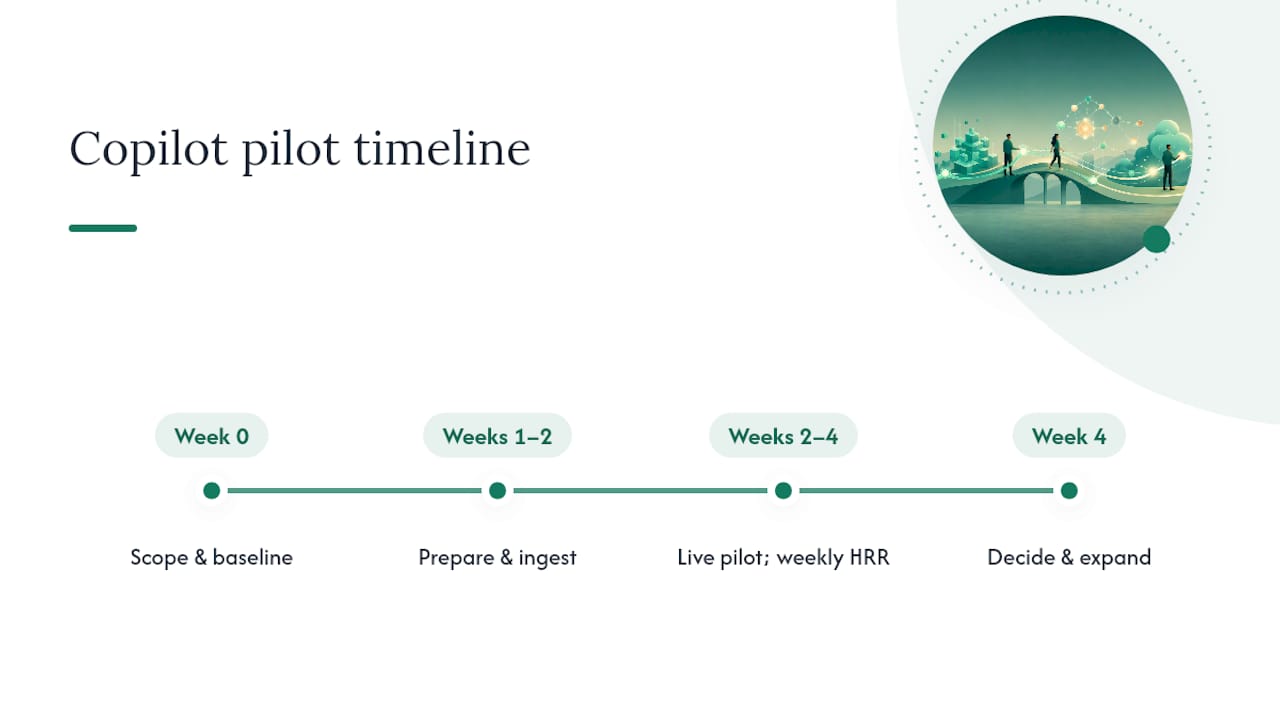
Week zero: scope and baseline. Pick one practice area, ideally one with high query volume and clear pain, like new-associate onboarding questions or client intake procedures. Pull current license utilization and identify who’s actually going to use this daily. Set your success criteria now, not after you see promising results.
Weeks one and two: prepare and ingest. Run the hygiene checklist against your chosen source library. Connect only the sources that library actually needs, resisting the urge to hook up every connector available. Preview sample data inside Copilot Studio and fix what’s obviously broken before full ingestion.
Weeks two through four: live pilot. Give a small user group of limited size is sufficient, access to the configured agent or Copilot Search scope. Collect HRR feedback weekly, not just at the end. Watch citation rates to see which content is actually earning its keep.
Week four: decide. Compare results against your pre-set success criteria. Calculate rough time saved per query and multiply by query volume to estimate recovered hours. If the numbers hold up, expand to a second practice area using the same playbook. If they don’t, diagnose whether it’s a content problem, a permissions problem, or genuinely low demand before scrapping the initiative. For a template on building this case for leadership, Gozera’s Copilot business case guide walks through the math firms use to get budget approved.
What Goes Wrong Most Often With Copilot Deployments?
The most common failure isn’t technical. It’s sequencing. Firms turn on Copilot licenses for everyone on day one, skip the hygiene work, and then wonder why adoption stalls at 20% three months later with most seats sitting idle.
A second recurring pitfall is source sprawl. Teams connect every available system because it’s technically possible, then discover that once an agent crosses roughly 25 sources, generative orchestration starts filtering what actually gets searched, and results get less predictable, not more comprehensive. The fix is disciplined scoping from the start, not damage control later.
A third pitfall is treating ingestion as a one-time project. Content goes stale, asset age calculates from ingestion date rather than last edit, and nobody notices until an agent confidently cites a policy that changed eight months ago. Build a recurring re-ingestion cadence into whoever owns each source, not into a calendar reminder that gets snoozed.
A fourth pitfall, particularly common in law and accounting firms handling sensitive client data, is skipping the permission audit before connecting a source. Copilot respects existing access controls, which means any pre-existing permission mistake gets amplified the moment search becomes smarter and more visible. Audit first, connect second, always in that order.
Finally, firms underestimate the citation gap. If your agent isn’t set to require source citations, users can’t verify an answer, and skepticism kills adoption faster than any bug. Requiring citations by default costs you a small amount of response speed and buys you the trust that actually drives usage numbers up.
How Should You Train Staff on Copilot Without a Six-Month Rollout?
Traditional enterprise change management assumes months of training decks and mandatory workshops. Professional-services firms don’t have that runway, and frankly don’t need it if the rollout is scoped correctly.
Train around real tasks, not features. Instead of a generic “here’s what Copilot can do” session, show associates exactly how to ask it to summarize a deposition transcript or draft a first-pass client memo from existing templates. Task-specific training sticks; feature tours don’t.
Identify two or three power users per practice group early and let them become informal champions. People trust a colleague who says “I used this to cut an hour off my Friday billing review” far more than they trust an IT memo. This costs nothing and moves faster than formal enablement sessions.
Set expectations about accuracy explicitly. Tell staff directly that Copilot answers require verification against source documents, especially for anything client-facing or billable. This isn’t a disclaimer; it’s the difference between an associate who becomes a power user and one who gets burned once and quits using the tool entirely.
Measure training success the same way you measure the pilot: through actual usage telemetry, not attendance at a training session. If query volume and HRR climb after a lunch-and-learn, the training worked. If they don’t, the tool isn’t the problem, the rollout sequencing is. Gozera’s implementation guide for IT leaders covers a rollout sequence built around this exact logic.
What Should You Budget for Licensing as Usage Scales?
Copilot licensing works as a per-seat add-on layered on top of your existing Microsoft 365 subscription, which means your cost scales linearly with headcount rather than with how much knowledge you’ve ingested or how many agents you’ve built. That’s good news for budgeting and bad news for firms that assign licenses broadly and then discover half of them sit unused.
The real cost risk isn’t the license price. It’s paying for seats nobody activates. A 500-person firm that licenses Copilot for 300 employees but sees active weekly usage from a minority of them isn’t running an AI strategy, it’s subsidizing a rounding error. This is precisely the gap telemetry is built to catch, and precisely why a pilot that measures active users before a full rollout matters more than the sticker price of any tier.
Budget for three cost centers, not one: the licenses themselves, the ingestion and hygiene work to prepare knowledge sources properly, and ongoing optimization to keep content fresh and agents tuned. Firms that budget only for the license line item consistently underestimate total cost of ownership, then wonder why adoption and ROI don’t match the invoice. Gozera’s ROI breakdown for mid-market firms walks through how these three cost centers typically split out in practice, and where firms tend to overspend without realizing it.
Publisher Perspective: Prioritization for Mid-Market Firms
Small, tightly scoped pilots beat wide indexing almost every time in professional services, where a permission mistake on client files carries real liability. Speed to value matters, but not at the cost of an access audit you skipped to hit a launch date. If you remember one thing from this guide, make it this: measure before you rebuild, and never license more seats than your telemetry says you’re actually using.
— Mad
Get a Copilot ROI Audit for Your Firm
Some consulting firms focus on the gap between what firms pay for Copilot licenses and what those licenses actually produce in recovered billable time. Instead of another rollout deck, an engagement starts with real telemetry, showing exactly which seats are active, which are dormant, and where a rebuilt workflow would pay for itself fastest.

A typical first engagement delivers a usage baseline, a scoped pilot on one practice area, and a written adoption plan your partners can actually act on, not a slide deck that gets filed away. Some teams pair enterprise governance experience with hands-on automation work using Python and n8n, closing the gaps a license alone never will. If your firm is sitting on Copilot seats you’re not sure are earning their cost, start a Copilot ROI audit with Gozera and get a baseline before you spend another quarter guessing.
Sources
Copilot’s connector ecosystem is wide, but not every source behaves the same way once it’s ingested. Microsoft 365 Copilot supports more than 100 prebuilt connectors for pulling third-party platform data into Microsoft Graph, where Copilot experiences can find it.
Featured sources most firms start with:
- Is Copilot Search the next generation of enterprise search? — Directions on Microsoft
- Knowledge management best practices for Copilot ingestion — Microsoft Dynamics 365 Blog
Advanced sources for firms with more mature stacks:
Unstructured sources like Confluence get ingested at the collection level, meaning you can’t cherry-pick individual pages. Reorganize content into logical collections first. Start with a small, curated set for any critical agent rather than indexing everything at once. Available connectors also vary by tenant configuration and license tier, so confirm what’s actually enabled before you plan around a source that isn’t there yet.