
Microsoft 365 Copilot works as a drafting and review assistant for mid-market law firms, not a replacement for legal judgment, and it delivers measurable time savings only after a documented readiness review confirms it can’t surface privileged or misclassified content. The right next step is not a firmwide rollout. It’s a scoped pilot in one or two practice groups, paired with telemetry that proves the license spend is converting into recoverable billable hours before you scale.
TL;DR:
- Most law firms see the fastest productivity gains when focusing on repetitive drafting and review tasks, not complex legal judgments.
- A narrow scope pilot in high-volume practice groups, with clear measurement and feedback, is essential before scaling Copilot usage firmwide.
- Proper governance requires mapping data sources, cleaning permissions, enabling sensitivity labels, and testing access controls to prevent inadvertent document exposure.
- ROI measurement hinges on telemetry tracking active prompts, draft acceptance rates, time savings, and license utilization to avoid license rot.
- Firms must treat Copilot outputs as drafts requiring strict verification, including checking citations, dates, and client information before final use.
Table of Contents
- What Are the Best Copilot for Law Firms Use Cases?
- How Do You Prepare Copilot Governance and Data Permissions?
- How Should Firms Run a Copilot Pilot Before Scaling?
- What Does Copilot Agent Builder Do for Law Firms?
- How Do You Measure Copilot ROI and Adoption?
- What Are the Risks and Required Controls for Copilot in Legal Practice?
- How Does Zera.ai Turn Copilot Pilots Into Billable Time?
- What Should Law Firm Leaders Do About Copilot Right Now?
- Get Copilot ROI Without the License Rot
- Where to Go for Deeper Copilot Guidance
- Sources
What Are the Best Copilot for Law Firms Use Cases?
Copilot earns its license fee fastest on repetitive drafting and review work, not novel legal analysis. That distinction should drive what you pilot first.
Microsoft’s own Copilot scenario library for legal teams lists meeting assistance, draft generation, and complex data summarization as the core legal applications, and firms that start there see faster wins than firms that try to automate judgment calls.
Practical starting points for a pilot:
- Drafting first-pass templates and clause variants for standard agreements
- Summarizing long contracts and discovery documents into issue lists
- Generating meeting recaps and action items straight from Teams calls
- Drafting routine client update emails and status letters
- Building rough timelines and pulling fact patterns from case files
DLA Piper’s internal experiments found Copilot saved up to 36 hours per week per user in content generation and data analysis tasks, an early-adopter figure, but it shows the ceiling when the tool is matched to the right workflow. Structured prompting matters more than most firms expect. The North Carolina Bar Association’s guidance on Copilot in Word recommends clause-by-clause prompts over one-shot “draft this contract” requests, since narrow, structured asks cut editing time far more than open-ended ones.
How Do You Prepare Copilot Governance and Data Permissions?
Before a single lawyer opens Copilot, someone needs to answer one question with certainty: what can this tool actually see? Skipping that step is the single most common way firms end up exposing documents nobody meant to share.
The American Bar Association’s guidance on pre-deployment readiness lays out a targeted review, and it looks different from a standard security audit:
- Inventory every reachable data source. Map SharePoint sites, OneDrive folders, Outlook mailboxes, Teams channels, and any connected document management system Copilot can index.
- Run a permission cleanup. Strip stale access grants, document who should see what, and close the gap between “who has access” and “who should have access.”
- Enable and test sensitivity labels. Confirm labeled content is actually blocked from Copilot outputs, not just tagged for show.
- Re-test after any DMS integration change. New connectors reopen the access map and require a fresh check.
A general cybersecurity audit checks whether outsiders can get in. A Copilot readiness review checks whether the tool itself can surface something it shouldn’t to someone inside the firm who technically has account access but no business reason to see a given matter.
Pro Tip: Run a test query as a mid-level associate account before launch, asking Copilot to summarize a matter that associate has no assignment to. If it returns anything useful, your permission review isn’t done.
How Should Firms Run a Copilot Pilot Before Scaling?
Firms that jump straight to a firmwide license purchase almost always end up with the license rot problem: seats nobody uses, paid for anyway. A structured pilot avoids that.
- Scope narrowly. Pick one or two practice groups with high-volume repetitive work, litigation support or transactional drafting are common starting points, and limit the pilot to specific workflows rather than “try Copilot on everything.”
- Set a 4 to 8 week window. Long enough to get past the learning curve, short enough to keep partner attention.
- Assign clear roles. Include an IT sponsor, a practice group champion, and someone accountable for measurement, not just enablement.
- Establish a baseline before day one. Capture current time-per-task for the workflows you’re piloting so you have something to compare against.
- Build a short checklist. Baseline telemetry captured, test templates and agents loaded, a training session scheduled, and a defined feedback loop back to IT.
- Define scaling triggers in advance. Decide what usage rate, time savings, and governance sign-off must be hit before you expand beyond the pilot group. Don’t scale on enthusiasm alone.
Gozera’s Microsoft 365 Copilot implementation guide for IT leaders walks through this staging process in more detail, including governance checkpoints between each phase.
What Does Copilot Agent Builder Do for Law Firms?
Generic prompts get you a generic first draft. Copilot Agent Builder gets you something closer to a junior associate who’s actually read your firm’s playbook.
The tool lets firms build practice-specific agents without writing code, pointing an agent at your own templates, checklists, and past work product instead of relying on Copilot’s general training. That keeps the data inside your tenant and cuts down on the vendor surface you’d otherwise expose by bolting on a third-party legal AI tool.
Practical agents worth building first:
- A contract reviewer trained on your firm’s standard clause library and redline preferences
- A matter-opening checklist agent that walks new associates through intake steps
- A client-communication helper that drafts status updates in your firm’s tone
Pro Tip: Before publishing any agent, review exactly which document libraries it can pull from. An agent with too broad a knowledge source can surface client-confidential material outside its intended matter scope.
How Do You Measure Copilot ROI and Adoption?
License spend without usage data is just an assumption. Telemetry turns that assumption into a number partners will actually believe.
Track these signals from week one of any pilot:
- Active prompts per seat, the clearest early signal of whether people are actually using the tool
- Insertion and acceptance rate, how often Copilot’s draft output survives into the final document
- Time-saved estimates per workflow, measured against your pre-pilot baseline
- Dormant license count, seats assigned but showing near-zero activity after 30 days
Convert active usage into a partner-facing number: if a contract reviewer using Copilot cuts first-draft time from three hours to ninety minutes across 40 matters a month, that’s real recoverable billable time, not a productivity claim nobody can verify. Gozera’s guide on building a Copilot business case covers how to frame that math for partner approval.
The most common failure mode is license rot, seats purchased and never adopted. The fix is narrow enablement sessions targeted at the highest-frequency tasks, plus a shared prompt library so lawyers aren’t reinventing basic queries from scratch.

What Are the Risks and Required Controls for Copilot in Legal Practice?
Copilot produces a solid first pass, not a finished, verified work product. Treat every output as a draft from a capable but unsupervised junior researcher.
Require these controls before any Copilot output leaves the building:
- A repeatable check on every name, date, number, and legal assertion before filing or sending
- Verification of any cited case or statute against a primary source, never trust a citation on sight
- A written acceptable-use policy covering what data can and can’t be entered into prompts
- Logging and an incident-response path in case client data appears somewhere it shouldn’t
Roughly a third of the productivity gain firms report comes from faster first drafts, according to early adopter data from DLA Piper, but that gain only holds up if verification stays mandatory. Skipping the review step to save five more minutes is how a hallucinated citation ends up in a filed brief.
How Does Zera.ai Turn Copilot Pilots Into Billable Time?
Most firms buy Copilot licenses and hope adoption follows. Gozera starts from the opposite direction: measure first, then build.
The process runs a telemetry audit to find exactly which seats are active and which are dormant, rebuilds two or three high-value workflows around Copilot instead of leaving adoption to chance, and fills automation gaps with Python and n8n where Copilot alone can’t close the loop. A monthly optimization retainer keeps usage climbing instead of decaying back into license rot after the initial rollout excitement fades.
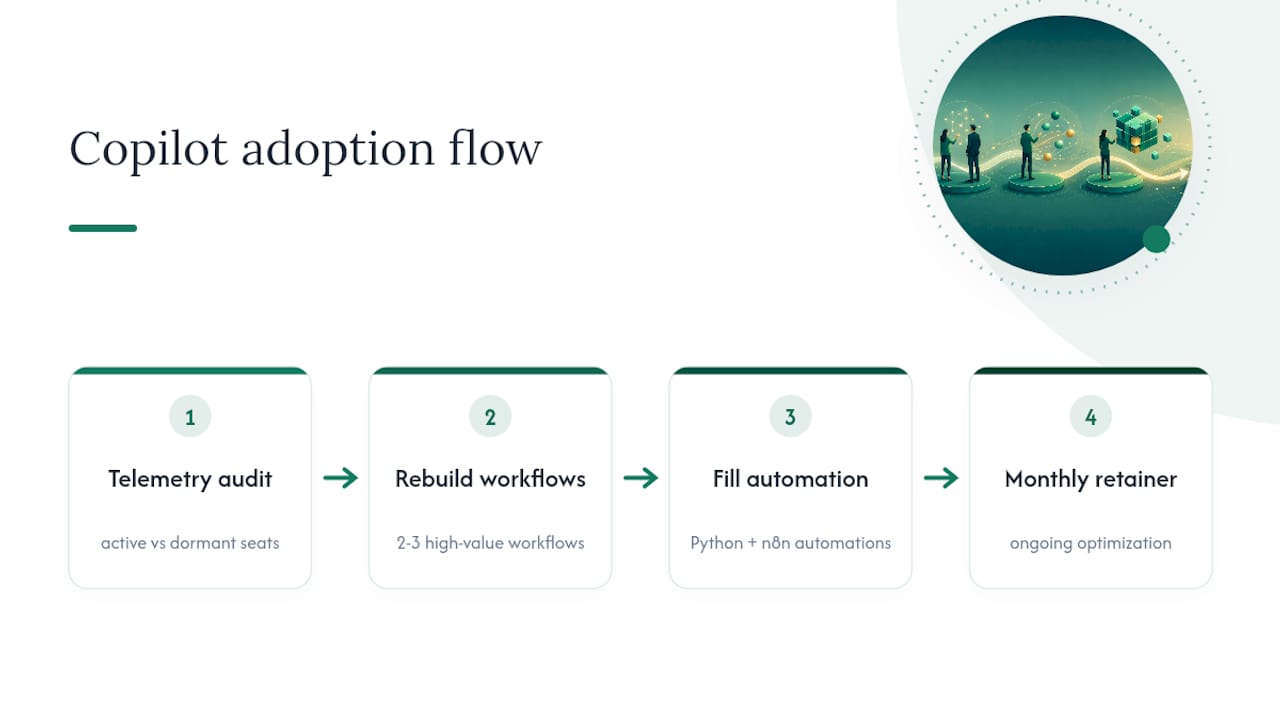
The outcome firms care about isn’t “more AI usage.” It’s a documented conversion from idle license spend to recoverable billable hours, backed by numbers a managing partner can defend to the executive committee.
What Should Law Firm Leaders Do About Copilot Right Now?
If I’m running IT or operations at a mid-market firm, I don’t start with a firmwide rollout. I start with a readiness review, then a pilot narrow enough to measure honestly. If nobody on staff can build that telemetry, that’s exactly the gap worth bringing in outside Copilot adoption expertise to close.
— Mad
Get Copilot ROI Without the License Rot
Gozera is the measurement-first alternative to buying Copilot seats and hoping adoption happens on its own. Where most firms discover license rot only after a year of unused subscriptions, Gozera’s readiness audits, pilot design, and telemetry reporting catch it before it starts, then rebuild the two or three workflows that actually move billable hours.

The engagement model is fixed-price: a readiness audit, a pilot design sprint, or a monthly optimization retainer once you’ve moved past pilot stage. Each one is built around the same principle covered throughout this guide: don’t pay for seats you can’t prove are working. If your firm has already bought Copilot licenses and isn’t sure how many are actually active, start with a readiness audit at Gozera and get a clear usage baseline before your next license renewal comes up.
Where to Go for Deeper Copilot Guidance
For technical scenario detail, consult Microsoft’s Copilot scenario library for legal teams. For governance specifics, read the American Bar Association’s pre-deployment readiness guidance. For a documented case example, review DLA Piper’s Copilot rollout, and for hands-on enablement, firms like XCD IT’s Copilot training program offer structured sessions for legal and accounting teams.
Sources
- DLA Piper’s journey with Microsoft 365 Copilot is a blueprint for legal innovation
- What Should Law Firms Do Before Deploying Copilot?
- Using Copilot in Legal (Copilot Scenario Library)
- CoPilot Legal Assistant: Use Agent Builder to Create an AI Helper
- 10 Ways Lawyers Can Use Copilot for 365 in Microsoft Word