
Effective copilot adoption services are not a one-time software rollout. They are a structured, multi-phase program that moves your firm from idle licenses to measurable productivity gains. The core pillars are strategy alignment, data and security readiness, role-based enablement, and metrics-driven optimization. Most mid-market professional services firms, whether law, accounting, or consulting, can expect to see measurable time savings within a scoped pilot period, with organization-wide adoption achievable within a few months when governance and training are in place. Microsoft 365 Copilot is not a feature you toggle on. It requires real organizational change to deliver real returns.
Key pillars of a successful program:
- Strategy alignment: Define business outcomes before touching a license.
- Data and security readiness: Remediate SharePoint permissions and apply sensitivity labels before rollout.
- Role-based enablement: Train by workflow, not by feature list.
- Metrics-driven optimization: Track cycle-time reduction and decision latency, not just logins.
- Ongoing governance: Weekly rhythms and license telemetry sustain momentum past the pilot.
How to build your Copilot adoption strategy and prepare your organization
The most common reason Copilot deployments stall is not technical. It is that no one defined what success looks like before the licenses were assigned. Start by tying your adoption goals directly to business priorities: reducing document review time at a law firm, cutting month-end close cycles at an accounting practice, or accelerating proposal drafts at a consulting firm. Vague goals produce vague results.
A readiness assessment covers three areas: licensing inventory, data governance, and compliance posture — ensuring standards are met just as detailed in UK audit readiness check services before key tool rollouts. On the governance side, Copilot surfaces data based on whatever permissions a user already holds in SharePoint and Microsoft 365. If those permissions are too broad, Copilot will expose content that should stay siloed. Remediate SharePoint permissions, apply Microsoft Purview sensitivity labels, and verify compliance policies before a single user touches the tool.
Leadership alignment is the other half of preparation. Stakeholders who understand the “why” behind Copilot adoption are far more likely to free up time for training and champion programs. Define your pilot scope early: pick two or three roles where Copilot has the clearest workflow fit, and start there rather than deploying firm-wide on day one.
- Conduct a licensing audit to identify assigned versus active seats.
- Map data access risks using Microsoft Purview before rollout.
- Select pilot cohorts by role and workflow impact, not seniority.
- Brief leadership on expected timelines and success metrics upfront.
- Document a governance policy covering acceptable Copilot use cases.
Pro Tip: Applying governance guardrails early, such as sensitivity labels and permission audits, accelerates adoption by creating a trusted AI environment. Teams adopt tools faster when they trust the data boundaries.
How to train users and drive real engagement with Microsoft 365 Copilot
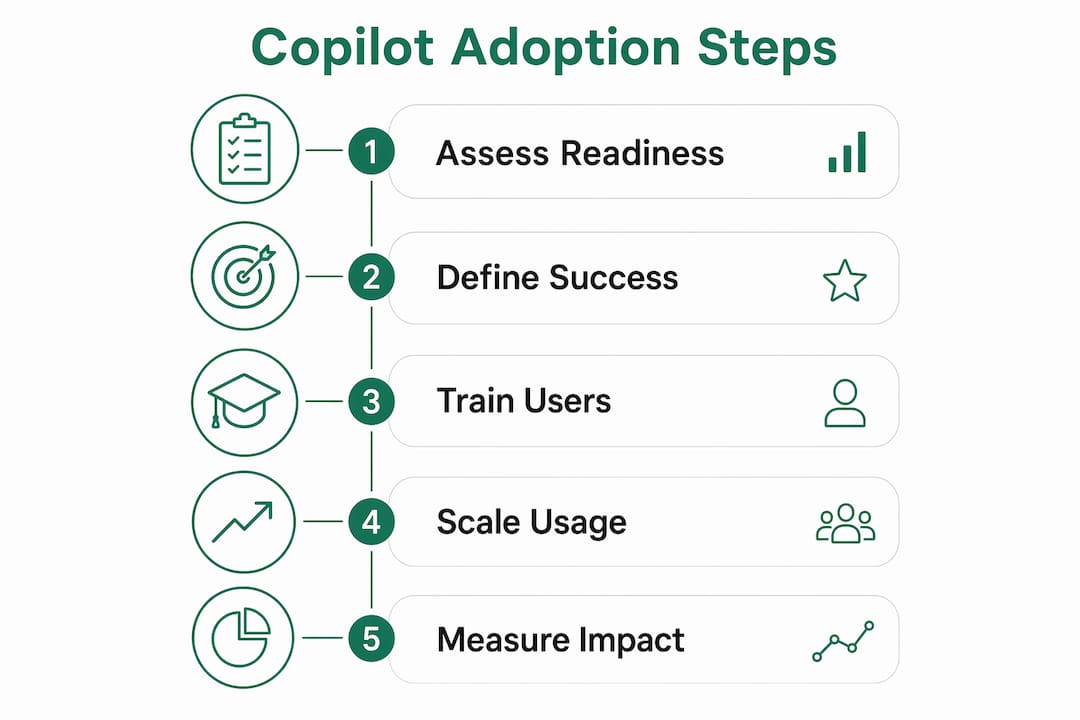
Generic training sessions are where Copilot adoption goes to die. A one-hour overview covering every feature across every role teaches nobody anything useful. What works is role-specific, scenario-based training that shows a paralegal exactly how to use Copilot in Teams meeting summaries, or shows an audit associate how to draft client-ready summaries from lengthy documents. The difference in confidence and daily usage is immediate.

Champion programs are the multiplier. Identify three to five early adopters per department who get deeper training and become internal advocates. They answer peer questions, surface friction points, and give your IT team real feedback before you scale. Live enablement clinics, held weekly or biweekly, reinforce skills far better than recorded videos that nobody watches twice.
Change management for AI adoption has one rule that differs from standard software rollouts: you are not just teaching a new tool, you are asking people to rethink how they work. Communications should lead with quick wins, not feature announcements. Show a before-and-after on a task the team already finds tedious, and adoption follows.
- Run role-specific training sessions tied to actual daily tasks.
- Appoint champions per department for peer-led advocacy.
- Hold live clinics on a regular cadence, not just at launch.
- Use internal communications to highlight quick wins, not product updates.
- Collect feedback from pilot users weekly and act on it visibly.
“Successful Copilot adoption is more about changing employee work habits via role-based training than primarily technical implementations. Organizations that invest in people-first enablement see sustained usage; those that treat it as an IT deployment see licenses go dark within weeks.” — Digital adoption specialist insights
One accounting firm that restructured its month-end close workflow around Copilot in Teams and Word reported that senior associates reclaimed hours previously spent on meeting recaps and first-draft memos. The Copilot coaching approach that drove that result was built around two specific tasks, not a broad feature tour. That focus is what made it stick.
How to scale adoption, measure impact, and embed Copilot into daily work
Moving from pilot to full rollout is where most firms either accelerate or stall. The transition requires a phased licensing scale-up tied to demonstrated usage in the pilot cohort, not a calendar date. If your pilot group is actively using Copilot in three or more workflows, that is your signal to expand. If usage is concentrated in one feature, fix the training gap before adding seats.

Success metrics need to move beyond “active users” and into business outcomes. Value metrics worth tracking include cycle-time reduction on document drafts, reduction in meeting follow-up time, and the number of manual process steps replaced by Copilot-assisted automation. Decision latency, meaning how long it takes a team to move from information gathering to a decision, is one of the clearest indicators that Copilot is actually changing how work gets done.
Telemetry is your ground truth. Microsoft Graph data lets you see usage at the feature level, not just whether someone opened Copilot once this month. That granularity matters because it tells you which workflows are sticky and which ones need a clinic. Automated license reclamation workflows can then pull back seats from users who have not engaged in 30 days, redirecting spend to teams with higher demand.
- Phase licensing expansion based on pilot usage data, not deployment schedules.
- Track outcome metrics: draft cycle time, meeting recap time, manual steps eliminated.
- Use Microsoft Graph telemetry to monitor feature-level engagement.
- Automate license reclamation for dormant seats to control spend.
- Integrate Copilot into existing tools like SharePoint, Teams, and Outlook by workflow, not feature.
- Review Copilot ROI metrics quarterly with leadership to maintain executive support.
Statistic callout: Firms that apply telemetry-driven license management with automated reclamation workflows consistently report materially better ROI compared to those managing licenses manually, because dormant seats are identified and reassigned before they become sunk costs.
Common challenges in Copilot adoption and how to solve them
1. Data readiness misconceptions
Most firms assume their Microsoft 365 environment is Copilot-ready. It rarely is. Overly permissive SharePoint access means Copilot can surface confidential files to users who should not see them. The fix is a structured data readiness audit that remediates permissions and applies sensitivity labels before any user gets access.
2. License mismanagement and dormant seats
Licenses assigned at rollout often go unused within weeks when training does not follow. Advanced practitioners use Microsoft Graph telemetry to identify active, low-usage, and dormant licenses, then reclaim idle seats automatically. Firms that skip this step pay for capacity that generates no return.
3. User hesitation and low engagement
Hesitation is almost always a training problem, not a technology problem. Users who cannot see how Copilot fits their specific job will not use it. Role-based clinics that address real tasks, like drafting a client memo or summarizing a deposition transcript, convert skeptics faster than any feature demonstration.
4. Shadow AI creating compliance blind spots
Shadow AI tools running alongside Microsoft 365 Copilot create governance gaps that IT teams often do not discover until an incident occurs. A governed Copilot deployment with clear acceptable-use policies reduces the incentive for teams to reach for unmanaged alternatives.
5. Stalled momentum after the pilot
Pilots succeed; full rollouts stall. The reason is almost always the absence of a sustained adoption rhythm. Weekly enablement sessions, monthly usage reports, and quarterly leadership updates, as part of a structured ongoing adoption cadence, keep Copilot visible and valued beyond the launch window.
6. Measuring the wrong things
Tracking logins and seat activation tells you nothing about value. Firms that shift to outcome metrics, such as reduced escalations, faster document turnaround, and fewer manual handoffs, build the business case for continued investment. That case is what secures budget for the next phase.
Pro Tip: Establish a governed weekly adoption rhythm combining enablement clinics, usage reporting, and a champion check-in. A consistent cadence embeds Copilot into work habits far more effectively than any single training event.
Key Takeaways
Sustainable Microsoft 365 Copilot adoption requires combining data governance, role-based training, and telemetry-driven optimization before and after rollout.
| Point | Details |
|---|---|
| Governance before rollout | Remediate SharePoint permissions and apply sensitivity labels before any user accesses Copilot. |
| Role-based training wins | Scenario-specific training tied to real job tasks drives daily usage far better than general feature overviews. |
| Pilot to scale transition | Expand licensing based on demonstrated pilot usage data, not calendar milestones. |
| Outcome metrics over logins | Track cycle-time reduction, decision latency, and manual steps eliminated, not just active user counts. |
| Sustained adoption rhythm | Weekly clinics, monthly reports, and quarterly leadership reviews keep adoption from stalling post-launch. |

Gozera works with mid-market law firms, accounting practices, and consulting firms across the US to turn idle Copilot licenses into measurable productivity gains. The approach combines telemetry-based license audits, workflow-specific enablement, and Python and n8n automation to close the gaps that generic rollouts leave open. If your firm is carrying licenses that are not earning their keep, Copilot ROI consulting from Gozera delivers a clear picture of where value is being lost and a fixed-price path to recovering it.