
Start governance first, pilot second, scale third. That is the verdict for any mid-market professional-services firm deploying Microsoft 365 Copilot in 2026. The single most effective first action is a phased pilot anchored to specific business workflows, not a broad license drop across the organization.
Your 30/60/90 action plan:
Days 1–30 (IT + Security lead)
- Complete tenant readiness: update channels, conditional access, MFA enforcement
- Run SharePoint/OneDrive permission audit and apply sensitivity labels to top-priority sites
- Select pilot cohort across a small, focused group of users covering roles with clear workflow problems to solve
- Assign pilot licenses via security group; enable Copilot Dashboard telemetry
Days 31–60 (Adoption lead + IT)
- Launch champion program and role-based training sessions
- Deploy scenario library for pilot roles (document synthesis, meeting prep, brief generation)
- Collect baseline metrics: time-per-task, active user rate, sessions per user
- Hold first AI council review at week 6; gate scale decision on adoption thresholds
Days 61–90 (All owners: IT, Security, Finance, Adoption)
- Evaluate pilot KPIs against acceptance criteria; identify dormant licenses
- Begin phased license expansion to next cohort using security group automation
- Publish internal ROI report; present telemetry findings to executive sponsor
- Finalize rollback and incident response procedures before broad rollout
The four pillars that govern every phase:
- Technical readiness: tenant settings, licensing, identity, network, and client prerequisites
- Data governance: sensitivity labeling, DLP, SharePoint permissions, and content indexing
- User enablement: champions, scenario library, role-based training, and community building
- Performance management: telemetry, KPIs, dormant license detection, and continuous improvement
Pro Tip: Before you assign a single Copilot license, pull a SharePoint permission state report. Copilot surfaces content based on existing M365 permissions, so an overshared site becomes an oversharing AI. Fix permissions first, then enable the tool.
Table of Contents
- What does a solid Microsoft 365 Copilot implementation framework look like?
- Technical prerequisites and the admin checklist you need before go-live
- How do you prepare your data and content for Copilot?
- What governance, compliance, and security controls does Copilot require?
- How should you design your Copilot pilot and stage licenses?
- How do you build a user enablement program that actually drives adoption?
- When should you extend Copilot with Copilot Studio agents?
- How do you measure Copilot adoption and prove ROI?
- What Microsoft resources and templates should you use?
- Your 90-day implementation roadmap with owners and decision gates
- How Gozera approaches Copilot implementation for professional-services firms
- Key Takeaways
- What most Copilot deployments get wrong
- Gozera’s Copilot ROI consulting gets you to measurable results in 90 days
- Authoritative sources and further reading
What does a solid Microsoft 365 Copilot implementation framework look like?
A successful Copilot rollout follows four phases: Plan, Implement/Pilot, Adopt, and Manage/Improve. Each phase maps directly to the four pillars above, and each has a defined decision gate before you move forward.

The four phases and their owners
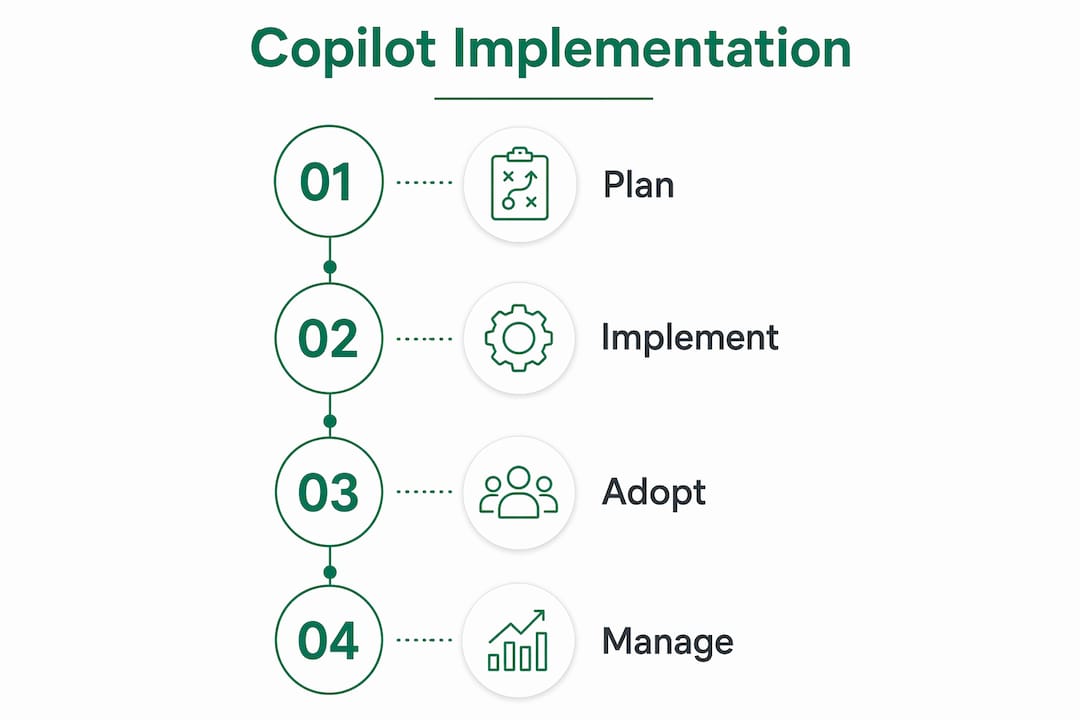
Plan is where IT and Security establish the governance baseline: tenant configuration, data classification, and pilot cohort design. No licenses go out during this phase.
Implement/Pilot is where a small, targeted group of users gets hands-on access. The goal is not to prove Copilot works in general. It is to prove it works for your specific workflows, with your data, under your security controls.
Adopt is the scale phase, triggered only after the pilot meets its KPI thresholds. This is where the champion network, scenario library, and community infrastructure carry the load.
Manage/Improve is ongoing. Copilot is not a one-time deployment project. Features change, user needs evolve, and the telemetry will surface new opportunities and new risks every quarter.
Governance bodies and stakeholders
Forming an AI council before the pilot launches is a leading practice for bridging technical deployment and day-to-day productivity gains. The council should include IT, at least one business unit leader per pilot department, a security representative, and a change management or adoption lead. The executive sponsor sits above the council and owns the “why” narrative for the broader organization.
Pro Tip: Assign a named adoption lead who is not the IT admin. The IT team owns technical gates; the adoption lead owns behavior change. Conflating those roles is one of the most common reasons pilots stall at 40% active usage.
Technical prerequisites and the admin checklist you need before go-live
Readiness activities include test environments, pilot testing, conditional access review, SharePoint Advanced Management reports, and network compliance checks. Run these in order before enabling Copilot for any user group.
Prioritized admin checklist
- Verify Microsoft 365 licensing eligibility. Copilot requires Microsoft 365 E3, E5, Business Standard, or Business Premium as the base license. Confirm every pilot user has a qualifying base license before assigning the Copilot add-on.
- Set update channels. Copilot features require Current Channel or Monthly Enterprise Channel for Microsoft 365 Apps. Devices on Semi-Annual Enterprise Channel will not receive all Copilot capabilities.
- Configure Entra ID conditional access. Enforce MFA for all Copilot-licensed users. Create a dedicated security group for Copilot pilot users to scope conditional access policies without disrupting the broader tenant.
- Run SharePoint Advanced Management reports. Pull the permission state report and the site ownership report. Flag any site with more than 1,000 unique permissions or no active owner.
- Enable unified audit logging. This must be on before Copilot goes live. Audit logs capture Copilot interactions and are required for compliance and incident response.
- Validate network readiness. Confirm endpoints for Microsoft 365 services are reachable per the Office 365 URL and IP address ranges documentation. Proxy configurations that intercept TLS can break Copilot responses.
- Set up a test environment. Use a non-production tenant or a dedicated test security group to validate Copilot behavior against your sensitivity labels and DLP policies before the pilot.
- Stage license assignment via security groups. Assign Copilot licenses to the pilot security group, not to individual users manually. Group-based licensing lets you add or remove users cleanly and automate expansion later.
Roles and responsibilities
| Role | Primary responsibilities | Decision authority |
|---|---|---|
| IT admin | Tenant config, licensing, update channels, network | Technical go/no-go |
| Security lead | Conditional access, DLP, audit logging, incident response | Security gate sign-off |
| Adoption lead | Champion program, training, scenario library | Adoption KPI gate |
| Executive sponsor | Budget, organizational narrative, escalation | Scale authorization |
| Finance | License cost tracking, ROI reporting | Budget approval |
Key principle: Copilot inherits every permission the user already has in Microsoft 365. It does not create new access paths. But it does make existing oversharing dramatically more visible and more consequential. A document a user could technically access but would never find manually is now one prompt away.
Pro Tip: Use the Microsoft 365 admin center’s group-based license assignment to automate pilot expansion. When a user joins the Copilot security group, they get the license automatically. When they leave, it reclaims. No manual ticket queue required.
How do you prepare your data and content for Copilot?
Copilot grounds its responses in the content it can reach through Microsoft Search. If that content is poorly labeled, overshared, or stale, the responses will reflect that. Data preparation is not optional; it is what separates a useful Copilot deployment from a liability.
Content readiness checklist
- Apply Microsoft Purview sensitivity labels to all SharePoint sites containing confidential, privileged, or client-specific data before enabling Copilot
- Configure Purview Data Loss Prevention policies to block Copilot from surfacing content labeled as highly confidential in chat or email responses
- Enable Restricted SharePoint Search if your governance posture is not yet mature enough to label all sites; this limits Copilot to a curated set of approved sites
- Run a top-site export to identify the 20 highest-traffic SharePoint sites and confirm each has an active owner and a current permission review
- Audit external sharing settings on OneDrive and SharePoint; disable anonymous link sharing for any site Copilot will index
- Inventory Microsoft 365 connectors and confirm which external content sources (if any) are enabled for Microsoft Search
Connector and indexing priorities
| Content source | Copilot access method | Governance action required |
|---|---|---|
| SharePoint Online | Native (Microsoft Search) | Permission audit, sensitivity labels |
| OneDrive for Business | Native (Microsoft Search) | External sharing review |
| Microsoft Teams channels | Native (Microsoft Search) | Channel membership review |
| Exchange Online | Native (Microsoft Search) | Mailbox permission review |
| External knowledge bases | Microsoft Graph connectors | Connector scope and auth review |
| Third-party document systems | Custom connectors or plugins | Least-privilege auth, data classification |
Pro Tip: Use sensitivity labeling plus Purview DLP policies to prevent Copilot from surfacing confidential content. Labeling is the single most effective control for safe knowledge extraction, and it pays dividends beyond Copilot for every compliance audit your firm faces.
For professional-services firms specifically, the highest-risk content categories are client matter files, draft legal documents, financial workpapers, and personnel records. Label those first, in that order.
What governance, compliance, and security controls does Copilot require?
Copilot respects existing Microsoft 365 permissions and sensitivity labels. It does not bypass them. But it does amplify the consequences of gaps in your governance posture, which is why security controls need to be in place before the pilot, not after.
Compliance policy checklist
- Enable Microsoft Purview Audit (formerly Advanced Audit) to capture Copilot interaction logs, including prompts and responses, for eDiscovery and compliance review.
- Apply Rights Management Service (RMS) encryption to documents labeled as confidential or highly confidential so that Copilot cannot extract and share their content outside approved contexts.
- Restrict external sharing at the tenant level for SharePoint and OneDrive; require IT approval for any exception during the pilot period.
- Configure DLP policies in Purview to detect and block sensitive data types (SSNs, financial account numbers, attorney-client privilege markers) in Copilot-generated outputs.
- Set retention policies for Copilot interaction data in Microsoft Purview to align with your firm’s record retention schedule and any applicable U.S. regulatory requirements.
- Review and document agent connector permissions before any Copilot Studio agent goes to production; apply least-privilege principles to every connector.
On data residency: Microsoft 365 Copilot processes prompts and responses within the Microsoft 365 service boundary for your tenant’s region. For U.S.-based firms, data is processed in U.S. data centers when the tenant is provisioned in the U.S. region. Confirm your tenant’s data residency configuration in the Microsoft 365 admin center before enabling Copilot, particularly if your firm handles data subject to HIPAA, FINRA, or state-level privacy statutes.
Rollback and incident response
If Copilot surfaces content it should not, the response sequence is: (1) disable Copilot for the affected user or group immediately via the security group license assignment, (2) pull the Purview audit log for the interaction, (3) assess whether the root cause is a permission gap or a labeling gap, (4) remediate the gap, (5) re-enable after a security lead sign-off. Document every incident in your IT service management system with a root cause and remediation record.
Pro Tip: Enable Purview Audit before day one of the pilot. Retroactive log capture is not possible. If an incident occurs during the pilot and audit logging was not active, you have no forensic record.
How should you design your Copilot pilot and stage licenses?
Microsoft’s internal deployment found that starting with pilot cohorts tied to specific business problems produced better long-term adoption than broad license assignments. That finding should anchor your pilot design.
Pilot cohort selection template
A good pilot cohort has three characteristics: a shared workflow problem Copilot can plausibly solve, a manager willing to track outcomes, and users who are not already overwhelmed by a major project deadline. Aim for 15–30 users across 2–3 distinct roles.
Example cohort for a professional-services firm:
- 8–10 attorneys or consultants who draft client-facing documents weekly
- 6–8 accountants or analysts who summarize data and prepare reports
- 4–6 operations or admin staff who manage meeting coordination and email triage
Sample 8–12 week pilot timeline
- Week 1–2: License assignment, onboarding session, baseline metric capture (time-per-task survey, active user count at day 7)
- Week 3–6: Active use period; adoption lead runs weekly 30-minute office hours; champions share prompt examples in the community channel
- Week 6: First AI council review; assess active user rate, sessions per user, and qualitative feedback; decide whether to continue, adjust, or pause
- Week 7–10: Adjusted use period based on week-6 findings; introduce second scenario set if adoption is healthy
- Week 11–12: Final measurement; compile pilot ROI report; present scale recommendation to executive sponsor
KPIs to track during the pilot
- Active user rate (target: 70%+ of licensed users active in week 4)
- Sessions per active user per week (baseline: establish in week 1)
- Self-reported time savings per task (survey at weeks 2, 6, and 12)
- High-value workflow automation counts (document drafts, meeting summaries generated)
- Support ticket volume related to Copilot (indicator of friction)
Pro Tip: Automate license staging via security groups from day one. When the pilot succeeds and you add cohort two, you add users to the group, not to a manual license queue. It also makes license reclamation clean when a user leaves the pilot.
Scale decision criteria
Before expanding beyond the pilot, confirm: active user rate meets or exceeds your target threshold, at least one documented workflow improvement per pilot role, no unresolved security incidents, and the AI council has reviewed and approved the scale plan.
How do you build a user enablement program that actually drives adoption?
The primary barrier to Copilot ROI is not technical capability. It is user habits. A champion network and role-based scenarios convert licensing into measurable productivity. Training alone does not.
Training and enablement checklist
- Deliver a live 60-minute onboarding session for each pilot cohort on day one of their access period
- Publish a role-specific prompt library in a shared Teams channel or SharePoint site within the first week
- Schedule weekly 30-minute “Copilot office hours” for the first six weeks, hosted by the adoption lead or a champion
- Use Viva Amplify to push targeted communications to pilot users at weeks 1, 3, and 6
- Record a short (5–7 minute) demo video for each key scenario and post it in the community channel
Scenario library for professional-services firms
These are the workflows where Copilot delivers the fastest, most measurable time savings for law, accounting, and consulting teams:
- Document synthesis: Summarize a 40-page contract or audit report into a structured executive brief using Copilot in Word
- Meeting prep: Generate a pre-meeting briefing from recent emails, documents, and calendar context using Copilot in Teams
- Matter or client brief generation: Draft a new client intake summary or matter status update from existing case notes
- Billing and time capture support: Use Copilot in Outlook to reconstruct a day’s activity log from email and calendar data for time entry
- Research summarization: Compile a literature or precedent summary from a set of uploaded documents using Copilot in Word or Loop
For a deeper look at Copilot workflows for professional services, the highest-ROI automations tend to cluster around document drafting and meeting intelligence.
Champion program structure
- Selection: Identify one champion per department in the pilot cohort; look for users who are already curious about the tool, not just the most senior person
- Responsibilities: Share weekly prompt tips in the community channel, collect peer feedback, attend monthly AI council reviews
- Reward mechanics: Recognition in firm communications, early access to new Copilot features, input into the scenario library roadmap
- Community: Use a dedicated Teams channel or Viva Engage community for champions to share wins, questions, and escalations
Pro Tip: The Copilot coaching program that works is role-specific, not generic. “Here is how Copilot helps attorneys draft engagement letters” lands differently than “here is what Copilot can do.” Build your training around the five scenarios above, not around feature tours.
When should you extend Copilot with Copilot Studio agents?
Out-of-the-box Copilot covers a wide range of general productivity tasks. Custom agents built in Copilot Studio unlock the highest ROI for professional-services firms because they automate role-specific workflows that generic chat cannot handle: drafting briefs from matter data, generating client summaries from CRM records, or pulling billing entries from a time-tracking system.
When to build a custom agent
Build a custom agent when: (1) the workflow requires data from a system outside Microsoft 365, (2) the task follows a repeatable structure that can be templated, or (3) the out-of-the-box Copilot response quality is insufficient because the required context is not in M365.
Use out-of-the-box Copilot when: the task is document-centric, the data is already in SharePoint or Teams, and the user’s prompt is the primary variable.
Integration examples for professional-services firms
| Integration target | Agent use case | Connector type |
|---|---|---|
| Document management system (iManage, NetDocuments) | Draft matter summaries from document history | Custom connector (REST API) |
| Practice management / billing (Clio, Aderant) | Generate time entry drafts from activity logs | Custom connector (REST API) |
| CRM (Salesforce, HubSpot) | Create client briefings from opportunity records | Power Platform connector |
| Accounting ERP (Sage, QuickBooks) | Summarize client account status for advisory calls | Custom connector (REST API) |
Agent testing checklist
- Test all conversation flows end-to-end in a non-production environment before any user access
- Validate fallback behavior: what does the agent do when it cannot answer? It should hand off gracefully, not fail silently
- Confirm connector authentication uses service accounts with least-privilege permissions, not admin credentials
- Run user acceptance testing with 3–5 pilot users before production release
- Set up monitoring alerts in Copilot Studio analytics for failed sessions and low-confidence responses
The Copilot Studio implementation guide on GitHub provides reference architectures, testing checklists, and integration patterns that are worth pulling into your internal playbook before you build anything custom.
Pro Tip: Treat agent environments the same way you treat application environments: dev, test, production, with separate connectors and secrets for each. Sharing a production connector in a dev agent is how credential exposure incidents happen.
How do you measure Copilot adoption and prove ROI?
Copilot telemetry and the Copilot Dashboard provide the metrics organizations need to measure value and identify dormant licenses. The dashboard is available in the Microsoft 365 admin center and shows active users, app-by-app usage, and agent invocation counts.
Telemetry metrics to track
- Active users: licensed users who triggered at least one Copilot interaction in the reporting period
- Feature usage by app: breakdown of Copilot usage in Word, Excel, PowerPoint, Outlook, Teams, and Loop
- Sessions per active user: frequency indicator; low sessions per user signals friction or low awareness
- Agent invocation counts: how often custom agents are triggered; key for measuring automation ROI
- Dormant license count: licensed users with zero activity in the past 30 days; these are your reclamation candidates
- Task time reduction: self-reported or system-measured reduction in time for key workflows (requires baseline)
ROI calculation framework
| Step | What to measure | How to measure |
|---|---|---|
| Baseline | Time per task before Copilot | Week-1 survey or time-tracking system |
| Post-pilot | Time per task after Copilot | Week-12 survey or time-tracking system |
| Time savings | (Baseline time – Post time) × active users × task frequency | Calculated |
| License cost | Monthly Copilot license cost × licensed users | Finance records |
| Net ROI | (Time savings × hourly billing rate) – License cost | Calculated |
For a detailed Copilot ROI framework built for mid-market firms, the key variable is billable rate. A firm billing at $300/hour recovers license costs with fewer saved hours than a firm billing at $100/hour. Build your ROI model around your actual billing rate, not a generic productivity multiplier.
Pro Tip: Pull Copilot telemetry data weekly during the pilot and monthly after scale. Dormant licenses are expensive. A user who has not touched Copilot in 30 days is a candidate for retraining, reassignment, or license reclamation. The dashboard makes this visible; acting on it is what separates a managed deployment from a sunk cost.
AI council review cadence
Hold a monthly AI council review for the first six months post-launch, then quarterly. Each review should cover: active user trends, dormant license actions taken, new scenario requests from users, security incidents (if any), and the next 30-day improvement priority.
What Microsoft resources and templates should you use?
Microsoft provides a substantial library of official resources. The ones below are worth pulling into your internal playbook at the phases indicated.
Phase-by-phase resource index
Planning phase:
- Microsoft 365 Copilot setup and license assignment guide on Microsoft Learn: the canonical technical prerequisites reference
- Microsoft Copilot Success Kit (available via the Microsoft Adoption Hub): contains readiness checklists, adoption playbooks, and scenario libraries organized by role
- Microsoft Adoption Hub implementation checklist: a downloadable Excel checklist covering executive sponsor identification, team assembly, champion selection, and technical readiness steps
Pilot and adoption phase:
- Implement Microsoft 365 Copilot training module on Microsoft Learn: covers prerequisites, SharePoint Advanced Management, data preparation, license assignment, security controls, and agent extension in a structured learning path
- Microsoft 365 Copilot Adoption Playbook: champion program templates, community setup guidance, and user feedback frameworks
- Microsoft Inside Track blog: deploying Copilot in five chapters documents Microsoft’s own internal rollout, including pilot cohort design and governance lessons
Copilot Studio and agent development:
- Copilot Studio implementation guide on GitHub: reference architectures, integration patterns, and a production-readiness checklist
- Copilot Studio implementation guidance on Microsoft Learn: lifecycle framing, KPI-driven management, and continuous improvement practices
Resource comparison by use case
| Resource | Best used for | Format |
|---|---|---|
| Copilot Success Kit | Readiness checklists, adoption playbooks, scenario library | Downloadable templates |
| Microsoft Learn: Implement module | Admin technical training and prerequisites walkthrough | Self-paced learning module |
| Inside Track deployment blog | Real-world deployment lessons and pilot design | Blog series |
| Copilot Studio GitHub guide | Agent architecture, testing checklists, integration patterns | GitHub repository |
| Microsoft Adoption Hub checklist | Planning phase team assembly and launch checklist | Excel download |
Copy the Adoption Hub checklist and the Success Kit scenario library into a SharePoint site at the start of your planning phase. Customize them for your firm’s roles and workflows before the pilot launches.
Your 90-day implementation roadmap with owners and decision gates
This roadmap operationalizes the BLUF plan with specific owners, acceptance criteria, and cost considerations for each gate.
Days 1–30: Foundation (IT + Security lead)
- Complete tenant readiness checklist (update channels, MFA, conditional access)
- Run SharePoint permission audit; flag overshared sites for remediation
- Apply sensitivity labels to top-priority content categories
- Enable unified audit logging and Purview Audit
- Define pilot cohort; create Copilot security group; assign pilot licenses
- Set up Copilot Dashboard and baseline telemetry capture
- Gate 1 decision: Security lead confirms no critical permission gaps; IT confirms telemetry is active
Days 31–60: Pilot (Adoption lead + IT)
- Launch pilot with onboarding session and scenario library
- Stand up champion community channel; publish prompt library
- Run weekly office hours for weeks 5–8
- Conduct week-6 AI council review; assess active user rate and qualitative feedback
- Begin Copilot Studio agent scoping for highest-ROI workflow (if applicable)
- Gate 2 decision: Active user rate meets threshold; no unresolved security incidents; adoption lead recommends scale
Days 61–90: Scale and measure (All owners)
- Expand licenses to cohort 2 via security group automation
- Publish pilot ROI report to executive sponsor and finance
- Identify and act on dormant licenses (retrain, reassign, or reclaim)
- Finalize rollback and incident response documentation
- Set AI council quarterly review cadence
- Gate 3 decision: Finance confirms license cost vs. measured time savings; executive sponsor authorizes full rollout
Owners and decision gates
| Gate | Owner | Acceptance criteria |
|---|---|---|
| Gate 1: Technical go-live | IT admin + Security lead | Permission audit complete, audit logging active, MFA enforced |
| Gate 2: Pilot scale | Adoption lead + IT admin | Active user rate on target, no open security incidents |
| Gate 3: Full rollout | Executive sponsor + Finance | Positive ROI projection, rollback plan documented |
Cost and licensing notes
Microsoft 365 Copilot is available as an add-on license to qualifying Microsoft 365 base plans. Pricing is not publicly listed as a flat rate for all configurations; confirm current pricing and volume discount eligibility with your Microsoft account team or licensing partner. Budget for the Copilot add-on per licensed user, plus operational costs for the adoption lead’s time, any Copilot Studio development work, and ongoing AI council facilitation.
Pro Tip: Size your pilot license count conservatively. It is far easier to justify expanding a successful pilot than to justify reclaiming licenses from a failed broad rollout. Start with 20–30 users, prove the model, then scale with data.
How Gozera approaches Copilot implementation for professional-services firms
Gozera’s lifecycle approach follows five steps: audit, pilot, automate, measure, and optimize. Each step is time-boxed and outcome-anchored, which means clients see measurable results within 90 days rather than waiting for a multi-year change management program to produce evidence.

The audit phase uses telemetry to establish a baseline: which licenses are active, which are dormant, which workflows are candidates for automation, and where the permission gaps are. This is not a theoretical assessment. It produces a ranked list of interventions with estimated time savings attached.
The pilot phase mirrors the framework in this guide, with Gozera providing the scenario library, champion program structure, and telemetry configuration so the client’s IT team does not have to build those from scratch.
The automate phase is where Gozera’s differentiation shows most clearly. For workflows that Copilot alone cannot handle, Gozera integrates automation using Python and n8n to close the gap, connecting Copilot outputs to downstream systems like billing platforms, document management systems, and CRM tools.
The measure phase produces an ROI report tied to actual telemetry: time saved per task, license utilization rate, automation event counts, and recoverable billable time. These are not estimates. They come from the Copilot Dashboard and the firm’s own time-tracking data.
The optimize phase is the ongoing retainer: monthly telemetry reviews, dormant license actions, new scenario development, and AI council facilitation.
What Gozera measures in every engagement: active user rate by week, sessions per user by role, dormant license count and trend, agent invocation counts for custom workflows, and self-reported time savings validated against billing system data. Every metric is tied to a dollar value the firm can report to its partners or board.
Pro Tip: The AI automation consulting work that moves the needle fastest is not the Copilot configuration. It is the workflow rebuild that happens around Copilot. The tool is the accelerant; the process redesign is the engine.
Key Takeaways
A governance-first, telemetry-driven Microsoft 365 Copilot implementation produces measurable ROI within 90 days when IT, Security, and Adoption leads execute against clear decision gates and pilot cohorts tied to specific business workflows.
| Point | Details |
|---|---|
| Governance before licenses | Run permission audits and apply sensitivity labels before assigning any Copilot licenses to prevent oversharing. |
| Pilot cohort design | Select a small group of users across a few roles with a shared workflow problem; tie the pilot to specific KPIs, not general curiosity. |
| Telemetry from day one | Enable the Copilot Dashboard and Purview Audit before the pilot launches; retroactive log capture is not possible. |
| Dormant license action | Review license utilization monthly; users with zero activity in 30 days are candidates for retraining or reclamation. |
| Gozera engagement | Gozera audits dormant licenses, rebuilds high-value workflows, and delivers a telemetry-based ROI report within a fixed-price 90-day engagement. |
What most Copilot deployments get wrong
Most Microsoft 365 Copilot deployments fail at the same point: they treat adoption as a training problem and throw more sessions at it when the real issue is that users do not have a workflow reason to open Copilot every day. A one-hour onboarding and a prompt library are not enough. The tool has to be embedded in a task the user does repeatedly, ideally daily, before it becomes a habit.
The second failure mode is deploying Copilot before the data governance work is done. Firms that skip the permission audit and sensitivity labeling phase discover the problem the hard way, when Copilot surfaces a confidential document in a context where it should not appear. That incident, even if minor, creates organizational anxiety that is much harder to reverse than it would have been to prevent.
The third thing most guides understate is the value of the AI council. A monthly review meeting sounds bureaucratic, but it is the mechanism that keeps the deployment from drifting. Without it, dormant licenses accumulate, new feature releases go unnoticed, and the adoption lead loses organizational support because there is no forum to report wins or escalate blockers.
The practical shortcut that actually works: pick one workflow per role, make Copilot the default tool for that workflow, and measure it obsessively for 90 days. One workflow done well beats ten workflows done poorly. The telemetry will tell you whether it is working, and the champion network will tell you why or why not.
Gozera’s Copilot ROI consulting gets you to measurable results in 90 days
Most mid-market professional-services firms are paying for Copilot licenses that a significant portion of their users have never touched. Gozera’s fixed-price consulting engagements are built to fix that, starting with a telemetry audit that shows exactly which licenses are active, which workflows are automatable, and where the fastest ROI is hiding.

An engagement with Gozera covers the full lifecycle: audit, pilot design, workflow automation (including Python and n8n integrations for gaps Copilot alone cannot close), and a 90-day ROI report tied to your actual billing and time-tracking data. Pricing is fixed per engagement, not hourly, so you know the cost before the work starts.
Law firms, accounting practices, and consulting firms working with Gozera get a deployment that is governed correctly from day one, a champion program that does not require a full-time change manager, and telemetry that gives partners and managing directors a number they can defend. If your Copilot licenses are sitting idle, book an assessment with Gozera and find out what they should be doing instead.
Authoritative sources and further reading
Copilot Studio resources
- Copilot Studio implementation guidance overview (Microsoft Learn): lifecycle framing, KPI-driven management, and continuous improvement practices for agent projects
- Copilot Studio implementation guide (GitHub): reference architectures, integration patterns, testing checklists, and a production-readiness review framework; download and adapt for your internal playbook
- New Microsoft Copilot Studio implementation guide announcement (Microsoft Copilot Blog): background on the Success by Design framework underpinning the guide
Gozera resources
- Gozera Copilot ROI and adoption consulting: service landing page for Copilot adoption audits, workflow automation sprints, and optimization retainers
- Copilot telemetry guide for IT managers: detailed telemetry and dashboard guidance for tracking adoption and identifying dormant licenses
- ROI of Microsoft Copilot for mid-market firms: ROI calculation frameworks and sample models for professional-services billing structures