
If your firm is searching “varonis vs netwrix” while trying to figure out Microsoft 365 Copilot adoption, the answer you actually need is this: hire a telemetry-first Copilot consultant, run a baseline audit before touching workflows, and set quarterly decision gates at months 3, 6, 9, and 12. That sequence is where the ROI lives.
- Time-to-value checkpoints: Expect quick wins by month 3 (active-user uplift, first recovered billable hours), an expansion decision at month 6, workflow optimization at month 9, and full-scale ROI reporting by month 12.
- Top deliverable to demand: A baseline telemetry report identifying dormant licenses, followed by two to four pilot workflows with runbooks and automation scripts.
- Trust signal: Look for a consultant with hands-on Microsoft 365 Copilot telemetry experience in professional-services verticals. Gozera, led by Cale Werake, specializes in exactly this for mid-market law, accounting, and consulting firms.
Immediate next step: Request a baseline telemetry audit before committing to any broader engagement.
Table of Contents
- Is this guide right for your firm?
- What does Copilot success actually look like at 3, 6, 9, and 12 months?
- What should a consultant actually deliver, phase by phase?
- How do consultants price this work, and what’s the real first-year cost?
- Which telemetry signals and KPIs should you track?
- How do you evaluate and select a Copilot adoption consultant?
- What does a real engagement look like for a 50–150-person firm?
- What are the data privacy and risk considerations?
- What change management actually works for Copilot adoption?
- What does post-rollout support look like?
- Key Takeaways
- The telemetry-first approach is the only one that holds up
- Gozera turns idle Copilot licenses into recovered billable time
- Useful sources for implementers and procurement teams
Is this guide right for your firm?
This article is for IT leaders, operations directors, and managing partners at professional-services firms with 50–500 staff running Microsoft 365 tenancies. If you’re in law, accounting, consulting, or engineering and your Copilot licenses are sitting idle, this is for you.
- What this covers: How to scope and evaluate a Copilot adoption consultant, run a telemetry baseline, design a pilot, and track ROI through quarterly checkpoints.
- What it does not cover: Any comparison of enterprise data-security or file-access governance tools. That’s a different procurement question for a different buyer.
- One readiness caveat: Firms mid-migration or with unresolved compliance reviews should resolve those prerequisites first before starting a Copilot pilot.
What does Copilot success actually look like at 3, 6, 9, and 12 months?
CFO-level guidance is clear: Copilot ROI follows a multi-quarter curve. Plan for it, or you’ll pull the plug too early.
- Month 3 — Quick wins: Active users reach a moderate share of licensed seats. At least two pilot workflows are running with measurable output. Recovered billable hours appear in telemetry, even if modest.
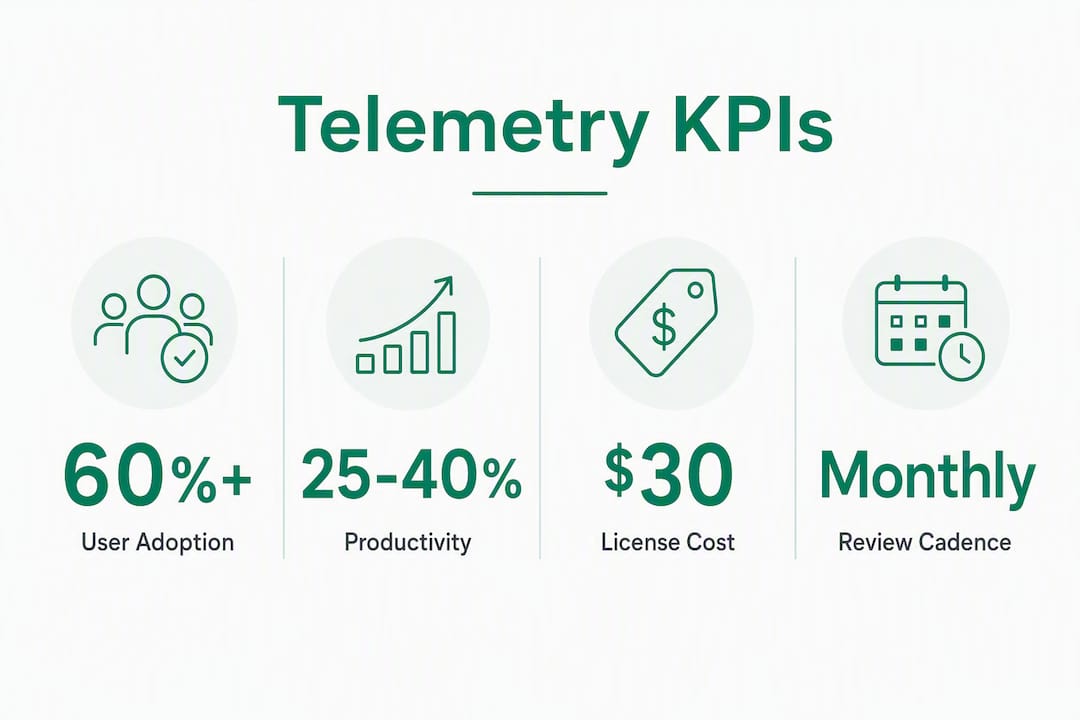
- Month 6 — Expansion decision: Active-user rate rises above 60%. Cost-per-recovered-hour is calculable. Decision gate: expand licenses, hold, or cut underperforming workflows.
- Month 9 — Optimization: Session depth (actions per session) is trending up. Automation glue (Python, n8n) is handling at least one repeating task. Role-based training is complete for all priority roles.
- Month 12 — Scale: Full ROI dashboard is live. Recovered billable time is documented against license cost. The firm has a Copilot Owner running monthly telemetry reviews.
A structured deployment can produce visible time savings and active-user adoption above 60% within 60–90 days for firms that are ready. The firms that miss this mark almost always skipped the baseline audit.
What should a consultant actually deliver, phase by phase?
The engagement blueprint below is also your evaluation standard. If a consultant can’t describe each phase in concrete deliverables, that’s a red flag.
- Phase 0: Baseline audit (the first few weeks) — Telemetry pull from Microsoft 365 Admin Center, dormant-license identification, permissions and sensitivity-label gap analysis, and Graph connector inventory. Without this, every subsequent phase is guesswork.
- Phase 3: Optimization (ongoing process). Monthly telemetry cadence, KPI dashboard updates, three-month sprint cycles, and cost-per-recovered-hour reporting. See workflow automation examples for the types of Python and n8n tasks that fill gaps Copilot can’t handle natively.
Pro Tip: Assign a named Copilot Owner on day one. This person owns telemetry reviews monthly and iterates on workflow design. License-utilization rates are a vanity metric — recovered billable hours are the number that matters.

How do consultants price this work, and what’s the real first-year cost?
Understanding the cost structure helps you evaluate proposals without getting surprised.
Common pricing models:
- Fixed readiness audit: One-time fee, typically covers telemetry baseline, gap analysis, and a written report.
- Fixed-price pilot sprint: Covers Phase 1 deliverables (runbooks, workflows, automation scripts) for a defined scope.
- Fixed-fee rollout: Covers Phase 2 enablement, governance, and SharePoint remediation.
- Monthly optimization retainer: Ongoing telemetry reviews, KPI reporting, and sprint cycles.
First-year cost components for a 50-person firm:
| Component | Typical Range |
|---|---|
| Configuration hours vary by governance scope. | Varies by governance scope |
| Professional services fees | Depends on engagement model |
| Monthly optimization retainer | Ongoing after rollout |
The headline license price sits at approximately $30/user/month, but all-in year-one costs depend heavily on your M365 baseline (E3 vs. E5) and how much governance work is required. A 50-person firm may need significant configuration hours spread over several months. Recovered billable time enters the breakeven equation fast: at professional-services billing rates, even two recovered hours per professional per week changes the math significantly. For a deeper look at the ROI drivers, see Gozera’s Copilot ROI analysis for mid-market firms.
Which telemetry signals and KPIs should you track?
Core metrics to demand from any consultant:
- Active users: 7-day, 30-day, and 90-day windows. Trend matters more than a snapshot.
- Session depth: Actions per session. Low depth means users open Copilot and abandon it.
- Workflow completion rate: What percentage of initiated tasks produce a usable output?
- Prompt-to-deliverable conversion: How often does a prompt result in a saved document, email sent, or analysis completed?
- Recovered billable hours: The primary business KPI. Calculate as: (time saved per task × task frequency × billing rate).
Sample ROI formula: Recovered billable hours per month × average billing rate = monthly value recovered. Divide cumulative professional services fees by monthly value recovered to get months-to-breakeven.
| Reporting Cadence | Audience | Content |
|---|---|---|
| Weekly operational | IT / Copilot Owner | Active users, session depth, error flags |
| Monthly executive | Managing partners | Recovered hours, cost-per-recovered-hour, workflow completion |
| Quarterly strategic | Leadership + finance | Checkpoint decision gate, expansion vs. hold recommendation |
How do you evaluate and select a Copilot adoption consultant?
Pre-qualification criteria:
- Demonstrated Copilot telemetry experience (ask to see a sample baseline report)
- Professional-services case studies with named verticals (law, accounting, consulting)
- Graph connector and SharePoint remediation experience
- Sensitivity-label and permissions expertise
- Measurable ROI examples, not just deployment counts
10 questions to ask in the interview:
- Can you show us a sample baseline telemetry report?
- What does your dormant-license identification process look like?
- How do you select pilot workflows for a firm like ours?
- What automation tools do you use to fill gaps Copilot can’t handle?
- How do you configure Graph connectors for practice-management systems?
- What does your Copilot Owner governance model look like?
- Can you show a sample ROI dashboard from a prior engagement?
- How do you handle sensitivity labels and permissions remediation?
- What are your deliverables at the end of the pilot phase?
- How do you structure your quarterly checkpoint reviews?
Red flags: Proposals that lead with seat activation counts, no mention of telemetry baseline, vague deliverables (“training and support”), no role-based training plan, and no automation component for workflow gaps.
What does a real engagement look like for a 50–150-person firm?
An anonymized mid-size accounting firm with typical Microsoft 365 licensing ran this sequence:
- Baseline audit (3 weeks): Telemetry pull revealed a significant portion of Copilot licenses had zero sessions in the prior 30 days. Permissions audit found several SharePoint sites with overly broad access.
- Pilot (5 weeks): Two workflows deployed: Excel billable-hour analysis grounded against scheduled SharePoint exports, and a client-communication drafting template in Outlook. Both included Python automation scripts for data prep.
- Rollout (10 weeks): Role-based enablement for five staff groups, Copilot Owner appointed (operations manager), governance playbook delivered, SharePoint remediation completed.
- Outcomes: Active-user rate rose from 40% to above 60% within 90 days. Two automated tasks saved several hours per week firm-wide. Month-to-breakeven on professional services fees occurred within several months.
The BPM case study from Microsoft’s customer stories shows a similar pattern at a larger firm: embedding Copilot directly into daily workflows, with agents handling planning and quality checks, freed time for higher-value advisory work. The mechanics scale down cleanly to mid-market.
What are the data privacy and risk considerations?
Treating Copilot adoption as process reengineering, not software installation, is the right frame. Without SharePoint permission remediation and sensitivity-label configuration, activating Copilot risks surfacing confidential client data to the wrong staff members.
Key controls to put in place before go-live: sensitivity labels on all matter files, overly broad SharePoint permissions tightened, and an audit trail for Copilot-generated outputs. For firms in regulated verticals, a compliance and security audit before the pilot phase is worth the investment. Copilot respects Microsoft 365 permissions exactly as configured, which means misconfigured permissions become a Copilot risk, not just a general IT hygiene issue.
What change management actually works for Copilot adoption?
The biggest barrier to Copilot ROI is organizational culture, not technical deployment. Firms that create deliberate space for experimentation unlock higher adoption than firms that simply push licenses.
Three things that move the needle: a named Copilot Owner with authority to iterate on workflows, role-based training tied to specific job tasks (not generic “here’s what Copilot can do” sessions), and visible wins shared internally within the first 30 days. When a partner sees a colleague recover two hours on a client memo, adoption spreads faster than any training program.
What does post-rollout support look like?
Post-rollout is where most engagements either compound their gains or stall. Monthly telemetry reviews catch declining session depth before it becomes a license-waste problem. Three-month sprint cycles let the Copilot Owner introduce new workflows without disrupting operations. A good optimization retainer includes KPI dashboard updates, prompt library refreshes, and at least one new workflow per quarter. The benefits of workflow automation compound over time: each automated task frees capacity for the next one.
Key Takeaways
Copilot ROI for mid-market professional-services firms requires a telemetry-first audit, a fixed-scope pilot, a named Copilot Owner, and quarterly decision gates at months 3, 6, 9, and 12.
| Point | Details |
|---|---|
| Start with telemetry | A baseline audit identifying dormant licenses and permissions gaps is the non-negotiable first step. |
| Use quarterly checkpoints | Plan decision gates at months 3, 6, 9, and 12 to expand, hold, or cut specific workflows. |
| Measure recovered hours, not seats | Active-user rate is a vanity metric; recovered billable hours and cost-per-recovered-hour are the real KPIs. |
| Demand concrete deliverables | Any consultant should provide runbooks, automation scripts, a governance playbook, and a live ROI dashboard. |
| Gozera’s engagement model | Gozera delivers the full audit-to-optimization sequence with telemetry reporting and workflow automation for mid-market firms. |
The telemetry-first approach is the only one that holds up
Most Copilot engagements fail for a predictable reason: the consultant skips the baseline and goes straight to training. You end up with a 30-slide deck on “Copilot tips,” a brief spike in usage, and then silence. The licenses go dormant again, and six months later someone asks why the investment didn’t pay off.
The firms that get real results treat this as a workflow redesign project. They measure what’s actually happening in their tenant before touching anything. They pick two workflows where the time savings are obvious and the data is already in Microsoft 365. They automate the prep work that Copilot can’t do natively. And they assign someone to own the number, monthly, permanently.
The EPC Group professional-services framework documents 25–40% billable-hour productivity gains across published case studies. That range is real, but it’s the ceiling for firms that do this right, not the floor for firms that wing it. The difference is almost always the baseline audit and the Copilot Owner.
Gozera turns idle Copilot licenses into recovered billable time
Mid-market professional-services firms are paying for Copilot licenses that sit unused while the ROI case erodes. Gozera’s fixed-price engagements start with a baseline telemetry audit, move through a scoped pilot with real workflow deliverables, and land on a live ROI dashboard your managing partners can read in 60 seconds.

No vague “AI transformation” promises. You get a telemetry report, two to four working pilot workflows with runbooks, a governance playbook, and a Copilot Owner model your operations team can run independently. The optimization retainer keeps the gains compounding after rollout.
Ready to find out how many of your licenses are dormant and what recovering them is worth? Request a Copilot readiness audit from Gozera and get a fixed-price proposal within a week.
Useful sources for implementers and procurement teams
- Microsoft Customer Story: BPM and Microsoft 365 Copilot — Real-world case study on embedding Copilot into daily workflows at a professional-services firm.
- The Crossing Report: Microsoft Copilot M365 for Law & Accounting — AI maturity stages and adoption benchmarks for professional-services verticals.
- CFO Dive: Why AI poses a unique ROI challenge for accounting firms — Frames the billable-hour tension and ROI measurement challenge for finance leaders.
- Virteva: Microsoft Copilot ROI CFO business case — Quarterly checkpoint framework and governance-first approach for CFOs.
- AI Vortex: Microsoft Copilot pricing and law firm cost analysis — Detailed breakdown of license costs, configuration hours, and year-one cost scenarios.
- AI Vortex: Excel billable-hours analysis with Copilot — Practical guide to the highest-leverage pilot workflow for professional-services firms.
- EPC Group: Copilot for professional services — Published productivity benchmarks and engagement tiers across law, accounting, and consulting.
- Midnight Blue Tech: The real cost of waiting on Copilot — Readiness criteria and the risk calculus for firms delaying adoption.
This article provides general information about Microsoft 365 Copilot adoption consulting. Confirm current licensing terms, compliance requirements, and pricing directly with Microsoft or a qualified advisor before making procurement decisions.