
Microsoft 365 Copilot saves knowledge workers somewhere between 30 minutes and four hours per week in typical mid-market deployments, depending heavily on role and task frequency. Vodafone’s Microsoft-documented pilot found an average of four hours per person, per week among 300 employees doing contract and document review. A separate timed experiment behind Microsoft’s Work Trend Index found meeting-recap time dropped from 42 minutes to just over 11, saving roughly 31 minutes per recap across a 57-person controlled trial.
The catch: those two numbers aren’t measuring the same thing. One is self-reported weekly time across a broad task mix; the other is a stopwatch on one specific task. Mixing “how much time did you save this week” surveys with telemetry-based usage data produces wildly different headline figures, and most vendor pitches don’t tell you which one they’re quoting.
Pro Tip: Before you trust any Copilot time-savings number in a vendor deck, ask whether it came from a survey, a timed task, or actual usage telemetry. The gap between these methods can be the difference between a real business case and a hopeful guess.
Key Takeaways
Realized Copilot time savings depend less on the tool itself than on task frequency, adoption depth, and whether measurement combines telemetry with timed tasks rather than survey guesswork alone.
| Point | Details |
|---|---|
| Typical range varies widely | Documented savings run from about 31 minutes per recap to 4 hours weekly, depending on role and task mix. |
| Measurement method changes the number | Telemetry and timed trials produce more conservative, defensible figures than self-report surveys. |
| Document review saves the most | Vodafone’s trial with 300 people found the largest gains in certain contract and document review work. |
| Adoption depth multiplies gains | Focused, high-frequency cohorts show larger measured impact than broad, shallow rollouts. |
| Gozera anchors savings to ROI | Gozera runs baseline telemetry, focused pilots, and workflow rebuilds to convert Copilot usage into documented recovered billable hours. |
Table of Contents
- Copilot Productivity Metrics: What the Major Studies Found
- Which Tasks Actually Save the Most Time?
- How Copilot Time Savings Get Measured (And Where the Numbers Lie)
- How to Run a Pilot That Measures Real Time Savings
- Turning Measured Time Savings Into ROI
- Adoption Practices That Multiply Copilot’s Impact
- Where Copilot Falls Short and What to Ask About Data Privacy
- How Gozera Structures a Copilot ROI Program
- What an IT Leader Should Do in the First 90 Days
- Getting Expert Help With Copilot Adoption
- Primary Sources for Copilot Time Savings Data
- Frequently Asked Questions
- Sources
Copilot Productivity Metrics: What the Major Studies Found
Four data points dominate the current evidence base, and each one measures something slightly different. Reading them side by side, rather than cherry-picking the biggest number, gives you a realistic range to plan around.
Vodafone’s case, documented by Microsoft, is the most cited enterprise example: 300 employees, real production workflows, four hours a week in contract and document review. It’s a customer story rather than an independent study, so treat it as a strong directional signal rather than a controlled result. The Work Trend Index recap experiment is smaller but methodologically tighter: 57 participants, a controlled comparison, and a measured 31-minute reduction per recap. Microsoft’s WorkLab “AI Data Drop,” covering roughly 20,000 users, adds scale but relies on perception surveys rather than telemetry, so its role-level breakdowns (summarizing, drafting, searching) are useful for direction, not precision.
| Study | Sample Size | Method / Duration | Headline Metric |
|---|---|---|---|
| Vodafone customer trial | 300 employees | Field deployment, ongoing use | ~4 hours saved per person, per week |
| Work Trend Index recap experiment | 57 participants | Timed randomized trial | ~31 minutes saved per meeting recap |
| WorkLab AI Data Drop | ~20,000 users | Perception survey | Broad, role-dependent time savings |
| GitHub Copilot developer research | Varies by study | Telemetry + controlled coding tasks | Acceptance rate tied to productivity gains |
A few patterns stand out once you line these up:
- Telemetry and timed-task studies produce smaller, more defensible numbers than survey-based estimates.
- Role concentration matters: document-heavy and meeting-heavy roles report the largest gains.
- Developer research, via GitHub Copilot, shows acceptance rate correlates with perceived productivity, a useful proxy metric outside coding contexts too.
Which Tasks Actually Save the Most Time?
Not every Copilot use case pays off equally. If you’re deciding where to point a pilot, the task categories below are where the evidence is strongest.
- Meeting recaps and follow-ups: the Work Trend Index trial measured a drop from 42:34 to 11:13 per recap, a clean, repeatable win.
- Document and contract review: Vodafone’s four-hours-a-week figure comes almost entirely from this category.
- Information search and synthesis: Australia’s government Copilot evaluation found perceived savings of roughly one hour a day in summarizing-heavy roles.
- Drafting emails and reports: similar Australian data showed close to one hour a day for drafting in some job families.
- Coding and pull-request workflows: GitHub Copilot studies show acceptance-rate gains translating into faster completion in controlled tests.
Frequency drives the math more than any single per-task figure. A lawyer who reviews five contracts a week banks Copilot’s savings five times over; a partner who touches the tool twice a month barely notices it on a monthly invoice.
How Copilot Time Savings Get Measured (And Where the Numbers Lie)
Every headline stat you see traces back to one of four measurement methods, and each has a distinct blind spot.
| Method | Strength | Weakness |
|---|---|---|
| Timed task experiments | Precise, repeatable, low bias | Small samples, narrow task scope |
| Telemetry / usage data | Reflects real behavior at scale | Doesn’t capture quality or rework |
| Self-report surveys | Cheap, broad role coverage | Prone to overestimation and recall bias |
| Difference-in-differences | Isolates the tool’s true effect | Requires a clean control group, harder to run |
The most common pitfalls managers run into:
- Selection bias: early adopters tend to be enthusiasts, so pilot groups often overstate firm-wide potential.
- Novelty effects: usage and reported satisfaction often spike in month one, then settle.
- Chained-task confusion: someone who uses Copilot for five sub-steps of one task may report the total time, not the incremental savings.
- Acceptance rate mistaken for time saved: a high suggestion-acceptance rate signals engagement, not necessarily hours recovered.
Any pilot report worth trusting includes a pre-period baseline, some form of comparison group, and both telemetry and a handful of sampled timed tasks, not just a satisfaction survey.
How to Run a Pilot That Measures Real Time Savings
A credible pilot doesn’t require a data science team. It requires discipline about what you measure and when.
- Set a fixed start and end date, typically 8 to 12 weeks, long enough to get past the novelty effect.
- Pick two or three roles with high task frequency, such as associates doing document review or analysts drafting reports.
- Capture a two-week baseline before rollout: track hours spent on the target tasks using existing timesheets or manual logs.
- Deploy Copilot to the pilot group only, keeping a matched comparison group on old workflows where possible.
- Collect telemetry weekly (DAU/WAU, acceptance rate) alongside a handful of timed task samples each week.
- Survey participants at the midpoint and end, but weight self-reported numbers below telemetry and timed data.
The KPIs that matter most:
- Daily and weekly active usage (DAU/WAU) as a proxy for real engagement, not license activation.
- Acceptance rate for Copilot-generated drafts or suggestions.
- Timed durations for a sampled set of recurring tasks, compared to baseline.
- For engineering teams, time-to-merge on pull requests before and after adoption.
- Recovered billable hours, calculated from the gap between baseline and pilot-period task durations.
Pro Tip: Run the pilot on 15 to 25 people per role, not your whole department. Smaller, well-instrumented cohorts produce cleaner data than a firm-wide rollout with no baseline.
Turning Measured Time Savings Into ROI
The formula is straightforward: recovered hours multiplied by your blended billable rate, minus the incremental cost of Copilot licensing and enablement.
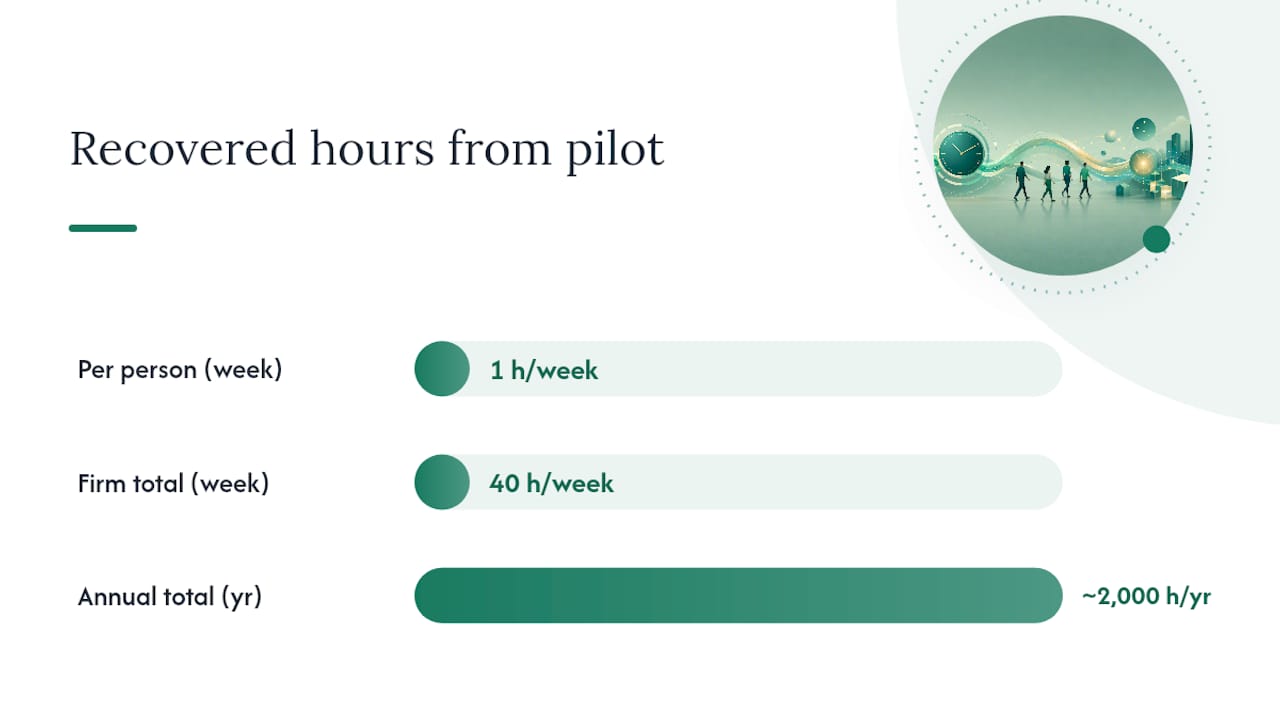
Take a mid-market law firm with 40 fee-earners on a $200 blended rate. If a focused pilot recovers a conservative one hour per person per week, that’s 40 hours weekly, or roughly 2,000 hours annually, worth $400,000 in recoverable billable time before costs. Against typical Copilot licensing and a modest enablement budget, the payback period is usually measured in months, not years, provided the recovered hours are actually redeployed into billable work rather than absorbed as slack. Forrester’s TEI-style framework for Copilot ROI treats this exact calculation as the core of its payback modeling, though it cautions that firms should substitute their own blended rates rather than use vendor defaults.
Three variables swing the outcome more than anything else:
- Adoption depth: a firm where 80% of licensed users are active weekly will realize far more than one stuck at 30%.
- Task frequency: high-volume document review multiplies savings faster than occasional use.
- Blended rate accuracy: using an inflated or generic rate overstates the business case and invites scrutiny later.
Adoption Practices That Multiply Copilot’s Impact
Deeper, more focused adoption consistently outperforms wide, shallow rollouts. GitHub’s own impact dashboard shows developer cohorts that progressed from basic completion use to agentic workflows saw substantially larger throughput gains than those who stayed at surface-level usage. The same principle applies to knowledge workers.
Practices that move the needle:
- Target rollouts by role instead of by department, starting with the highest-frequency task owners.
- Build role-specific prompt templates rather than relying on generic onboarding.
- Integrate Copilot directly into existing workflow tools instead of treating it as a separate app.
- Automate the repetitive steps around Copilot’s output using tools like Python or n8n, so the AI’s draft doesn’t sit in a manual queue.
A basic enablement checklist for the first 90 days:
- Run weekly coaching sessions for the pilot cohort, not a single onboarding webinar.
- Track acceptance rate and feature mix by cohort, not just license activation.
- Surface early wins internally to build momentum before expanding.
- Set governance rules for sensitive document types before scaling.
Cohorts that move deeper into the tool’s capabilities, rather than spreading thin across the whole firm, are the ones that show up in the ROI numbers six months later.
Where Copilot Falls Short and What to Ask About Data Privacy
Copilot isn’t a universal fix, and pretending otherwise sets up a pilot to fail on inflated expectations.
- Hallucination risk remains real, particularly on nuanced legal or technical language that requires exact precision.
- Context window limits mean very long or highly technical documents may need chunking or manual review.
- Task variability is wide: some categories (recaps, drafting) show reliable gains, while others show inconsistent results.
- For code-heavy teams, generated output still needs human review for maintainability, not just correctness.
Before scaling, require validation sampling on Copilot outputs, clear governance on which document types it can touch, and a retention policy your compliance team has actually reviewed. Ask Microsoft and any implementation partner directly how tenant data is isolated, how long prompts and outputs are retained, and whether your firm’s data trains any shared model.
Pro Tip: Ask for a written answer on data retention and tenant isolation before your first dollar of licensing spend, not after the pilot is already running on live client files.
How Gozera Structures a Copilot ROI Program
Gozera runs Copilot adoption for mid-market professional-services firms as a structured, measured program rather than a one-time rollout.
- Discovery: map current workflows and identify where Copilot licenses sit dormant.
- Baseline telemetry: measure actual usage and task durations before making changes.
- Focused pilot: deploy to two or three high-frequency roles with clear KPIs in place.
- Workflow integration: rebuild the surrounding process so Copilot output flows into existing systems.
- Automation: close remaining gaps with Python and n8n where manual steps still slow things down.
- Reporting and optimization: deliver a dashboard tying recovered hours to dollar value, then keep tuning.
Firms typically see measurable adoption cohort movement and a documented recovered-hours figure within the first pilot cycle, backed by a dashboard, a pilot report, and an ROI calculation rather than a vendor slide deck.
What an IT Leader Should Do in the First 90 Days
Start with the highest-frequency document workflow in your firm, not the flashiest use case. Pick two or three teams, instrument telemetry before rollout, and run a handful of timed tasks to anchor your numbers in reality, not sentiment.
By day 90, you should have a measured adoption rate and a preliminary recovered-hours figure you can defend in a partner meeting. Track output quality alongside time saved. A fast draft that needs three rounds of correction isn’t actually saving anyone time.
Getting Expert Help With Copilot Adoption
Gozera exists for the exact gap most firms hit after buying Copilot licenses: paying for seats that sit idle while nobody can prove the tool is working. Where a generic rollout guide leaves you guessing at your own numbers, Gozera builds the baseline telemetry, runs the focused pilot, and hands you an ROI report tied to your firm’s actual blended rate, not a vendor template.

The engagement starts with pilot scoping: identifying which two or three roles in your firm are most likely to produce recoverable billable hours, then instrumenting usage before a single workflow changes. From there, Gozera rebuilds the workflows around Copilot’s output and automates the remaining manual steps with Python and n8n, so the time saved actually shows up on someone’s calendar. If your firm has 50 to 500 employees and licenses that aren’t earning their keep, start with a discovery conversation to scope what a focused pilot would look like for your practice.
Primary Sources for Copilot Time Savings Data
- Vodafone customer story: 300-person trial, four hours weekly in document review.
- Work Trend Index recap methodology: 57-person timed trial, 31 minutes saved per recap.
- AI Data Drop: ~20,000-user survey on perceived time savings by role.
- GitHub Copilot productivity research: acceptance rate and coding task speed data.
- Forrester TEI report: ROI framework for translating time savings into payback.
Frequently Asked Questions
What is a realistic Copilot time savings estimate for a mid-market firm?
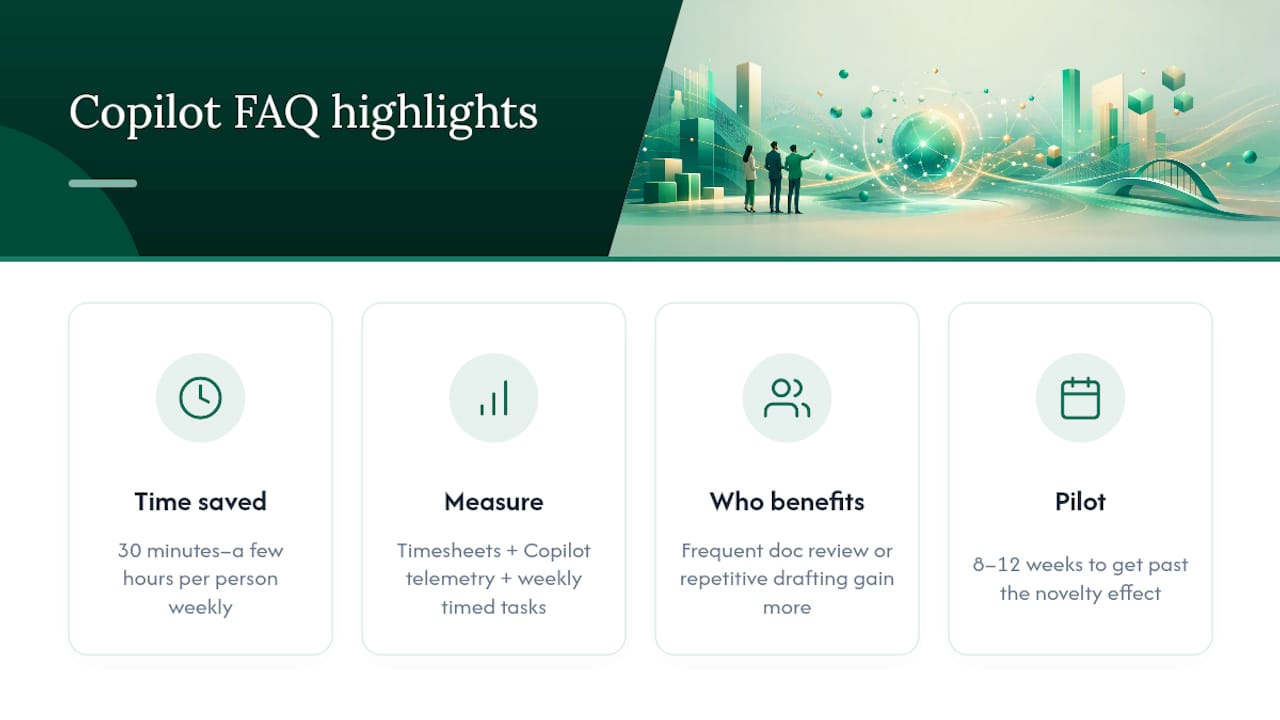
Expect somewhere between 30 minutes and a few hours per person weekly, concentrated in document review, meeting recaps, and drafting, with the exact figure depending on task frequency and adoption depth.
How do I measure Copilot productivity gains without a data science team?
Combine existing timesheet data as a baseline with Copilot’s own usage telemetry (DAU/WAU, acceptance rate) and a handful of manually timed tasks each week. That mix is more reliable than a satisfaction survey alone.
Does Copilot save more time for lawyers than for accountants or consultants?
Savings track task type more than job title. Any role with high-frequency document review or repetitive drafting tends to see larger gains than roles built around client meetings and judgment calls.
Is Copilot safe for confidential client documents?
Tenant isolation and retention settings vary by configuration, so confirm data handling policies directly with Microsoft and your implementation partner before running sensitive files through the tool.
How long should a Copilot pilot run before I trust the numbers?
Eight to twelve weeks is usually enough to get past the novelty effect and produce a defensible before-and-after comparison, provided you captured a real baseline first.
Sources
- Time savings and an enhanced employee experience at Vodafone through its use of Microsoft 365 Copilot
- How we value the assistance (Copilot analytics labs methodology / Work Trend Index companion)
- Measuring GitHub Copilot’s impact on productivity (CACM research summary)
- The TEI of Microsoft 365 Copilot (Forrester TEI report)