
Here are two minimal, working examples. The first uses delegated auth for local testing:
from azure.identity import DeviceCodeCredential
from msgraph import GraphServiceClient

credential = DeviceCodeCredential(client_id="YOUR_CLIENT_ID", tenant_id="YOUR_TENANT_ID")
client = GraphServiceClient(credentials=credential, scopes=["User.Read"])
user = await client.me.get()
print(user.display_name)
The second uses app-only auth for background services:
from azure.identity import ClientSecretCredential
from msgraph import GraphServiceClient

credential = ClientSecretCredential("TENANT_ID", "CLIENT_ID", "CLIENT_SECRET")
client = GraphServiceClient(credentials=credential, scopes=["https://graph.microsoft.com/.default"])
users = await client.users.get()
- Delegated example:
DeviceCodeCredentialplus/mefor the fastest sanity check - App-only example:
ClientSecretCredentialplus/usersfor the pattern most production jobs actually use
Try delegated auth first on your laptop to confirm connectivity, then move to app-only with a managed identity once you deploy.
Key Takeaways
Runnable Python examples for Microsoft Graph succeed when they pair the correct credential class with proper pagination and error handling from the start.
| Point | Details |
|---|---|
| Start with delegated auth | Use DeviceCodeCredential against /me locally before building app-only scripts. |
| Match credentials to environment | Reserve ClientSecretCredential and managed identity for unattended, production services. |
| Handle pagination explicitly | Loop on odata_next_link since Graph pages results and silently truncates lists otherwise. |
| Secure secrets properly | Store client secrets in environment variables or Key Vault, never in committed config files. |
| Instrument for ROI | Track which automations actually run to connect Graph scripts to measurable Copilot adoption gains. |
Table of Contents
- Prerequisites and Quick Setup for Python Microsoft Graph Examples
- Delegated Vs App-Only: Choosing the Right Auth Model
- Setting Up GraphServiceClient for a Delegated Auth Example
- App-Only Access and Paging Through Large User Lists
- Common Cookbook Tasks: Mail, Groups, and Error Handling
- Taking Your Graph Scripts From Sandbox to Production
- Turning These Examples Into Something a Firm Can Ship
- Sources
Prerequisites and Quick Setup for Python Microsoft Graph Examples
Install the two packages every example in this guide depends on:
- Run
python3 -m pip install azure-identity msgraph-sdkinside a virtual environment. - Confirm you’re on Python 3.8 or later (the SDK’s async client needs it).
- Create a virtualenv with
python3 -m venv .venvbefore installing anything, so dependencies never leak into your system Python. - Get a free E5 sandbox through the Microsoft 365 Developer Program rather than testing against a production tenant.
- If you want working code before you’ve written a line, the Microsoft Graph quick-start tool (Python option) auto-generates an app registration and a sample project in about two minutes.
Pro Tip: Never test Graph calls against your firm’s real tenant. A single misconfigured app-only script listing all users can trip alerts in your security team’s SIEM before lunch.
Delegated Vs App-Only: Choosing the Right Auth Model
Delegated authentication acts on behalf of a signed-in person; app-only authentication runs as a background identity with no user attached. That distinction decides almost everything else about your setup, from which credential class you import to which permissions you request in the Microsoft Entra admin center.
For local development, InteractiveBrowserCredential and DeviceCodeCredential are the two options worth knowing:
InteractiveBrowserCredentialpops a browser window and works well on a developer workstation with a display.DeviceCodeCredentialprints a code you enter on a second device, which suits headless environments like a remote VM or a CI runner.ClientSecretCredentialand managed identity are for services with no interactive user at all.
Delegated permissions request scopes like User.Read; app-only permissions request .default against roles like User.Read.All, and both require Azure Identity’s credential classes to actually authenticate. Delegated apps generally need per-scope user consent, while app-only permissions almost always require a tenant admin to grant consent up front in the admin center. Skip that step and every API call returns a 403, no matter how correct your code is.
Setting Up GraphServiceClient for a Delegated Auth Example
Once you’ve picked a credential, initializing the client takes one line:
from azure.identity import DeviceCodeCredential
from msgraph import GraphServiceClient

credential = DeviceCodeCredential(client_id="YOUR_CLIENT_ID", tenant_id="YOUR_TENANT_ID")
scopes = ["User.Read", "Mail.Read"]
client = GraphServiceClient(credentials=credential, scopes=scopes)

async def get_me():
    user = await client.me.get(
        request_configuration=client.me.get_request_config(
            query_parameters={"$select": ["displayName", "mail", "jobTitle"]}
        )
    )
    print(user.display_name, user.mail)
Run it by saving your client_id and tenant_id in environment variables or a config.cfg file, then executing python3 main.py from your virtualenv. The Build Python apps with Microsoft Graph tutorial walks through the exact config file structure Microsoft’s samples expect.
Two things trip up almost everyone on their first run:
- A cached browser session can silently reuse the wrong account, so
/mereturns data for someone else’s login. - Forgetting to request
Mail.Readup front means the call above works, but a later attempt to read messages fails with an insufficient-scope error instead of a clear “add this permission” message.
The $select parameter matters more than it looks. Requesting only three fields instead of the full user object cuts payload size and speeds up every subsequent call in a loop.
App-Only Access and Paging Through Large User Lists
Background jobs, like a nightly script that syncs your firm’s directory into a CRM, need app-only auth. Here’s a runnable example that lists every user in the tenant:
from azure.identity import ClientSecretCredential
from msgraph import GraphServiceClient

credential = ClientSecretCredential(
    tenant_id="YOUR_TENANT_ID",
    client_id="YOUR_CLIENT_ID",
    client_secret="YOUR_CLIENT_SECRET",
)
client = GraphServiceClient(credentials=credential, scopes=["https://graph.microsoft.com/.default"])

async def list_all_users():
    users = []
    response = await client.users.get()
    while response:
        users.extend(response.value)
        if response.odata_next_link:
            response = await client.users.with_url(response.odata_next_link).get()
        else:
            break
    return users
- Register the app with
User.Read.Allas an application permission, not delegated, and get a tenant admin to grant consent before the script will return anything. - Store the client secret as an environment variable or in Azure Key Vault, never in the script itself.
- Loop on
odata_next_linkuntil it comes back empty, since Graph pages results at a set maximum number of items per call and a naive single request silently truncates your data.
Pro Tip: If a “complete” user list looks suspiciously round, like exactly 100 or 200 records, you almost certainly forgot the pagination loop.
Common Cookbook Tasks: Mail, Groups, and Error Handling

Sending mail requires building a Message object with a body and recipient list, then calling send_mail on the user’s mailbox:
from msgraph.generated.models.message import Message
from msgraph.generated.models.item_body import ItemBody
from msgraph.generated.models.recipient import Recipient
from msgraph.generated.models.email_address import EmailAddress

message = Message(
    subject="Weekly status",
    body=ItemBody(content_type="text", content="Attached is this week's summary."),
    to_recipients=[Recipient(email_address=EmailAddress(address="teammate@firm.com"))],
)
await client.me.send_mail.post(body={"message": message})
Reading a group’s membership follows the same pagination pattern as the users list. Wrap every call in a try/except that catches the SDK’s APIError, since throttling and permission failures both surface there:
- Use
$selectto request only the fields you need,$filterto narrow results server-side, and$topto cap page size. - Catch
APIErroraround every call and inspect the response code before retrying blindly. - Treat a 429 response as a signal to back off and retry after the
Retry-Afterheader’s value, not a fixed delay, since throttling limits vary by endpoint and tenant.
Taking Your Graph Scripts From Sandbox to Production
Code that works on your laptop and code that survives a production deployment are different problems. Keep secrets out of source control entirely: environment variables or Key Vault, never a config.cfg file committed alongside your script.
- Swap
ClientSecretCredentialfor a managed identity once your script runs inside Azure, so there’s no secret to rotate at all. - Rotate any client secrets that do exist on a fixed schedule, and log every consent grant so you can audit who approved which permission.
- Keep testing in an E5 developer tenant even after launch, since it isolates permission changes from your real user base.
Pro Tip: The same telemetry patterns that catch a broken Graph script, like tracking which calls actually execute versus which licenses sit unused, are what let you measure whether a Microsoft 365 Copilot rollout is paying for itself. Gozera builds this kind of usage instrumentation into its Copilot adoption engagements for professional-services firms.
Turning These Examples Into Something a Firm Can Ship
The reader’s real bottleneck usually isn’t finding correct Python syntax. It’s not knowing which of these decisions actually matters. Firms burn hours debating naming conventions in their app registration while shipping a script with no pagination loop, which silently returns 100 users out of 4,000.
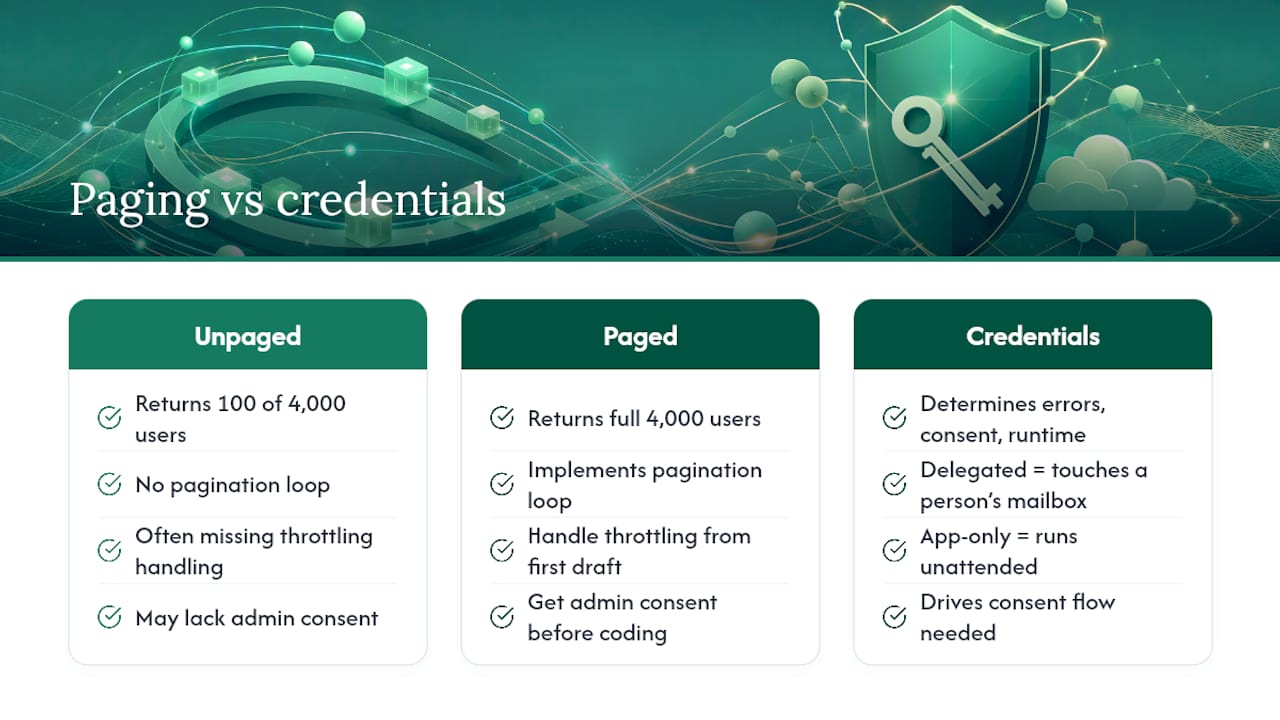
Prioritize three things in this order: pick the right credential class for the job (delegated for anything touching a specific person’s mailbox, app-only for anything running unattended), handle pagination and throttling from the first draft rather than bolting it on later, and get admin consent sorted before you write a single line of business logic. Conventional tutorials tend to treat authentication as a checkbox to clear before the “real” work starts. In practice, the credential decision determines your error-handling code, your consent flow, and whether the script can even run without a human present.
Firms adopting Microsoft 365 Copilot alongside custom Graph scripts often skip the instrumentation step entirely. They automate a workflow, confirm it runs once, and never measure whether it’s actually used six months later. The same odata_next_link loop that paginates a user list can just as easily log which employees touch a given automation, and that data is what turns a Python script from a clever demo into a defensible line item on a budget review. If Gozera’s work with mid-market professional-services firms has shown one consistent pattern, it’s that the technical build is rarely the hard part. Measuring what happens after launch is.
— Mad