
For mid-market professional services firms, the top Microsoft 365 workflow tools in 2026 are Microsoft Power Automate, FlowForma, Nintex, and Gozera consulting services. Power Automate leads the pack because it ships inside Microsoft 365 E3 and E5 licenses, offers a large number of prebuilt connectors, and now integrates directly with Copilot for natural-language flow creation. The others fill specific gaps: FlowForma for no-code SharePoint-native processes, Nintex for document-heavy workflows, and Gozera for firms that need someone to wire it all together and demonstrate the ROI.
Here is the short version before we go deep:
- Microsoft Power Automate: Native M365 integration, included in E3/E5, AI-assisted flow building, desktop RPA for legacy apps.
- FlowForma: No-code process automation built entirely inside SharePoint, Teams, and Outlook; used by over 300,000 users globally.
- Nintex: Strong document generation, dynamic forms, and broad enterprise app integrations via Microsoft AppSource.
- Gozera: Fixed-price consulting that measures actual Copilot usage via telemetry, rebuilds high-value workflows, and delivers clear ROI reporting for law, accounting, consulting, and engineering firms.
Table of Contents
- How do these tools compare across the criteria that matter?
- Governance and adoption: what actually prevents workflow automation from sticking
- How to measure workflow effectiveness and ROI with Microsoft 365 Copilot
- Practical strategies for integrating workflow automation with Microsoft 365 Copilot
- Key Takeaways
- Why the “just deploy it” approach to Copilot keeps failing
- Gozera turns idle Copilot licenses into measurable billable time
How do these tools compare across the criteria that matter?
The table below maps each option against the seven factors that most directly affect a mid-market professional services firm’s decision.
| Criterion | Power Automate | FlowForma | Nintex | Gozera |
|---|---|---|---|---|
| M365 integration depth | Native, deepest | Native (SharePoint/Teams/Outlook) | Strong via connectors | Configures all three |
| Ease of use for citizen developers | Low-code, moderate learning curve | No-code, drag-and-drop | Low-code, moderate | Guided enablement |
| Workflow template availability | 1,400+ connectors, many templates | Built-in process templates | Rich document/form templates | Custom-built to firm needs |
| Mid-market professional services fit | High | High (niche processes) | High (document-heavy) | Purpose-built |
| License cost implications | Included in E3/E5 (cloud flows) | Separate subscription | Separate subscription | Fixed-price engagements |
| Governance and security | Enterprise-grade, built-in | Full audit trail, tenant-native | Strong compliance controls | Governance-first design |
| Adoption and ROI measurement | Process mining + Copilot analytics | Usage reporting | Basic analytics | Telemetry-driven ROI reporting |
Strengths and limitations at a glance:
- Power Automate: Best total cost of ownership for firms already on M365; premium connectors and desktop RPA require add-on licensing.
- FlowForma: Fastest time-to-value for SharePoint-centric teams; less suited for complex cross-system orchestration outside M365.
- Nintex: Excels at document generation and dynamic forms; separate licensing adds cost that can duplicate what Power Automate already covers.
- Gozera: Not a software platform but a consulting layer that sits above all three, measuring what is actually used and rebuilding what is not working.
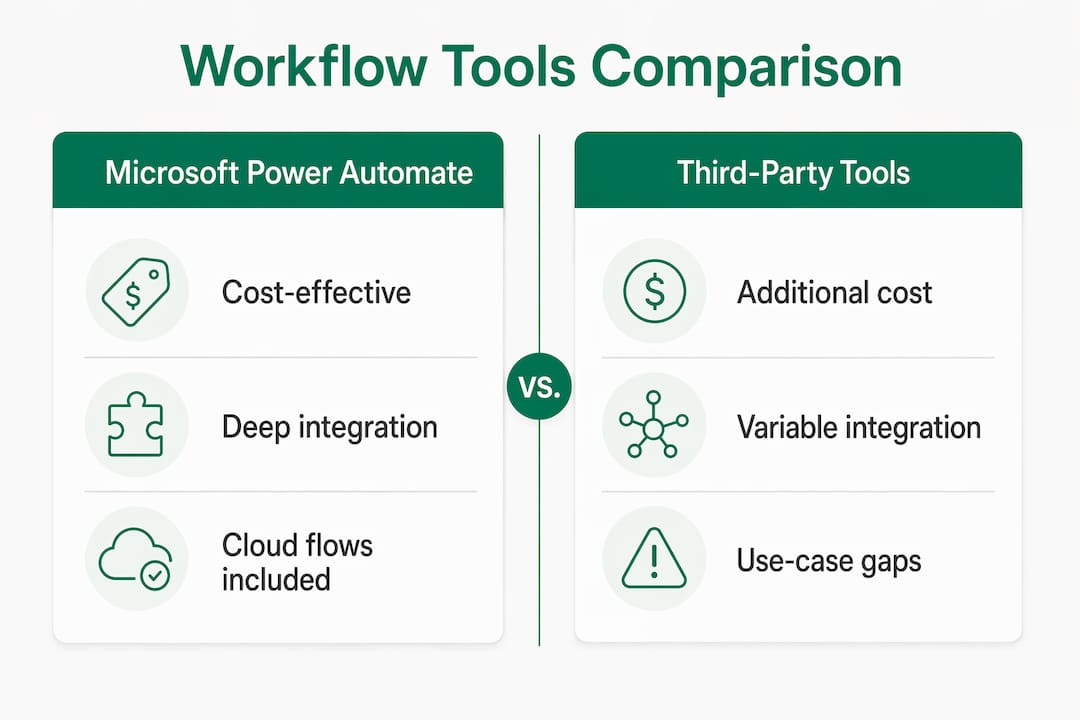
Many firms waste budget on third-party tools when included Power Automate cloud flows already cover the use case. Consolidating first, then adding specialized tools only where the gap is real, consistently reduces both cost and governance complexity.
Governance and adoption: what actually prevents workflow automation from sticking
The most common failure mode in mid-market firms is not a bad tool choice. It is deploying automation without a governance structure, then watching shadow automations multiply until no one knows what runs where or who owns it.
IT-led governance does not mean IT builds everything. The citizen developer model works well when business users build within guardrails that IT sets: approved connector lists, naming conventions, environment segmentation, and mandatory DLP policies. Without those guardrails, you get license sprawl, compliance gaps, and automations that break silently.
For professional services firms specifically, audit trails are non-negotiable. Client data flowing through an unmonitored automation is a liability, not an efficiency gain. Both FlowForma and Power Automate support full process audit logs; the difference is that FlowForma’s data never leaves your Microsoft 365 tenant by design.
Governance priorities for mid-market professional services:
- Segment Power Automate environments by department or sensitivity level.
- Enforce DLP policies that block sensitive data connectors for non-IT-approved flows.
- Run quarterly license reviews to identify dormant flows and reassign or retire them.
- Require all production automations to be registered in a central flow inventory.
- Use process mining before building, not after, to confirm you are automating a real bottleneck.
Pro Tip: Centralized telemetry is the fastest way to kill license sprawl. Pull Power Platform admin center usage data monthly and flag any license that has not triggered a flow in 60 days. Reassigning those licenses funds new automation capacity without any additional spend.
How to measure workflow effectiveness and ROI with Microsoft 365 Copilot
Measurement is where most firms fall short. They deploy automations, feel good about it, and never quantify what changed. That approach makes it impossible to justify the next round of investment or identify which workflows deserve more attention.
Power Automate’s process mining capabilities give you a data-driven map of where work actually slows down, not where people think it does. Pair that with Copilot’s usage analytics and you can see which staff are engaging with AI-assisted flows and which are bypassing them entirely.
Cineplex saved over 30,000 hours annually by deploying Power Automate and generative AI workflows across finance and guest services, with more than 100 employees building AI-driven solutions. Bo Wang, Vice President of Taxation & Treasury at Cineplex, noted: “Microsoft Power Automate continues to enhance our automation efforts. Its generative AI capabilities and integration with other Power Platform products like Microsoft Copilot Studio really set Power Automate apart from competing solutions.”
For professional services firms, the most meaningful ROI metrics are hours recovered per billable role, error rates on document-heavy processes, and time-to-completion on client deliverables. A law firm that cuts contract review prep from four hours to forty minutes has a number it can take to the managing partner. That is the kind of ROI that funds the next phase.
Methods for aligning automation outcomes to business goals:
- Establish a pre-automation baseline for each targeted process (time, error rate, handoff count).
- Set a 90-day review cycle to compare post-automation metrics against the baseline.
- Track Copilot license utilization via telemetry to identify dormant seats and redirect them.
- Map automation savings to billable time recovered, not just hours saved in the abstract.
- Use Power Automate’s built-in analytics dashboard to monitor flow run success rates weekly.
Practical strategies for integrating workflow automation with Microsoft 365 Copilot
The highest-ROI architecture for mid-market professional services firms combines Copilot as the reasoning layer with Power Automate handling the structured execution. Copilot interprets unstructured inputs, such as a client email or a contract clause, and triggers the appropriate Power Automate flow. The flow then routes data, generates documents, or updates records without anyone touching a keyboard.

Natural language flow creation in Copilot Studio cuts build time significantly. A non-developer can describe a process in plain English and Copilot Studio drafts the flow, which an IT reviewer then approves and deploys. That model keeps governance intact while accelerating delivery.
For firms with legacy desktop applications, hybrid automation architectures combining cloud flows with desktop RPA extend automation reach without requiring a full system replacement. An accounting firm running a 15-year-old billing platform can still automate data entry into it via Power Automate Desktop.
Implementation stages that consistently work:
- Discovery (weeks 1–2): Process mining to identify the top five automation candidates by time impact.
- Integration sprint (weeks 3–6): Build and test the highest-priority flows with IT governance review.
- Copilot enablement (weeks 7–8): Connect Copilot to approved flows; train staff on natural language triggers.
- Optimization cycle (ongoing): Monthly telemetry review, flow performance analysis, license reallocation.
Pro Tip: Orchestration beats isolated automation every time. A single Copilot-triggered flow that spans three departments delivers more measurable ROI than ten disconnected automations each owned by a different team. Design for the handoff, not just the task.
For firms evaluating Power Automate alternatives before committing, the key question is always the same: does the alternative justify its separate licensing cost given what Power Automate already covers in your existing M365 subscription?
Key Takeaways
Microsoft Power Automate, included in Microsoft 365 E3 and E5 licenses, is the lowest-cost and deepest-integrated workflow automation platform for mid-market professional services firms, with FlowForma and Nintex filling specific niche gaps.
| Point | Details |
|---|---|
| Power Automate leads on cost and integration | Cloud flows are included in M365 E3/E5; adding premium connectors or desktop RPA requires add-on licensing only when needed. |
| Governance prevents shadow IT | Segment environments, enforce DLP policies, and maintain a central flow inventory before scaling citizen developer programs. |
| Measure ROI with telemetry and process mining | Track hours recovered per billable role and Copilot license utilization monthly to justify and direct further investment. |
| Copilot plus Power Automate is the highest-ROI architecture | Use Copilot as the reasoning layer for unstructured inputs and Power Automate for structured execution and routing. |
| Gozera accelerates adoption with fixed-price consulting | Gozera measures actual Copilot usage via telemetry, rebuilds dormant workflows, and delivers ROI reporting for law, accounting, and consulting firms. |
Why the “just deploy it” approach to Copilot keeps failing
The consulting industry has spent two years telling professional services firms to adopt Microsoft 365 Copilot. Most firms did. Then the licenses sat idle.
The problem is not the technology. Power Automate is genuinely capable. Copilot’s natural language flow creation in Copilot Studio is a real productivity accelerator. FlowForma’s no-code model removes the developer bottleneck for SharePoint-heavy teams. The tools work. What does not work is deploying them without measuring what changes, without rebuilding the workflows that feed them, and without anyone accountable for the adoption curve.
Mid-market professional services firms, specifically law, accounting, and consulting practices, have a structural advantage here: their work is process-dense and billable-time-driven. Every hour recovered by automation has a dollar value that is easy to calculate. That makes the ROI case straightforward, if someone actually measures it.
The firms seeing the most measurable gains from Copilot workflows in professional services are not the ones with the most sophisticated tech stacks. They are the ones with someone who runs the telemetry, identifies the dormant licenses, and rebuilds the three workflows that actually matter for billable output. That is a consulting problem as much as a technology problem.
Gozera turns idle Copilot licenses into measurable billable time
Most mid-market firms already own the tools described in this article. The gap is not access to Power Automate or Copilot. It is knowing which licenses are dormant, which workflows are broken, and which automations would recover the most billable hours if rebuilt correctly.

Gozera works exclusively with professional services firms in law, accounting, consulting, and engineering. Every engagement starts with a telemetry audit that shows exactly which Copilot licenses are being used and which are not. From there, Gozera runs fixed-price integration sprints to rebuild the workflows that matter, automates gaps using Python and n8n where Power Automate falls short, and delivers ROI reporting that managing partners can take to a budget meeting. No lengthy change management programs. No vague productivity promises. If you want to know what your Microsoft 365 investment is actually returning, start with a Copilot ROI audit from Gozera.