
Most law firms lose a significant portion of billable hours every year, not because attorneys work less, but because manual time reconstruction is structurally broken. The fix is to automate billable hour recovery using AI tools that capture activity from email, calendar, documents, and calls, then surface approval-ready entries in under 10 minutes a day. Six platforms lead this space in 2025–2026: Clio Duo, MagicTime by Lawgro, SmartTime by BigHand, PointOne, Billables.ai, and Laurel. Each takes a different approach to capture, integration, and workflow, so the right choice depends on firm size, existing tech stack, and billing complexity.
| Tool | Best For | Key Features | Integration | Pricing Model | User-Friendliness | Support |
|---|---|---|---|---|---|---|
| Clio Duo | Clio Manage users | AI time capture, one-click approval, matter coding | Native Clio Manage | Subscription (tiered) | High | Email, chat, phone |
| MagicTime by Lawgro | Solo and small firms | Passive calendar/email capture, narrative generation | Clio, Google, Outlook | Subscription | High | Email, chat |
| SmartTime by BigHand | Mid-market firms | Human-in-the-loop review, AI-assisted reconstruction | BigHand suite, PMS | Subscription (enterprise) | Moderate | Dedicated CSM |
| PointOne | Multi-app environments | Cross-platform activity capture, document tracking | Broad API integrations | Subscription | Moderate | Email, documentation |
| Billables.ai | Mid-sized law and consulting | Real-time tracking, AI analytics, reporting dashboard | Practice management APIs | Subscription | High | Email, chat |
| Laurel | Compliance-heavy firms | Deep customization, client billing rules, compliance | Enterprise integrations | Subscription (custom) | Moderate | Dedicated support |
The accuracy gains are real. Firms using activity-based AI capture typically recover that 10–25% leakage within the first month of deployment, and daily review drops from 60 minutes of manual reconstruction to roughly 10 minutes of approvals. The sections below break down how each tool works, what to look for, and how to integrate AI capture with the systems your firm already runs.
Which AI time tracking tools do law firms use most?
The six leading platforms each occupy a distinct position in the market, and understanding where they differ saves you from a costly mismatch.
Clio Duo is the natural choice for firms already running Clio Manage. It monitors calendar events, completed tasks, client communications, and documents created or edited within matters, then feeds suggestions into a unified approval queue. The one-click approval posts directly to Clio time entries with matter codes, activity codes, and billing rates already applied. No CSV imports, no manual configuration.

MagicTime by Lawgro targets solo practitioners and small firms that want passive capture without a heavy IT lift. It pulls from calendar and email activity, generates professional billing narratives automatically, and learns from approval patterns over time. The setup is light, and the daily workflow asks for almost nothing from the attorney.
SmartTime by BigHand takes a more structured approach suited to mid-market firms with complex billing requirements. Its human-in-the-loop design means AI reconstructs time entries and flags them for attorney review rather than auto-posting, which preserves accuracy on matters with nuanced coding requirements. BigHand’s broader suite handles dictation and workflow, so SmartTime fits naturally into firms already using that ecosystem.
PointOne stands out for firms running activity across many applications simultaneously. It captures time from communication platforms, document management systems, and project tools in parallel, making it useful when billable work happens across five or six different apps in a single day.
-
Billables.ai combines real-time tracking with an analytics layer that surfaces patterns: which matter types generate the most unbilled time, which attorneys miss the most entries, and where billing cycles slow down.
-
Laurel goes deepest on customization. It applies client-specific billing rules automatically at the point of entry, which matters for firms managing alternative fee arrangements or clients with strict billing guidelines.
All six tools share a common data model: they read activity from calendar, email, documents, and sometimes calls, infer likely billable time, and ask for approval rather than reconstruction. The shift from recorder to reviewer is the core behavioral change, and it is what makes adoption stick.
How accurate is AI time tracking for billable hours?
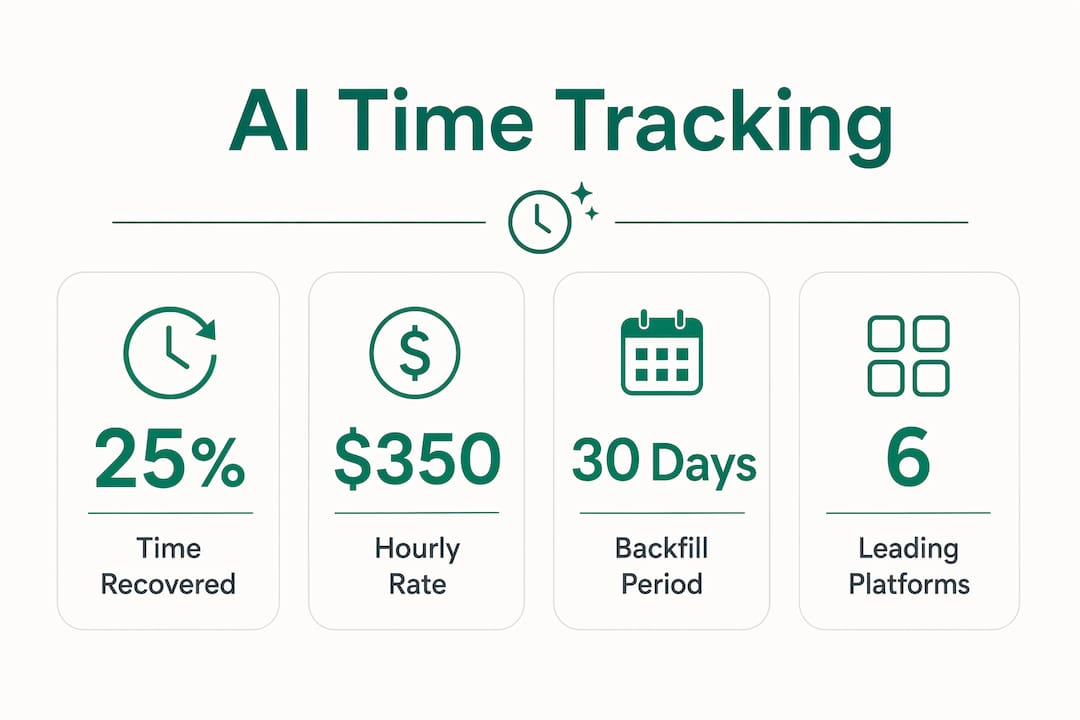
Accuracy is the first objection every managing partner raises, and it is a fair one. The good news is that AI capture reaches 90%+ on engagement matching and 95%+ on duration estimates once the system has learned from two to four weeks of approval patterns. Early suggestions require more editing; the agent improves as it observes which activities you approve, reject, and modify.
The deeper accuracy problem is not false positives. It is the time that never gets entered at all. Firms under-report billable time by 10–25% when relying on manual reconstruction, and that leakage is not random. It clusters around brief calls, short document reviews, and quick client emails, exactly the activities attorneys deprioritize when reconstructing a day from memory at 6 PM.
The structural problem with manual billing: asking a busy attorney to reconstruct fifteen-minute increments from memory at the end of the day is not a discipline problem. It is a design problem. AI capture fixes the design, not the person.
Human-in-the-loop review is what keeps AI accuracy from degrading over time. Tools like SmartTime by BigHand and Clio Duo both build review steps into the workflow, so attorneys catch miscoded matters before they reach the invoice. Daily approval takes 5–10 minutes versus 45–60 minutes for manual reconstruction, which means the accuracy benefit comes with a time savings, not a time cost.
Pro Tip: Run a 30-day historical backfill when you first connect an AI capture tool. Most platforms can analyze 30–365 days of past calendar data and surface unbilled activities you have already missed, generating immediate recoverable revenue before the ongoing capture even begins.
What features matter most in AI time-tracking tools?
Not every feature in a vendor’s marketing deck translates to recovered revenue. These are the ones that actually move the needle:
- Automated activity capture across multiple sources. Calendar and email are table stakes. The tools that recover the most time also capture document edits, call logs, and project management activity. PointOne and Laurel both go wide here.
- Context-aware billing narratives. Auto-generated descriptions that follow your firm’s language standards and billing conventions save editing time and reduce write-offs from vague entries. MagicTime by Lawgro and Clio Duo both generate narratives that learn from your approval history.
- One-click approval with bulk actions. The approval workflow needs to be faster than manual entry, or attorneys will abandon it. Single-click posting with bulk approve/reject and an undo function covers the most common daily scenarios.
- Customizable billing increments and thresholds. Six-minute versus fifteen-minute rounding changes realized revenue meaningfully across a full year. The ability to set minimum billable time thresholds (ignore events under six minutes, for example) keeps the suggestion queue clean.
- Direct integration with your practice management system. Approved time should write directly to your system of record with no CSV export. Clio Duo does this natively; others use API connections to Clio, MyCase, PracticePanther, Tabs3, and similar platforms.
- Adaptive AI learning. Every approval, rejection, and edit is a training signal. Tools that incorporate this feedback improve suggestion quality over weeks, reducing the editing burden on attorneys.
Accurate job hours improve invoicing quality across the entire billing cycle, not just at the time entry stage. Firms that capture more accurately also produce cleaner invoices, which reduces client disputes and accelerates payment.
What do law firms actually gain from automating time recovery?
The financial case is straightforward. A solo attorney billing $350 per hour who loses one hour per day to forgotten entries loses roughly $30,000 per year. With AI capture, 90% of that lost time is recoverable, producing a net gain of around $25,200 after tool costs, plus 208 hours per year reclaimed from manual entry work.
At the firm level, the math scales fast. A five-attorney firm where junior associates miss 25% of their calls can capture six figures in additional billable time over twelve months, with the added benefit of standardized narrative quality across all timekeepers.
Beyond revenue, the operational benefits are concrete:
- Faster billing cycles. When time entries are captured daily rather than reconstructed weekly, invoices go out sooner and payment follows sooner.
- Reduced write-offs. Vague or missing entries are the primary driver of client disputes. AI-generated narratives with specific activity descriptions reduce the friction that leads to write-offs.
- Better staff satisfaction. The daily reconstruction chore is one of the most-cited frustrations among associates. Removing it improves retention, particularly among junior attorneys who carry the highest entry burden relative to billing rate.
- Audit-ready records. AI capture creates contemporaneous records tied to actual activity, which holds up better in billing disputes than end-of-day memory reconstruction.
- Support for alternative fee arrangements. When you can show a client exactly what AI-assisted work was done and when, value-based billing becomes defensible rather than approximate.
How do you connect AI time tracking to your existing systems?
Integration quality determines whether AI capture becomes a firm-wide habit or a tool that three attorneys use and the rest ignore. The principle is simple: approved time must write directly to your system of record with no manual step in between. Any gap in that chain creates reconciliation work that erodes the time savings.
The most common integration points are Clio Manage, Microsoft 365 (Outlook calendar and email), document management systems like NetDocuments or iManage, and practice management platforms including MyCase and PracticePanther. Clio Duo handles the Clio side natively. SmartTime by BigHand integrates with the BigHand suite and connects to major practice management systems via API. Laurel supports enterprise-grade integrations with custom billing rule enforcement at the connection layer.

Billing-native integration on the same record avoids the reconciliation lag that plagues standalone AR tools. The same principle applies to time capture: when approved entries write directly to the billing system rather than to an intermediate export, profitability data stays current and invoices reflect actual work without a sync delay.
Microsoft 365 deserves specific attention. Outlook calendar and email are the two highest-volume activity sources for most attorneys, and every tool on this list connects to them. Firms running Microsoft 365 Copilot have an additional layer available: Copilot telemetry can surface AI-assisted drafting activity and map it to client matters, supporting both billing transparency and value-based fee justification. Timesheet approval workflows that incorporate this telemetry give managing partners a cleaner picture of where attorney time actually goes.
Pro Tip: Avoid building your integration on CSV exports, even as a temporary measure. Once attorneys see that approved entries do not appear in the billing system immediately, trust in the tool drops and adoption stalls. Insist on a direct API write before going firm-wide.
How do you choose the right AI tool for your firm?
The decision comes down to four variables: your current practice management platform, firm size, billing complexity, and how much change management capacity you have.
Start with your practice management system. If your firm runs Clio, Clio Duo removes all integration friction and is the default starting point. If you run a different platform, check whether the tool writes directly to it via API or requires an export step.
Match the tool to your firm’s size and structure. MagicTime by Lawgro and Clio Duo are built for firms where attorneys want a light daily workflow. SmartTime by BigHand and Laurel are built for firms with dedicated billing staff, complex matter coding requirements, and enterprise-level compliance needs. Billables.ai and PointOne sit in the middle, suited to mid-sized firms that want analytics alongside capture.
Evaluate accuracy claims with a pilot. Every vendor will quote accuracy figures. The only number that matters is the accuracy on your matters, with your attorneys, after two to four weeks of learning. Most platforms offer a pilot period; use it to run a historical backfill and measure how many suggestions require editing before approval.
Pricing models vary significantly. Subscription tiers based on attorney count are the most common structure. Some platforms offer usage-based pricing or fixed-bid implementation engagements. The payback period on AI capture is typically short: firms that recover even a fraction of their 10–25% leakage recoup the tool cost within the first billing cycle.
Customer support matters more than it looks on a feature sheet. When an attorney’s suggestions stop appearing or a matter code syncs incorrectly, the issue needs to resolve in hours, not days. Ask vendors specifically about support response times and whether you get a dedicated contact or a shared queue.
How does Microsoft 365 Copilot improve billable hour capture?
For mid-market firms already paying for Microsoft 365 Copilot licenses, the billable hour recovery opportunity is often sitting unused. Copilot telemetry tracks which documents were drafted with AI assistance, which emails were summarized, and how much time was spent in AI-assisted workflows, all of which can be mapped to client matters and used to justify billing.
The challenge most firms face is that Copilot usage telemetry sits in Microsoft 365 admin dashboards that no one is actively reading. Licenses go dormant, workflows never get rebuilt around Copilot’s capabilities, and the ROI case never gets made to partners. Gozera’s approach addresses this directly: measure actual usage via telemetry, identify dormant licenses, and rebuild high-value workflows so that Copilot-assisted work generates recoverable billable time rather than invisible productivity.
The workflow rebuild piece is where the real leverage is. When Copilot is integrated into document drafting, client email summarization, and matter research, each of those activities generates a telemetry record. With Python or n8n automation connecting that telemetry to your billing system, the AI-assisted work surfaces as an approval-ready time entry rather than disappearing into the background. That is the same capture-then-approve model the six tools above use, applied to Copilot’s native activity data.
The Copilot ROI case for law firms: firms that map Copilot-assisted workflows to client matters can justify alternative fee arrangements with evidence rather than estimates. Telemetry shows exactly when AI-assisted drafting occurred, for which matter, and for how long, creating a contemporaneous record that supports both billing transparency and client trust.
Copilot telemetry for billing requires a baseline measurement before you can show improvement. Gozera’s fixed-price audit engagement starts there: map current Copilot usage, identify the workflows where attorneys are already using AI without capturing the time, and build the integration that connects that activity to the billing system. The ROI of Copilot at mid-market firms becomes measurable within one billing cycle when the telemetry is connected correctly.
Gozera turns idle Copilot licenses into recovered billable time
If your firm is already paying for Microsoft 365 Copilot and not seeing it in your realization rate, that is the gap Gozera closes. The six tools compared above are purpose-built for passive time capture. Gozera is a different kind of engagement: a fixed-price consulting sprint that measures what your Copilot licenses are actually doing, rebuilds the workflows where attorneys are doing AI-assisted work without capturing it, and connects that activity to your billing system so the time shows up where it belongs.
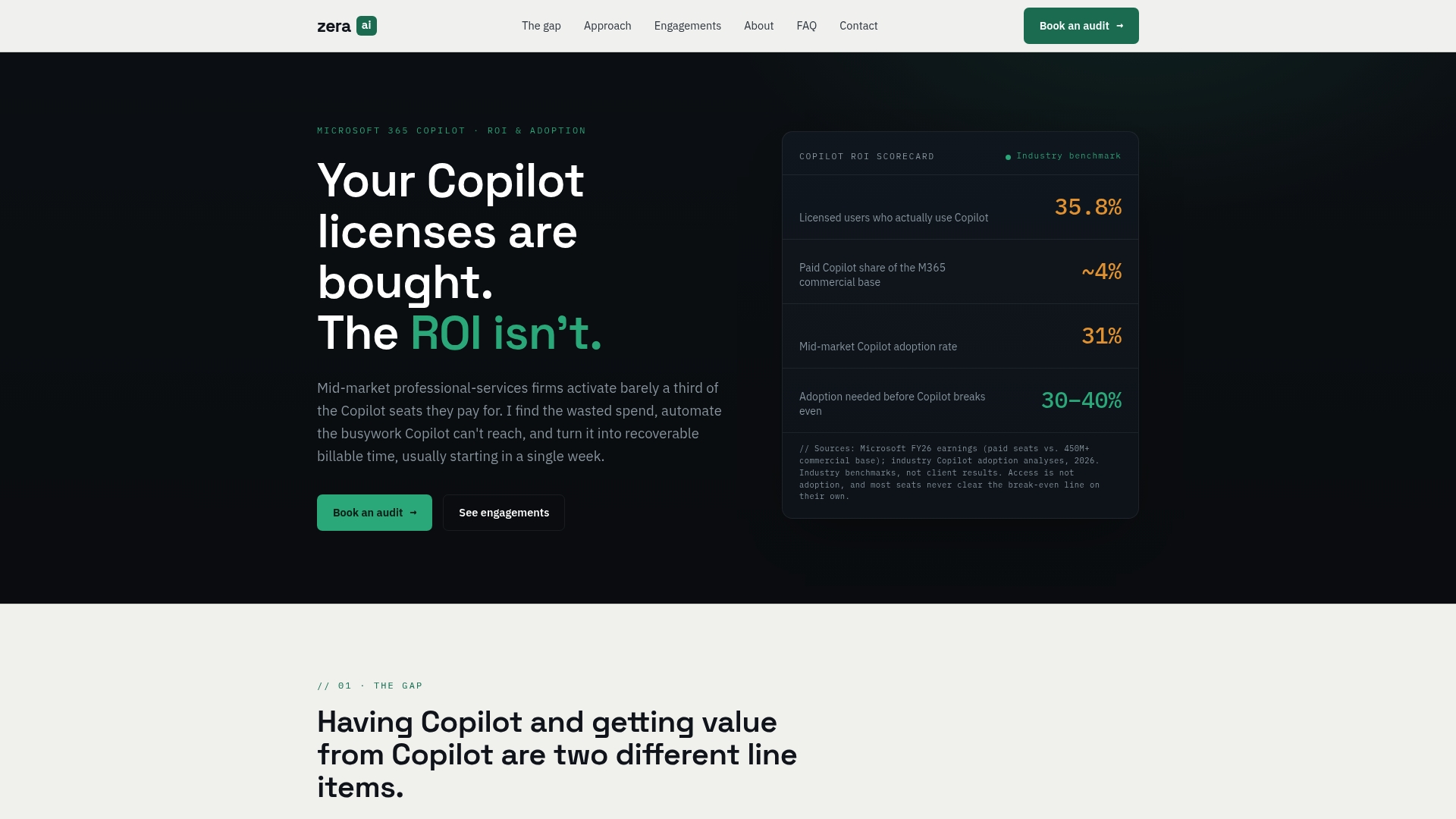
The firms that get the most from Copilot adoption are not the ones with the most licenses. They are the ones with workflows rebuilt around what Copilot actually does well, telemetry connected to billing, and a clear ROI number they can show partners at the end of the first month. Gozera delivers that in a fixed-price engagement, without a lengthy change management process. If your Copilot licenses are sitting idle while your attorneys still reconstruct time from memory, Copilot workflows for professional services is where to start.
Key Takeaways
AI-powered billable hour capture closes the 10–25% time leakage gap by replacing end-of-day memory reconstruction with a daily 10-minute approval workflow, producing measurable revenue recovery within the first billing cycle.
| Point | Details |
|---|---|
| Leakage rate | Most firms lose 10–25% of billable hours to manual reconstruction; AI capture closes most of that gap. |
| Daily time savings | AI approval takes 5–10 minutes per day versus 45–60 minutes for manual reconstruction. |
| Tool selection | Match the platform to your practice management system first; Clio Duo for Clio users, Laurel for compliance-heavy firms. |
| Copilot opportunity | Microsoft 365 Copilot telemetry can map AI-assisted work to client matters, supporting both billing capture and value-based fee arrangements. |
| Gozera’s role | Gozera audits dormant Copilot licenses, rebuilds workflows, and connects telemetry to billing systems in a fixed-price engagement for mid-market firms. |