
Enable Copilot in Dynamics 365 Project Operations, run a two-week pilot with preset billing templates, and you can start recovering billable time that currently disappears into vague, write-down-prone entries. The term “copilot billing narratives” refers specifically to AI-generated external comments and time-entry descriptions produced inside Microsoft 365 Copilot via Dynamics 365 Project Operations — not Copilot pricing or usage billing. When these narratives are governed correctly, they become audit-ready, client-compliant records that hold up in vendor bill reviews.
Your next action in the next 24–72 hours:
- Confirm your tenant meets Project Operations version and region requirements.
- Enable “Copilot in time entry” for one pilot org unit only.
- Loop in your tenant administrator, head of billing or timekeeping, and one partner sponsor before you touch any settings.
Pro Tip: Scope the pilot to a single org unit with 15–20 active timekeepers. A focused group gives you clean before/after data without the noise of a firm-wide rollout.
Key Takeaways
Copilot billing narratives deliver recoverable revenue only when the feature is enabled correctly, governed with approval thresholds, and fed firm-specific context through structured prompt templates.
| Point | Details |
|---|---|
| Enable for one pilot org unit | Activate “Copilot in time entry” in Feature Control for a single org unit before any firm-wide rollout. |
| Feed context to get specificity | Include matter ID, UTBMS task code, role, and a one-line style guide in every prompt to avoid vague, write-down-prone output. |
| Preserve the AI Generated Content field | Never edit entries solely to remove the Sparkle icon; the audit trail depends on provenance flags surviving to approver review. |
| Measure write-downs and billable capture | Track submission rate, approval rate, write-down frequency, and billable-hour capture before and after the pilot to quantify recoverable revenue. |
| Gozera accelerates pilot-to-ROI | Gozera’s fixed-price engagement delivers baseline telemetry, prompt design, and governance playbook for mid-market professional-services firms. |
Table of Contents
- What Copilot billing narratives are and what the platform won’t do
- Admin checklist: confirm availability and enable Copilot in time entry
- How to make Copilot narratives accurate, billable, and defensible
- Governance controls and the audit trail your approvers need
- Two-week pilot roadmap and the KPIs that prove recoverable revenue
- Common failure modes and how to fix them fast
- Ready-to-use prompts and sample narratives for law, accounting, and consulting
- How Copilot connects to billing systems beyond Project Operations
- Security and data privacy when using AI-generated billing narratives
- Handling exceptions and manual edits without breaking the audit trail
- The firms that wait are the ones paying for idle licenses
- Gozera’s fixed-price pilot package for billing narrative ROI
- Sources
What Copilot billing narratives are and what the platform won’t do
Copilot-generated billing narratives are external (customer-facing) comments drafted automatically inside Dynamics 365 Project Operations. The feature uses four inputs: Project, Project Task, Role, and Duration. That’s it. Copilot does not read email threads, prior invoices, or matter notes unless you feed that context manually through a prompt.
Key platform behaviors to know before you enable anything:
- Suggestion scope: Copilot suggests draft time entries for the current work week only. It will not backfill earlier weeks.
- Comment length: Generated external comments are capped at roughly 100 characters.
- Provenance flags: Every Copilot-created entry carries a Sparkle icon. Entries whose external comments were generated entirely by Copilot also surface an “AI Generated Content” field visible to approvers.
- No overwrite: Copilot will not replace an existing external comment. If a timekeeper has already typed something, Copilot leaves it alone.
- UI refresh: Entries created by Copilot may not appear immediately. Users need to manually refresh the grid.
- Availability: The feature’s availability varies by Project Operations version and region. Confirm your environment before enabling.
The 100-character limit matters more than most firms realize. A narrative that reads “Reviewed contract clauses per client matter” is defensible. One that reads “Reviewed docs” is not — and Copilot will produce the latter if you give it nothing to work with.
Admin checklist: confirm availability and enable Copilot in time entry
Before touching any settings, verify your environment. Copilot in time entry has been generally available in Project Operations, but preview behavior and on-by-default status differ across version ranges. Check the Microsoft documentation for the exact version your tenant runs.
- Sign in to Dynamics 365 Project Operations as a system administrator.
- Navigate to Settings → Parameters → Organization Units.
- Select the pilot org unit (not your entire organization).
- Open Project Parameters → Feature Control.
- Toggle Copilot in time entry to enabled.
- Save, then ask a pilot user to refresh their time entry grid to confirm the Sparkle icon appears.
- Notify approvers that they will now see an “AI Generated Content” field on submitted entries.
Pro Tip: Create a dedicated pilot org unit that mirrors one real practice group. Pre-assign projects, tasks, and roles so Copilot’s suggestions map to actual work. Suggestions tied to unassigned or generic tasks produce vague narratives that approvers reject.
The Power Community’s walkthrough covers the Copilot sidecar UX in detail, including bulk “Log my time” and “Generate comments” workflows that save the most time for high-volume timekeepers.
How to make Copilot narratives accurate, billable, and defensible
Context is the single biggest lever. Copilot generates from Project, Task, Role, and Duration — four fields that, without enrichment, produce generic output. Feed it more.
- Always include: matter ID or client reference, UTBMS task code or your firm’s task taxonomy, and any client-specific billing guidelines as a short style note in the prompt.
- Enforce character discipline: 100 characters forces specificity. A prompt that says “no block billing; include section reference and deliverable” produces a usable narrative. One that says “write a billing entry” does not.
- Require partner validation thresholds: set a minimum review requirement for entries above a rate band or matter risk level before submission.
Prompt scaffold (copy and adapt):
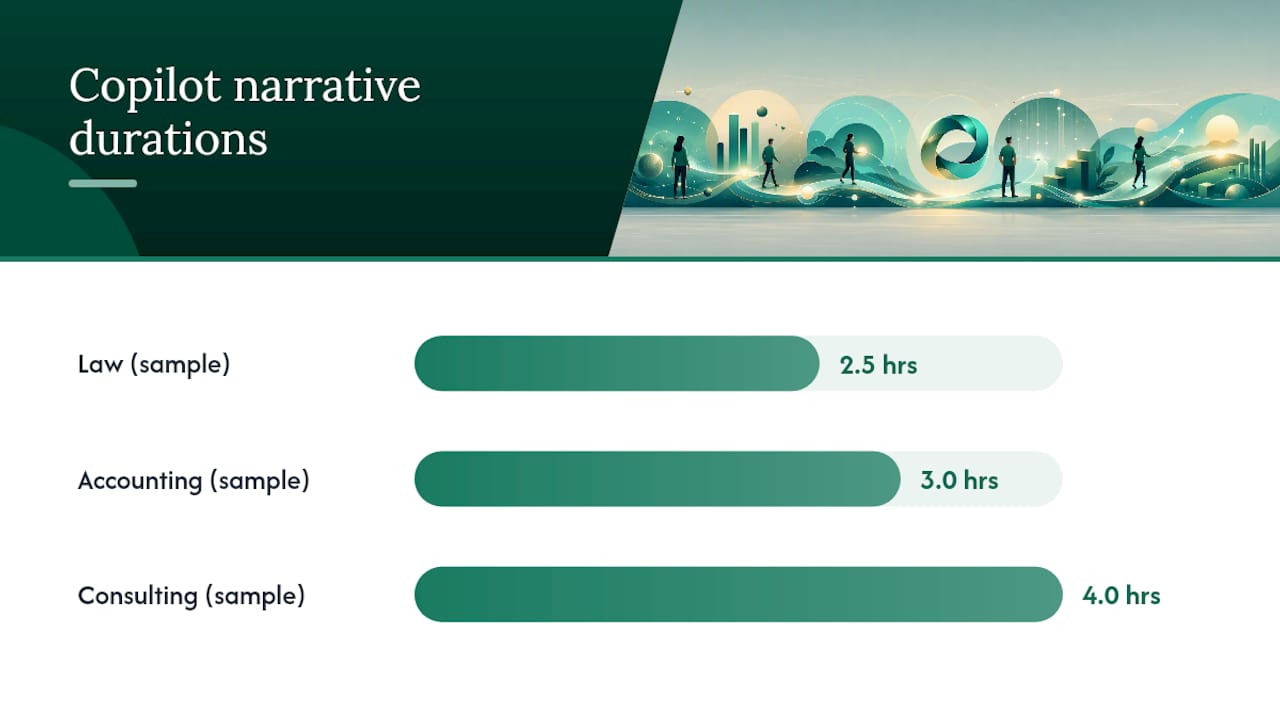
Sample narratives by practice area:
- Law: “Reviewed §4.2–4.5 indemnification clauses; drafted redline per client outside counsel guidelines. (2.5 hrs)”
- Accounting: “Prepared Q3 revenue schedules; reconciled variance against prior period forecast per engagement scope. (3.0 hrs)”
- Consulting: “Facilitated requirements workshop; drafted slide deck sections 3–5 for stakeholder review. (4.0 hrs)”
Case-study evidence from legal workflows shows that Copilot-assisted drafting can reduce drafting time for client updates and status summaries by roughly 60%, with improved realization rates tied directly to clearer narratives.
Pro Tip: Build a “gold source” phrase bank per major client — required keywords, prohibited terms, preferred task descriptions — and paste the relevant lines into every Copilot prompt as a style guide. Fifteen seconds of context prep prevents a write-down conversation later.
Governance controls and the audit trail your approvers need
Governance is where most pilots stall. Partners see “AI Generated Content” and freeze. The fix is policy, not technology.
- Preserve provenance: never instruct timekeepers to edit a Copilot entry just to remove the Sparkle icon. The icon disappears on edit, which breaks the audit trail. Edits should happen only when the narrative is substantively wrong.
- Define approval tiers: entries above a set rate band or on high-risk matters require partner sign-off before submission. Entries below that threshold can follow standard workflow.
- Retain change history: your tenant’s data-retention policy must cover time-entry change logs, including timestamps of manual edits and approvals, to satisfy audit and ethics obligations.
| Governance Layer | Owner | What to Capture |
|---|---|---|
| Provenance flag | System (auto) | Sparkle icon, AI Generated Content field |
| Approval threshold | Managing partner | Rate band or matter risk tier |
| Edit audit log | IT / tenant admin | Edit timestamp, user, before/after text |
| Retention policy | IT / compliance | Change history aligned to firm retention schedule |
AI billing optimization workflows that combine narrative generation with pre-screening against client billing rules consistently show lower write-down rates and fewer billing disputes — but only when the approval layer is enforced, not bypassed.
Two-week pilot roadmap and the KPIs that prove recoverable revenue
A focused pilot beats a broad rollout every time. Run 15–20 active users, one billing period, three to five prompt iterations guided by partner feedback.
| Phase | Objective | Telemetry Signal | Go/No-Go Criteria |
|---|---|---|---|
| Prepare (Days 1–3) | Baseline metrics | Submission rate, approval rate, write-down frequency | Baseline captured for one full billing period |
| Pilot (Days 4–7) | Enable Copilot, deploy templates | Specificity score, matter-reference presence | Most entries include matter reference |
| Measure (Days 8–10) | Before/after comparison | Billable-hour capture, dispute rate | Measurable reduction in write-downs |
| Scale | Expand org units | Recoverable revenue uplift per user | Partner sponsor sign-off |
KPIs to report to partners: recoverable revenue uplift (modeled from reduced write-downs), time saved per timekeeper per week, submission-to-approval cycle time, and dispute rate change. Microsoft Copilot reduces administrative overhead by reusing firm data held within the tenant, which is why telemetry-driven pilots show measurable billable-time gains quickly. Capture both quality signals (specificity score, prohibited keywords flagged) and revenue signals (write-down frequency, dispute rate) to connect Copilot usage to recoverable revenue directly. See Gozera’s telemetry guide for instrumentation details.
Common failure modes and how to fix them fast
Duplicated entries or missing assignments. Verify resource assignments in Project Operations. Copilot generates suggestions only for tasks the user is assigned to. Unassigned or generic tasks produce either duplicates or no suggestions at all. Fix: audit resource assignments before the pilot starts.
Vague or block-billed comments. The most common failure. Copilot produced “Worked on project tasks” because the prompt had no context. Fix: enforce the prompt scaffold from Section 4 as a mandatory template. Add required fields — client matter reference, task detail, deliverable — to your time-entry form.
Approver pushback. Partners see the AI Generated Content flag and reject entries on principle. Fix: run a 30-minute session showing provenance, the approval threshold policy, and a side-by-side quality comparison of AI-generated versus manually written narratives from the same period.
Triage runbook:
- Check resource assignments in Project Operations.
- Confirm the pilot org unit’s Feature Control toggle is still enabled.
- Ask the user to refresh the time-entry grid.
- If narrative quality is consistently poor, revert to manual entry for that org unit (disable the toggle at org unit level) and revise prompt templates before re-enabling.
Ready-to-use prompts and sample narratives for law, accounting, and consulting
Law — contract clause review:
Accounting — financial schedules:
Consulting — requirements workshop:
Quick prompt library:
- “Generate comments for all current-week entries on [Project Name].”
- “Make this narrative client-facing, billable, and free of block billing.”
- “Add matter reference [ID] and time reason to this entry.”
Pro Tip: Store approved narratives from past billing cycles as a phrase bank in a shared OneNote or SharePoint page. Feed the most relevant examples as context lines in your Copilot prompt. Copilot mirrors the style of what you give it.
How Copilot connects to billing systems beyond Project Operations
Project Operations handles time entry and external comment generation. What it does not do is push those narratives into your downstream billing or practice management system automatically. That gap is where firms lose the efficiency gains they just created.
For firms running eBilling platforms (e.g., Thomson Reuters Legal Tracker, TyMetrix, or similar), the approved time entries from Project Operations need to export in LEDES or UTBMS format. Confirm your Project Operations instance has the correct billing integration or export connector configured before the pilot ends. If it does not, a lightweight automation layer using n8n or Python can bridge the gap — mapping approved entries to the correct matter codes and pushing them to your billing platform on a schedule. Gozera’s n8n automation playbook covers this pattern for professional-services firms specifically.
For firms using time-entry systems outside Project Operations entirely, Copilot’s narrative generation capability is not directly portable. The prompt patterns and governance controls in this guide still apply — but the technical integration path requires a custom connector or API bridge.
Security and data privacy when using AI-generated billing narratives
Copilot in Project Operations operates within your Microsoft 365 tenant boundary. Client matter data, project names, and task descriptions do not leave your tenant to train Microsoft’s models. That said, three risks deserve explicit policy:
Prompt injection. If timekeepers paste unvetted external content (client emails, third-party documents) into a Copilot prompt, that content enters the generation context. Restrict prompts to internal matter data only.
Oversharing through context. A prompt that includes a client’s confidential negotiating position as “style context” exposes that information to anyone who can view the time entry. Train timekeepers to use matter IDs and task codes, not substantive client communications, as context.
Tenant data governance. Ensure your Microsoft 365 data-loss prevention (DLP) policies cover time-entry fields. Copilot outputs are stored as standard Dataverse records and fall under your existing retention and access-control policies — but only if those policies explicitly include Project Operations entities.
Handling exceptions and manual edits without breaking the audit trail
Manual edits are inevitable. The governance question is whether you can tell, after the fact, what Copilot originally wrote and what a human changed.
The Sparkle icon disappears the moment a user edits a Copilot-generated entry. That is by design — the edited version is no longer purely AI-generated. Your audit trail therefore depends on two things: the “AI Generated Content” field (which persists even after edits) and your tenant’s change-history logging for Dataverse records.
Policy guidelines:
- Require timekeepers to note the reason for any substantive edit in a separate internal comment field, not in the external comment itself.
- Set a threshold: edits that change the billable time by more than a defined amount (e.g., 15 minutes) require approver acknowledgment before submission.
- Never instruct users to edit entries solely to remove the AI flag. That practice destroys provenance and creates a compliance risk if the matter is ever audited.
For exceptions — entries where Copilot’s suggestion is entirely wrong (wrong project, wrong task, wrong role) — the correct action is to delete the Copilot entry and create a manual one. Do not edit a fundamentally incorrect AI entry into a correct one; the change log will show a heavily modified AI entry, which looks worse in an audit than a clean manual entry.
The firms that wait are the ones paying for idle licenses
Mid-market professional-services firms are sitting on Microsoft 365 Copilot licenses that generate no recoverable revenue because no one ran a governed pilot. The technology is already embedded in Dynamics 365 Project Operations. The telemetry to measure ROI is available today. The only missing piece is a tightly scoped pilot — two to four partners, 15–20 users, two weeks — with preset templates and an approval threshold that makes the output defensible.
Firms that run this pilot first, measure write-down reduction and billable-hour capture, and then scale to additional org units will have a concrete ROI number to show their partners. Firms that wait will have the same idle licenses and the same write-down conversations next quarter.
If you want to accelerate the pilot with a vendor-savvy implementer, Gozera (Zera.ai) runs exactly this kind of engagement — baseline telemetry, prompt design, governance playbook, and a short enablement sprint. Led by Cale Werake, the team has built the Copilot adoption framework specifically for mid-market law, accounting, and consulting firms.
Gozera’s fixed-price pilot package for billing narrative ROI
Most firms spend more time debating whether to pilot Copilot billing narratives than it takes to actually run one. Gozera’s fixed-price engagement removes that friction: baseline telemetry capture, prompt and template design for your practice areas, a governance playbook your approvers will accept, and a two-week enablement sprint for your pilot users — delivered without a long-term retainer or a six-month change management program.

The engagement produces a conservative ROI projection modeled from reduced write-downs and increased billing capture per user — a number your managing partner can act on. If the pilot does not show measurable recoverable-revenue uplift, you know before you scale. Book a pilot scoping call with Gozera and get your baseline telemetry running this week.
Sources
- Copilot in time entry – Dynamics 365 Project Operations
- From Tedious to Effortless: How Copilot Transforms Time Entry in Dynamics 365 Project Operations – Power Community
- How Microsoft Copilot boosts billable hours for professional services firms | Rand Group
- Copilot Case Studies Enhancing Legal Workflow Efficiency – legalGPTs
- AI Billing Optimization for Corporate Law Firms (2026) — Practical Legal Workflow Guide — AI Vortex