
If your team writes code and cares about data residency, pick n8n. If your team is business-led and needs automations running in days, not weeks, Make.com is the faster path. The decisive factors are billing model and hosting: n8n charges per workflow execution and can run on your own infrastructure, while Make bills per operation (now called credits), which means every step inside a loop counts separately.
Pick n8n when your firm self-hosts for compliance, runs high-volume or loop-heavy workflows, needs full JavaScript or Python nodes, or is building AI agents that require state and tool-calling. The per-execution billing model keeps costs flat as workflow complexity grows.
Pick Make when your operations team needs to ship automations without developer support, your workflow volumes are modest and predictable, and you want 2,000+ prebuilt connectors without writing a single HTTP request.
For mid-market professional-services firms, the ROI math often tips toward n8n once monthly workflow executions exceed a few thousand, especially when those workflows process rows of data in loops. Make’s per-operation credit model can multiply costs quickly in exactly those scenarios.
Table of Contents
- How do n8n and Make compare across the dimensions that matter?
- What are n8n and Make.com, and why does the difference matter?
- What are the real feature differences between n8n and Make?
- How does pricing actually work, and what will it cost your firm?
- What can each platform do with AI agents in 2026?
- Which platform should your team actually choose?
- What does migration or deployment actually look like?
- How do the two platforms handle security and compliance?
- How do connectors and extensibility compare?
- What skills and team structure does each platform require?
- What does the cost and ROI look like for a real mid-market firm?
- Key Takeaways
- What practitioners learn after the first migration
- Gozera turns your automation platform decision into a Copilot ROI result
- Useful sources and further reading
How do n8n and Make compare across the dimensions that matter?
| Dimension | n8n | Make.com |
|---|---|---|
| Best for / ideal user | Developer-led teams, regulated firms, AI agent builders | Citizen developers, ops teams, fast prototypers |
| Hosting | Self-host (Docker/Kubernetes) or cloud | Cloud only |
| Pricing model | Per execution (cloud) or flat server cost (self-host) | Per operation / credits; loops multiply cost |
| Custom code support | Full JavaScript and Python code nodes | Limited inline JS functions |
| Connector breadth | ~400–500 native nodes + HTTP/GraphQL for any API | 2,000+ prebuilt connectors |
| Error handling | Per-node retries, dedicated error workflows | Per-module handlers, rollback options |
| AI / agent capabilities | Native AI Agent node, LangChain, MCP support | AI connectors, Maia assistant, limited autonomous loops |
| Ease of use | Steeper ramp; developer-friendly canvas | Polished visual canvas; low barrier to entry |
| Enterprise / security | Git export, self-host data control, SSO | Cloud-managed team features, enterprise tier available |
Pro Tip: For mid-market professional-services firms, the single biggest cost lever is whether you self-host n8n. Moving from Make’s credit model to a self-hosted n8n instance can convert a variable monthly bill into a predictable server cost, which makes Copilot license ROI calculations far easier to defend to a managing partner.
What are n8n and Make.com, and why does the difference matter?
n8n is a fair-code workflow automation platform. You can run it on your own servers (Docker, Kubernetes, or a cloud VM) or use n8n Cloud. On the cloud tier, you pay per workflow execution regardless of how many nodes that workflow contains. Self-hosted, your cost is the server. That architecture matters for law and accounting firms because it means your client data, document content, and Copilot telemetry never leave infrastructure you control.
Make.com (formerly Integromat, which is why you’ll still see “n8n vs Integromat” in older comparisons) is cloud-only. Its visual canvas is genuinely polished, and its library of 2,000+ prebuilt connectors covers nearly every SaaS tool a professional-services firm uses. The tradeoff is that every step in every scenario consumes credits, and that billing model behaves very differently from n8n’s once your workflows start processing batches of records.
For context on where these two sit in the broader market: Zapier remains the dominant no-code option for simple point-to-point integrations, and Activepieces is an open-source alternative gaining traction for teams that want self-hosting without n8n’s learning curve. Neither replaces n8n or Make for complex, multi-step professional-services workflows, but they’re worth knowing as you evaluate the full field of n8n alternatives.
The Copilot connection is direct: if you’re using Microsoft 365 Copilot and want to measure adoption via telemetry, route that telemetry through automation pipelines, or enrich Copilot outputs with external data, your automation platform becomes part of your compliance perimeter. Self-hosting n8n keeps that perimeter tight.
What are the real feature differences between n8n and Make?
Hosting and data residency
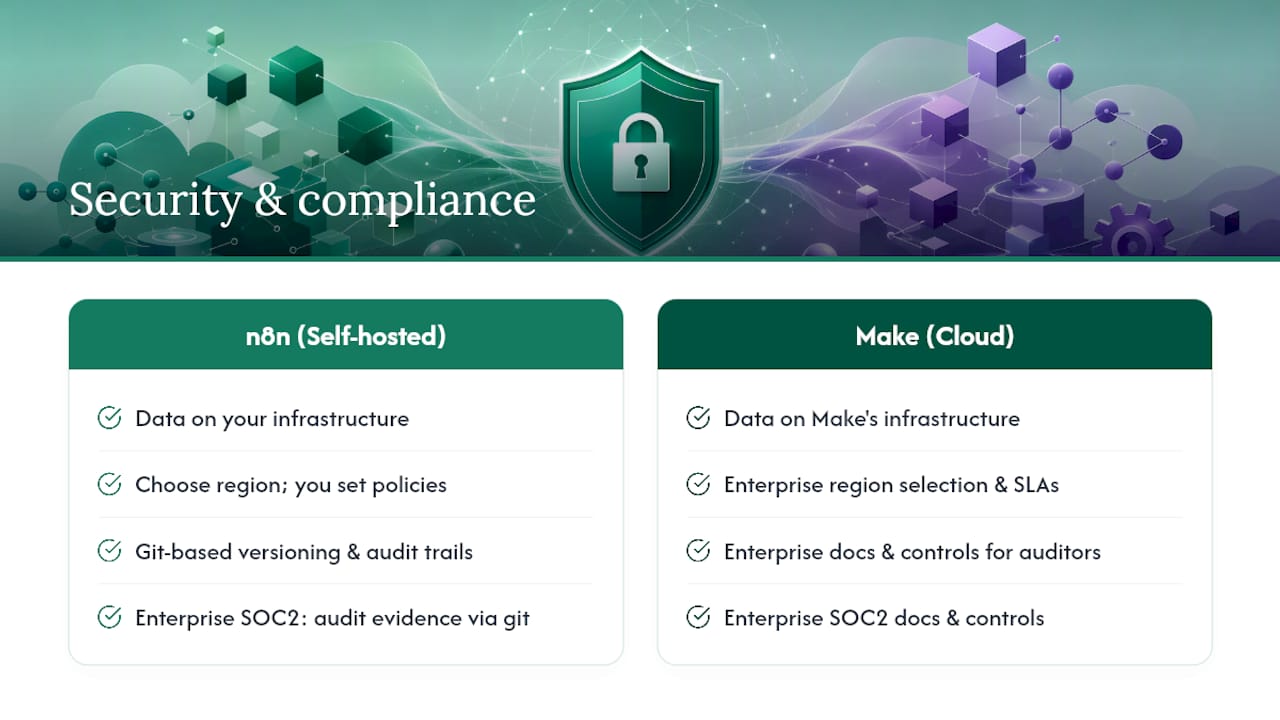
n8n’s self-hosting option is its most consequential differentiator for regulated industries. A law firm or accounting practice running n8n on Azure or AWS in a specific region controls exactly where data lands. Make’s cloud infrastructure is managed by Make, and while enterprise tiers offer region selection, you’re still operating within their SaaS boundary. For Copilot adoption telemetry, that distinction affects what you can log, retain, and audit.
Code and transformation flexibility
n8n ships full JavaScript and Python code nodes, which means you can write arbitrary transformation logic, call external libraries, and build complex data-shaping steps inline. Make offers custom JavaScript function steps, but the scope is narrower: you can’t install npm packages or run multi-file Python logic. For workflows that ingest documents, normalize time entries, or feed a retrieval-augmented generation (RAG) pipeline, that gap is significant. n8n’s code nodes handle it natively; Make requires workarounds or external services.
Logic, branching, and agent orchestration
Both platforms support conditional routing and loops. The difference shows up at the edges. Make’s visual canvas makes simple branching intuitive, but deeply nested conditional logic or dynamic agent loops become brittle as scenario complexity grows. n8n’s node graph handles the same complexity more cleanly because developers can drop into code when the visual approach stops scaling. For AI agent workflows that require tool-calling, memory, or multi-step reasoning, n8n’s architecture is the better fit.
Error handling and observability
n8n gives you per-node retry configuration and dedicated error workflows: a separate workflow that triggers when the main one fails, with full access to the error context. That pattern maps well to production operations where you need alerts, logging, and automated recovery. Make’s per-module error handlers and rollback options cover most cases, but the observability story is thinner for teams that want to pipe errors into a monitoring stack like Datadog or PagerDuty.
Operational maintainability
Git export and developer-pattern support in n8n means workflows can live in version control alongside application code. CI/CD pipelines can deploy workflow changes the same way they deploy software. Make has no equivalent Git-first workflow. For a consulting firm that treats its automation library as a business-critical asset, that difference compounds over time.
Pro Tip: Before you commit to either platform, export three of your most complex current automations and map every transformation step. That exercise will tell you whether you need code nodes or whether Make’s visual functions are sufficient. Most firms discover at least one workflow that requires real code.
How does pricing actually work, and what will it cost your firm?
Billing mechanics
n8n Cloud charges per workflow execution. One execution = one run of a workflow, regardless of how many nodes it contains or how many records it processes. Self-hosted n8n has no per-run metering at all; your cost is the server.
Make bills per operation, now called credits. Every module (step) in a scenario consumes one credit per execution. Loops multiply that: processing 500 invoice records through a 5-step scenario consumes 2,500 credits in a single run. That’s the hidden cost differential that catches teams off guard.
Worked examples
Scenario A: Invoice processing automation
A 5-step workflow that pulls invoices from a billing system, normalizes line items, pushes to a document store, updates a CRM record, and sends a Slack notification. Runs 1,000 times per month.
- Make: 1,000 runs × 5 steps = 5,000 operations/month
- n8n Cloud: 1,000 executions/month (step count irrelevant)
Scenario B: Document ingestion with loop
A workflow that ingests a batch of 200 contracts per run, extracts metadata from each (3 steps per record), and writes to a database. Runs 50 times per month.
Scenario C: Client onboarding sequence
A 10-step workflow that runs 500 times per month with no loops.
Cost comparison summary
| Scenario | Monthly volume | Make operations | n8n executions | Primary cost driver |
|---|---|---|---|---|
| Invoice processing (5 steps) | 1,000 runs | 5,000 ops | 1,000 executions | Step count (Make) |
| Document ingestion (loop, 200 records, 3 steps) | 50 runs | 30,000 ops | 50 executions | Loop depth (Make) |
| Client onboarding (10 steps, no loop) | 500 runs | 5,000 ops | 500 executions | Step count (Make) |
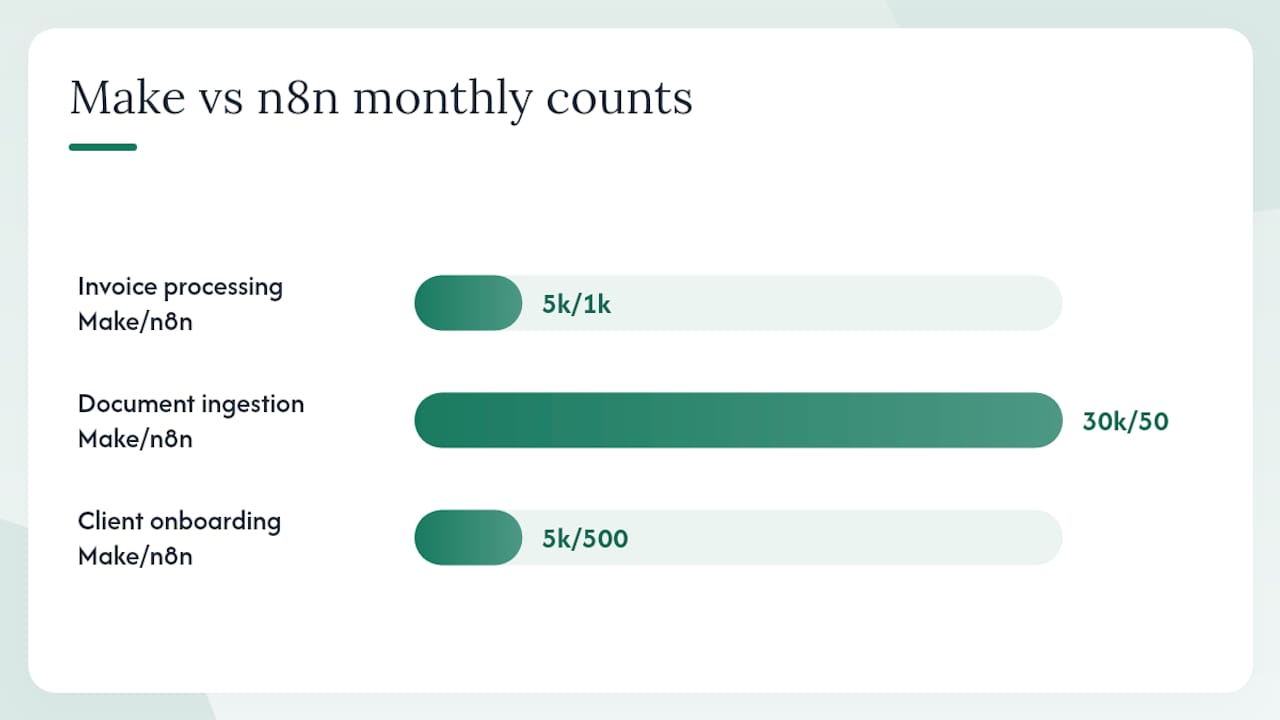
The loop scenario is where Make’s credit model diverges sharply from n8n’s execution model. At scale, that divergence is the single largest unexpected line item for firms that started on Make and grew their automation library.
Pro Tip: Run a 30-day credit audit on your Make account before any platform decision. Export your scenario history, identify the top five credit consumers, and calculate what those same workflows would cost on n8n Cloud or self-hosted. That single exercise often produces the business case for migration.
What can each platform do with AI agents in 2026?
n8n’s AI story in 2026 is meaningfully ahead of Make’s for teams building autonomous or semi-autonomous workflows. n8n ships a native AI Agent node with LangChain-style orchestration, MCP server/client support, and vector store integrations. You can build a looped agent that calls tools, checks memory, and routes based on model output, all within a single workflow. That architecture maps directly to Copilot-adjacent use cases: document Q&A pipelines, contract review assistants, and time-entry classification agents.
Make has AI connectors and the Maia assistant, which handles agent-like behavior for simpler tasks. The gap is in autonomous loops: Make’s architecture doesn’t support the kind of iterative tool-calling that production AI agents require. Each AI module call also consumes credits, so a multi-turn agent conversation can burn through a credit allocation quickly.
For Copilot workflows specifically, the practical consequences are:
- Data control: — Self-hosted n8n keeps model inputs and outputs on your infrastructure, which matters when those inputs include privileged client documents.
Pro Tip: If you’re building a RAG pipeline to enrich Copilot outputs with firm-specific knowledge, start with n8n’s vector store nodes and a self-hosted embedding model. You get full control over what gets indexed, and you avoid sending client documents to a third-party API as part of the ingestion process.
For a broader look at AI automation tools for consultants, the agent architecture question is increasingly the deciding factor.
Which platform should your team actually choose?
Choose n8n when:
- Your firm self-hosts for data residency, client confidentiality, or audit requirements
- Workflows process large batches of records in loops (the billing math strongly favors n8n)
- Your team includes developers comfortable with JavaScript or Python
- You’re building AI agents, RAG pipelines, or Copilot-augmented workflows that need tool-calling
- You need Git-based version control and CI/CD deployment for your automation library
- You’re a law firm, accounting practice, or consulting firm with strict data handling obligations
Choose Make when:
- Your operations team needs to ship automations without developer involvement
- Workflow volumes are low to moderate and loops are shallow or absent
- You need broad connector coverage fast and don’t want to write HTTP requests
- You’re prototyping Copilot-adjacent workflows before committing to a production architecture
- Your firm is under 100 people and automation is not yet a core operational dependency
Real mid-market examples where the choice is clear: a 150-person accounting firm running nightly batch reconciliations across 3,000 client records should be on n8n. A 60-person consulting firm that needs to automate proposal generation and CRM updates with no developer on staff should start with Make.
For workflow automation examples specific to professional services, the pattern holds: complexity and volume tip toward n8n, simplicity and speed tip toward Make.
What does migration or deployment actually look like?
Migration mechanics
Moving from Make to n8n is non-trivial but manageable because both platforms use node-graph mental models. The main refactor work is in transformations: Make’s inline functions and proprietary formatting need to be rewritten as JavaScript or Python code nodes in n8n. Treat each transformation rule as a discrete task, test it with representative data, and don’t try to migrate everything at once.
Implementation checklist
- Map scenarios to workflows: — Document every Make scenario, its trigger, step count, and monthly operation volume before touching n8n.
- Establish CI/CD: — Export workflows to Git, set up a deployment pipeline, and define a promotion process from dev to production.
Realistic timeline: A firm migrating 20–30 workflows with moderate complexity should budget 6–10 weeks with a platform engineer and an automation owner. Simpler libraries (under 10 workflows, no loops) can move in 2–3 weeks.
Required roles: Platform engineer or DevOps (self-hosting setup), automation engineer (JS/Python refactoring), and an automation product owner who tracks Copilot adoption metrics through the transition.
Pro Tip: Run a three-workflow pilot before committing to full migration. Pick one simple workflow, one loop-heavy workflow, and one AI-enabled workflow. Measure execution cost, error rate, and developer time on each. Those three data points will either confirm the migration case or reveal a gap you hadn’t anticipated.
How do the two platforms handle security and compliance?
For U.S. professional-services firms, the compliance question usually comes down to one thing: where does client data go, and who controls it?
Self-hosting n8n answers that question cleanly. Your data stays on infrastructure you own, in the region you choose, under the logging and retention policies you set. That matters for law firms under attorney-client privilege obligations, accounting firms handling tax data, and any firm subject to state-level data privacy laws. Git-based versioning and developer audit patterns also make it easier to demonstrate to auditors exactly what a workflow does and when it changed.
Make’s cloud model is not inherently insecure, but it shifts control to Make’s infrastructure team. Enterprise tiers offer region selection and enhanced SLAs. For SOC 2 alignment, Make’s enterprise tier provides the documentation and controls most firms need. SSO is available on both platforms at enterprise pricing.
On HIPAA and regulated workflows: Neither platform is a HIPAA Business Associate by default. If your workflows touch protected health information, you need a signed Business Associate Agreement with your platform vendor and must verify that the vendor’s infrastructure meets the technical safeguard requirements. Self-hosted n8n on your own HIPAA-compliant infrastructure sidesteps the vendor BAA question entirely, but introduces your own infrastructure compliance obligations. Consult qualified legal counsel before routing regulated data through any automation platform.
For Copilot telemetry specifically, self-hosting n8n means your adoption metrics, usage logs, and workflow outputs never leave your environment. That’s a meaningful advantage when you’re trying to build a defensible ROI case for Copilot licenses without exposing firm data to a third-party SaaS platform.
For regulated-industry context, workflow automation guidance for law firms covers the compliance framing in more detail.
This section provides general information, not legal or compliance advice. Confirm current requirements with a qualified attorney or compliance professional.
How do connectors and extensibility compare?
Make’s connector library is its strongest card: roughly 2,000+ native integrations covering the full range of SaaS tools a professional-services firm uses, from billing platforms to document management systems to CRM. For most common integrations, you click, authenticate, and you’re done.
n8n’s native node set is smaller, around 400–500 nodes, but the HTTP Request node covers the gap for any REST API, and the GraphQL node handles structured query APIs. In practice, most professional-services integrations that aren’t in n8n’s native library are reachable via HTTP with a few lines of configuration.
For Microsoft 365 specifically, both platforms connect to the Graph API, SharePoint, Teams, and Exchange. n8n’s approach requires more manual configuration; Make has polished Microsoft 365 modules that non-developers can configure without reading API documentation. If Copilot-adjacent workflows need to read from SharePoint or write to Teams channels, Make’s modules get you there faster. n8n gets you there with more control over exactly what the request looks like.
Extension paths differ significantly:
- n8n: — Build custom nodes as npm packages, publish them to the community node registry, and install them on your self-hosted instance. Long-term maintenance is your responsibility, but you own the code.
- Make: — Use the Make Developer Hub to build custom apps. The process is more structured and less code-heavy, but you’re building within Make’s ecosystem and subject to their platform changes.
For teams evaluating Microsoft 365 workflow tools, the connector question is often secondary to the billing model and hosting question. Don’t let a large connector count drive the decision if the billing model will hurt you at scale.
What skills and team structure does each platform require?
Make’s polished visual canvas genuinely reduces the ramp time for citizen developers. An operations analyst with no coding background can build a functional Make scenario in a day. That speed is real and valuable for firms that need to automate quickly without hiring a developer.
n8n requires more. A developer comfortable with JavaScript or Python will be productive within a week. A non-developer will struggle with code nodes, credential configuration, and self-hosting setup. The learning curve is steeper, and the payoff is proportional.
Recommended team composition by platform:
For Make:
- Automation owner (operations background, no coding required)
- Optional: IT administrator for credential management and enterprise tier configuration
For n8n:
- Platform engineer or DevOps (self-hosting, monitoring, patching)
- Automation engineer (JavaScript or Python, API experience)
- Automation product owner (tracks Copilot adoption metrics, owns the ROI reporting)
The product owner role is often overlooked. Someone needs to translate workflow performance into Copilot license utilization data and present that to managing partners. Without that role, automation investment stays invisible to firm leadership.
Onboarding cadence: Start with a two-day internal workshop to map the firm’s top 10 automation candidates. Assign ownership to each. Run the first three workflows in parallel with manual processes for two weeks before going live. That approach limits disruption to billable work while building team confidence.
What does the cost and ROI look like for a real mid-market firm?
Assumptions: A 120-person accounting firm with 80 Copilot licenses. Monthly automation volume: 3,000 workflow executions, including 200 batch document-processing runs that loop through 150 records each with 4 steps per record.
Monthly operation count under Make:
- Standard workflows: 2,800 runs × average 6 steps = 16,800 operations
- Batch loops: 200 runs × 150 records × 4 steps = 120,000 operations
- Total: approximately 136,800 operations/month
Monthly cost under n8n Cloud:
- 3,000 executions/month (loop depth irrelevant to billing)
Self-hosted n8n:
- Server cost (a mid-range cloud VM): approximately $80–$150/month depending on provider and configuration, with no per-execution charge
| Model | Monthly volume | Estimated monthly cost | Primary cost driver |
|---|---|---|---|
| Make (credit model) | ~136,800 ops | Varies by plan tier; loop-heavy volume pushes into higher tiers | Loop depth × step count |
| n8n Cloud | 3,000 executions | Scales with execution count, not step count | Execution volume |
| n8n self-hosted | Flat server cost | ~$80–$150/month infrastructure | Server + ops labor |
For Copilot ROI, the firm recovers billable time through automation of document ingestion, time-entry normalization, and client onboarding tasks. If automation frees two hours per week per attorney across 40 attorneys at a $300 blended rate, that’s $24,000 in recoverable billable time per month. The workflow automation ROI case for professional services follows that same structure.
Implementation timeline for this firm: 8 weeks. Weeks 1–2: environment setup and credential migration. Weeks 3–5: workflow refactoring and parallel testing. Weeks 6–7: Copilot pipeline validation. Week 8: cutover and monitoring.
Pro Tip: Build the business case around recoverable billable hours, not platform cost savings. A managing partner responds to “$24,000 in recovered time per month” far more readily than “we saved $800 on software credits.” Telemetry from n8n’s execution logs gives you the data to make that calculation credible.
Key Takeaways
For mid-market professional-services firms, n8n’s execution-based billing and self-hosting option make it the stronger long-term choice when workflow volume is high, loops are common, or data residency is a compliance requirement.
| Point | Details |
|---|---|
| Billing model is the decisive factor | Make’s per-operation credits multiply fast in loop-heavy workflows; n8n’s per-execution model stays flat. |
| Self-hosting controls both cost and compliance | Self-hosted n8n converts variable credit bills into a predictable server cost and keeps client data on your infrastructure. |
| Code flexibility determines AI agent viability | Full JavaScript and Python nodes in n8n support RAG pipelines and agent loops that Make’s inline functions cannot replicate. |
| Team skill set drives platform fit | Make suits citizen developers shipping fast; n8n suits developer-led teams building for scale and auditability. |
| Gozera accelerates the ROI case | Gozera’s telemetry-driven audit identifies which workflows to migrate first and translates automation savings into a Copilot license ROI report partners can act on. |
What practitioners learn after the first migration
The conventional wisdom on automation platform selection focuses on connector count and UI polish. Both matter less than you’d expect once you’re six months into production.
What actually determines whether a platform choice succeeds at a mid-market firm is whether the billing model stays predictable as the automation library grows. Teams that start on Make for its ease of use consistently hit a moment, usually around month four or five, where a new batch-processing workflow causes the monthly credit bill to spike in a way nobody anticipated. That’s not a Make failure; it’s a mismatch between the billing model and the workflow pattern.
The other thing practitioners consistently underestimate is the ops burden of self-hosting. “Free” self-hosted n8n is not free: it requires patching, monitoring, backup management, and someone who knows what to do when the container crashes at 2 AM during a client deadline. Budget that labor explicitly, or the TCO calculation will look better on paper than it does in practice.
The firms that get the most from their automation investment are the ones that treat it as a product, not a project. They assign an automation product owner, track execution metrics, and review the library quarterly. That discipline is what turns Copilot license spend from a sunk cost into a measurable productivity asset.
Gozera turns your automation platform decision into a Copilot ROI result
Most firms spend weeks comparing platforms and months second-guessing the choice. Gozera skips that cycle. The firm’s managed audit identifies your highest-value automation candidates, measures current Copilot license utilization via telemetry, and delivers a prioritized workflow build plan in weeks, not quarters.

The engagement runs as a fixed-price sprint: baseline measurement first, then workflow builds using n8n and Python to close the gaps Copilot alone doesn’t cover, then a monthly optimization retainer that tracks recoverable billable hours and keeps license utilization visible to firm leadership. No open-ended change management. No guessing at ROI.
If you’re evaluating n8n vs Make and want the decision grounded in your firm’s actual workflow volumes and Copilot adoption data, book a Copilot ROI audit with Gozera and get a clear answer in days.
Useful sources and further reading
- n8n vs Make – Which is right for you?
- Make vs n8n (2026) — Integration Atlas
- Make vs n8n — OpenHosst
- n8n vs Make: Honest 2026 Comparison | Abhiman Labs
- n8n vs Make.com: The Definitive Enterprise Comparison (2026) – Goodish
- n8n vs Make — Zapier blog
- Top n8n alternatives — Composio