
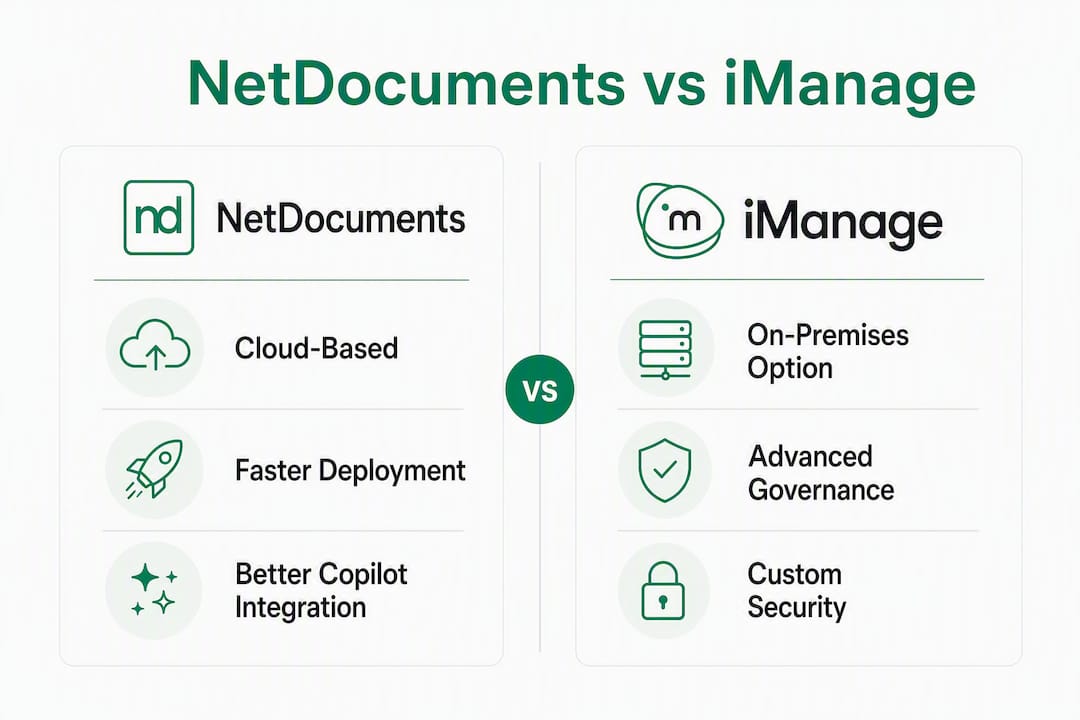
NetDocuments is the faster, lower-overhead choice for cloud-first mid-market law firms. iManage is the deeper, more configurable platform for large firms with dedicated IT and complex governance requirements. The deciding factor is rarely features — it’s your deployment model, IT capacity, and how tightly you need Microsoft 365 and Copilot woven into daily workflows.
- Cloud-first, mid-market firms: NetDocuments deploys faster, demands less IT overhead, and its browser-first architecture reduces the friction that kills Copilot adoption.
- Large firm or enterprise legal (300+ seats, complex governance): iManage Work gives you granular ethical walls, advanced records management, and private-cloud or on-prem control that NetDocuments cannot match.
- Microsoft 365 / Copilot priority: Both platforms integrate with Outlook and Office, but the quality of that integration in real daily workflows — not in a vendor demo — determines whether your Copilot licenses pay for themselves or sit idle.
One TCO caveat worth stating upfront: implementation, reseller fees, and ongoing admin routinely dwarf the per-user license cost for both platforms. Budget accordingly before you compare sticker prices.
Table of Contents
- How do NetDocuments and iManage compare on the dimensions that matter?
- What makes iManage the right call — and when it isn’t
- What makes NetDocuments the right call — and where it falls short
- How do you choose between iManage and NetDocuments?
- Key Takeaways
- Why the DMS decision is really a Copilot ROI decision
- Gozera helps you measure Copilot ROI before you commit
- Useful sources for vendor evaluation and RFP planning
How do NetDocuments and iManage compare on the dimensions that matter?
The table below maps the core decision dimensions IT buyers actually use. Read it alongside your firm’s must-have list, not as a scorecard.
| Dimension | iManage / iManage Work | NetDocuments |
|---|---|---|
| Deployment model | On-prem, private cloud, or iManage Cloud | Cloud-native SaaS only |
| Best for | Large firms, enterprise legal, AmLaw 200 | Mid-to-large cloud-first firms, professional services |
| Admin complexity | High — dedicated IT or reseller typically required | Moderate — lighter admin, more self-service |
| Migration difficulty | High — folder structure, security policies, metadata mapping | Moderate — re-architecture still needed; faster cutover |
| Pricing & TCO shape | Higher implementation and consultant costs; modular add-ons | Lower infrastructure cost; add-ins and storage can add up |
| Microsoft 365 / Outlook integration | Deep via iManage Work add-ins; desktop-first | Strong via ndOffice/ndMail; Windows-first desktop add-ins |
| AI / automation | RAVN engine: document classification, search, analytics | Built-in AI search; lighter automation compared to RAVN |
| Security & certifications | SOC 2, ISO 27001; granular ethical walls | SOC 2; cloud-native encryption; SaaS resilience |
| Customization & integrations | Extensive — APIs, third-party connectors, configurable governance | Good — growing connector ecosystem; less deep customization |
| User experience / adoption | Steeper learning curve; mandatory profiling affects save times | Faster adoption; browser-first UX reduces onboarding friction |
| Search & document retrieval | Powerful full-text search with RAVN-enhanced classification | Strong cloud search; workspace model aids retrieval |
| Email management | Robust Outlook integration; drag-and-drop filing | ndMail handles email filing; Windows-first limitation applies |
The most consequential difference: iManage’s desktop-first architecture means per-machine installs and configuration at every workstation. NetDocuments’ browser-first model sidesteps that overhead — which matters enormously when you’re trying to get Copilot prompts surfacing in the same window where lawyers actually work.
Pro Tip: Before committing to either platform, instrument a sample workflow — search, open, edit, save, email — and count the clicks and app switches required. That “toggle tax” translates directly into lost billable minutes per attorney per day. Run the math on your seat count before you sign anything.

What makes iManage the right call — and when it isn’t
iManage, and specifically iManage Work, is built for firms that treat document governance as a compliance function, not just a filing convenience. Ethical walls, matter-level security, and granular access controls are native to the platform — not bolted-on modules. For AmLaw 200 firms, financial services legal teams, or any organization subject to strict information barrier requirements, that depth is genuinely hard to replicate elsewhere.
Where iManage leads:
- Granular governance and ethical walls configurable at the matter, workspace, and document level
- Private-cloud and on-prem deployment for firms that cannot or will not move everything to a shared SaaS environment
- RAVN AI engine for document classification, predictive search, and knowledge automation at scale
- Advanced records management with retention schedules and disposition workflows
- Broad third-party ecosystem — practice management, billing, and e-discovery integrations
Where it costs you:
- Implementation timelines run long. A full enterprise rollout can span several months, often requiring a certified reseller or implementation partner.
- Mandatory document profiling (matter, client, document type fields on every save) is a governance win but a UX friction point. Attorneys who skip or misfile create downstream search problems.
- Some desktop add-ins require per-machine installation, which hits Mac users harder and adds IT overhead at every refresh cycle.
- Administrative overhead is real. Without a dedicated DMS admin or a managed-service arrangement, configuration drift accumulates.
Migration into iManage: Plan for folder-structure mapping, metadata schema design, and security policy rewrite — not just a file copy. Firms migrating from a legacy system or from SharePoint should budget 3–6 months minimum for a phased rollout, with a pilot cohort of 20–50 users before full cutover. Reseller involvement is almost always necessary, and that cost belongs in your TCO model from day one.
On the Copilot side, iManage’s desktop add-in architecture creates the toggle tax problem directly. Attorneys switching between the iManage Work pane, Outlook, and a Copilot prompt lose context with every switch. Mitigating that requires deliberate workflow design — not just installing the add-in and hoping for adoption.

What makes NetDocuments the right call — and where it falls short
NetDocuments is the platform that actually gets used. Its browser-first, cloud-native architecture means attorneys can access documents from any device without IT touching a workstation, and the workspace model groups matters, documents, and emails in a way that maps naturally to how legal work is organized. For mid-market firms that want fast time-to-value and don’t have a full-time DMS administrator, that matters more than a feature checklist.
Where NetDocuments leads:
- Faster deployment — cloud-native SaaS removes server procurement and on-prem configuration from the critical path
- Browser-first UX that reduces onboarding friction and accelerates adoption across the firm
- Workspace model that organizes matters intuitively, reducing misfiled documents
- Lower infrastructure overhead, which directly reduces IT burden for firms without dedicated DMS staff
- Strong Microsoft 365 integration via ndOffice and ndMail, with a growing connector ecosystem
Where it costs you:
- Cloud-only. If your firm has regulatory, client, or jurisdictional requirements that mandate on-prem data residency, NetDocuments is off the table.
- ndOffice and ndMail are Windows-first. Mac users get a less complete desktop experience, which matters if your attorneys or staff are on Apple hardware.
- Governance depth is lighter than iManage. Ethical walls and matter-level security exist, but firms with complex information barrier requirements may find the controls less granular.
- Migration still requires folder-structure re-architecture and security policy rewriting — the cloud-native destination doesn’t eliminate that planning work.
Migration into NetDocuments: Cloud-to-cloud migrations run faster than on-prem-to-cloud, but don’t underestimate the re-architecture work. Folder structures that made sense in a legacy system often need to be rebuilt around the workspace model. OCR processing and version history can inflate storage costs during migration. Budget 6–12 weeks for a phased pilot-to-full-rollout cycle for a firm under 200 seats, longer for larger or more complex environments.
The Copilot integration story is genuinely better here. Because NetDocuments runs in the browser, it’s easier to surface document context alongside Copilot prompts without forcing attorneys to toggle between applications. That said, out-of-the-box M365 add-ins still need fine-tuning in real workflows — validate the actual UX with pilot users in their daily work, not in a training demo.
How do you choose between iManage and NetDocuments?
Start with the three questions that eliminate one platform immediately for most firms, then work through the detail.
The three eliminating questions
- Do you require on-prem or private-cloud deployment? If yes, NetDocuments is out. Full stop.
- Do you have a dedicated DMS administrator or a managed-service partner? If no, iManage’s administrative overhead will create problems within 12 months.
- Are more than 30% of your attorneys on Mac? If yes, both platforms have desktop add-in limitations, but iManage’s are more acute — factor that into your pilot design.
Decision checklist
| Priority | Requirement | iManage | NetDocuments |
|---|---|---|---|
| Must-have | On-prem or private cloud | ✓ | ✗ |
| Must-have | Granular ethical walls | ✓ (native) | Partial |
| Must-have | Cloud-native SaaS | Partial | ✓ |
| Must-have | Fast deployment | Difficult | Achievable |
| Nice-to-have | Advanced AI/RAVN classification | ✓ | Lighter |
| Nice-to-have | Mac desktop parity | Partial | Partial |
| Nice-to-have | Lower IT overhead | ✗ | ✓ |
| Deal-breaker | No dedicated DMS admin | Risk | Manageable |
| Deal-breaker | Strict data residency requirements | Manageable | Risk |
Questions to ask vendors and resellers
- What does your standard implementation methodology look like, step by step? Who owns each phase?
- What is the reseller’s role post-go-live, and what does ongoing support cost?
- Can you provide a documented migration methodology and a reference client who migrated from a similar environment?
- What are your pilot success criteria, and how do you measure them?
- How does your platform integrate with Microsoft 365 Copilot today — specifically, which APIs or connectors expose document context to Copilot prompts?
- What are your SLAs for uptime, support response, and data recovery?
- Can you provide your current SOC 2 Type II report and ISO 27001 certificate?
Pricing and TCO: what to actually budget
Per-user license fees are the visible number. The real cost is everything else. Implementation, reseller fees, add-on modules, and ongoing admin consistently dominate total cost of ownership for both platforms. Build your model around these line items:
- Implementation and data migration (consultant hours, reseller fees)
- Desktop add-in deployment and ongoing workstation management
- Storage overages (especially during migration with OCR and versioning)
- User training and change management
- Ongoing DMS administration (internal FTE or managed service)
- Annual license escalation clauses
Neither vendor publishes standard list pricing publicly. Require itemized quotes that separate license, implementation, and support costs. Any vendor or reseller who bundles these into a single number is making comparison difficult by design.
Timeline estimates
| Phase | Scope | Realistic timeline |
|---|---|---|
| Pilot | Small user group, a few practice groups | Several weeks |
| Phased rollout | Mid-sized user group, full matter migration | Several months |
| Full cutover | Large user base, all data, all integrations | Several months up to a year |
Pro Tip: Build your Copilot integration test into the pilot phase, not after go-live. Instrument three high-value workflows — matter search, document drafting, and email filing — and measure clicks, app switches, and time-to-complete before and after. That data is your Copilot ROI baseline, and it’s the number that justifies the platform investment to partners.
Red flags to watch for
- Reseller quotes that bundle license and implementation without line-item separation
- Vendor unable to produce a current SOC 2 Type II report on request
- No documented pilot program or pilot success criteria
- M365/Copilot integration described only in marketing terms, with no API or connector documentation
- Migration methodology described as “we’ll handle it” with no written plan
A unified search layer that surfaces results from the DMS, SharePoint, and email simultaneously often delivers more measurable productivity lift than the platform choice alone. Ask both vendors how their platform participates in a unified search architecture.
Key Takeaways
NetDocuments wins on deployment speed and Copilot integration simplicity for mid-market firms; iManage wins on governance depth and deployment flexibility for large or enterprise legal teams.
| Point | Details |
|---|---|
| Deployment model is the first filter | If you need on-prem or private cloud, iManage is the only option; NetDocuments is cloud-only. |
| TCO goes beyond license fees | Implementation, reseller costs, and ongoing admin routinely exceed per-user license costs for both platforms. |
| Toggle tax kills Copilot ROI | Measure app-switching friction in a pilot before full rollout; browser-first NetDocuments typically reduces this friction. |
| Governance depth favors iManage | Ethical walls and granular records management are native to iManage Work; NetDocuments is lighter on this axis. |
| Gozera validates Copilot ROI | Gozera’s telemetry-based audits measure actual Copilot usage and DMS integration friction, giving mid-market firms a data-backed go/no-go before full platform commitment. |
Why the DMS decision is really a Copilot ROI decision
Most firms treat the DMS selection as a document management problem. It isn’t. It’s a productivity infrastructure decision, and the variable that determines whether your Copilot licenses generate recoverable billable time or sit idle is how cleanly the DMS integrates into the workflows where attorneys actually spend their day.
The toggle tax concept is not abstract. Every unnecessary application switch between a DMS, Outlook, and a Copilot prompt costs seconds. Multiply that by the number of document interactions per attorney per day, across a 100-seat firm, and you’re looking at a material number of billable hours lost annually. The platform that minimizes that switching cost for your specific device mix and workflow patterns is the right platform — regardless of which vendor has the longer feature list.
For mid-market firms in the 50–300 seat range, the evidence points toward NetDocuments as the faster path to measurable Copilot ROI, primarily because the browser-first architecture reduces the integration surface area that needs to be configured and maintained. For larger firms with complex governance requirements, iManage Work’s depth justifies the overhead — but only if the implementation is resourced properly from day one.
The one action worth taking this quarter: design a 6–8 week pilot that tests your chosen platform against three specific high-value workflows, with Copilot integration active from week one. Measure toggle tax, time-to-complete, and user-reported friction. That pilot data is more valuable than any vendor comparison document, including this one.
Gozera helps you measure Copilot ROI before you commit
Choosing between iManage and NetDocuments is the visible decision. The less visible one — whether your Copilot licenses will actually generate measurable productivity gains after go-live — is where most mid-market firms lose money.

Gozera’s Copilot adoption consulting gives IT leaders and managing partners a telemetry-based baseline before full platform commitment. The engagement covers actual usage measurement across your Microsoft 365 environment, identification of dormant licenses, workflow rebuilds that embed Copilot into your highest-value legal processes, and a clear ROI report that partners can read in five minutes. Automation gaps get closed with Python and n8n integrations, not workarounds. A typical engagement runs 6–8 weeks and delivers a documented ROI baseline tied to recoverable billable time — the number that makes the platform investment defensible.
If you’re in the evaluation phase and want to validate whether your DMS shortlist will actually support Copilot-driven workflows at your firm’s scale, book a Copilot adoption audit with Gozera and get the data before you sign a multi-year contract.
Useful sources for vendor evaluation and RFP planning
Use these resources to validate vendor claims, build your RFP, and pressure-test migration methodology before you commit.
Third-party reviews and comparisons:
- NetDocuments vs. iManage Work — G2: Side-by-side user reviews across enterprise content management; useful for sentiment patterns and feature-level feedback from practitioners.
- iManage vs. NetDocuments — Capterra: Aggregated ratings with filter by firm size and use case.
- iManage vs. NetDocuments — BigMode Consulting: Practitioner-level comparison with deployment and adoption notes.
- iManage vs. NetDocuments — LexWorkplace: Strong on TCO and migration planning considerations.
- Toggle Tax and unified search — Powell Software: Useful framing for measuring productivity friction between DMS and M365.
Vendor documentation:
- iManage Knowledge Work Platform: Vendor documentation on RAVN AI, governance modules, and deployment options.
What to request in vendor RFP responses:
- Current SOC 2 Type II report and ISO 27001 certificate (not a marketing summary — the actual report)
- Documented migration methodology with a reference client from a comparable environment
- Itemized pricing that separates license, implementation, storage, and support costs
- API and connector documentation for Microsoft 365 Copilot integration
- Pilot program structure, success criteria, and go/no-go decision framework
- SLA documentation covering uptime, support response tiers, and data recovery objectives