
Yes — n8n is a practical automation foundation for accelerating Microsoft 365 Copilot adoption and recovering measurable billable time at mid-market professional-services firms. The fastest path to ROI starts with a telemetry audit: pull your Microsoft Graph usage data today to identify which Copilot seats are dormant, then target those gaps with n8n workflows that push Copilot into the daily task flow.
Gozera’s approach pairs n8n’s self-hosted workflow engine with Microsoft 365 Copilot telemetry to turn idle licenses into recoverable billable time. Two things make this combination work at the mid-market level: n8n’s flat infrastructure cost at scale, and its native API connectors into the CRM, time-tracking, and matter-management systems your staff already use.
- Run a Microsoft Graph telemetry pull to baseline active Copilot sessions per seat
- Flag licenses with zero or sub-threshold activity over the past 30 days
- Map those dormant seats to specific workflow gaps n8n can close
- Prioritize 2–3 automations that touch the highest-volume daily tasks
Table of Contents
- Why n8n fits mid-market professional services using Microsoft 365 Copilot
- High-impact n8n automations that increase Copilot adoption and recover billable time
- A practical blueprint to build and scale n8n automations that drive Copilot ROI
- How to architect n8n automations for confidential client data
- How to measure adoption and calculate ROI from n8n-driven Copilot automation
- Should you build n8n and Copilot automations in-house or hire a specialist?
- Key Takeaways
- What most firms get wrong about n8n and Copilot adoption
- Gozera’s Copilot adoption consulting: measured outcomes in weeks, not quarters
- Useful sources and further reading
Why n8n fits mid-market professional services using Microsoft 365 Copilot
The cost model alone is worth understanding before anything else. Per-execution pricing on cloud automation platforms erodes margins fast once you’re running 15–25 active client workflows. Self-hosted n8n flips that to flat infrastructure cost, which protects margins as volume grows. For a 100-person consulting firm running billing handoffs, CRM hygiene, and matter updates daily, that difference compounds quickly.
Beyond cost, n8n’s API-first architecture connects directly to HubSpot, Salesforce, Clio, QuickBooks, Harvest, and Microsoft 365 without middleware layers that break under load. Native API integrations preserve data integrity and give Copilot clean, structured inputs — which is exactly what the model needs to produce useful output rather than hallucinated summaries.
The Copilot adoption lever here is specific: n8n automates the task preparation that Copilot depends on. When CRM records are stale, meeting notes are unstructured, and time entries are missing, Copilot has nothing useful to work with. Fix the data pipeline, and Copilot adoption follows.
Pro Tip: Start with 2–3 high-impact automations before pushing firm-wide adoption. A CRM hygiene workflow and a meeting-notes-to-matter-update flow will produce visible ROI within two weeks and build internal credibility for the broader rollout.
Architecture that works at this scale: a self-hosted n8n instance behind your firewall, secure credential vaulting, direct API connectors to your line-of-business systems, and a telemetry pipeline feeding Microsoft Graph data into your ROI dashboard.
High-impact n8n automations that increase Copilot adoption and recover billable time
These eight use cases consistently produce the fastest time-to-value for professional-services firms. Each one also improves the data quality Copilot needs to generate useful output.
- CRM hygiene automation — n8n polls your CRM nightly, flags stale contacts and missing fields, and queues updates for Copilot-assisted completion. Recovers multiple hours per week per team.
- Time-tracking validation — Compares calendar events to time entries, flags gaps, and prompts staff via Teams. Directly recovers unbilled hours that would otherwise disappear.
- Matter and client status updates — Pulls activity from email, calendar, and document systems; drafts status notes via Copilot; posts to the matter management system. Eliminates 30–60 minutes of manual writing per matter per week.
- Proposal generation — n8n ingests intake data, retrieves comparable past engagements, and triggers a Copilot draft. Proposal turnaround drops from multiple days to within the same day.
- Billing handoffs — Approved time entries flow automatically from your PSA to your accounting system, with Copilot summarizing any exceptions. Cuts billing cycle time significantly.
- Meeting notes to CRM — Transcripts from Teams meetings route through n8n, Copilot extracts action items and decisions, and the structured output lands in HubSpot or Salesforce automatically.
- Executive dashboards — n8n aggregates utilization, billing, and pipeline data on a schedule; Copilot drafts the narrative summary; the report lands in the managing partner’s inbox every Monday.
- AR follow-up sequences — Overdue invoices trigger personalized follow-up emails drafted by Copilot and sent via your email system, with escalation logic built into the n8n workflow. Law firms automating billing and AR operations see meaningful reductions in days-sales-outstanding.
Example flow: CRM hygiene + Copilot enrichment
Trigger (nightly schedule) → Query CRM for contacts not updated in 30 days → Pull associated email and calendar activity via Microsoft Graph → Send activity summary to Copilot for field suggestions → Write enriched fields back to CRM → Log completion to telemetry dashboard.
For more workflow automation examples built specifically for professional-services contexts, Gozera’s resource library covers law, accounting, and consulting patterns in detail.

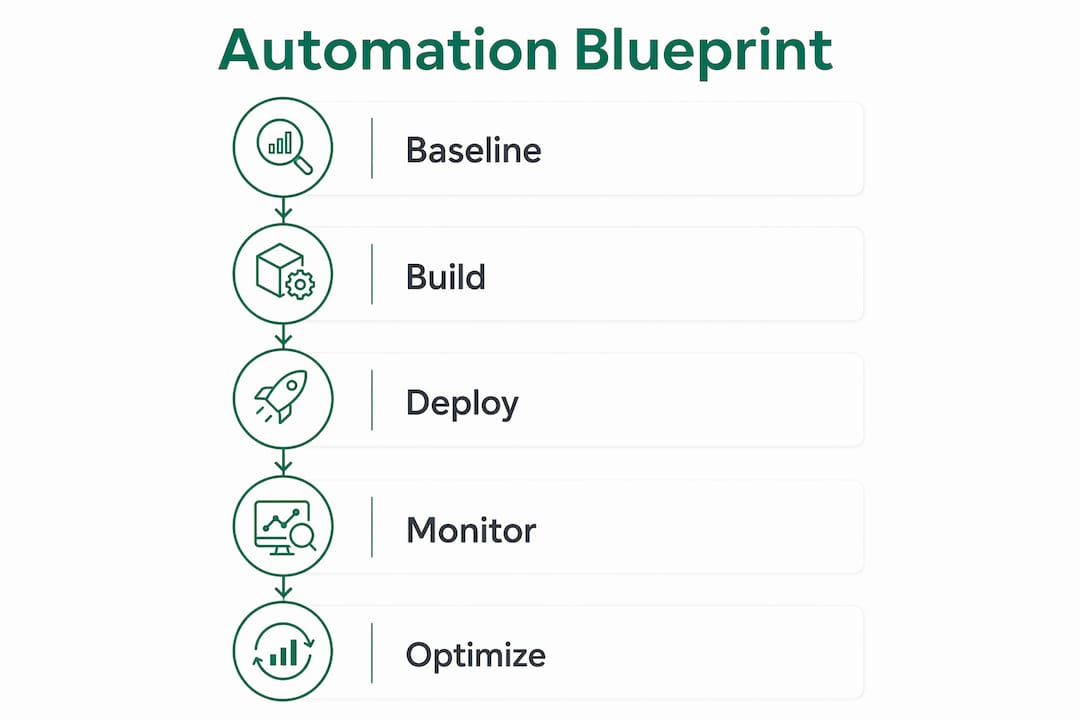
A practical blueprint to build and scale n8n automations that drive Copilot ROI
| Phase | Duration | Key Outputs |
|---|---|---|
| Baseline telemetry | Week 1 | Microsoft Graph report, dormant seat list, utilization heatmap |
| Gap analysis | Week 2 | Prioritized automation backlog, workflow map |
| Build sprint | Weeks 3–6 | 2–3 production n8n workflows, Copilot touchpoints wired |
| Test and validate | Week 7 | Error rate baseline, user acceptance sign-off |
| Secure and deploy | Week 8 | Self-hosted instance live, credential vault, TLS, audit log |
| Measure and optimize | Weeks 9 and beyond | ROI dashboard, monthly optimization cadence |
A staged approach reduces risk: run your proof-of-concept on n8n’s cloud tier, validate the workflow logic and ROI signal, then migrate to self-hosted once patterns are confirmed. This avoids over-investing in infrastructure before you know which automations actually move the needle.
Success metrics to track from day one:
- Active Copilot sessions per licensed seat (Microsoft Graph)
- License utilization rate (active seats / total seats)
- Recoverable billable hours per workflow per week
- Mean time-to-complete for target tasks (pre/post)
- Workflow error and retry rates (n8n execution logs)
For the 2-week sprint scope: implement CRM hygiene and proposal automation together. Both share the same CRM connector and Microsoft Graph credential, so the second workflow costs a fraction of the first to build. Required skills: one n8n workflow builder, Python for lightweight data transforms, and basic DevOps capacity for the self-hosted deployment.
How to architect n8n automations for confidential client data
Self-hosting n8n is the standard choice for law and accounting firms where attorney-client privilege and IRS data confidentiality are non-negotiable. When workflow logic and data processing stay inside your private infrastructure, the compliance review is straightforward.
Secure deployment checklist:
- Self-hosted instance on private cloud or on-premises infrastructure
- Network segmentation isolating n8n from public-facing systems
- Credential vaulting (HashiCorp Vault or Azure Key Vault) for all API keys
- TLS on all internal and external connections
- Automated encrypted backups with tested restore procedures
- Execution logging with tamper-evident audit trail
Governance controls matter as much as the infrastructure. Role-based access limits who can view, edit, or deploy workflows. Version control on workflow definitions (Git-backed) gives you rollback capability and a change history that satisfies most audit requirements. For US-based law and accounting firms, data residency and privilege considerations mean client-sensitive workflow data should never transit third-party cloud automation services without explicit legal review.
Pro Tip: Keep all client-sensitive workflows on your self-hosted n8n instance. Feed only anonymized telemetry (execution counts, timing, error rates) to external analytics clusters. This preserves confidentiality while still giving you the adoption metrics you need.
How to measure adoption and calculate ROI from n8n-driven Copilot automation
The core formula is straightforward. Recoverable billable hours × blended hourly rate = recovered revenue. License ROI = (recovered revenue minus project cost) divided by total Copilot license spend.
Sample calculation for a 100-person consulting firm:
- 60 Copilot seats at a typical monthly cost
- Target: recovered hours per active user weekly across active users
- Blended rate: a representative hourly rate
- Monthly recovered revenue calculated accordingly
- Automation project cost estimated as a one-time investment
- Achieved license ROI multiple demonstrates strong return on investment.
| KPI | Source | Target |
|---|---|---|
| Active Copilot sessions per seat | Microsoft Graph | >15 sessions/month |
| License utilization rate | Microsoft Graph | High license utilization rate |
| Recoverable billable hours | n8n logs + time-tracking | 2+ hours/user/week |
| Task completion time (pre/post) | Time-tracking system | Significant reduction |
| Workflow error rate | n8n execution logs | <2% per workflow |
The ROI of Microsoft Copilot depends almost entirely on whether staff actually use it in their daily workflow. n8n automations that push Copilot into the task flow, rather than leaving it as an optional add-on, are what convert license spend into measurable output.
Should you build n8n and Copilot automations in-house or hire a specialist?
Hire a specialist when:
- You have no internal n8n or Python expertise
- Copilot licenses have been dormant for 60+ days with no clear owner
- Client data confidentiality requires a defensible self-hosting architecture from day one
- You need ROI evidence within a quarter, not a year
- Workflow volume or complexity exceeds what one IT generalist can manage alongside other duties
Build in-house when:
- You have a dedicated automation engineer or a DevOps-capable IT team
- Workflow scope is limited to 3–5 automations with low compliance risk
- You have 3–6 months of runway before ROI pressure becomes acute
- Assess internal capability against the skills checklist: n8n builder, Python, DevOps, Microsoft Graph API familiarity.
- Estimate time-to-value for each path. A specialist engagement typically delivers production workflows in 6–8 weeks. An internal build with a learning curve often runs 4–6 months.
- Calculate the cost of delay. At $150/hour blended rate, every month of dormant Copilot licenses costs real money.
- Scope the engagement model. Fixed-price audit plus sprint, then optional monthly optimization retainer, is the lowest-risk structure for most mid-market firms.
For context on AI automation consulting engagement models and what to expect from a specialist sprint, Gozera’s consulting guide covers typical timelines and deliverables.
Key Takeaways
n8n automation for professional services produces the fastest Copilot ROI when telemetry comes first, self-hosting protects client data, and automations target the 2–3 workflows with the highest daily volume before any firm-wide rollout begins.
| Point | Details |
|---|---|
| Telemetry before automation | Pull Microsoft Graph data first to identify dormant seats and target the right workflow gaps. |
| Self-hosting for compliance | Law and accounting firms should run n8n on private infrastructure to preserve privilege and data residency. |
| Start with 2–3 automations | CRM hygiene and proposal generation deliver visible ROI within two weeks and build internal credibility. |
| Measure recoverable billable time | Track hours recovered per workflow weekly; at a typical $150/hour blended rate, the math justifies the project cost quickly. |
| Gozera for fast, measured outcomes | Gozera delivers telemetry baseline, n8n workflow builds, and an ROI dashboard in a fixed-price 6–8 week sprint. |
What most firms get wrong about n8n and Copilot adoption
The firms that struggle with Copilot adoption almost always share one pattern: they bought the licenses, ran a training session, and waited for usage to climb. It doesn’t. Copilot is not a self-adopting tool. It needs clean data inputs, structured task triggers, and a workflow that puts it in front of staff at the moment they need it, not as a tab they have to remember to open.
The second mistake is treating automation as a point solution rather than an operating system. A single billing handoff workflow is useful. But when CRM hygiene, time-tracking validation, matter updates, and proposal generation all run through the same n8n instance with shared telemetry, you get compounding returns. Each workflow improves the data quality that the next one depends on.
Governance shortcuts kill adoption faster than anything else. Firms that skip credential vaulting, audit logging, and version control on their workflows end up with fragile automations that break silently and erode staff trust. When a workflow fails and nobody knows, staff revert to manual processes and Copilot goes dormant again. Treat automation as a first-class engineering discipline from week one, and the ROI arrives on schedule.
Gozera’s Copilot adoption consulting: measured outcomes in weeks, not quarters
Most firms spending on Copilot licenses are leaving the majority of that investment idle. Gozera’s fixed-price consulting engagements start with a telemetry audit that shows exactly which seats are dormant and why, then move directly into a 6–8 week n8n automation sprint that wires Copilot into your highest-volume daily workflows.

Deliverables include a Microsoft Graph telemetry report, a prioritized automation backlog, production n8n workflow builds with Python transforms where needed, a secure self-hosted deployment option for firms with strict confidentiality requirements, and an ROI dashboard tracking recoverable billable hours from week one. Cale Werake leads every engagement, combining enterprise governance expertise with hands-on AI development so the architecture holds up under compliance review.
Engagements are fixed-price with no open-ended retainer required. Monthly optimization support is available after the sprint for firms that want ongoing workflow tuning and adoption reporting. Book a Copilot adoption audit with Gozera to get your telemetry baseline and automation roadmap within two weeks.
Useful sources and further reading
- n8n for professional services firms — covers self-hosting architecture, confidentiality controls, and deployment patterns for law and accounting firms.
- Self-hosted n8n at scale for client workflows — explains the cost model shift from per-execution to flat infrastructure and the staged POC-to-production migration path.
- Automating consulting business workflows with n8n — step-by-step flows for proposal generation, billing, and project tracking.
- Professional services automation architecture — native API integration patterns and production-grade monitoring requirements.
- Gozera: ROI of Microsoft Copilot for mid-market firms — ties Copilot license economics to recoverable billable time with worked examples.
- Gozera: Copilot workflows for professional services — implementation guidance pairing Copilot with n8n workflow automations.
- Gozera: workflow automation for law firms — sector-specific compliance and ROI considerations for legal practices.
- TaxBowl law firm accounting support — partner resource for automating billing and accounting handoffs at law firms.