
Microsoft 365 Copilot in Word can generate first drafts and build new documents from up to 20 referenced files, emails, or meetings when you give it real context. That’s the whole verdict. Feed it a past proposal, a client email chain, and a meeting transcript, and it produces a structured draft in minutes rather than hours.
For mid-market professional-services firms, the payoff shows up in three places:
- Blank-page acceleration — drafts start from something, not nothing
- Consistent voice — reused language and firm tone carry across documents
- Faster iteration — revisions happen in a conversational back-and-forth instead of a rewrite cycle
The catch: every output is a draft. Copilot does not verify facts, cite sources reliably, or catch compliance gaps. Treat anything it writes as a first pass that needs a human reader before it reaches a client.
Key Takeaways
Copilot for document drafting delivers real time savings only when paired with curated content, prompt discipline, human review gates, and telemetry that proves the ROI.
| Point | Details |
|---|---|
| Ground every draft | Attach up to 20 files, emails, or meetings so Copilot works from real context, not guesswork. |
| Build two libraries | Maintain a prompt library and a sanitized content library to keep outputs on-brand and accurate. |
| Use the RFP Generator agent | Seed proposal drafts from past wins and CRM data instead of starting from a blank template. |
| Never skip human review | Require SME and legal sign-off before any Copilot draft reaches a client, especially in regulated bids. |
| Track telemetry, not hope | Measure sessions, retention, and time-to-first-draft to find dormant licenses and prove billable-time recovery. |
Table of Contents
- How does copilot for document drafting work in daily practice?
- How do you set up prompts and content libraries for better drafts?
- What governance controls prevent bad Copilot outputs from shipping?
- How do you measure Copilot ROI and adoption?
- What does a 6 to 12 week Copilot pilot look like?
- How Gozera turns Copilot pilots into measurable ROI
- Primary Microsoft documentation and training modules
- What the data actually supports about Copilot drafting
- Sources
How does copilot for document drafting work in daily practice?
Copilot doesn’t replace your drafting process. It compresses the part that used to take the longest: getting from a blank page to something workable.
In Word, you can start a document and point Copilot at specific files, emails, or Teams meetings as source material, rather than relying on generic training data. That distinction matters for professional-services work, where the “right” answer usually already exists somewhere in a past deliverable.
Common use cases showing up across law, accounting, consulting, and engineering firms include:
- Drafting a first pass at an RFP response using a similar past proposal as the seed document
- Turning a technical memo into a plain-language executive summary for a client-facing audience
- Rewriting a stiff, jargon-heavy section into something a partner would actually sign off on
- Summarizing a long engagement letter or contract into key terms for internal review
None of this replaces judgment. A senior associate still decides what goes in the proposal, what commitments the firm can actually make, and whether the tone fits the client relationship. Tools covered in Microsoft’s Copilot 101 overview frame this the same way: an assistant embedded in the apps you already use, not a separate system to learn.
How do you set up prompts and content libraries for better drafts?
Copilot’s output quality depends almost entirely on what you feed it. A vague prompt against an empty document produces generic filler. A specific prompt grounded in your firm’s actual content produces something close to usable.
Here’s how to build that foundation:
- Start a prompt library. Collect the phrasings that consistently produce good results for your document types. A prompt like “Draft an executive summary for this technical audit, written for a non-technical board audience, under 300 words” works better on the fifth use than the first, once you’ve refined it.
- Curate a trusted content library. Pull your firm’s strongest past proposals, standard scope templates, and win-theme language into a dedicated SharePoint library. Strip client-specific PII before adding anything, and keep only material that reflects language you’d want reused.
- Deploy the RFP Generator agent template. Microsoft’s RFP Generator agent template in Copilot Studio is built specifically to streamline proposal drafting by reusing past proposals and boilerplate, and it can be extended with connectors to your CRM and SharePoint to pull client-specific data automatically.
- Ground every draft with references. Attach up to 20 files, emails, or meetings when starting a document in Word. The more targeted the source material, the less editing the draft needs afterward.
Pro Tip: Build your content library around your three or four best-performing proposals first, not your entire archive. A tight, high-quality library beats a bloated one that dilutes Copilot’s context with mediocre examples.
Microsoft’s own Draft impactful documents using AI training module covers drafting from multiple sources and using the Writing Coach agent, and it’s a reasonable first assignment for anyone piloting this internally.
What governance controls prevent bad Copilot outputs from shipping?
Hallucination risk is real, and it gets worse in high-stakes documents where a fabricated case citation or an invented compliance clause can cost a firm real credibility. Copilot’s RFP Generator documentation is direct about this: agents perform best with single, focused interactions, uploaded files improve accuracy, and every output still needs human review for accuracy and compliance before it goes out the door.
The access model matters too. Copilot only surfaces content a user already has permission to see, which means your existing SharePoint and Teams permission structure becomes your Copilot governance structure by default. Sloppy permissions upstream turn into sloppy Copilot outputs downstream.
A workable review process looks like this:
- Draft generated by Copilot, flagged clearly as a first pass
- Subject-matter expert reviews for factual accuracy and technical correctness
- Legal or compliance sign-off on any binding language or regulatory claims
- Evidence mapping against RFP requirements before final submission
For government bids or heavily regulated engagements, that review layer needs to be non-negotiable, and some firms benefit from tools built specifically for regulated-industry proposal review on top of whatever Copilot produces.
Pro Tip: Never let a first-time Copilot user submit a client-facing document without a second reviewer for the first 90 days. The habit of trusting the draft too much forms fast, and it’s hard to unlearn.
How do you measure Copilot ROI and adoption?
Most firms buying Copilot licenses have no idea how many sit idle. That’s the gap Gozera exists to close, and it starts with telemetry, not guesswork.
Track these metrics from day one of a pilot:
- Active Copilot sessions per user, per week — a proxy for whether the tool is becoming habitual or getting ignored
- Documents generated versus documents edited and retained — a low retention rate signals bad prompts or a weak content library, not a bad tool
- Time-to-first-draft, measured against your pre-Copilot baseline for the same document type
- User retention over 30, 60, and 90 days — adoption that spikes at launch and fades by week six is the most common failure pattern
Dormant licenses show up fast once you pull this data, and the fix is usually retraining, reallocating the license to a heavier user, or expanding the pilot to a team that’s actually asking for it.
The billing narrative comes next: estimate time saved per document type, multiply by the relevant billable rate, and you have a defensible recovery figure for finance. A practical ROI framework helps structure that conversation before it reaches a partner meeting.
A 90-day checklist keeps this honest: baseline time-to-draft before launch, measure weekly telemetry, survey users at day 30 and day 90, and compare recovered billable hours against license cost.
What does a 6 to 12 week Copilot pilot look like?
A pilot without a defined scope turns into an open-ended experiment nobody can evaluate. Set boundaries before you start.
- Define scope and success metrics. Pick 10 to 20 users, one or two document types (proposals are a strong starting point), and a target like a 20% reduction in time-to-first-draft.
- Prepare the technical foundation. Build the content library, set up connectors for the RFP Generator agent, and confirm SharePoint permissions match who should actually see what.
- Run the pilot and collect data. Track telemetry weekly, run staged SME reviews on every output, and gather qualitative feedback from users at the midpoint.
- Hit the decision gate at week 8 to 10. Scale if the metrics clear your target and users report genuine time savings. Iterate if adoption is inconsistent but the signal is positive. Pause if dormant licenses outnumber active users and retraining hasn’t moved the needle.
Firms that skip the scoping step almost always end up with anecdotal success stories and no real business case. The ones that measure from day one walk into the license renewal conversation with numbers instead of opinions, a distinction covered in more depth in Gozera’s Copilot workflow guide.
How Gozera turns Copilot pilots into measurable ROI
Gozera specializes in exactly the gap most firms hit after rollout: licenses purchased, adoption stalled, and no clear picture of what Copilot is actually doing for the business. The work centers on a few concrete services:
- Adoption audits that measure real usage via telemetry, not vendor dashboards
- Dormant license identification and remediation plans tied to actual user behavior
- Workflow rebuilds that integrate Copilot and the RFP Generator agent into existing proposal and drafting processes
- Automation with Python and n8n to close the gaps Copilot alone can’t handle
- Optimization retainers that keep ROI improving after the initial pilot ends
If your firm has Copilot licenses sitting mostly unused and a proposal team still drafting from scratch, a Copilot adoption audit is the fastest way to find out where the recoverable billable time actually is.
Primary Microsoft documentation and training modules
For product specifics and hands-on setup, these Microsoft resources ground everything covered above:
- Draft and add content with Copilot in Word — core drafting capability and file-referencing limits
- RFP Generator agent template documentation — setup, accuracy notes, and compliance guardrails
- Draft impactful documents using AI training module — structured exercises for pilot participants
- Using Copilot to respond to an RFP — scenario-based workflow guidance
What the data actually supports about Copilot drafting
Most advice on this topic treats Copilot like a magic productivity switch. It isn’t. The firms getting real value are the ones treating it like a junior associate: useful, fast, occasionally wrong, and always in need of a second set of eyes before anything ships.
The conventional wisdom overindexes on prompt tricks and underindexes on the two things that actually move the needle: a curated content library and telemetry that tells you whether anyone is using the tool six weeks after the training session ends. Prompt engineering matters, but it’s a tuning problem. Dormant licenses and unverified content are the ones that cost real money.
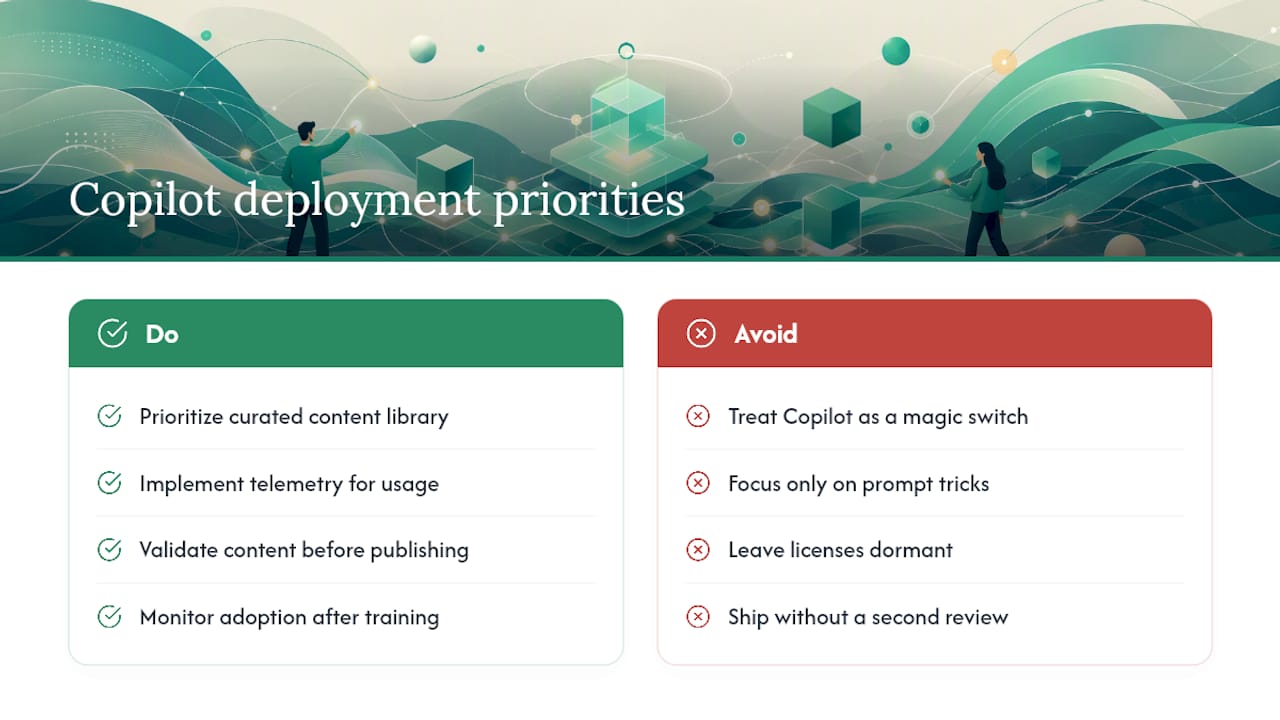
If you’re starting from zero, prioritize the content library and the measurement plan before you touch prompt templates. A firm with a mediocre prompt library and rigorous telemetry will outperform a firm with clever prompts and no idea how many licenses are actually being used. The tool is not the bottleneck. Governance and measurement are.
Sources
- Draft and add content with Copilot in Word | Microsoft Support
- Draft impactful documents using AI – Training | Microsoft Learn