Category: Uncategorized

  • Best AI Automation Tools for Consultants: 2026 Guide

    Best AI Automation Tools for Consultants: 2026 Guide

    What’s the best AI automation tool for consultants optimizing Microsoft 365 Copilot?

    The best AI automation tool for consultants isn’t a single app. It’s a purpose-built combination of workflow automation, telemetry-driven usage measurement, and Copilot-native integration that converts idle licenses into recoverable billable time.

    Consulting team discussing AI automation tools in meeting room

    For mid-market professional services firms, the right platform does three things well: it measures what’s actually happening inside your Microsoft 365 environment, rebuilds the workflows where consultants lose the most time, and automates the gaps with tools like Python and n8n. Firms that use AI this way report higher EBITDA margins than those still running generic AI chatbots alongside disconnected processes.

    Key attributes of the best consultant automation tools:

    • Copilot-native integration with Word, Excel, Outlook, and Teams
    • Telemetry and usage tracking to surface dormant licenses before they drain budget
    • Workflow-specific automation for client prep, proposal follow-up, and deliverable tracking
    • Data grounding so AI outputs are defensible, not generic
    • Measurable ROI reporting tied to billable time and deal closure rates

    Gozera, led by Cale Werake, builds exactly this kind of engagement for law firms, accounting practices, and consulting companies in the 50–500 employee range.


    Table of Contents

    Core features every AI automation tool for consultants must have

    The gap between a useful AI tool and one that actually moves the needle on revenue comes down to whether it was built for consulting workflows or adapted from something else.

    • Automated client meeting prep: Briefing documents that pull project status, open items, and recent communications before every meeting. Client prep automation directly reduces the administrative drag that competes with billable delivery.
    • Deliverable and milestone tracking: Proactive alerts across a full client portfolio, not manual spreadsheet updates.
    • Proposal and SOW drafting: AI that uses your templates, past projects, and client context, not a blank prompt.
    • Pipeline follow-up automation: Systematic outreach to prospects and past clients without pulling consultants away from active engagements.
    • CRM and calendar integration: Tools that connect to the systems you already use, including Microsoft 365, Salesforce, and project management platforms.
    • Document analysis and knowledge management: Grounding AI outputs in firm-specific documents, the way Google’s NotebookLM does, so deliverables hold up under client scrutiny.
    • Multi-agent AI collaboration: Platforms that run multiple models simultaneously and compare outputs produce better consulting frameworks than any single-model tool.

    Purpose-built platforms consistently outperform generic AI assistants for high-volume administrative tasks. The difference shows up in proposal quality, response time, and how much a consultant actually trusts the output.


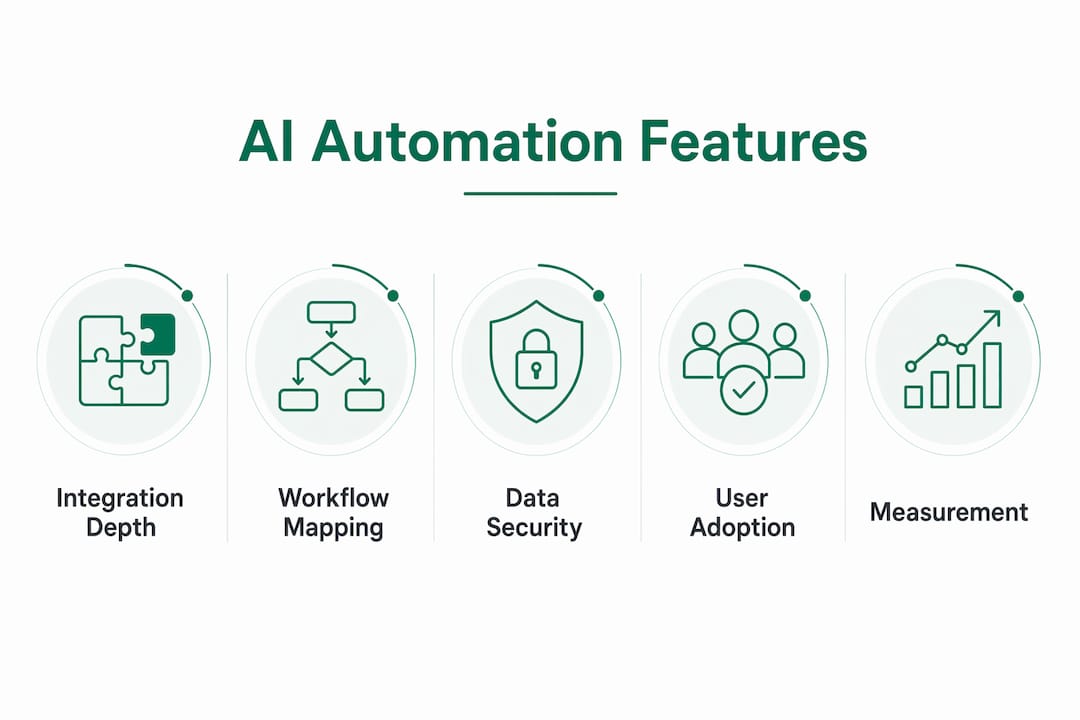
    Infographic showing core AI automation features for consultants

    How AI automation drives Microsoft 365 Copilot adoption and ROI

    Low Copilot adoption is almost always a workflow problem, not a technology problem. Licenses sit idle because the tool was deployed without rebuilding the processes it was meant to support.

    AI automation fixes this by embedding Copilot into the moments where consultants already work. Automated meeting prep triggers Copilot to generate briefing summaries inside Outlook. Proposal workflows push Copilot-drafted SOWs into Word with client-specific context already loaded. Follow-up sequences run through Teams without anyone manually scheduling them.

    The pipeline impact is direct: AI-powered automation lifts closed deal rates from existing pipelines without adding business development headcount. That’s not a marginal efficiency gain. For a 10-partner accounting firm, it means more revenue from the relationships already in the CRM.

    Industry benchmark: Professional services firms successfully using generative AI report significantly higher EBITDA margins than non-users, with the advantage growing as adoption matures.

    The firms closing that gap fastest aren’t buying more tools. They’re rebuilding workflows around the tools they already pay for, then measuring the delta.


    Best practices for implementing AI automation in consulting workflows

    Most failed AI rollouts share one root cause: the automation was layered on top of disorganized data and undefined processes. The technology worked fine. The foundation didn’t.

    Start with operational discipline, not tool selection. Map the five workflows where your consultants lose the most non-billable time. Client meeting prep, proposal formatting, status reporting, pipeline follow-up, and credential management are the usual culprits. Document the current state before touching any AI configuration.

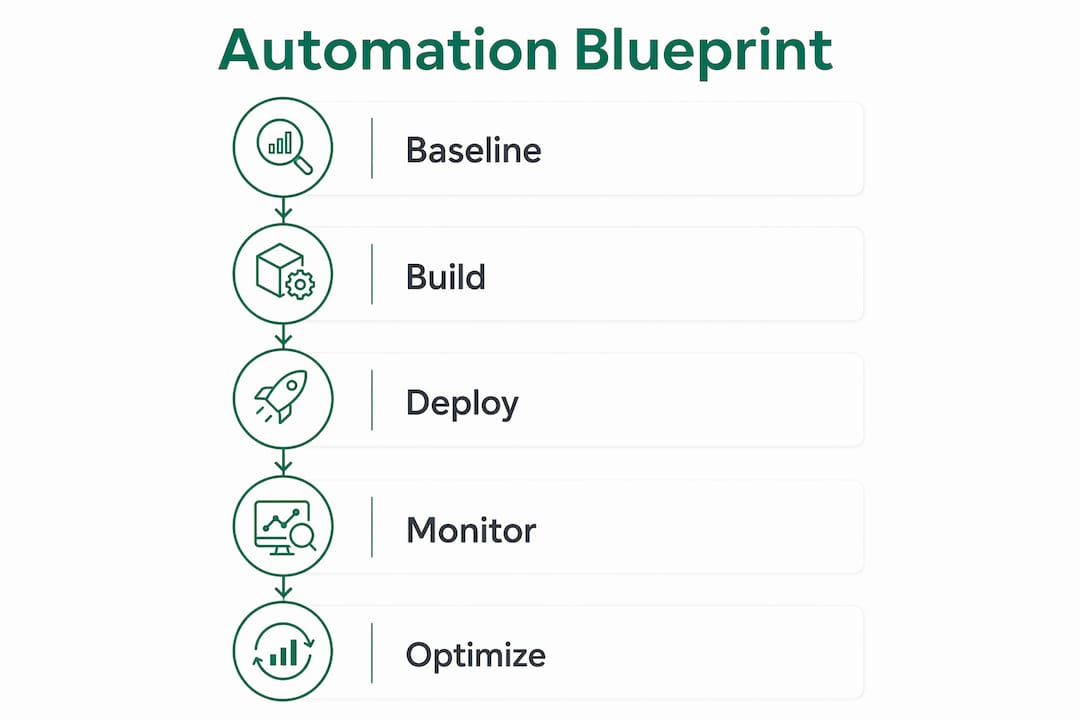
    Baseline measurement comes before optimization. Gozera’s approach uses telemetry to establish actual Copilot usage rates, identify which licenses are dormant, and quantify the time cost of current manual processes. Without that baseline, you’re optimizing blind.

    Pilot on one workflow, prove the ROI, then expand. Pick the highest-volume, most repetitive workflow first. Automate it with n8n or Python, connect it to Copilot, and measure the time recovered over 30 days. That number becomes the internal business case for the next phase.

    Connect your full software stack deliberately. Zapier connects 7,000+ apps and works well for no-code workflow triggers. For more complex consulting automations, n8n gives you the control to handle conditional logic and data transformation that Zapier can’t.

    Pro Tip: Avoid deploying multi-agent AI before your data is clean. Firms that run AI across messy CRM records and inconsistent file structures see no margin improvement. Organize the data first, then let the agents work.


    How to measure and prove ROI from AI automation in your firm

    Measurement is where most firms drop the ball. They deploy the tools, feel like things are faster, and never quantify it. That makes it impossible to justify the next investment or hold vendors accountable.

    The metrics that matter for mid-market professional services:

    Metric What to track Why it matters
    Copilot license utilization Active users vs. total licenses Identifies wasted spend immediately
    Billable time recovered Hours per consultant per week Directly ties automation to revenue
    Proposal turnaround time Days from brief to sent SOW Measures delivery efficiency
    Pipeline follow-up rate % of prospects contacted on schedule Connects automation to deal flow
    Closed deal rate New engagements from existing pipeline Quantifies revenue impact
    EBITDA margin trend Quarter-over-quarter change Confirms firm-level financial impact

    Gozera uses telemetry pulled directly from the Microsoft 365 environment to populate these metrics. Dormant licenses show up in the first audit. Billable time recovery becomes visible within the first sprint. The ROI report isn’t a projection; it’s a measurement.

    Benchmark: Firms that adopt AI with structured workflows show significantly higher EBITDA margins than those using AI ad hoc, with the advantage compounding over time.

    Ongoing optimization matters as much as the initial deployment. Monthly telemetry reviews catch adoption drift before it becomes a budget problem.


    Common challenges in AI adoption and why operational discipline decides the outcome

    The most common failure pattern: a firm buys Copilot licenses, sends a training email, and waits for productivity to improve. It doesn’t. Six months later, a large share of licenses remain unused and the IT director is fielding questions about ROI.

    The real obstacles are structural:

    • Unorganized data: AI grounded in inconsistent CRM records, scattered SharePoint folders, and duplicate client files produces unreliable outputs. Consultants stop trusting it fast.
    • Generic AI without firm context: ChatGPT and similar tools handle broad tasks well. They don’t know your engagement methodology, your client history, or your billing structure. Outputs require heavy editing, which erodes the time savings.
    • Incomplete process mapping: Automating a broken process makes it break faster. Firms that skip workflow documentation before AI deployment create new problems at machine speed.
    • Analysis paralysis from single-model outputs: One AI model’s recommendation carries one perspective. Multi-agent platforms that compare outputs from multiple models give consultants something to validate, not just accept.

    The firms that succeed build standardized client workflows first, then use AI to enhance those workflows rather than replace undefined ones. That sequencing is the difference between a productivity gain and a failed rollout.


    How to choose the right AI automation tool for your consulting firm

    Not every tool belongs in every firm’s stack. The right selection criteria depend on your size, your existing systems, and where you lose the most time.

    Integration depth with Microsoft 365 is non-negotiable for firms already in the ecosystem. A tool that requires exporting data out of Teams or Outlook to function adds friction instead of removing it.

    Specificity to consulting workflows matters more than feature count. A platform built for professional services understands the difference between a CV and a project credential, between a proposal and a status report. Generic tools don’t.

    Pricing model fit: Most tools offer tiered pricing based on users or features. For firms with 50–500 employees, per-user costs compound quickly. Calculate total cost of ownership including implementation and training, not just the monthly license fee.

    Vendor accountability: Fixed-price engagements with defined deliverables protect you better than open-ended retainers. Gozera structures its work as audits, integration sprints, and monthly optimization retainers, each with measurable outcomes attached.

    Data security and governance: Enterprise-grade tools should meet SOC 2 Type II standards at minimum. For law firms and accounting practices handling client confidential data, this isn’t optional.


    Comparing AI automation approaches for Microsoft 365 Copilot in mid-market firms

    The market breaks into three broad categories, each suited to a different maturity level:

    General-purpose AI assistants (ChatGPT, Claude, Perplexity) handle research, drafting, and brainstorming well. They’re the right starting point for individual consultants building AI habits. They don’t integrate with your Microsoft 365 environment, don’t track usage, and don’t automate workflows.

    Workflow automation platforms (Zapier, n8n) connect your existing tools and automate repetitive processes. Zapier’s no-code interface works for straightforward triggers. n8n handles complex conditional logic and data transformation that consulting workflows often require. Neither replaces a Copilot adoption strategy.

    Copilot-native consulting engagements like Gozera’s approach go further. They measure actual usage via telemetry, rebuild the workflows where Copilot delivers the most value, automate the remaining gaps with Python and n8n, and report ROI against a documented baseline. That’s a different category from a software subscription.

    For mid-market professional services, the firms seeing the strongest results combine a Copilot-native foundation with targeted workflow automation, not a stack of disconnected tools.


    Integration considerations for your existing consulting software ecosystem

    Copilot works best when it’s connected to the systems consultants actually use, not deployed as a standalone feature.

    The highest-value integrations for professional services firms:

    • CRM (Salesforce, HubSpot, Microsoft Dynamics): Copilot-generated meeting summaries and follow-up drafts should flow directly into client records without manual copying.
    • Project management (Asana, Monday.com, Microsoft Project): Deliverable tracking and milestone alerts connect to Copilot’s task automation inside Teams.
    • Document management (SharePoint, OneDrive): Grounding Copilot in firm-specific documents requires clean folder structures and consistent naming conventions. This is where most firms need to do cleanup work before deployment.
    • Meeting intelligence (Fathom, Granola, Otter.ai): Transcription tools that feed structured notes into Copilot workflows reduce post-meeting admin from 20 minutes to under five.

    The workflow automation examples that deliver the fastest ROI are almost always the ones that eliminate a manual handoff between two systems the firm already pays for.


    What successful AI automation implementations look like in consulting firms

    The pattern across successful deployments is consistent: start narrow, measure everything, expand deliberately.

    A mid-market accounting firm identified proposal drafting and client status reporting as its two highest-friction workflows. Both consumed significant non-billable time weekly across the team. After a Gozera audit revealed low Copilot license utilization, the engagement rebuilt both workflows with Copilot integration and n8n automation. Proposal turnaround dropped. Status reports became automated. Billable capacity increased without adding headcount.

    A consulting firm in the legal services space faced a different problem: pipeline follow-up was inconsistent because delivery work always took priority. Automated follow-up sequences connected to the CRM changed that. Past clients received systematic outreach. Closed deal rates from the existing pipeline improved.

    Neither outcome required a lengthy change management program. Both required clean data, documented workflows, and a structured implementation approach. The benefits of workflow automation compound when the foundation is right.


    Cost considerations and pricing models for AI automation tools

    The cost structure for AI automation in consulting spans a wide range, and the cheapest option rarely delivers the best ROI.

    General AI assistants (ChatGPT Plus, Claude Pro, Perplexity) run $20/month per user. Low barrier to entry, but no Copilot integration and no workflow automation.

    Microsoft 365 Copilot is priced per user per month. For a 100-person firm, the annual cost before implementation work is substantial. Licenses sitting idle at low utilization represent significant annual waste.

    Workflow automation platforms like Zapier start free and scale with usage. n8n is open-source with self-hosted options, which matters for firms with data governance requirements.

    Consulting engagements for Copilot adoption optimization are typically fixed-price. Gozera structures work as discrete phases: an adoption audit, an integration sprint, and an ongoing monthly optimization retainer. Each phase has defined deliverables and measurable outcomes, so you know what you’re buying before the engagement starts.

    The right question isn’t “what does the tool cost?” It’s “what does unused Copilot capacity cost us every month?” For most mid-market firms, that number is larger than the cost of fixing it.


    Gozera turns idle Copilot licenses into measurable firm revenue

    Most firms already own the tool that could recover significant billable capacity. The problem is that Microsoft 365 Copilot was deployed without rebuilding the workflows around it, and now the licenses sit idle while the monthly invoice keeps coming.

    Gozera

    Gozera works specifically with mid-market law firms, accounting practices, and consulting companies to fix that. The process starts with a telemetry-based audit that shows exactly which licenses are dormant, which workflows are costing the most non-billable time, and where Copilot integration would deliver the fastest return. From there, Gozera rebuilds those workflows, automates the gaps with Python and n8n, and delivers ROI reporting tied to real usage data, not projections.

    No lengthy change management. No open-ended retainer with vague deliverables. Fixed-price engagements with measurable outcomes at every phase. If you’re responsible for Copilot ROI at your firm and the numbers aren’t where they should be, book a Copilot adoption audit with Gozera to see exactly where the value is being left on the table.


    Key Takeaways

    Firms that treat Copilot adoption as a workflow problem, not a training problem, recover measurable billable capacity and see significantly higher EBITDA margin improvements that compound over time.

    Point Details
    Idle licenses are a workflow problem Copilot adoption fails when workflows aren’t rebuilt around the tool before deployment.
    Telemetry reveals the real picture Usage data identifies dormant licenses and quantifies the cost of inaction before any optimization begins.
    Operational discipline precedes AI gains Firms layering AI on disorganized data see no margin improvement; clean data and documented processes come first.
    Pipeline automation lifts revenue without headcount AI-driven follow-up and proposal automation increases closed deal rates from existing pipelines.
    Gozera delivers fixed-price Copilot ROI Gozera audits usage, rebuilds workflows, and automates gaps with Python and n8n for measurable outcomes at each phase.
  • Top Microsoft 365 Workflow Tools for Professional Services

    Top Microsoft 365 Workflow Tools for Professional Services

    For mid-market professional services firms, the top Microsoft 365 workflow tools in 2026 are Microsoft Power Automate, FlowForma, Nintex, and Gozera consulting services. Power Automate leads the pack because it ships inside Microsoft 365 E3 and E5 licenses, offers a large number of prebuilt connectors, and now integrates directly with Copilot for natural-language flow creation. The others fill specific gaps: FlowForma for no-code SharePoint-native processes, Nintex for document-heavy workflows, and Gozera for firms that need someone to wire it all together and demonstrate the ROI.

    Here is the short version before we go deep:

    • Microsoft Power Automate: Native M365 integration, included in E3/E5, AI-assisted flow building, desktop RPA for legacy apps.
    • FlowForma: No-code process automation built entirely inside SharePoint, Teams, and Outlook; used by over 300,000 users globally.
    • Nintex: Strong document generation, dynamic forms, and broad enterprise app integrations via Microsoft AppSource.
    • Gozera: Fixed-price consulting that measures actual Copilot usage via telemetry, rebuilds high-value workflows, and delivers clear ROI reporting for law, accounting, consulting, and engineering firms.

    Table of Contents

    How do these tools compare across the criteria that matter?

    The table below maps each option against the seven factors that most directly affect a mid-market professional services firm’s decision.

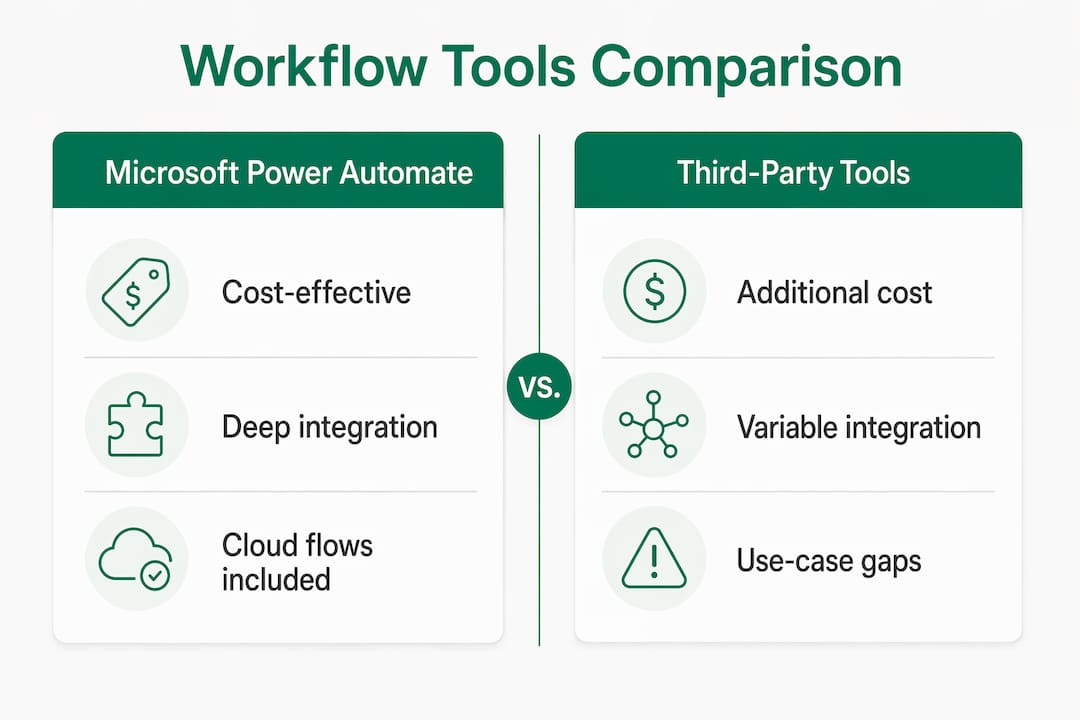
    Comparison infographic of Microsoft workflow tools versus third-party options

    Criterion Power Automate FlowForma Nintex Gozera
    M365 integration depth Native, deepest Native (SharePoint/Teams/Outlook) Strong via connectors Configures all three
    Ease of use for citizen developers Low-code, moderate learning curve No-code, drag-and-drop Low-code, moderate Guided enablement
    Workflow template availability 1,400+ connectors, many templates Built-in process templates Rich document/form templates Custom-built to firm needs
    Mid-market professional services fit High High (niche processes) High (document-heavy) Purpose-built
    License cost implications Included in E3/E5 (cloud flows) Separate subscription Separate subscription Fixed-price engagements
    Governance and security Enterprise-grade, built-in Full audit trail, tenant-native Strong compliance controls Governance-first design
    Adoption and ROI measurement Process mining + Copilot analytics Usage reporting Basic analytics Telemetry-driven ROI reporting

    Strengths and limitations at a glance:

    • Power Automate: Best total cost of ownership for firms already on M365; premium connectors and desktop RPA require add-on licensing.
    • FlowForma: Fastest time-to-value for SharePoint-centric teams; less suited for complex cross-system orchestration outside M365.
    • Nintex: Excels at document generation and dynamic forms; separate licensing adds cost that can duplicate what Power Automate already covers.
    • Gozera: Not a software platform but a consulting layer that sits above all three, measuring what is actually used and rebuilding what is not working.

    Many firms waste budget on third-party tools when included Power Automate cloud flows already cover the use case. Consolidating first, then adding specialized tools only where the gap is real, consistently reduces both cost and governance complexity.


    Governance and adoption: what actually prevents workflow automation from sticking

    The most common failure mode in mid-market firms is not a bad tool choice. It is deploying automation without a governance structure, then watching shadow automations multiply until no one knows what runs where or who owns it.

    IT-led governance does not mean IT builds everything. The citizen developer model works well when business users build within guardrails that IT sets: approved connector lists, naming conventions, environment segmentation, and mandatory DLP policies. Without those guardrails, you get license sprawl, compliance gaps, and automations that break silently.

    For professional services firms specifically, audit trails are non-negotiable. Client data flowing through an unmonitored automation is a liability, not an efficiency gain. Both FlowForma and Power Automate support full process audit logs; the difference is that FlowForma’s data never leaves your Microsoft 365 tenant by design.

    Governance priorities for mid-market professional services:

    • Segment Power Automate environments by department or sensitivity level.
    • Enforce DLP policies that block sensitive data connectors for non-IT-approved flows.
    • Run quarterly license reviews to identify dormant flows and reassign or retire them.
    • Require all production automations to be registered in a central flow inventory.
    • Use process mining before building, not after, to confirm you are automating a real bottleneck.

    Pro Tip: Centralized telemetry is the fastest way to kill license sprawl. Pull Power Platform admin center usage data monthly and flag any license that has not triggered a flow in 60 days. Reassigning those licenses funds new automation capacity without any additional spend.


    How to measure workflow effectiveness and ROI with Microsoft 365 Copilot

    Measurement is where most firms fall short. They deploy automations, feel good about it, and never quantify what changed. That approach makes it impossible to justify the next round of investment or identify which workflows deserve more attention.

    Power Automate’s process mining capabilities give you a data-driven map of where work actually slows down, not where people think it does. Pair that with Copilot’s usage analytics and you can see which staff are engaging with AI-assisted flows and which are bypassing them entirely.

    Cineplex saved over 30,000 hours annually by deploying Power Automate and generative AI workflows across finance and guest services, with more than 100 employees building AI-driven solutions. Bo Wang, Vice President of Taxation & Treasury at Cineplex, noted: “Microsoft Power Automate continues to enhance our automation efforts. Its generative AI capabilities and integration with other Power Platform products like Microsoft Copilot Studio really set Power Automate apart from competing solutions.”

    For professional services firms, the most meaningful ROI metrics are hours recovered per billable role, error rates on document-heavy processes, and time-to-completion on client deliverables. A law firm that cuts contract review prep from four hours to forty minutes has a number it can take to the managing partner. That is the kind of ROI that funds the next phase.

    Methods for aligning automation outcomes to business goals:

    • Establish a pre-automation baseline for each targeted process (time, error rate, handoff count).
    • Set a 90-day review cycle to compare post-automation metrics against the baseline.
    • Track Copilot license utilization via telemetry to identify dormant seats and redirect them.
    • Map automation savings to billable time recovered, not just hours saved in the abstract.
    • Use Power Automate’s built-in analytics dashboard to monitor flow run success rates weekly.

    Practical strategies for integrating workflow automation with Microsoft 365 Copilot

    The highest-ROI architecture for mid-market professional services firms combines Copilot as the reasoning layer with Power Automate handling the structured execution. Copilot interprets unstructured inputs, such as a client email or a contract clause, and triggers the appropriate Power Automate flow. The flow then routes data, generates documents, or updates records without anyone touching a keyboard.

    Team discussing workflow automation strategies

    Natural language flow creation in Copilot Studio cuts build time significantly. A non-developer can describe a process in plain English and Copilot Studio drafts the flow, which an IT reviewer then approves and deploys. That model keeps governance intact while accelerating delivery.

    For firms with legacy desktop applications, hybrid automation architectures combining cloud flows with desktop RPA extend automation reach without requiring a full system replacement. An accounting firm running a 15-year-old billing platform can still automate data entry into it via Power Automate Desktop.

    Implementation stages that consistently work:

    • Discovery (weeks 1–2): Process mining to identify the top five automation candidates by time impact.
    • Integration sprint (weeks 3–6): Build and test the highest-priority flows with IT governance review.
    • Copilot enablement (weeks 7–8): Connect Copilot to approved flows; train staff on natural language triggers.
    • Optimization cycle (ongoing): Monthly telemetry review, flow performance analysis, license reallocation.

    Pro Tip: Orchestration beats isolated automation every time. A single Copilot-triggered flow that spans three departments delivers more measurable ROI than ten disconnected automations each owned by a different team. Design for the handoff, not just the task.

    For firms evaluating Power Automate alternatives before committing, the key question is always the same: does the alternative justify its separate licensing cost given what Power Automate already covers in your existing M365 subscription?


    Key Takeaways

    Microsoft Power Automate, included in Microsoft 365 E3 and E5 licenses, is the lowest-cost and deepest-integrated workflow automation platform for mid-market professional services firms, with FlowForma and Nintex filling specific niche gaps.

    Point Details
    Power Automate leads on cost and integration Cloud flows are included in M365 E3/E5; adding premium connectors or desktop RPA requires add-on licensing only when needed.
    Governance prevents shadow IT Segment environments, enforce DLP policies, and maintain a central flow inventory before scaling citizen developer programs.
    Measure ROI with telemetry and process mining Track hours recovered per billable role and Copilot license utilization monthly to justify and direct further investment.
    Copilot plus Power Automate is the highest-ROI architecture Use Copilot as the reasoning layer for unstructured inputs and Power Automate for structured execution and routing.
    Gozera accelerates adoption with fixed-price consulting Gozera measures actual Copilot usage via telemetry, rebuilds dormant workflows, and delivers ROI reporting for law, accounting, and consulting firms.

    Why the “just deploy it” approach to Copilot keeps failing

    The consulting industry has spent two years telling professional services firms to adopt Microsoft 365 Copilot. Most firms did. Then the licenses sat idle.

    The problem is not the technology. Power Automate is genuinely capable. Copilot’s natural language flow creation in Copilot Studio is a real productivity accelerator. FlowForma’s no-code model removes the developer bottleneck for SharePoint-heavy teams. The tools work. What does not work is deploying them without measuring what changes, without rebuilding the workflows that feed them, and without anyone accountable for the adoption curve.

    Mid-market professional services firms, specifically law, accounting, and consulting practices, have a structural advantage here: their work is process-dense and billable-time-driven. Every hour recovered by automation has a dollar value that is easy to calculate. That makes the ROI case straightforward, if someone actually measures it.

    The firms seeing the most measurable gains from Copilot workflows in professional services are not the ones with the most sophisticated tech stacks. They are the ones with someone who runs the telemetry, identifies the dormant licenses, and rebuilds the three workflows that actually matter for billable output. That is a consulting problem as much as a technology problem.


    Gozera turns idle Copilot licenses into measurable billable time

    Most mid-market firms already own the tools described in this article. The gap is not access to Power Automate or Copilot. It is knowing which licenses are dormant, which workflows are broken, and which automations would recover the most billable hours if rebuilt correctly.

    Gozera

    Gozera works exclusively with professional services firms in law, accounting, consulting, and engineering. Every engagement starts with a telemetry audit that shows exactly which Copilot licenses are being used and which are not. From there, Gozera runs fixed-price integration sprints to rebuild the workflows that matter, automates gaps using Python and n8n where Power Automate falls short, and delivers ROI reporting that managing partners can take to a budget meeting. No lengthy change management programs. No vague productivity promises. If you want to know what your Microsoft 365 investment is actually returning, start with a Copilot ROI audit from Gozera.

  • Copilot Adoption Services: Your 2026 Practical Guide

    Copilot Adoption Services: Your 2026 Practical Guide

    Effective copilot adoption services are not a one-time software rollout. They are a structured, multi-phase program that moves your firm from idle licenses to measurable productivity gains. The core pillars are strategy alignment, data and security readiness, role-based enablement, and metrics-driven optimization. Most mid-market professional services firms, whether law, accounting, or consulting, can expect to see measurable time savings within a scoped pilot period, with organization-wide adoption achievable within a few months when governance and training are in place. Microsoft 365 Copilot is not a feature you toggle on. It requires real organizational change to deliver real returns.

    Key pillars of a successful program:

    • Strategy alignment: Define business outcomes before touching a license.
    • Data and security readiness: Remediate SharePoint permissions and apply sensitivity labels before rollout.
    • Role-based enablement: Train by workflow, not by feature list.
    • Metrics-driven optimization: Track cycle-time reduction and decision latency, not just logins.
    • Ongoing governance: Weekly rhythms and license telemetry sustain momentum past the pilot.

    How to build your Copilot adoption strategy and prepare your organization

    The most common reason Copilot deployments stall is not technical. It is that no one defined what success looks like before the licenses were assigned. Start by tying your adoption goals directly to business priorities: reducing document review time at a law firm, cutting month-end close cycles at an accounting practice, or accelerating proposal drafts at a consulting firm. Vague goals produce vague results.

    A readiness assessment covers three areas: licensing inventory, data governance, and compliance posture — ensuring standards are met just as detailed in UK audit readiness check services before key tool rollouts. On the governance side, Copilot surfaces data based on whatever permissions a user already holds in SharePoint and Microsoft 365. If those permissions are too broad, Copilot will expose content that should stay siloed. Remediate SharePoint permissions, apply Microsoft Purview sensitivity labels, and verify compliance policies before a single user touches the tool.

    Leadership alignment is the other half of preparation. Stakeholders who understand the “why” behind Copilot adoption are far more likely to free up time for training and champion programs. Define your pilot scope early: pick two or three roles where Copilot has the clearest workflow fit, and start there rather than deploying firm-wide on day one.

    • Conduct a licensing audit to identify assigned versus active seats.
    • Map data access risks using Microsoft Purview before rollout.
    • Select pilot cohorts by role and workflow impact, not seniority.
    • Brief leadership on expected timelines and success metrics upfront.
    • Document a governance policy covering acceptable Copilot use cases.

    Pro Tip: Applying governance guardrails early, such as sensitivity labels and permission audits, accelerates adoption by creating a trusted AI environment. Teams adopt tools faster when they trust the data boundaries.

    How to train users and drive real engagement with Microsoft 365 Copilot

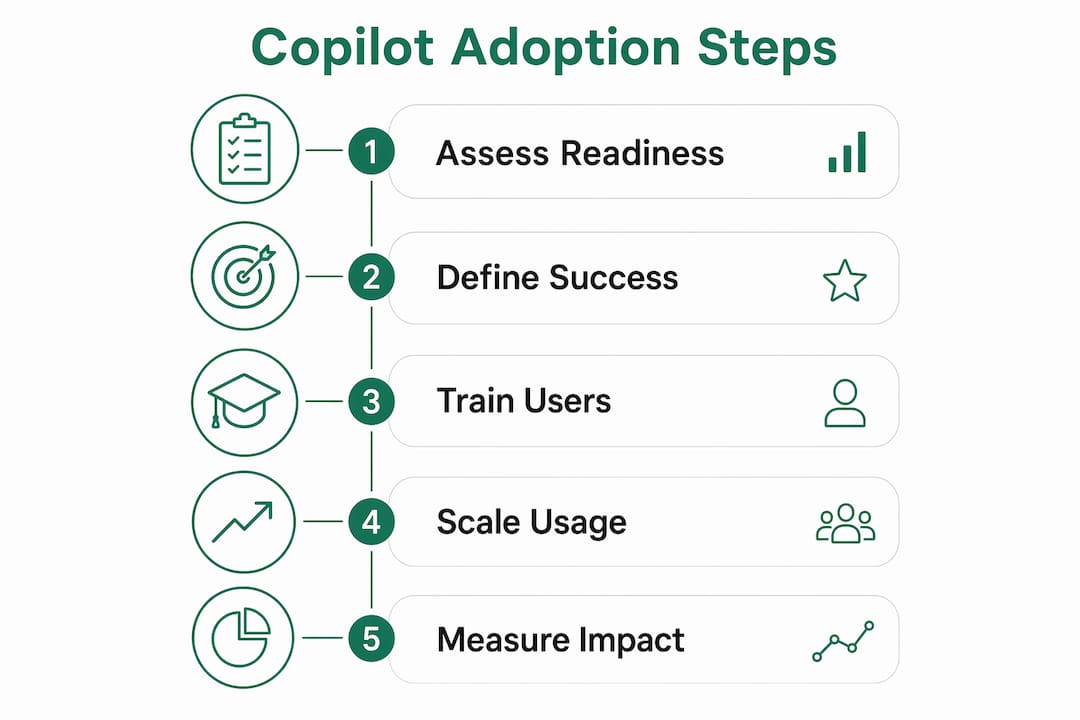
    Infographic showing five key steps for Copilot adoption

    Generic training sessions are where Copilot adoption goes to die. A one-hour overview covering every feature across every role teaches nobody anything useful. What works is role-specific, scenario-based training that shows a paralegal exactly how to use Copilot in Teams meeting summaries, or shows an audit associate how to draft client-ready summaries from lengthy documents. The difference in confidence and daily usage is immediate.

    User training on Microsoft 365 Copilot

    Champion programs are the multiplier. Identify three to five early adopters per department who get deeper training and become internal advocates. They answer peer questions, surface friction points, and give your IT team real feedback before you scale. Live enablement clinics, held weekly or biweekly, reinforce skills far better than recorded videos that nobody watches twice.

    Change management for AI adoption has one rule that differs from standard software rollouts: you are not just teaching a new tool, you are asking people to rethink how they work. Communications should lead with quick wins, not feature announcements. Show a before-and-after on a task the team already finds tedious, and adoption follows.

    • Run role-specific training sessions tied to actual daily tasks.
    • Appoint champions per department for peer-led advocacy.
    • Hold live clinics on a regular cadence, not just at launch.
    • Use internal communications to highlight quick wins, not product updates.
    • Collect feedback from pilot users weekly and act on it visibly.

    “Successful Copilot adoption is more about changing employee work habits via role-based training than primarily technical implementations. Organizations that invest in people-first enablement see sustained usage; those that treat it as an IT deployment see licenses go dark within weeks.” — Digital adoption specialist insights

    One accounting firm that restructured its month-end close workflow around Copilot in Teams and Word reported that senior associates reclaimed hours previously spent on meeting recaps and first-draft memos. The Copilot coaching approach that drove that result was built around two specific tasks, not a broad feature tour. That focus is what made it stick.

    How to scale adoption, measure impact, and embed Copilot into daily work

    Moving from pilot to full rollout is where most firms either accelerate or stall. The transition requires a phased licensing scale-up tied to demonstrated usage in the pilot cohort, not a calendar date. If your pilot group is actively using Copilot in three or more workflows, that is your signal to expand. If usage is concentrated in one feature, fix the training gap before adding seats.

    Hands using adoption metrics dashboard in IT center

    Success metrics need to move beyond “active users” and into business outcomes. Value metrics worth tracking include cycle-time reduction on document drafts, reduction in meeting follow-up time, and the number of manual process steps replaced by Copilot-assisted automation. Decision latency, meaning how long it takes a team to move from information gathering to a decision, is one of the clearest indicators that Copilot is actually changing how work gets done.

    Telemetry is your ground truth. Microsoft Graph data lets you see usage at the feature level, not just whether someone opened Copilot once this month. That granularity matters because it tells you which workflows are sticky and which ones need a clinic. Automated license reclamation workflows can then pull back seats from users who have not engaged in 30 days, redirecting spend to teams with higher demand.

    • Phase licensing expansion based on pilot usage data, not deployment schedules.
    • Track outcome metrics: draft cycle time, meeting recap time, manual steps eliminated.
    • Use Microsoft Graph telemetry to monitor feature-level engagement.
    • Automate license reclamation for dormant seats to control spend.
    • Integrate Copilot into existing tools like SharePoint, Teams, and Outlook by workflow, not feature.
    • Review Copilot ROI metrics quarterly with leadership to maintain executive support.

    Statistic callout: Firms that apply telemetry-driven license management with automated reclamation workflows consistently report materially better ROI compared to those managing licenses manually, because dormant seats are identified and reassigned before they become sunk costs.

    Common challenges in Copilot adoption and how to solve them

    1. Data readiness misconceptions

    Most firms assume their Microsoft 365 environment is Copilot-ready. It rarely is. Overly permissive SharePoint access means Copilot can surface confidential files to users who should not see them. The fix is a structured data readiness audit that remediates permissions and applies sensitivity labels before any user gets access.

    2. License mismanagement and dormant seats

    Licenses assigned at rollout often go unused within weeks when training does not follow. Advanced practitioners use Microsoft Graph telemetry to identify active, low-usage, and dormant licenses, then reclaim idle seats automatically. Firms that skip this step pay for capacity that generates no return.

    3. User hesitation and low engagement

    Hesitation is almost always a training problem, not a technology problem. Users who cannot see how Copilot fits their specific job will not use it. Role-based clinics that address real tasks, like drafting a client memo or summarizing a deposition transcript, convert skeptics faster than any feature demonstration.

    4. Shadow AI creating compliance blind spots

    Shadow AI tools running alongside Microsoft 365 Copilot create governance gaps that IT teams often do not discover until an incident occurs. A governed Copilot deployment with clear acceptable-use policies reduces the incentive for teams to reach for unmanaged alternatives.

    5. Stalled momentum after the pilot

    Pilots succeed; full rollouts stall. The reason is almost always the absence of a sustained adoption rhythm. Weekly enablement sessions, monthly usage reports, and quarterly leadership updates, as part of a structured ongoing adoption cadence, keep Copilot visible and valued beyond the launch window.

    6. Measuring the wrong things

    Tracking logins and seat activation tells you nothing about value. Firms that shift to outcome metrics, such as reduced escalations, faster document turnaround, and fewer manual handoffs, build the business case for continued investment. That case is what secures budget for the next phase.

    Pro Tip: Establish a governed weekly adoption rhythm combining enablement clinics, usage reporting, and a champion check-in. A consistent cadence embeds Copilot into work habits far more effectively than any single training event.

    Key Takeaways

    Sustainable Microsoft 365 Copilot adoption requires combining data governance, role-based training, and telemetry-driven optimization before and after rollout.

    Point Details
    Governance before rollout Remediate SharePoint permissions and apply sensitivity labels before any user accesses Copilot.
    Role-based training wins Scenario-specific training tied to real job tasks drives daily usage far better than general feature overviews.
    Pilot to scale transition Expand licensing based on demonstrated pilot usage data, not calendar milestones.
    Outcome metrics over logins Track cycle-time reduction, decision latency, and manual steps eliminated, not just active user counts.
    Sustained adoption rhythm Weekly clinics, monthly reports, and quarterly leadership reviews keep adoption from stalling post-launch.

    https://gozera.ai

    Gozera works with mid-market law firms, accounting practices, and consulting firms across the US to turn idle Copilot licenses into measurable productivity gains. The approach combines telemetry-based license audits, workflow-specific enablement, and Python and n8n automation to close the gaps that generic rollouts leave open. If your firm is carrying licenses that are not earning their keep, Copilot ROI consulting from Gozera delivers a clear picture of where value is being lost and a fixed-price path to recovering it.

  • Microsoft 365 Copilot Alternatives for Professional Services

    Microsoft 365 Copilot Alternatives for Professional Services

    What are the top Microsoft 365 Copilot alternatives for mid-market firms?

    The strongest Microsoft 365 Copilot alternatives for mid-market professional services firms are Claude, Google Gemini, and ChatGPT Team. Each wins a specific use case, and the right pick depends almost entirely on where your firm’s data and workflows already live.

    Before comparing them, one distinction matters: Microsoft Copilot (the free consumer tool) and Microsoft 365 Copilot (the enterprise add-on) are different products. The enterprise version costs a per user monthly fee on top of an existing Microsoft 365 license and connects to your organizational data through Microsoft Graph. That distinction shapes every cost and ROI comparison below.

    Here is where each alternative wins:

    • Claude: Best for long-document work. It handles roughly 500 pages of text in a single conversation, which makes it the go-to for contract review, audit packs, and compliance documents. Microsoft 365 Copilot cannot match that depth on lengthy files.
    • Google Gemini: Best for Google Workspace shops. It lives natively inside Gmail, Docs, Sheets, and Drive, and is bundled into Workspace Business tiers at no extra per-seat cost in many configurations. Switching to Microsoft 365 just to run Copilot rarely makes financial sense for these firms.
    • ChatGPT Team: Best for cross-platform flexibility. At roughly $20–$30 per user per month without requiring an M365 license, it suits firms that span multiple ecosystems or want a capable general assistant without the full Microsoft stack.
    • Microsoft 365 Copilot: Still the strongest choice for firms already living in Outlook, Word, Excel, and Teams. The in-app integration and agentic AI workflows via Microsoft Graph are unmatched for M365-native knowledge workers.

    Security posture differs meaningfully across these tools. Microsoft 365 Copilot stays within your M365 tenant and honors existing Purview compliance controls. ChatGPT Team and Claude Team exclude your data from model training. Gemini follows Google Workspace data terms. For law firms and accounting practices with strict data governance requirements, that distinction drives the decision as much as features do.

    Table of Contents

    How do Microsoft 365 Copilot and its alternatives compare?

    The decision between Copilot and its competitors comes down to ecosystem fit, cost structure, and the type of work your teams actually do. A firm where attorneys spend their day in Word and Outlook gets a fundamentally different ROI than one where consultants bounce between Google Docs, Slack, and browser-based tools.

    Colleagues discussing software alternatives at table

    Tool Best For Ecosystem Integration Context Window Cost (per user/month) Workflow Fit ROI Impact
    Microsoft 365 Copilot M365-native knowledge workers Deep: Outlook, Word, Excel, Teams, SharePoint Active file + Graph search ~$30 add-on (M365 license required) Native in-app; no context switching High for M365-heavy users; low if licenses sit idle
    Zera.ai Firms needing Copilot adoption and ROI optimization Microsoft 365 consulting layer; Python and n8n automation Telemetry-driven; no fixed window Fixed-price engagements Rebuilds workflows around Copilot; closes automation gaps Measurable ROI via billable time recovery
    Claude Long documents, contracts, audit packs Connectors to M365, Slack, Drive roughly 500 pages roughly $25–$30 per user per month Browser-based; manual context switching High for document-heavy regulated work
    Google Gemini Google Workspace organizations Native: Gmail, Docs, Sheets, Drive, Meet Standard LLM context Bundled in Workspace Business tiers In-app for Google stack; friction for M365 files High for Workspace-native teams; low migration cost
    ChatGPT Team Cross-platform, general-purpose AI Platform-agnostic; connectors for SharePoint, Drive, GitHub Strong general reasoning ~$20–$30 (no M365 required) Browser-based; requires connectors for deep integration Good general ROI; manual context switching offsets savings

    Infographic comparing Microsoft 365 Copilot and alternatives

    One cost trap deserves attention. Switching to a less expensive alternative can look attractive on a per-seat basis, but manual context switching between systems erodes the productivity gains that justified the AI investment in the first place. A paralegal who copies text from Claude into a Word document to finish a brief has not saved time. That friction is the hidden cost most license comparisons ignore.

    For firms evaluating Microsoft 365 Copilot license options, the total all-in cost for a Business Standard seat runs closer to $42 per user per month once the base plan is included.

    How do you maximize adoption and ROI with Copilot and its alternatives?

    Most adoption failures trace back to one root cause: the AI has nothing useful to work with. Disorganized SharePoint libraries, untagged documents, and inconsistent naming conventions produce poor AI output regardless of which tool you deploy. Treating internal data cleanup as part of the AI rollout, not as a separate IT maintenance task, is the single highest-leverage preparation step.

    Beyond data hygiene, these practices move the needle for mid-market professional services firms:

    • Measure actual usage first. Telemetry data reveals which licenses are dormant and which workflows are generating real productivity gains. Without a baseline, you cannot know whether your investment is working.
    • Rebuild workflows around the AI, not the other way around. Embedding Copilot into the apps your teams already use, Outlook for email triage, Word for document drafting, Excel for financial analysis, eliminates the context switching that kills ROI. Read more on Copilot workflow design for professional services.
    • Close automation gaps with complementary tools. Python scripting and n8n automation handle tasks that Copilot cannot, such as pulling data from external systems or triggering multi-step processes across platforms.
    • Train for specific tasks, not general AI use. A 30-minute session showing a billing associate exactly how to use Copilot to draft a client update from meeting notes lands better than a broad “AI literacy” program.
    • Tag and organize SharePoint libraries before go-live. Copilot’s Microsoft Graph grounding only works well when the underlying content is findable. Poor tagging means the AI returns generic answers instead of firm-specific ones.

    Pro Tip: The biggest ROI gap between Microsoft 365 Copilot and query-response alternatives like Claude or ChatGPT Team is “Agentic Work.” Copilot can autonomously traverse Microsoft Graph, pulling context from your emails, meetings, and documents to generate outputs without you manually feeding it information. That capability, described in Microsoft’s adoption guidance, is what separates a productivity multiplier from a slightly faster search box.

    For a deeper look at measuring Copilot ROI, the key metrics are recovered billable hours, reduction in time spent on routine drafting and summarization, and license utilization rate. Firms that track all three can make a defensible business case for continued investment, or identify which licenses to reallocate.

    Understanding Microsoft 365 team collaboration benefits also helps frame the ROI conversation with managing partners who want outcomes, not feature lists.

    How does Zera.ai help firms get real ROI from Microsoft 365 Copilot?

    Most mid-market firms that buy Microsoft 365 Copilot licenses see a familiar pattern: initial enthusiasm, a few power users who love it, and a large portion of seats that go untouched within 60 days. Gozera’s consulting practice exists specifically to fix that.

    Gozera uses telemetry-driven audits to identify exactly which licenses are dormant and why. From there, the team rebuilds workflows with Copilot embedded at the points where it recovers the most billable time, whether that is contract summarization for a law firm, financial report drafting for an accounting practice, or proposal generation for a consulting team. Automation gaps that Copilot cannot fill natively get closed with Python and n8n integrations.

    What firms can expect from a Gozera engagement:

    • A usage audit that shows actual Copilot activity versus licensed seats, with a clear picture of where money is being wasted
    • Workflow rebuilds targeting the highest-value tasks in your specific practice area
    • Automation of repetitive processes that currently require manual data movement between systems
    • ROI reporting tied to recovered billable time, not vanity metrics
    • Ongoing optimization retainers that adjust as Microsoft releases new Copilot capabilities

    Gozera’s fixed-price engagement model means no open-ended consulting bills. Led by Cale Werake, whose background spans enterprise governance and hands-on AI development, the firm brings a level of technical depth that most generalist IT consultants cannot match for professional services workflows. For firms committed to Microsoft 365 as their primary platform, Gozera is the partner that turns a licensing cost into a measurable productivity asset.

    Key Takeaways

    The right Microsoft 365 Copilot alternative depends on where your firm’s data lives, not on which AI model scores highest on benchmarks.

    Point Details
    Ecosystem fit drives the decision Choose Copilot for M365-native workflows, Gemini for Google Workspace, Claude for long documents, and ChatGPT Team for cross-platform flexibility.
    Hidden costs erode savings Manual context switching between browser-based AI and M365 apps offsets per-seat cost savings from cheaper alternatives.
    Data hygiene is a prerequisite Disorganized SharePoint libraries reduce AI output quality for any tool; clean and tag content before deployment.
    Measure usage before optimizing Telemetry audits reveal dormant licenses and identify which workflows are generating real productivity gains.
    Gozera for Copilot ROI Gozera’s fixed-price consulting audits license utilization, rebuilds workflows, and closes automation gaps to recover billable time for mid-market professional services firms.

    Gozera turns idle Copilot licenses into billable productivity

    If you have already bought Microsoft 365 Copilot licenses and are not seeing the returns you expected, the problem is almost never the tool. It is the gap between what Copilot can do and how your workflows are actually set up to use it.

    Gozera

    Gozera works with law firms, accounting practices, and consulting teams to close that gap fast. A telemetry audit shows exactly which licenses are sitting idle. Workflow rebuilds embed Copilot where it recovers the most billable time. Python and n8n automation handle the gaps Copilot cannot fill natively. The result is a defensible ROI number, not a slide deck about AI potential.

    Fixed-price engagements mean you know the cost upfront. No lengthy change management programs, no open-ended retainers until you see results. If your firm is ready to turn a licensing expense into a measurable productivity gain, book a Copilot ROI audit with Gozera today.

  • Microsoft 365 Automation with Python: 2026 Production Guide

    Microsoft 365 Automation with Python: 2026 Production Guide

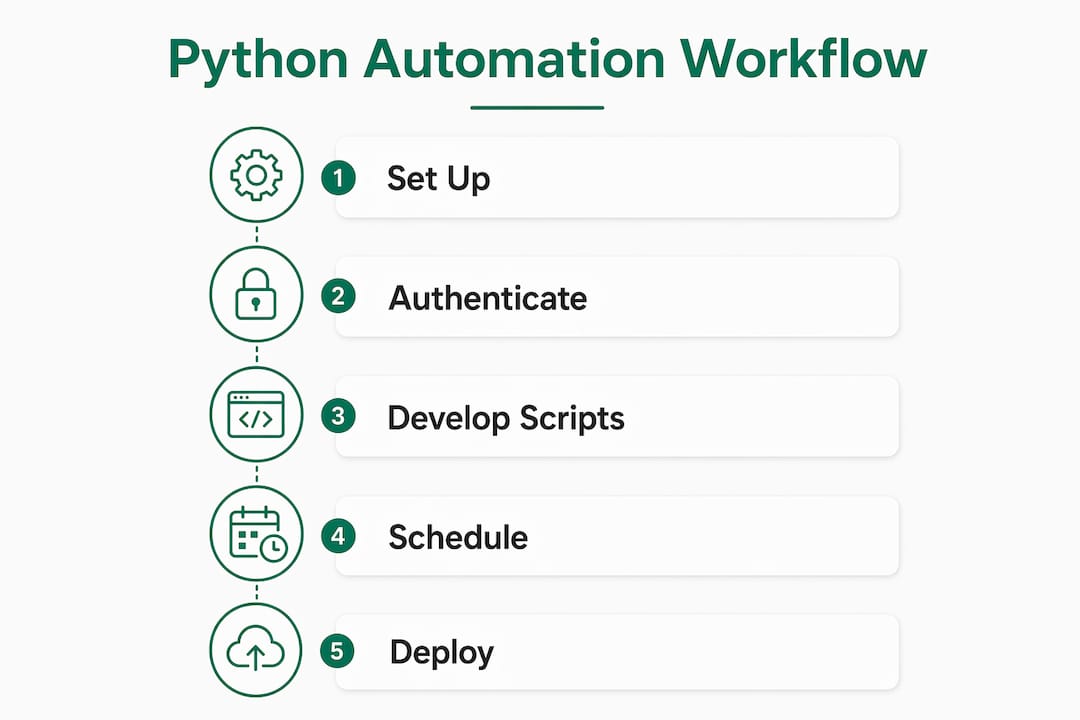
    Python is the most practical tool available for automating Microsoft 365 at scale. Using the Microsoft Graph SDK for Python, the Office365-REST-Python-Client library, and the Azure Connectors Python SDK, you can automate virtually every Microsoft 365 service your firm runs: Outlook mail, Calendar, SharePoint, OneDrive, and Teams. Authentication runs through OAuth2 managed by MSAL (Microsoft Authentication Library) for Python, which handles token acquisition and refresh without custom wrappers. The result is production-grade automation that IT teams at law firms, accounting practices, and consulting companies can deploy and maintain without constant intervention.

    Here is what you can automate with these tools:

    • Outlook email: send, read, filter, and manage messages and attachments programmatically
    • Calendar: create, update, and delete events; manage attendees and recurring appointments
    • SharePoint Online: upload, download, and manage files, lists, and site permissions
    • OneDrive: sync files, move folders, and trigger file-based workflows
    • Teams: post channel messages, create teams, and manage memberships
    • Task scheduling: run scripts on cron, APScheduler, or Azure Automation runbooks
    • Advanced Graph REST calls: paginate large datasets, handle complex resources, and build custom integrations

    How to set up your Microsoft 365 environment for Python automation

    Infographic showing Python automation workflow steps

    Before writing a single line of automation code, you need a registered app in Microsoft Entra (formerly Azure AD) and a properly configured Python environment.

    App registration in Microsoft Entra

    1. Sign in to the Microsoft Entra admin center and navigate to App registrations.
    2. Select New registration, give the app a name (e.g., M365-Python-Automation), and choose the appropriate account type for your tenant.
    3. On the Overview page, copy the Application (client) ID and Directory (tenant) ID.
    4. Under Certificates & secrets, create a new client secret and copy the value immediately. It will not be shown again.
    5. Under API permissions, add the Microsoft Graph permissions your scripts need (e.g., Mail.ReadWrite, Calendars.ReadWrite, Files.ReadWrite.All, Sites.ReadWrite.All).
    6. Grant admin consent for the permissions you added.

    Python environment prerequisites

    • Python 3.8 or higher (Python 3.10 recommended for Azure Automation runbooks)
    • pip for package management
    • Core libraries:
    pip install msgraph-sdk azure-identity msal Office365-REST-Python-Client requests
    

    Secure credential storage

    Never hardcode credentials in scripts. Store your client_id, tenant_id, and client_secret in environment variables or a .env file loaded with python-dotenv, and add that file to .gitignore immediately.

    import os
    CLIENT_ID = os.environ["AZURE_CLIENT_ID"]
    TENANT_ID = os.environ["AZURE_TENANT_ID"]
    CLIENT_SECRET = os.environ["AZURE_CLIENT_SECRET"]
    

    Secure credential management is not optional in production. Hardcoded secrets in source code are the leading cause of credential leaks in enterprise automation projects. Use environment variables, Azure Key Vault references, or managed identities for every deployment.

    Pro Tip: For Azure Automation runbooks, skip client secrets entirely and use managed identities instead. Microsoft’s own tutorials recommend this approach because it eliminates secret rotation overhead and ties authentication directly to the Azure resource.


    How to connect to Microsoft 365 APIs and authenticate with Python

    Authentication is where most Microsoft 365 automation projects break down in production. The fix is straightforward: use MSAL for Python and never build a custom OAuth2 flow.

    MSAL token acquisition for app-only access

    import msal
    
    authority = f"https://login.microsoftonline.com/{TENANT_ID}"
    app = msal.ConfidentialClientApplication(
        client_id=CLIENT_ID,
        client_credential=CLIENT_SECRET,
        authority=authority
    )
    
    token_response = app.acquire_token_for_client(
        scopes=["https://graph.microsoft.com/.default"]
    )
    access_token = token_response["access_token"]
    

    This is app-only authentication, which runs without a signed-in user. It is the right choice for unattended automation scripts. For workflows that act on behalf of a specific user, use delegated permissions with the device code flow instead.

    Token lifecycle management

    Refresh tokens expire after 90 days without re-authentication. In unattended automation, that means a script that worked in january can silently fail in april. MSAL’s built-in token cache handles refresh automatically when you serialize and persist the cache between runs.

    All Microsoft 365 API authentication must use OAuth2 managed with MSAL. Basic authentication was deprecated by Microsoft, and any script still relying on username/password auth will fail in production environments.

    Best practices for token management:

    • Use msal.SerializableTokenCache and persist it to disk or Azure Key Vault between script runs
    • Never log or print access tokens
    • Scope requests to the minimum permissions required (least-privilege principle)
    • For Azure-hosted scripts, prefer managed identities over client secrets

    Pro Tip: The Azure Connectors Python SDK has built-in authentication via ManagedIdentityTokenProvider and DefaultAzureCredential, which means you skip the MSAL setup entirely for Azure-hosted scripts. It is the fastest path to production for teams running automation inside Azure Functions or Automation Accounts.


    How to automate Outlook email with Python

    The two primary libraries for Python automation with Outlook are the Microsoft Graph SDK (msgraph-sdk) and the Office365-REST-Python-Client. Both work well; the Graph SDK is the more modern choice for new projects.

    Sending email with the Graph SDK

    from msgraph import GraphServiceClient
    from msgraph.generated.users.item.send_mail.send_mail_post_request_body import SendMailPostRequestBody
    from msgraph.generated.models.message import Message
    from msgraph.generated.models.item_body import ItemBody
    from msgraph.generated.models.recipient import Recipient
    from msgraph.generated.models.email_address import EmailAddress
    from azure.identity import ClientSecretCredential
    
    credential = ClientSecretCredential(TENANT_ID, CLIENT_ID, CLIENT_SECRET)
    client = GraphServiceClient(credential)
    
    message = Message()
    message.subject = "Automated Report"
    message.body = ItemBody()
    message.body.content = "Your weekly summary is attached."
    recipient = Recipient()
    recipient.email_address = EmailAddress()
    recipient.email_address.address = "partner@yourfirm.com"
    message.to_recipients = [recipient]
    
    request_body = SendMailPostRequestBody()
    request_body.message = message
    await client.users.by_user_id("me").send_mail.post(request_body)
    

    Reading the inbox and managing messages

    messages = await client.users.by_user_id("me").mail_folders.by_mail_folder_id("inbox").messages.get()
    for msg in messages.value:
        print(msg.subject, msg.received_date_time)
    

    To mark a message as read, patch the is_read property. To move it to a folder, use the move action with the target folder ID.

    Key email automation scenarios for professional services firms

    • Auto-forwarding client intake emails to matter management systems
    • Sending scheduled billing reminders with PDF attachments
    • Parsing incoming invoices and routing them to the right approver
    • Archiving emails by client matter number into SharePoint folders

    Pro Tip: Microsoft Graph enforces API throttling on mail endpoints. If you are processing large volumes, add exponential backoff on HTTP 429 responses. The Graph SDK surfaces these as ODataError exceptions, so wrap your calls in a try/except block and retry after the Retry-After header value.


    How to automate Microsoft 365 Calendar with Python

    Calendar automation is one of the highest-ROI use cases for professional services firms. Scheduling client meetings, sending reminders, and syncing appointments with billing systems are all achievable with a few dozen lines of Python.

    Hands typing Python code for calendar automation

    Creating a calendar event

    from msgraph.generated.models.event import Event
    from msgraph.generated.models.date_time_time_zone import DateTimeTimeZone
    from msgraph.generated.models.attendee import Attendee
    
    event = Event()
    event.subject = "Quarterly Review"
    event.start = DateTimeTimeZone()
    event.start.date_time = "2026-03-15T10:00:00"
    event.start.time_zone = "America/New_York"
    event.end = DateTimeTimeZone()
    event.end.date_time = "2026-03-15T11:00:00"
    event.end.time_zone = "America/New_York"
    
    attendee = Attendee()
    attendee.email_address = EmailAddress()
    attendee.email_address.address = "client@example.com"
    event.attendees = [attendee]
    
    await client.users.by_user_id("me").events.post(event)
    

    Best practices for time zone and date handling

    • Always specify time_zone explicitly. Omitting it defaults to UTC, which causes meeting time mismatches for US-based attendees.
    • Store and compare datetimes as UTC internally; convert to local time only at the display layer.
    • For recurring events, set the recurrence property using PatternedRecurrence with the appropriate RecurrencePattern type (weekly, monthly, etc.).

    Common calendar automation use cases

    • Auto-scheduling follow-up calls after a contract is signed
    • Blocking time for recurring compliance deadlines (tax filings, audit windows)
    • Syncing court dates or deposition schedules from external case management systems
    • Sending calendar invites when a new client matter is opened

    Pro Tip: When updating an existing event, retrieve the event’s id first and use a PATCH request rather than deleting and recreating it. This preserves the original invite thread and avoids confusing attendees with duplicate notifications.


    How to schedule tasks and trigger workflows with Python

    Python scripts do not run themselves. You need a scheduler or a trigger mechanism, and the right choice depends on where your script lives.

    Local and server-based scheduling

    For scripts running on a Windows or Linux server, the two most common options are:

    • APScheduler: a Python library that supports cron-style, interval, and date-based triggers with a clean API
    • OS cron jobs (Linux) or Windows Task Scheduler: reliable for simple, time-based execution without additional dependencies
    from apscheduler.schedulers.blocking import BlockingScheduler
    
    scheduler = BlockingScheduler()
    
    @scheduler.scheduled_job('cron', hour=8, minute=0)
    def morning_report():
        # your Graph API calls here
        pass
    
    scheduler.start()
    

    Azure-hosted scheduling

    For production deployments, Azure Automation runbooks are the right tool. You write a Python script, upload it as a runbook, attach a schedule, and Azure handles execution. Runbooks use managed identities for authentication, which removes the need for stored secrets entirely.

    Power Automate Cloud does not execute Python natively. Python scripts in Power Automate Cloud require hosting in an Azure Automation Account or as an Azure Function with an HTTP trigger. The Power Automate flow calls the Azure Function URL, passes data as JSON, and the Python function returns a result. This hybrid pattern is the standard approach for combining event-driven orchestration with Python business logic.

    Pro Tip: For failure recovery, configure Azure Automation runbooks with retry settings and alert rules in Azure Monitor. A runbook that fails silently is worse than no automation at all.


    How to use Microsoft Graph REST APIs directly in Python

    Sometimes the SDKs do not expose a specific endpoint, or you need fine-grained control over the request. Direct REST calls with the requests library fill that gap.

    Making a raw Graph API call

    import requests
    
    headers = {
        "Authorization": f"Bearer {access_token}",
        "Content-Type": "application/json"
    }
    
    response = requests.get(
        "https://graph.microsoft.com/v1.0/me/messages",
        headers=headers,
        params={"$top": 50, "$select": "subject,receivedDateTime,from"}
    )
    response.raise_for_status()
    data = response.json()
    

    Handling pagination

    Microsoft Graph returns paginated results for large collections. Check for @odata.nextLink in the response and loop until it is absent:

    url = "https://graph.microsoft.com/v1.0/me/messages"
    while url:
        response = requests.get(url, headers=headers)
        data = response.json()
        for message in data.get("value", []):
            process(message)
        url = data.get("@odata.nextLink")
    

    Error handling and retry strategy

    import time
    
    def graph_get(url, headers, max_retries=3):
        for attempt in range(max_retries):
            response = requests.get(url, headers=headers)
            if response.status_code == 429:
                retry_after = int(response.headers.get("Retry-After", 10))
                time.sleep(retry_after)
            elif response.status_code >= 500:
                time.sleep(2 ** attempt)
            else:
                response.raise_for_status()
                return response.json()
        raise Exception("Max retries exceeded")
    

    Advanced scenarios that require direct REST calls:

    • Querying Microsoft Search API for cross-service content discovery
    • Accessing beta-endpoint features not yet in the stable SDK
    • Batch requests using the $batch endpoint to reduce API call volume
    • Custom delta queries for incremental sync of large mailboxes or drives

    Pro Tip: Use aiohttp instead of requests when you need concurrent API calls. Fetching 50 mailboxes sequentially with requests takes seconds; fetching them concurrently with asyncio and aiohttp takes a fraction of that time.


    Production-ready patterns and best practices for Microsoft 365 Python automation

    The teams that get Microsoft 365 Python automation into production fastest share one habit: they offload authentication complexity to managed SDKs rather than building their own OAuth2 flows. IT teams that avoid custom OAuth2 wrappers and rely on established SDKs report faster, more stable deployments with fewer API connection bugs.

    The Azure Connectors Python SDK takes this further with a connector-first, async-native design. It provides type-safe, async-first Python clients with built-in authentication, configurable retry policies, and exponential backoff out of the box. For teams building automation inside Azure Functions, it is the cleanest path available.

    Core production patterns:

    • Least-privilege permissions: request only the Graph scopes your script actually uses. Broad permissions like Mail.ReadWrite.All on a script that only sends mail are a security liability.
    • Centralized logging: write structured logs (JSON format) to Azure Monitor or Application Insights so failures are traceable without SSH access to a server.
    • Idempotent operations: design scripts so re-running them after a failure does not create duplicate emails, events, or files.
    • Secret rotation: rotate client secrets on a schedule and use Azure Key Vault references in runbooks to avoid hardcoded expiry surprises.
    • Hybrid architecture: use Power Automate for event triggers and Azure-hosted Python for the business logic. Power Automate handles the “when” and Python handles the “what.”

    For mid-market professional services firms, the Copilot workflows guide from Gozera covers how these Python automation patterns integrate with Microsoft 365 Copilot to recover billable time at scale.

    Pro Tip: Start with the Azure Connectors Python SDK’s Office365Client for new projects. The managed identity token provider and built-in retry logic eliminate two of the three most common production failure modes before you write a single business logic line.


    How to automate SharePoint Online with Python

    The Office365-REST-Python-Client library gives you two distinct clients for SharePoint: ClientContext for the SharePoint REST API v1 (lists, files, site admin, permissions) and GraphClient for Microsoft Graph-based SharePoint access. Use ClientContext when you need full SharePoint fidelity.

    Uploading a file to SharePoint

    from office365.sharepoint.client_context import ClientContext
    
    ctx = ClientContext("https://yourtenant.sharepoint.com/sites/YourSite").with_client_secret(
        client_id=CLIENT_ID,
        client_secret=CLIENT_SECRET,
        tenant=TENANT_ID
    )
    
    with open("report.pdf", "rb") as f:
        file_content = f.read()
    
    target_folder = ctx.web.get_folder_by_server_relative_url("/sites/YourSite/Shared Documents")
    target_folder.upload_file("report.pdf", file_content).execute_query()
    print("File uploaded.")
    

    Reading a SharePoint list

    list_obj = ctx.web.lists.get_by_title("Client Matters")
    items = list_obj.items.get().execute_query()
    for item in items:
        print(item.properties.get("Title"), item.properties.get("Status"))
    

    Common SharePoint automation scenarios for professional services include auto-archiving completed matter folders, syncing client data from an external CRM into a SharePoint list, and enforcing document naming conventions on upload. For law firms managing document-heavy workflows, automating SharePoint document routing can cut manual filing time significantly.


    How to automate OneDrive file operations with Python

    OneDrive automation through Microsoft Graph uses the drives endpoint. The GraphClient from Office365-REST-Python-Client or the msgraph-sdk both work well here.

    Programmer working on OneDrive file automation scripting

    Listing files in a OneDrive folder

    drive_items = await client.users.by_user_id("me").drive.root.children.get()
    for item in drive_items.value:
        print(item.name, item.size)
    

    Uploading a file to OneDrive

    file_path = "/Documents/invoice.pdf"
    with open("invoice.pdf", "rb") as f:
        content = f.read()
    
    await client.users.by_user_id("me").drive.root.item_with_path("Documents/invoice.pdf").content.put(content)
    

    For files larger than 4 MB, use the upload session API, which splits the file into chunks and handles resumable uploads. This is the correct approach for automating document delivery in accounting or legal workflows where PDF exports regularly exceed that threshold. Firms using finance automation integrations alongside Microsoft 365 often connect OneDrive file triggers to downstream processing pipelines using this pattern.


    How to automate Microsoft Teams with Python

    Teams automation via Microsoft Graph covers channel messaging, team creation, and membership management. The GraphClient handles all of it.

    Posting a message to a Teams channel

    from office365.graph_client import GraphClient
    import msal
    
    def acquire_token():
        authority = f"https://login.microsoftonline.com/{TENANT_ID}"
        app = msal.ConfidentialClientApplication(CLIENT_ID, CLIENT_SECRET, authority=authority)
        return app.acquire_token_for_client(["https://graph.microsoft.com/.default"])
    
    client = GraphClient(acquire_token)
    
    team_id = "your-team-id"
    channel_id = "your-channel-id"
    
    client.teams[team_id].channels[channel_id].messages.add(
        subject="Automated Alert",
        body="The nightly reconciliation completed with 0 errors."
    ).execute_query()
    

    Common Teams automation scenarios

    • Posting daily status updates from a Python monitoring script to a DevOps channel
    • Creating a new Team automatically when a client matter is opened in your practice management system
    • Adding or removing members from a Team when staff join or leave a project
    • Sending approval request messages with Adaptive Cards via the Graph API

    For law firms and accounting practices, Teams automation pairs naturally with bookkeeping workflow automation to notify the right people the moment a document is ready for review, without anyone manually checking a queue.


    Key Takeaways

    Production Microsoft 365 automation with Python requires three things working together: proper app registration in Microsoft Entra, MSAL-managed OAuth2 authentication, and the right SDK for each service.

    Point Details
    Use established SDKs Microsoft Graph SDK and Office365-REST-Python-Client eliminate custom OAuth2 complexity and reduce connection bugs.
    Refresh tokens expire MSAL refresh tokens expire after 90 days; persist the token cache to prevent silent automation failures.
    Azure hosts Python for Power Automate Power Automate Cloud requires Azure Automation or Azure Functions to execute Python scripts.
    Least-privilege permissions Request only the Graph API scopes each script needs; broad permissions increase security exposure.
    Hybrid architecture wins Combine Power Automate event triggers with Azure-hosted Python logic for production-grade, event-driven workflows.

    If your firm is running Microsoft 365 Copilot licenses alongside Python automation and not seeing measurable ROI, Gozera can help. Gozera’s consulting practice measures actual Copilot usage via telemetry, identifies dormant licenses, and rebuilds workflows with Python and n8n to generate recoverable billable time. Visit Gozera to see how mid-market professional services firms turn idle licenses into documented productivity gains.

    https://gozera.ai

  • Automate Billable Hour Recovery: AI Tools for Law Firms

    Automate Billable Hour Recovery: AI Tools for Law Firms

    Most law firms lose a significant portion of billable hours every year, not because attorneys work less, but because manual time reconstruction is structurally broken. The fix is to automate billable hour recovery using AI tools that capture activity from email, calendar, documents, and calls, then surface approval-ready entries in under 10 minutes a day. Six platforms lead this space in 2025–2026: Clio Duo, MagicTime by Lawgro, SmartTime by BigHand, PointOne, Billables.ai, and Laurel. Each takes a different approach to capture, integration, and workflow, so the right choice depends on firm size, existing tech stack, and billing complexity.

    Tool Best For Key Features Integration Pricing Model User-Friendliness Support
    Clio Duo Clio Manage users AI time capture, one-click approval, matter coding Native Clio Manage Subscription (tiered) High Email, chat, phone
    MagicTime by Lawgro Solo and small firms Passive calendar/email capture, narrative generation Clio, Google, Outlook Subscription High Email, chat
    SmartTime by BigHand Mid-market firms Human-in-the-loop review, AI-assisted reconstruction BigHand suite, PMS Subscription (enterprise) Moderate Dedicated CSM
    PointOne Multi-app environments Cross-platform activity capture, document tracking Broad API integrations Subscription Moderate Email, documentation
    Billables.ai Mid-sized law and consulting Real-time tracking, AI analytics, reporting dashboard Practice management APIs Subscription High Email, chat
    Laurel Compliance-heavy firms Deep customization, client billing rules, compliance Enterprise integrations Subscription (custom) Moderate Dedicated support

    The accuracy gains are real. Firms using activity-based AI capture typically recover that 10–25% leakage within the first month of deployment, and daily review drops from 60 minutes of manual reconstruction to roughly 10 minutes of approvals. The sections below break down how each tool works, what to look for, and how to integrate AI capture with the systems your firm already runs.

    Which AI time tracking tools do law firms use most?

    The six leading platforms each occupy a distinct position in the market, and understanding where they differ saves you from a costly mismatch.

    Clio Duo is the natural choice for firms already running Clio Manage. It monitors calendar events, completed tasks, client communications, and documents created or edited within matters, then feeds suggestions into a unified approval queue. The one-click approval posts directly to Clio time entries with matter codes, activity codes, and billing rates already applied. No CSV imports, no manual configuration.

    Two professionals discussing AI time tracking tools

    MagicTime by Lawgro targets solo practitioners and small firms that want passive capture without a heavy IT lift. It pulls from calendar and email activity, generates professional billing narratives automatically, and learns from approval patterns over time. The setup is light, and the daily workflow asks for almost nothing from the attorney.

    SmartTime by BigHand takes a more structured approach suited to mid-market firms with complex billing requirements. Its human-in-the-loop design means AI reconstructs time entries and flags them for attorney review rather than auto-posting, which preserves accuracy on matters with nuanced coding requirements. BigHand’s broader suite handles dictation and workflow, so SmartTime fits naturally into firms already using that ecosystem.
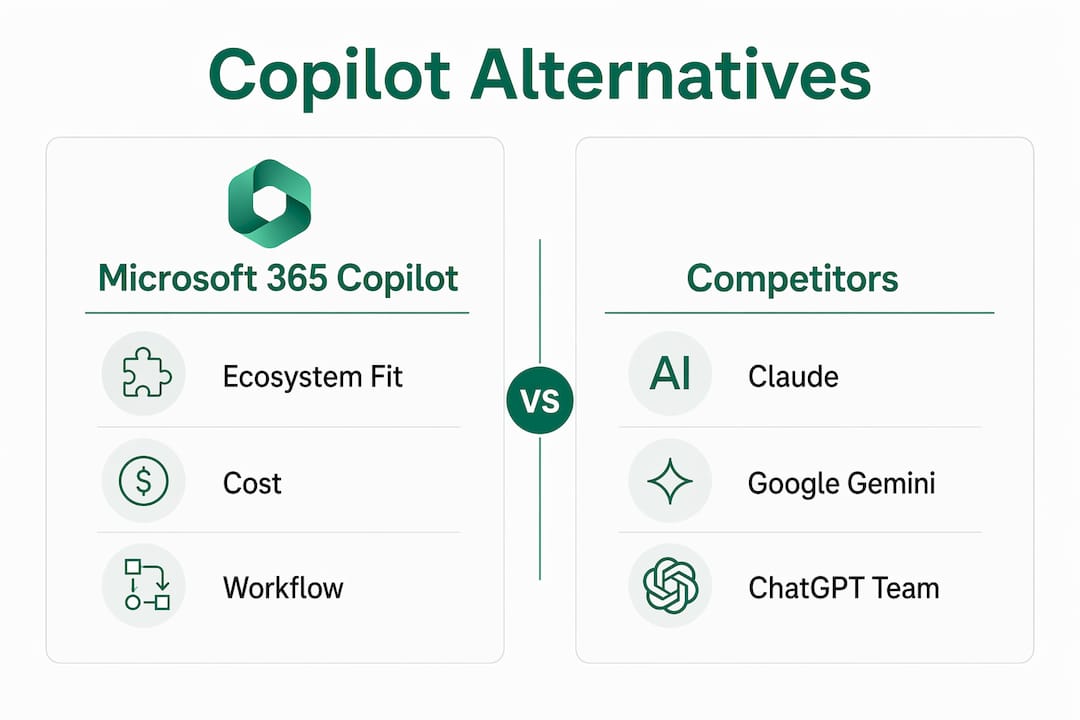

    PointOne stands out for firms running activity across many applications simultaneously. It captures time from communication platforms, document management systems, and project tools in parallel, making it useful when billable work happens across five or six different apps in a single day.

    • Billables.ai combines real-time tracking with an analytics layer that surfaces patterns: which matter types generate the most unbilled time, which attorneys miss the most entries, and where billing cycles slow down.

    • Laurel goes deepest on customization. It applies client-specific billing rules automatically at the point of entry, which matters for firms managing alternative fee arrangements or clients with strict billing guidelines.

    All six tools share a common data model: they read activity from calendar, email, documents, and sometimes calls, infer likely billable time, and ask for approval rather than reconstruction. The shift from recorder to reviewer is the core behavioral change, and it is what makes adoption stick.

    How accurate is AI time tracking for billable hours?

    Infographic showing key AI time tracking statistics

    Accuracy is the first objection every managing partner raises, and it is a fair one. The good news is that AI capture reaches 90%+ on engagement matching and 95%+ on duration estimates once the system has learned from two to four weeks of approval patterns. Early suggestions require more editing; the agent improves as it observes which activities you approve, reject, and modify.

    The deeper accuracy problem is not false positives. It is the time that never gets entered at all. Firms under-report billable time by 10–25% when relying on manual reconstruction, and that leakage is not random. It clusters around brief calls, short document reviews, and quick client emails, exactly the activities attorneys deprioritize when reconstructing a day from memory at 6 PM.

    The structural problem with manual billing: asking a busy attorney to reconstruct fifteen-minute increments from memory at the end of the day is not a discipline problem. It is a design problem. AI capture fixes the design, not the person.

    Human-in-the-loop review is what keeps AI accuracy from degrading over time. Tools like SmartTime by BigHand and Clio Duo both build review steps into the workflow, so attorneys catch miscoded matters before they reach the invoice. Daily approval takes 5–10 minutes versus 45–60 minutes for manual reconstruction, which means the accuracy benefit comes with a time savings, not a time cost.

    Pro Tip: Run a 30-day historical backfill when you first connect an AI capture tool. Most platforms can analyze 30–365 days of past calendar data and surface unbilled activities you have already missed, generating immediate recoverable revenue before the ongoing capture even begins.

    What features matter most in AI time-tracking tools?

    Not every feature in a vendor’s marketing deck translates to recovered revenue. These are the ones that actually move the needle:

    • Automated activity capture across multiple sources. Calendar and email are table stakes. The tools that recover the most time also capture document edits, call logs, and project management activity. PointOne and Laurel both go wide here.
    • Context-aware billing narratives. Auto-generated descriptions that follow your firm’s language standards and billing conventions save editing time and reduce write-offs from vague entries. MagicTime by Lawgro and Clio Duo both generate narratives that learn from your approval history.
    • One-click approval with bulk actions. The approval workflow needs to be faster than manual entry, or attorneys will abandon it. Single-click posting with bulk approve/reject and an undo function covers the most common daily scenarios.
    • Customizable billing increments and thresholds. Six-minute versus fifteen-minute rounding changes realized revenue meaningfully across a full year. The ability to set minimum billable time thresholds (ignore events under six minutes, for example) keeps the suggestion queue clean.
    • Direct integration with your practice management system. Approved time should write directly to your system of record with no CSV export. Clio Duo does this natively; others use API connections to Clio, MyCase, PracticePanther, Tabs3, and similar platforms.
    • Adaptive AI learning. Every approval, rejection, and edit is a training signal. Tools that incorporate this feedback improve suggestion quality over weeks, reducing the editing burden on attorneys.

    Accurate job hours improve invoicing quality across the entire billing cycle, not just at the time entry stage. Firms that capture more accurately also produce cleaner invoices, which reduces client disputes and accelerates payment.

    What do law firms actually gain from automating time recovery?

    The financial case is straightforward. A solo attorney billing $350 per hour who loses one hour per day to forgotten entries loses roughly $30,000 per year. With AI capture, 90% of that lost time is recoverable, producing a net gain of around $25,200 after tool costs, plus 208 hours per year reclaimed from manual entry work.

    At the firm level, the math scales fast. A five-attorney firm where junior associates miss 25% of their calls can capture six figures in additional billable time over twelve months, with the added benefit of standardized narrative quality across all timekeepers.

    Beyond revenue, the operational benefits are concrete:

    • Faster billing cycles. When time entries are captured daily rather than reconstructed weekly, invoices go out sooner and payment follows sooner.
    • Reduced write-offs. Vague or missing entries are the primary driver of client disputes. AI-generated narratives with specific activity descriptions reduce the friction that leads to write-offs.
    • Better staff satisfaction. The daily reconstruction chore is one of the most-cited frustrations among associates. Removing it improves retention, particularly among junior attorneys who carry the highest entry burden relative to billing rate.
    • Audit-ready records. AI capture creates contemporaneous records tied to actual activity, which holds up better in billing disputes than end-of-day memory reconstruction.
    • Support for alternative fee arrangements. When you can show a client exactly what AI-assisted work was done and when, value-based billing becomes defensible rather than approximate.

    How do you connect AI time tracking to your existing systems?

    Integration quality determines whether AI capture becomes a firm-wide habit or a tool that three attorneys use and the rest ignore. The principle is simple: approved time must write directly to your system of record with no manual step in between. Any gap in that chain creates reconciliation work that erodes the time savings.

    The most common integration points are Clio Manage, Microsoft 365 (Outlook calendar and email), document management systems like NetDocuments or iManage, and practice management platforms including MyCase and PracticePanther. Clio Duo handles the Clio side natively. SmartTime by BigHand integrates with the BigHand suite and connects to major practice management systems via API. Laurel supports enterprise-grade integrations with custom billing rule enforcement at the connection layer.

    Hands typing to integrate AI tools at desk

    Billing-native integration on the same record avoids the reconciliation lag that plagues standalone AR tools. The same principle applies to time capture: when approved entries write directly to the billing system rather than to an intermediate export, profitability data stays current and invoices reflect actual work without a sync delay.

    Microsoft 365 deserves specific attention. Outlook calendar and email are the two highest-volume activity sources for most attorneys, and every tool on this list connects to them. Firms running Microsoft 365 Copilot have an additional layer available: Copilot telemetry can surface AI-assisted drafting activity and map it to client matters, supporting both billing transparency and value-based fee justification. Timesheet approval workflows that incorporate this telemetry give managing partners a cleaner picture of where attorney time actually goes.

    Pro Tip: Avoid building your integration on CSV exports, even as a temporary measure. Once attorneys see that approved entries do not appear in the billing system immediately, trust in the tool drops and adoption stalls. Insist on a direct API write before going firm-wide.

    How do you choose the right AI tool for your firm?

    The decision comes down to four variables: your current practice management platform, firm size, billing complexity, and how much change management capacity you have.

    Start with your practice management system. If your firm runs Clio, Clio Duo removes all integration friction and is the default starting point. If you run a different platform, check whether the tool writes directly to it via API or requires an export step.

    Match the tool to your firm’s size and structure. MagicTime by Lawgro and Clio Duo are built for firms where attorneys want a light daily workflow. SmartTime by BigHand and Laurel are built for firms with dedicated billing staff, complex matter coding requirements, and enterprise-level compliance needs. Billables.ai and PointOne sit in the middle, suited to mid-sized firms that want analytics alongside capture.

    Evaluate accuracy claims with a pilot. Every vendor will quote accuracy figures. The only number that matters is the accuracy on your matters, with your attorneys, after two to four weeks of learning. Most platforms offer a pilot period; use it to run a historical backfill and measure how many suggestions require editing before approval.

    Pricing models vary significantly. Subscription tiers based on attorney count are the most common structure. Some platforms offer usage-based pricing or fixed-bid implementation engagements. The payback period on AI capture is typically short: firms that recover even a fraction of their 10–25% leakage recoup the tool cost within the first billing cycle.

    Customer support matters more than it looks on a feature sheet. When an attorney’s suggestions stop appearing or a matter code syncs incorrectly, the issue needs to resolve in hours, not days. Ask vendors specifically about support response times and whether you get a dedicated contact or a shared queue.

    How does Microsoft 365 Copilot improve billable hour capture?

    For mid-market firms already paying for Microsoft 365 Copilot licenses, the billable hour recovery opportunity is often sitting unused. Copilot telemetry tracks which documents were drafted with AI assistance, which emails were summarized, and how much time was spent in AI-assisted workflows, all of which can be mapped to client matters and used to justify billing.

    The challenge most firms face is that Copilot usage telemetry sits in Microsoft 365 admin dashboards that no one is actively reading. Licenses go dormant, workflows never get rebuilt around Copilot’s capabilities, and the ROI case never gets made to partners. Gozera’s approach addresses this directly: measure actual usage via telemetry, identify dormant licenses, and rebuild high-value workflows so that Copilot-assisted work generates recoverable billable time rather than invisible productivity.

    The workflow rebuild piece is where the real leverage is. When Copilot is integrated into document drafting, client email summarization, and matter research, each of those activities generates a telemetry record. With Python or n8n automation connecting that telemetry to your billing system, the AI-assisted work surfaces as an approval-ready time entry rather than disappearing into the background. That is the same capture-then-approve model the six tools above use, applied to Copilot’s native activity data.

    The Copilot ROI case for law firms: firms that map Copilot-assisted workflows to client matters can justify alternative fee arrangements with evidence rather than estimates. Telemetry shows exactly when AI-assisted drafting occurred, for which matter, and for how long, creating a contemporaneous record that supports both billing transparency and client trust.

    Copilot telemetry for billing requires a baseline measurement before you can show improvement. Gozera’s fixed-price audit engagement starts there: map current Copilot usage, identify the workflows where attorneys are already using AI without capturing the time, and build the integration that connects that activity to the billing system. The ROI of Copilot at mid-market firms becomes measurable within one billing cycle when the telemetry is connected correctly.

    Gozera turns idle Copilot licenses into recovered billable time

    If your firm is already paying for Microsoft 365 Copilot and not seeing it in your realization rate, that is the gap Gozera closes. The six tools compared above are purpose-built for passive time capture. Gozera is a different kind of engagement: a fixed-price consulting sprint that measures what your Copilot licenses are actually doing, rebuilds the workflows where attorneys are doing AI-assisted work without capturing it, and connects that activity to your billing system so the time shows up where it belongs.

    https://gozera.ai

    The firms that get the most from Copilot adoption are not the ones with the most licenses. They are the ones with workflows rebuilt around what Copilot actually does well, telemetry connected to billing, and a clear ROI number they can show partners at the end of the first month. Gozera delivers that in a fixed-price engagement, without a lengthy change management process. If your Copilot licenses are sitting idle while your attorneys still reconstruct time from memory, Copilot workflows for professional services is where to start.


    Key Takeaways

    AI-powered billable hour capture closes the 10–25% time leakage gap by replacing end-of-day memory reconstruction with a daily 10-minute approval workflow, producing measurable revenue recovery within the first billing cycle.

    Point Details
    Leakage rate Most firms lose 10–25% of billable hours to manual reconstruction; AI capture closes most of that gap.
    Daily time savings AI approval takes 5–10 minutes per day versus 45–60 minutes for manual reconstruction.
    Tool selection Match the platform to your practice management system first; Clio Duo for Clio users, Laurel for compliance-heavy firms.
    Copilot opportunity Microsoft 365 Copilot telemetry can map AI-assisted work to client matters, supporting both billing capture and value-based fee arrangements.
    Gozera’s role Gozera audits dormant Copilot licenses, rebuilds workflows, and connects telemetry to billing systems in a fixed-price engagement for mid-market firms.
  • Digital Transformation for Accounting Firms: 2026 Guide

    Digital Transformation for Accounting Firms: 2026 Guide

    Digital transformation for accounting firms is the strategic integration of cloud computing, AI, and automation into core workflows to drive measurable growth, improve accuracy, and elevate client advisory services. Firms that combine these technologies with deliberate process redesign are pulling ahead fast. Cloud plus AI adoption correlates with a 24% higher likelihood of firm growth, and advisory services now account for 13% of revenue on average. The firms winning in 2026 are not the ones chasing the newest tools. They are the ones building technology around well-mapped processes and clear ROI targets.

    How does digital transformation for accounting firms actually work?

    Cloud adoption is the foundation of every successful modernization effort. 81% of U.S. firms now operate at least partially in the cloud, and among high-growth firms that number rises to 86%. That gap matters because cloud infrastructure enables the real-time data access, remote collaboration, and system integration that modern advisory work demands.

    Integration is where most firms either win or lose. Firms with highly integrated tech stacks are 53% more likely to report high growth. That statistic reflects a simple truth: disconnected systems create manual work, and manual work kills capacity.

    Hands setting up integrated accounting technology

    The most common failure mode is the “Frankenstein tech stack,” a collection of point solutions that do not talk to each other. A firm might use one platform for tax prep, another for document management, a third for client communication, and a fourth for billing, with staff manually transferring data between all of them. The result is wasted time, version-control errors, and frustrated staff.

    Avoiding that outcome requires evaluating integration before adding any new tool. The right question is not “Does this tool do what we need?” It is “Does this tool connect cleanly to what we already have?”

    • Audit your current stack before purchasing anything new. Map every data handoff between systems.
    • Prioritize platforms with open APIs or native connectors to your existing practice management and general ledger systems.
    • Consider hybrid architectures that combine cloud-hosted platforms with on-premise data stores where regulatory requirements demand it.
    • Retire redundant tools rather than layering new ones on top. Fewer, better-connected systems outperform more, fragmented ones.

    Pro Tip: Before signing any new software contract, require a live integration demo with your current systems. A tool that cannot connect cleanly on day one will not connect cleanly after you have migrated your client data.

    What is the real impact of AI on accounting workflows?

    AI adoption in accounting has moved from experiment to standard practice. 98% of accounting professionals now report using AI tools daily or weekly. That near-universal adoption reflects how deeply AI has embedded itself into routine work, not as a novelty, but as a production dependency.

    The efficiency numbers are concrete. Accountants using generative AI tools completed monthly statement preparation 7.5 days faster, and routine back-office processing time fell by 8.5%. Those are not marginal gains. For a firm billing 2,000 hours per year per accountant, an 8.5% reduction in back-office time translates directly into recoverable capacity.

    Infographic showing key digital transformation statistics in accounting

    Quality improves alongside speed. The same research found a 12% increase in reporting granularity among AI-assisted firms. Clients receive more detailed, more useful financial reports without the firm adding headcount to produce them.

    The right mental model for AI in accounting is capacity expansion, not replacement. Firms recover 5–10% time per task and redirect that time toward higher-value advisory work. The accountant’s expertise does not become less relevant. It becomes more available.

    “AI delivers measurable value in defined, high-volume workflows like tax prep but remains limited in tasks involving professional judgment under ambiguity. The accountant’s role shifts toward reviewing, interpreting, and advising, not disappearing.”

    AI also has clear limits. It performs best in structured, high-volume workflows where the rules are defined. Tasks requiring professional judgment under ambiguity, such as advising a client through a complex restructuring or navigating a contested audit, still require experienced human oversight. Pairing AI output with senior reviewer sign-off is not bureaucratic caution. It is quality control.

    • Automate data extraction and categorization in tax and audit workflows first. These are high-volume, rule-based tasks where AI accuracy is highest.
    • Use AI for draft generation in client reports, then have a senior accountant review and add interpretive commentary.
    • Track time recovered per task after AI deployment. Without measurement, you cannot prove ROI or identify where adoption is stalling.
    • Align AI use with Copilot workflows that embed the tool into existing processes rather than requiring staff to switch contexts.

    Pro Tip: Treat AI as a junior staff member who is fast and tireless but needs supervision. Assign a senior reviewer to every AI-generated output until your team has calibrated the tool’s accuracy on your specific client base.

    Why process mapping must come before platform selection

    The single most expensive mistake in accounting firm modernization is buying technology before understanding the process it is supposed to fix. Mapping end-to-end workflows before selecting or building platforms is the defining practice of firms that avoid fragmented systems and wasted spend.

    The mapping exercise should trace every step from the first prospect conversation through engagement setup, work delivery, review, billing, and cash collection. That full-cycle view reveals where manual data transfers occur, where approval bottlenecks form, and where client communication breaks down. Those pain points, not vendor feature lists, should drive your technology decisions.

    Once the process is mapped, the buy-versus-build decision becomes straightforward. A mature platform exists for most standard accounting workflows. Custom builds make sense only when a workflow is genuinely unique to your firm and no available platform handles it without significant compromise.

    Decision Factor Buy a Platform Build a Custom Solution
    Workflow type Standard, widely practiced Unique to your firm’s model
    Timeline Fast deployment needed Long build cycle acceptable
    Maintenance capacity Limited internal IT Dedicated development resources
    Integration complexity Platform has native connectors Existing stack requires custom APIs
    Cost profile Predictable subscription High upfront, lower long-term

    A practical example: a mid-market tax firm manually copied client data from its intake form into its tax preparation software, then again into its billing system. Mapping that workflow exposed two redundant data transfers. Automating both with a simple integration layer recovered roughly 20 minutes per client engagement. At 400 clients per year, that is more than 130 hours returned to the firm annually.

    The lesson is not that automation is magic. The lesson is that you cannot automate what you have not mapped. Starting with specific pain points and building from there produces better outcomes than deploying broad platforms and hoping staff adapt.

    1. Document every workflow step from client intake to invoice payment. Use swimlane diagrams to show which role owns each step.
    2. Identify manual data transfers between systems. Each one is an automation candidate.
    3. Rank pain points by volume and cost. Fix the highest-frequency bottlenecks first.
    4. Evaluate platforms against your mapped process, not against vendor demos built on ideal scenarios.
    5. Pilot one workflow at a time before expanding. Measure time saved before moving to the next process.

    How does leadership shape AI adoption and advisory growth?

    Leadership defines the ceiling on AI adoption. Firms where managing partners actively set AI strategy and governance see faster, more consistent adoption than firms where AI is left to individual staff discretion. 76% of high-growth firms use AI weekly, and the common thread is leadership that treats AI as a firm-wide capability, not a departmental experiment.

    Governance is the practical expression of that leadership. Firm leaders must define which processes AI can touch autonomously and where human review is mandatory. Without those guardrails, staff either over-rely on AI output or avoid using it entirely. Both outcomes waste the investment.

    Data governance deserves equal attention. AI tools trained on or connected to client financial data require clear policies on data residency, access controls, and audit trails. Firms operating under AICPA standards or SEC reporting requirements cannot treat data governance as an afterthought.

    Training is the most consistently underestimated implementation cost. Staff should be trained during implementation, not after rollout. Waiting until a tool is live to teach people how to use it guarantees a slow adoption curve and inflated support costs.

    • Set AI governance policies in writing before deployment. Define autonomous versus human-reviewed tasks explicitly.
    • Assign an AI champion in each practice area. This person owns adoption metrics and troubleshoots workflow friction.
    • Build training into the implementation timeline, not as a separate phase after go-live.
    • Review AI adoption ROI quarterly. Dormant licenses and unused features are a direct cost, not a sunk one.

    The advisory opportunity is the strategic payoff. 94% of U.S. firms now offer advisory services, with 63% calling them a key revenue driver. AI creates the capacity to deliver those services at scale. When AI handles routine compliance work, senior accountants have time to provide proactive insights, scenario modeling, and strategic planning. That shift changes the firm’s economics from linear headcount growth to repeatable, scalable advisory revenue.

    Pro Tip: Inaction on AI integration now carries greater operational risk than implementation does. Firms that delay governance decisions are not avoiding risk. They are accumulating it.

    Key Takeaways

    Successful digital transformation in accounting requires process mapping before platform selection, AI embedded into workflows rather than layered on top, and leadership-defined governance to protect quality and drive measurable advisory growth.

    Point Details
    Cloud integration drives growth Firms with integrated tech stacks are 53% more likely to report high growth than those with fragmented systems.
    AI expands capacity, not headcount AI recovers 5–10% of time per task, which firms should reinvest into client advisory work.
    Process mapping comes first Map workflows from prospect to cash collection before selecting or building any platform.
    Leadership sets the adoption ceiling Firms where leaders define AI governance and train staff during implementation see faster, more consistent adoption.
    Advisory is the revenue opportunity 94% of U.S. firms now offer advisory services, and AI creates the capacity to deliver them at scale.

    What I have seen firms get wrong about digital transformation

    The firms that struggle most with digital modernization share one pattern: they buy technology to solve a problem they have not fully defined. A new platform arrives, staff get a two-hour training session, and six months later the tool is barely used. The licenses sit idle, the old manual process continues in parallel, and leadership wonders why the investment did not pay off.

    The firms that get it right start with a different question. Not “What tool should we buy?” but “Where are we losing time, and what does that cost us per year?” That framing changes everything. It turns technology selection into a financial decision with a measurable baseline, not a feature comparison exercise.

    I have also seen firms treat AI adoption as a one-time project rather than an ongoing practice. The tools evolve fast. A workflow that runs well on today’s AI capabilities will need to be revisited in 12 months. Firms that build a culture of continuous measurement and adjustment outperform those that deploy once and move on.

    The human side is underestimated every time. Staff who feel that AI threatens their role will find ways to work around it. The firms that communicate clearly that AI expands capacity rather than cuts jobs see adoption rates that actually match their license counts. That communication is leadership’s job, and it cannot be delegated to an IT memo.

    — Mad

    Gozera helps accounting firms get real ROI from Microsoft 365 Copilot

    Accounting firms investing in Microsoft 365 Copilot often face the same problem: licenses sit unused, workflows stay manual, and the expected productivity gains never materialize.

    https://gozera.ai

    Gozera specializes in fixing exactly that. The firm measures actual Copilot usage through telemetry, identifies dormant licenses, and rebuilds workflows so the tool generates recoverable billable time rather than overhead. For mid-market accounting firms with 50–500 staff, Gozera’s Copilot adoption consulting delivers a data-driven path from idle licenses to demonstrated ROI, without lengthy change management programs or generic training sessions. If your firm has Copilot licenses and is not measuring their output, that is the first problem worth solving.

    FAQ

    What is digital transformation for accounting firms?

    Digital transformation for accounting firms is the structured integration of cloud platforms, AI tools, and automation into core workflows to improve efficiency, accuracy, and client advisory capacity. It is a continuous process, not a one-time technology purchase.

    How does AI affect accounting staff and their roles?

    AI expands what accounting staff can accomplish rather than replacing them. Research shows accountants using AI complete monthly statement preparation 7.5 days faster and redirect recovered time toward higher-value advisory work.

    What is a Frankenstein tech stack and why does it matter?

    A Frankenstein tech stack is a collection of disconnected software tools that require manual data transfers between them. It creates errors, wastes staff time, and prevents firms from scaling advisory services efficiently.

    How should accounting firms start their digital transformation?

    Firms should start by mapping end-to-end workflows from client intake to invoice payment, identifying manual bottlenecks before selecting any platform. Starting with specific, high-frequency pain points produces faster and more measurable results than broad platform deployments.

    What role does leadership play in AI adoption at accounting firms?

    Leadership must define AI governance policies, set boundaries between autonomous AI tasks and mandatory human review, and train staff during implementation. Firms where managing partners actively own AI strategy see significantly higher adoption rates and faster ROI.

  • How to Reduce Idle Microsoft 365 Licenses and Cut Costs

    How to Reduce Idle Microsoft 365 Licenses and Cut Costs

    Idle Microsoft 365 licenses are defined as seats assigned to users who have not accessed any Microsoft 365 service within the past 60–90 days. For mid-market professional services firms, these dormant seats represent direct, recoverable spending. License waste typically runs 8%–22% of a firm’s total Microsoft 365 estate. That figure translates to 10%–18% in annual budget recovery when firms act on it. IT and operations managers who reduce idle Microsoft 365 licenses do more than cut costs. They create a cleaner, more auditable environment that supports Microsoft 365 Copilot adoption and positions the firm for better renewal terms.


    How to audit your Microsoft 365 environment for idle licenses

    The Microsoft 365 Admin Center is the starting point for any license audit. Its built-in usage reports show activity across Exchange Online, SharePoint, Teams, and OneDrive at the per-user level. Filter for accounts with zero activity over the past 90 days. That list is your first candidate pool for reclamation.

    Overhead view of usage report review hands

    Microsoft Entra ID sign-in logs add a second layer of validation. A user may show activity in the Admin Center because a background service authenticated on their behalf. Entra ID logs reveal whether an actual human sign-in occurred. Cross-referencing both sources removes false positives before you act.

    HR data is the third input most IT teams underuse. Joiners, movers, and leavers records from your HR system tell you whether an inactive account belongs to a current employee, a contractor who finished a project, or someone who left the firm. Automating the HR-to-IT notification chain closes the gap between an employee’s last day and the date their license is reclaimed. Without automation, that gap can stretch to weeks of unnecessary billing.

    Microsoft Intune device inventory rounds out the picture. A user with an assigned E5 license but no enrolled device is a strong candidate for a tier downgrade. Intune data also surfaces shared devices, which often indicate frontline or part-time workers who need only an F1 or F3 license rather than a full E3 or E5.

    Common pitfalls to watch for during an audit:

    • Service accounts often show zero user sign-in activity but run automated processes. Never flag them as idle without checking IT documentation.
    • Shared mailboxes appear inactive at the user level but may receive high volumes of inbound mail. They require a separate review process.
    • Add-on licenses for Defender for Endpoint, Power BI Pro, or Microsoft 365 Copilot carry their own usage telemetry. Pull add-on reports separately from base license reports.
    • Project-cycle users may show 60 days of inactivity between engagements. Validate with line managers before reclaiming.

    Pro Tip: Connect your HR system directly to Microsoft Entra ID via SCIM provisioning or an automation tool. When an employee is marked as terminated in your HR platform, their Microsoft 365 license assignment can be removed within hours rather than days.


    Steps for reclaiming and right-sizing Microsoft 365 licenses safely

    A phased approach prevents disruption. Moving too fast on license removal breaks workflows and damages trust with business units. The three phases are: identify, validate, and reassign.

    1. Identify candidates. Pull the inactive user list from Admin Center and Entra ID. Cross-reference with HR leavers data. Flag accounts inactive for 90 or more days.
    2. Validate with line managers. Send a short confirmation request to the relevant department head. Ask whether the user is on leave, between projects, or genuinely inactive. Usage data alone is not sufficient to confirm a license is unneeded.
    3. Convert or remove. For departed employees, remove the license and convert the mailbox to a shared mailbox. This preserves email history for compliance without retaining a paid seat.
    4. Downgrade where appropriate. A user who only reads email and joins Teams calls does not need an E5 license. Downgrading from E5 to E3 saves approximately $21 per user per month. For light users, moving to an F3 frontline license saves more.
    5. Reassign freed licenses. Before purchasing new seats for incoming staff, check the pool of reclaimed licenses. Reassignment from that pool costs nothing.
    6. Document every change. Maintain a change log with the date, account name, previous license tier, new state, and the manager who validated the change. This record supports compliance and audit reviews.

    Converting a departed employee’s mailbox to a shared mailbox is one of the highest-value actions available. Shared mailbox conversions can recover $20–$200 per mailbox per month depending on the license tier previously assigned. A shared mailbox requires no paid license as long as its storage stays under 50 GB and no active user is assigned to it directly.

    Deleting an account entirely is a separate decision from removing a license. Account deletion removes access to OneDrive files, Teams chat history, and any data stored in the user’s profile. License removal preserves the account and its data while stopping the billing. For most professional services firms, license removal with mailbox conversion is the right default. Account deletion should require a separate approval step.

    Infographic showing steps to reclaim Microsoft 365 licenses

    Pro Tip: During a license downgrade, keep the old license assigned for 24–48 hours while the new one activates. This overlap prevents the user from losing access to files or Teams channels mid-workday.


    How to build a Microsoft 365 license governance cadence

    One-time audits decay quickly. A firm that audits in january and does nothing until the following december will accumulate months of waste. A recurring review cadence prevents that drift.

    A tiered review schedule structures the work into manageable blocks:

    • Monthly (15 minutes): Review accounts flagged by automated alerts for terminated users. Remove or convert licenses within the same billing cycle as the departure.
    • Quarterly (60 minutes): Run a full usage report across all license tiers. Identify add-on licenses with zero usage. Review any new license assignments made outside the standard provisioning process.
    • Pre-renewal (2–3 weeks before Enterprise Agreement expiry): Conduct a comprehensive audit of the entire estate. Right-sizing before renewal resets the seat count baseline and can unlock an additional 6%–12% discount from Microsoft account teams. This is the single highest-leverage moment in the licensing calendar.

    Group-based licensing in Microsoft Entra ID makes governance significantly easier. Instead of assigning licenses to individual users, you assign them to security groups tied to job roles. When a user changes roles or leaves, updating their group membership automatically adjusts their license. Group-based licensing reduces manual errors and prevents the seat creep that accumulates when individual assignments are made ad hoc.

    Automated workflows reduce the administrative overhead of recurring audits. Tools like Power Automate or n8n can send weekly reports of inactive accounts directly to IT managers, flag add-on licenses with no usage in 30 days, and trigger approval requests to line managers before any license change is executed.

    Pro Tip: Build your governance cadence into your IT operations calendar as fixed recurring tasks, not optional reviews. Treat the monthly 15-minute check the same way you treat a patch Tuesday cycle.

    Review type Frequency Time required Primary focus
    Terminated user sweep Monthly 15 minutes Departed employees, immediate reclamation
    Full usage audit Quarterly 60 minutes Tier fit, add-on usage, new assignments
    Pre-renewal review Annual Half day Seat count reset, negotiation baseline
    Add-on license check Quarterly 30 minutes Copilot, Defender, Power BI utilization

    Common challenges when reducing Microsoft 365 license counts

    The most common mistake IT managers make is treating license removal as an immediate cost reduction. Removing a license does not reduce billable seat count until the next contract renewal unless a mid-term adjustment is negotiated with Microsoft. The license is freed for internal reallocation, but the firm continues paying for the committed seat count until renewal. Understanding this distinction prevents disappointment and sets accurate expectations with finance teams.

    Service accounts and shared mailboxes create a second category of risk. Shared and service accounts often show zero sign-in activity but are critical to automated workflows, compliance archiving, or third-party integrations. Removing their licenses can break processes that no one notices until something fails in production.

    Other challenges to anticipate:

    • Project-cycle inactivity. A consultant or attorney who finished a major engagement may show 60 days of inactivity before their next project begins. Reclaiming that license and then reassigning it two months later creates unnecessary churn.
    • Compliance-driven retention. Some users must retain access to Microsoft Purview or Defender for compliance reasons even if their day-to-day usage is low. Low usage does not equal unnecessary.
    • Timing mismatches. HR may notify IT of a departure days or weeks after the fact. That gap generates avoidable billing.
    • Line manager resistance. Managers sometimes resist license downgrades for their teams out of caution. Clear communication about what changes and what stays the same reduces friction.

    Treating every inactive account as waste is the fastest way to create new problems. The goal is not to minimize licenses at all costs. The goal is to match license tier and count to actual, validated need. That distinction separates a cost-reduction exercise from a governance program.


    Key Takeaways

    Reducing idle Microsoft 365 licenses requires systematic auditing, validated reclamation, and a recurring governance cadence to deliver sustained cost savings and a stronger renewal position.

    Point Details
    License waste is measurable Typical estates carry 8%–22% waste, with 10%–18% budget recovery achievable through reclamation.
    Audit with multiple data sources Combine Admin Center reports, Entra ID logs, HR data, and Intune inventory for accurate identification.
    Validate before reclaiming Confirm inactive accounts with line managers to avoid removing licenses needed for project or compliance work.
    Right-size tiers, not just counts Downgrading from E5 to E3 saves approximately $21 per user per month; shared mailbox conversions save more.
    Time reclamation to renewal Right-sizing before Enterprise Agreement renewal can unlock an additional 6%–12% discount from Microsoft.

    Why license governance is the IT initiative that pays for itself

    Most IT cost-reduction efforts require upfront investment before they generate savings. License governance is the exception. The tools you need are already inside your Microsoft 365 tenant. The Admin Center, Entra ID, and Intune are all in place. The data exists. The gap is almost always process, not tooling.

    What I have seen consistently in professional services firms is that the license problem is really an offboarding problem. When someone leaves a law firm or accounting practice, the IT team is often the last to know. The HR system updates, the manager moves on, and the license keeps billing for another 30, 60, or 90 days. Fixing that notification chain delivers more savings than any audit tool.

    The second thing I have learned is that savings from license reclamation should be reinvested visibly. When finance sees a line item reduction in Microsoft 365 spend, the instinct is to cut the IT budget by the same amount. The better outcome is to redirect those savings toward Microsoft 365 Copilot licenses for the users who will actually use them. That reframe turns a cost-cutting exercise into a productivity investment, and it gives IT a much stronger story to tell at the executive level.

    The firms that do this well treat license optimization as a continuous discipline, not a one-time project. They embed it in their IT operations calendar, automate what they can, and use the governance data to negotiate better terms at renewal. That is the difference between a firm that saves money once and a firm that compounds those savings year over year.

    — Mad


    How Gozera helps professional services firms control Microsoft 365 costs

    Mid-market professional services firms often have the data they need to reduce unused Microsoft 365 licenses. What they lack is the process to act on it consistently. Gozera works with law firms, accounting practices, and consulting organizations to build license governance frameworks grounded in telemetry, not assumptions.

    https://gozera.ai

    Gozera’s approach starts with a baseline measurement of actual usage across your Microsoft 365 estate, including Copilot adoption rates, add-on utilization, and tier fit by role. From there, the team builds automated workflows using tools like Python and n8n to close the HR-to-IT notification gap and maintain a right-sized license count through every billing cycle. If your firm is approaching an Enterprise Agreement renewal, that is the highest-leverage moment to act. Explore Gozera’s consulting services and see how a structured reclamation program translates directly into measurable ROI.


    FAQ

    What counts as an idle Microsoft 365 license?

    An idle Microsoft 365 license is one assigned to a user who has not signed in or used any Microsoft 365 service in the past 60–90 days. Service accounts and shared mailboxes require separate validation before being classified as idle.

    How much can a firm save by reducing unused Microsoft 365 licenses?

    Typical savings run 10%–18% of total Microsoft 365 spend through license reclamation. Downgrading a single user from E5 to E3 saves approximately $21 per user per month, and shared mailbox conversions can recover an additional $20–$200 per mailbox monthly.

    Does removing a license immediately reduce what my firm pays Microsoft?

    No. License removal frees the seat for internal reallocation but does not reduce the billable committed seat count until the next contract renewal, unless a mid-term adjustment is negotiated directly with Microsoft.

    What is the best time to reduce the number of licenses in Office 365?

    The highest-leverage moment is 2–3 weeks before your Enterprise Agreement renewal. Right-sizing the seat count at that point resets the renewal baseline and can unlock a 6%–12% discount from Microsoft account teams.

    How does group-based licensing help manage Microsoft 365 licenses?

    Group-based licensing assigns licenses based on security group membership tied to job roles. When a user’s role changes or they leave the firm, updating their group membership automatically adjusts their license, reducing manual errors and preventing seat creep.

  • Benefits of Workflow Automation for Professional Services

    Benefits of Workflow Automation for Professional Services

    Workflow automation is the systematic use of technology to execute repetitive business tasks without manual intervention, and its benefits for professional services firms are measurable and immediate. Law firms, accounting practices, and consulting groups lose significant billable time to manual handoffs, approval chasing, and status reporting. Automation addresses all three. Teams that automate standardized processes can reclaim roughly 2.5 hours of productive time per employee daily. For a 50-person firm, that compounds into a material shift in capacity and profitability without adding headcount.

    What are the core benefits of workflow automation?

    Workflow automation, known in process management circles as business process automation (BPA), delivers three primary advantages: time savings, cost reduction, and error minimization. These are not theoretical. Operational costs drop 40–75% in processes that move from fully manual to automated execution. That range reflects differences in process complexity and how well firms standardize before they automate.

    The efficiency gains are equally concrete. Automation reduces administrative time per process by 60–70%, and teams can handle up to ten times more tasks without increasing headcount. For a mid-market accounting firm managing client onboarding, tax filing workflows, or audit preparation cycles, that multiplier translates directly into more clients served per billing period.

    Team collaborating on workflow efficiency improvements

    Professional services firms carry a structural disadvantage: their core product is human judgment, which means every hour spent on administrative coordination is an hour not billed. Automation removes that drag. The advantages of automation are not about replacing professionals. They are about protecting the time those professionals spend doing work that actually generates revenue.

    How does workflow automation increase efficiency and productivity?

    Automation accelerates processes by removing the waiting time between steps. In a manual workflow, a document moves from drafter to reviewer to approver through email chains, calendar coordination, and follow-up messages. An automated workflow routes the document instantly, sends deadline alerts, and escalates if no action is taken within a defined window.

    The types of tasks that benefit most in professional services include:

    • Client intake and onboarding forms, conflict checks, and engagement letter generation
    • Invoice approval and billing cycles that require multi-step sign-off
    • Compliance reporting with fixed deadlines and audit trails
    • Document review routing across practice groups or service lines
    • Status update notifications that currently require manual email drafts

    The last item deserves attention. Invisible manual tasks like chasing approvals and sending status updates represent some of the largest efficiency gains once automated. Most managers do not track how much time their teams spend on coordination versus actual work. Automation makes that cost visible and then eliminates it.

    Pro Tip: Start with the workflows that have the most handoffs between people or departments. Each handoff is a delay point. Automating those first produces the fastest, most visible time savings.

    Infographic showing key workflow automation benefits statistics

    Automation also scales capacity without scaling cost. A consulting firm that automates its project kickoff workflow can onboard three new clients simultaneously using the same administrative resources that previously handled one. That is the core of the workflow efficiency benefit: capacity grows without a proportional increase in labor.

    What cost savings and error reductions result from workflow automation?

    The financial case for automation rests on two pillars: lower labor intensity and fewer costly mistakes. Both are well documented in 2026 operational data.

    Data accuracy improves by up to 88% when manual data entry is replaced by automated validation and routing. Error rates fall between 50% and 80%. In professional services, where a single billing error or missed compliance deadline can trigger client disputes or regulatory penalties, those reductions carry significant financial weight.

    The table below summarizes the primary cost and error reduction metrics from current industry data:

    Metric Impact
    Operational cost reduction 40–75% per automated process
    Administrative time saved 60–70% per process
    Data accuracy improvement Up to 88%
    Error rate reduction 50–80%
    Approval cycle speed Days reduced to hours

    Approval cycles deserve specific focus. Manual routing of contracts, invoices, or compliance documents through email often takes days. Automated routing with deadline triggers compresses that to hours. For law firms managing matter approvals or accounting firms closing monthly books, that cycle compression directly reduces work-in-progress balances and accelerates cash flow.

    Rework costs are the hidden expense that automation eliminates most effectively. When an error in a manually processed document requires correction, review, and re-approval, the labor cost multiplies. Automated validation catches errors at the point of entry, before they propagate downstream. That prevention model is far cheaper than the correction model it replaces.

    How does automation improve collaboration, visibility, and decision-making?

    Automated workflows generate data as a byproduct of execution. Every step, timestamp, and outcome is logged. That log transforms management from reactive to proactive.

    Real-time visibility into process performance replaces subjective status reporting. Instead of asking a team member where a deliverable stands, a manager checks a live dashboard. That shift has a compounding effect on decision quality. Managers who see bottlenecks as they form can intervene before they become delays. Managers who rely on manual status updates always respond after the fact.

    The collaboration benefits are equally direct:

    • Cross-departmental handoffs become trackable and accountable, with clear ownership at each stage
    • Deadline visibility is shared across teams rather than siloed in individual inboxes
    • Escalation rules trigger automatically when tasks stall, removing the need for manual follow-up
    • Audit trails document every action, supporting compliance reviews without additional reporting effort

    For professional services firms where multiple practice groups or service lines collaborate on client engagements, these features reduce the coordination overhead that currently consumes partner and manager time.

    Pro Tip: Use the process data your automation generates to run quarterly workflow reviews. Bottlenecks that appear in the data often reveal process design problems that no one noticed when the work was done manually.

    The ROI of Microsoft Copilot and similar AI-assisted automation tools is most visible in firms that use the resulting data to drive continuous improvement, not just initial efficiency gains. Automation that runs without review gradually drifts out of alignment with current business needs.

    What are the best practices and challenges for realizing automation benefits?

    The most common automation failure is not technical. It is process. Firms that automate a broken workflow do not fix the problem. They accelerate it.

    Automating broken processes accelerates waste and error propagation. A manual approval process with unclear ownership becomes an automated approval process with unclear ownership, except now errors move faster and affect more downstream steps. The fix is to simplify and standardize the workflow before any automation tool touches it.

    Best practices for sustainable automation in professional services:

    • Map the current process completely before selecting any tool or building any automation. Document every step, every decision point, and every person involved.
    • Eliminate unnecessary steps first. If a step exists because of a legacy habit rather than a business requirement, remove it before automating the rest.
    • Assign clear ownership to each automated workflow. Someone must be accountable for monitoring performance and updating the workflow when business rules change.
    • Start with pilot workflows that are high-volume, low-risk, and well-understood. Prove the model before scaling it.
    • Build governance into the design. Automation requires active ownership and continuous monitoring. It is not a set-and-forget solution.

    The governance point is underappreciated. Business rules change. Regulatory requirements shift. Client expectations evolve. An automated workflow that was accurate at deployment can become inaccurate six months later if no one reviews it. Firms that treat automation as a one-time project rather than an ongoing practice consistently underperform on ROI.

    Process discipline is the foundation of automation success. Firms that invest in standardization before deployment realize the full range of efficiency and cost benefits. Firms that skip that step often automate their problems rather than solve them.

    Key Takeaways

    Workflow automation delivers measurable gains in efficiency, cost, and accuracy only when firms standardize processes first and maintain active governance after deployment.

    Point Details
    Time savings are immediate Automation reduces administrative time per process by 60–70% and frees roughly 2.5 hours per employee daily.
    Cost reductions are substantial Operational costs fall 40–75% per automated process, with error rates dropping 50–80%.
    Standardize before automating Automating a flawed workflow accelerates errors; simplify and map processes before deployment.
    Visibility drives better decisions Real-time process data replaces reactive status reporting with proactive management.
    Governance sustains ROI Automated workflows require ongoing ownership and review to stay aligned with business needs.

    What I’ve learned about automation ROI in professional services

    Most firms approach automation as a cost-cutting exercise. That framing produces modest results. The firms that realize the largest gains treat automation as a capacity-building exercise. The goal is not to reduce headcount. The goal is to free your best people from work that does not require their judgment.

    I have seen accounting firms automate their client onboarding workflow and immediately redirect two senior staff members from administrative coordination to client advisory work. The revenue impact of that redeployment exceeded the cost of the automation project within the first quarter. That is the pattern worth pursuing.

    The other lesson I would pass on: do not underestimate the value of Copilot telemetry data in identifying where your team’s time actually goes before you automate anything. Most managing partners are surprised by what the data shows. The tasks consuming the most time are rarely the ones anyone expected.

    Pilot workflows are not a compromise. They are the fastest path to firm-wide adoption. A single successful automation in one practice group creates internal advocates who do the change management work for you. That is far more effective than a top-down rollout with a training program attached.

    The firms that struggle with automation share one trait: they automate before they govern. They build workflows without assigning owners, without defining review cycles, and without connecting the automation to a measurable business outcome. Six months later, the workflow is running but no one knows if it is running correctly. Start with governance. The technology is the easy part.

    — Mad

    How Gozera helps professional services firms capture automation ROI

    Gozera works with mid-market law, accounting, and consulting firms to turn Microsoft 365 Copilot licenses into measurable productivity gains. Many firms carry dormant Copilot licenses that generate cost without generating output. Gozera measures actual usage through telemetry, identifies where workflows can be rebuilt using tools like Python and n8n, and demonstrates clear ROI through process reengineering rather than generic training programs.

    https://gozera.ai

    The approach is data-driven and outcome-anchored. Gozera establishes a baseline, rebuilds the workflows that matter most, and tracks recoverable billable time as the primary success metric. For firms that want faster results without lengthy change management, Gozera’s consulting services provide a direct path from idle licenses to realized value.

    FAQ

    What is workflow automation in professional services?

    Workflow automation is the use of technology to execute repetitive business tasks, such as document routing, approval cycles, and compliance reporting, without manual intervention. In professional services, it frees billable staff from administrative coordination so they can focus on client-facing work.

    How much time can automation save per employee?

    Employees can reclaim approximately 2.5 hours of productive time daily by automating repetitive tasks. Across a 50-person firm, that represents a substantial increase in available capacity without adding staff.

    What is the biggest risk when implementing workflow automation?

    The biggest risk is automating a flawed process. Firms that skip process standardization before deployment accelerate existing errors rather than eliminating them. Map and simplify every workflow before building any automation.

    How does automation reduce errors in business processes?

    Automated validation and routing improve data accuracy by up to 88% and cut error rates between 50% and 80%. Errors are caught at the point of entry rather than discovered downstream during review or audit.

    Does workflow automation require ongoing maintenance?

    Automation requires active ownership and continuous monitoring because business rules, regulatory requirements, and client expectations change over time. A workflow that was accurate at deployment can drift out of alignment without regular review.

  • Workflow Automation Examples for Professional Services in 2026

    Workflow Automation Examples for Professional Services in 2026

    Workflow automation is the software-driven execution of repeatable, rule-based business processes without manual intervention. For law firms, accounting practices, and consulting organizations, the most impactful workflow automation examples include employee onboarding, invoice approval routing, sales follow-up sequences, and customer support ticket classification. These are not theoretical wins. Automated processes reduce manual time by up to 50% on tasks that previously consumed hours of staff attention each week. That figure represents recoverable capacity, which in professional services translates directly to billable time.

    1. Workflow automation examples across core business functions

    The strongest place to start is where the volume is highest and the rules are clearest. The following examples cover the functions where mid-market professional services firms see the fastest return.

    Hands typing on keyboard with onboarding documents

    Employee onboarding

    Manual onboarding is one of the most expensive coordination failures in professional services. HR and IT onboarding workflows automatically generate IT tickets, grant folder access, and assign training the moment a new employee record enters the system. That single trigger eliminates 2–3 day provisioning delays and reduces coordination time by over 60%.

    A typical automated onboarding flow includes:

    • New hire record created in the HR system triggers the workflow
    • IT ticket auto-generated for device provisioning and system access
    • Training modules assigned in the learning management system
    • Welcome email and first-week schedule sent to the new hire
    • Manager notified with a checklist of day-one responsibilities

    Sales follow-up and lead routing

    Sales teams lose deals not because of poor pitches but because of slow follow-up. Sales automation workflows trigger reminders when prospects do not respond within a defined period, marking deals “stale” after 14 days and sending reminders at the 7-day mark. That kind of rule-based cadence removes the need for manual CRM hygiene.

    Common sales automation steps include:

    • New lead enters CRM and is scored against defined criteria
    • Lead routed to the correct account manager based on territory or deal size
    • Automated quote follow-up sent if no response within 7 days
    • Deal flagged as stale after 14 days of inactivity
    • Closed-lost trigger initiates a re-engagement sequence after 90 days

    Invoice processing and approval routing

    Invoice processing is the clearest example of a task that is high-volume, rule-driven, and painful when done manually. An automated invoice workflow receives the document, extracts key fields, routes it to the correct approver based on dollar threshold, and sends payment confirmation once approved. Accounting teams at mid-market firms typically process dozens of invoices weekly. Automating the routing and approval steps alone removes the back-and-forth email chains that delay payment cycles.

    Customer support ticket classification

    Support teams waste significant time triaging tickets that could be classified and routed automatically. An automated support workflow reads incoming tickets, applies category labels based on keywords or AI classification, assigns them to the right team, and triggers SLA timers. If a ticket breaches its SLA window, an escalation alert fires automatically. Post-resolution, a feedback survey goes out without any manual action.

    Marketing nurture sequences

    Marketing automation is one of the most mature examples of automated processes in business. A new contact subscribes to a newsletter and immediately enters a welcome series. Behavior triggers, such as clicking a pricing page or downloading a guide, shift the contact into a more targeted nurture track. This kind of conditional branching is impossible to manage manually at scale.

    Time-off approvals and expense routing

    Operations teams spend disproportionate time on approvals that follow identical rules every time. A time-off request submitted in an HR system can trigger an automatic check against team capacity, route to the manager for one-click approval, and update the shared calendar without any additional steps. Expense reports follow the same logic: submitted, checked against policy thresholds, routed for approval, and logged in the accounting system.

    Pro Tip: Select workflows with a clear trigger, a defined action, and a measurable outcome before you build anything. If you cannot describe the workflow in three sentences, it is not ready to automate.

    2. How AI-enhanced automation goes beyond rule-based workflows

    Traditional robotic process automation, commonly called RPA, follows fixed rules. It breaks when inputs change. AI-enhanced automation uses machine learning and natural language processing to interpret unstructured data like contract text or support ticket sentiment, enabling decisions that go beyond what a static rule can handle.

    The practical difference shows up in these capabilities:

    • Contract review: NLP models extract key clauses, flag non-standard terms, and summarize risk areas without a lawyer reading every page
    • Sentiment analysis: Support tickets are scored for urgency based on tone, not just keywords, so genuinely frustrated clients get escalated faster
    • Dynamic lead scoring: AI models update lead scores in real time based on behavioral signals, not just form fills
    • Document classification: Incoming emails and attachments are sorted and filed automatically based on content, not sender rules

    The next evolution is agentic automation. Agentic AI workflows allow AI agents to plan, reason, and coordinate multi-step processes with minimal human intervention. A single agent can receive a client request, pull relevant data from multiple systems, draft a response, and route it for human review before sending.

    “The trend toward agentic workflows, where AI agents autonomously handle complex, multi-step processes with minimal human intervention, is reshaping business automation in 2026. Professional services firms that adopt this model early will recover capacity that currently disappears into manual coordination.”

    For mid-market professional services firms already using Microsoft 365, Copilot telemetry provides the visibility needed to understand which workflows are performing and where AI-assisted steps are stalling. That data is the foundation for continuous improvement.

    3. Common challenges and best practices for implementing automation

    The most common automation failure is not a technology problem. Automating broken workflows only accelerates inefficiency and errors. The process must be standardized and working before automation touches it.

    Pro Tip: Map the manual process completely before building the automated version. Every exception you discover on paper is an exception you will not have to debug in production.

    Three principles separate successful automation programs from failed ones:

    First, focus on high-volume, rule-based tasks with clear ownership. Automating judgment-heavy work early leads to failed runs and frustrated teams. Invoice approvals, onboarding checklists, and lead routing are good starting points. Performance reviews and client strategy decisions are not.

    Second, build error logging and manual overrides into every workflow from day one. Business rules change. APIs update. A workflow that ran perfectly for six months can break silently when a vendor changes their data format. Without logging, no one knows why it stalled.

    Third, measure ROI continuously. Automation is not a one-time implementation. The firms that get the most value treat it as an ongoing program with regular reviews of performance data, exception rates, and time savings.

    4. How to identify and prioritize automation opportunities

    The best automation candidates share four characteristics: they are repeatable, rule-driven, involve handoffs between systems, and have a visible bottleneck. Processes like onboarding, invoice approval, lead routing, and support escalation meet all four criteria and deliver measurable results quickly.

    Use this prioritization framework to rank candidates in your organization:

    1. List every process that requires manual data entry or copy-paste between systems
    2. Estimate the weekly time cost per person involved
    3. Identify the trigger event and the desired end state
    4. Check whether the rules are consistent enough to automate without constant exceptions
    5. Confirm there is a clear owner who will maintain the workflow after launch

    Workflow management with real-time visibility lets team leaders track performance and catch bottlenecks as they happen, not after a quarterly review surfaces the problem. That shift from retrospective reporting to live monitoring changes how quickly teams can respond to failures.

    Automation candidate Trigger Estimated time saved per week
    Employee onboarding New hire record created 3–5 hours per hire
    Invoice approval routing Invoice received 2–4 hours per week
    Lead routing and follow-up New lead enters CRM 1–3 hours per rep
    Support ticket classification Ticket submitted 2–3 hours per week
    Time-off and expense approvals Request submitted 1–2 hours per week

    For firms using Microsoft 365, Copilot ROI metrics provide a data-driven baseline for measuring the impact of each automation before and after implementation.

    Key takeaways

    Workflow automation delivers the highest ROI when applied to high-volume, rule-based processes with clear triggers, defined owners, and measurable outcomes.

    Point Details
    Start with standardized processes Automate only workflows that already work consistently; broken processes scale their problems.
    Prioritize quick wins Onboarding, invoice routing, and lead follow-up deliver fast, measurable time savings.
    Build in error handling Manual overrides and error logging prevent silent failures when systems or rules change.
    Use telemetry to track ROI Real-time performance data replaces guesswork and supports continuous improvement decisions.
    Evolve toward AI-enhanced flows NLP and agentic automation handle unstructured data that rule-based systems cannot process.

    What I have learned from watching firms automate the wrong things first

    Most professional services firms I work with come in with the same instinct: automate the most painful process first. That instinct is usually wrong. The most painful process is often painful because it is poorly defined, full of exceptions, and owned by three people who disagree on the rules. Automating it first guarantees a messy, expensive failure.

    The firms that build durable automation programs start with the boring stuff. Onboarding checklists. Invoice routing. Expense approvals. These are not glamorous, but they are consistent, well-understood, and easy to measure. A law firm I worked with recovered nearly four hours per new hire in IT provisioning time alone by automating a single onboarding trigger. That is not a headline number, but it compounds across every hire for the rest of the year.

    The other mistake I see constantly is treating automation as a project with a finish line. It is not. Business rules change, APIs break, and the workflows you built last year may not match how your team actually works today. The firms that get lasting value from automation treat it as an ongoing program, not a one-time build. Microsoft 365 Copilot telemetry has made this easier by giving IT leaders and managing partners live workflow performance data rather than quarterly summaries. That visibility changes the conversation from “why did this fail?” to “here is what we are fixing next week.”

    — Mad

    Gozera helps mid-market firms turn automation into measurable ROI

    Professional services firms often have the right tools in place but lack the visibility to know which workflows are actually working. Gozera specializes in Microsoft 365 Copilot ROI and adoption consulting for law, accounting, and consulting firms with 50–500 employees.

    https://gozera.ai

    Gozera measures actual Copilot usage through telemetry, identifies dormant licenses, and rebuilds workflows that generate recoverable billable time. The approach is data-driven and outcome-anchored, so firms see measurable results without lengthy change management programs. If your Copilot licenses are sitting idle or your automation efforts have stalled, Gozera’s consulting services provide the baseline measurement and workflow design expertise to move from cost to return.

    FAQ

    What are the best workflow automation examples for professional services?

    Employee onboarding, invoice approval routing, lead follow-up sequences, and support ticket classification are the strongest starting points. These processes are high-volume and rule-based, which makes them reliable automation candidates with fast payback.

    How do I know if a process is ready to automate?

    A process is ready when it has a clear trigger, consistent rules, and a measurable outcome. If the process requires frequent judgment calls or has no defined owner, standardize it manually before automating.

    What is the difference between RPA and AI-enhanced automation?

    RPA follows fixed rules and breaks when inputs change. AI-enhanced automation uses machine learning and NLP to handle unstructured data and make dynamic decisions, making it suitable for tasks like contract review and sentiment-based ticket escalation.

    How do I measure the ROI of workflow automation?

    Track time saved per process, error rates before and after automation, and exception frequency. Microsoft 365 Copilot telemetry gives mid-market firms real-time data on workflow performance, which supports faster and more accurate ROI calculations.

    What is the biggest mistake firms make when automating workflows?

    Automating broken or poorly defined processes is the most common failure. Standardize and test the manual version of a workflow before building the automated version.