Category: Uncategorized

  • Solicitor-Client Privilege and AI: What Canadian Counsel Must Do Now

    Solicitor-Client Privilege and AI: What Canadian Counsel Must Do Now

    Using a public consumer AI chatbot on privileged matters will likely waive solicitor-client privilege in Canada. Counsel-directed, closed enterprise AI deployed under strict contractual controls is far less likely to do so. That single distinction is what two landmark U.S. decisions handed down in early 2026 make clear, and Canadian practitioners should treat those rulings as a preview of where domestic courts are heading.

    Three variables determine most outcomes: the type of AI platform and its data-retention or training policies; whether a lawyer directed the use of the tool; and how the material was shared or disclosed to the platform. Get all three right and privilege likely survives. Get any one wrong and you may have handed opposing counsel a gift.

    If you have already used AI on a privileged matter, take these steps before anything else:

    • Stop uploading further privileged material to the platform immediately.
    • Preserve all session logs, prompts, and outputs before they are auto-deleted.
    • Notify supervising counsel so a privilege assessment can begin.

    Key Takeaways

    Counsel-directed, enterprise AI used under documented controls is the single most effective way to preserve solicitor-client privilege while capturing the productivity benefits of tools like Microsoft 365 Copilot.

    Point Details
    Public AI waives privilege Uploading privileged material to a public consumer chatbot risks waiver under Canadian doctrine and the Heppner reasoning.
    Enterprise controls are the fix Tenant isolation, training opt-outs, and documented counsel direction address the three factors courts have found dispositive.
    Governance is not optional An AI Acceptable Use Policy, engagement letter language, and telemetry logging are the minimum viable governance stack.
    Incident response must be immediate Stop uploads, preserve logs, and notify counsel within 24 hours of any potential disclosure to an AI vendor.
    Gozera audits and fixes Copilot deployments Gozera’s governance-first Copilot engagements give Canadian law firms the documentation and controls needed to defend privilege claims.

    Table of Contents

    How solicitor-client privilege and AI interact under Canadian law

    Courts in Canada and abroad are not inventing new privilege doctrine for AI. They are applying the same tests that have governed solicitor-client privilege for decades to a new set of facts. That framing matters, because it tells you exactly which elements to protect.

    The Canadian test for solicitor-client privilege requires: (1) a communication between a client and a lawyer acting in a professional capacity; (2) made in confidence; and (3) for the purpose of obtaining or giving legal advice. Litigation privilege (the Canadian equivalent of work-product protection) requires that the dominant purpose of the document be preparation for anticipated or ongoing litigation, and it extends to third parties who assist counsel in that preparation.

    Both forms of privilege are owned by the client, not the lawyer. That ownership principle matters when an AI platform’s terms of service allow the vendor to retain, review, or train on user inputs, because the client’s confidential communications may be flowing to a third party without the client’s informed consent.

    The elements that AI use most directly implicates are confidentiality and counsel direction. A communication that leaves the solicitor-client relationship and enters a platform that can retain, share, or train on it is no longer confidential in any meaningful sense. And a document that an employee generates by querying a public chatbot without any lawyer involvement fails the “communication with counsel” element entirely.

    Canadian commentary, including analysis published by Hull and Hull LLP, warns that uploading privileged material to open AI platforms is analogous to posting it online and can trigger waiver under Canadian fairness and consistency principles. No Canadian court has issued a definitive ruling yet, but the doctrinal path is well-lit.


    What the Heppner and Warner decisions say — and why they reached opposite results

    Two U.S. federal decisions issued in February 2026 are the most instructive data points available. Neither creates new law. Both apply existing privilege doctrine to AI-generated materials, and the contrast between them is the lesson.

    United States v. Heppner (S.D.N.Y.)

    The defendant generated documents using a publicly available AI chatbot and later claimed those materials were protected by attorney-client privilege and the work-product doctrine. The court rejected both claims on three grounds: the communications were not with an attorney; the platform’s privacy terms permitted retention and potential third-party disclosure of user inputs; and no lawyer had directed or supervised the use of the tool. As Goodwin’s analysis of the decision explains, the lack of confidentiality under the platform’s own terms was independently dispositive. The defendant could not claim a reasonable expectation of confidentiality while using a tool whose terms explicitly disclaimed it.

    Warner v. Gilbarco, Inc. (E.D. Mich.)

    A pro se litigant used AI to help prepare litigation materials. The opposing party moved to compel production. The court denied the motion and held the materials protected as work product. The key distinction, as Sidley’s Data Matters analysis explains, was that the materials reflected the litigant’s own mental impressions prepared in anticipation of litigation, and disclosure to the AI platform did not meaningfully increase the likelihood that the adversary would obtain them. The court applied the standard work-product waiver test: does the disclosure materially increase adversary access? On those facts, it did not.

    The two decisions sit at opposite ends of the risk spectrum. Heppner represents the worst-case scenario: public platform, no counsel direction, no confidentiality. Warner represents a narrow safe harbor: materials reflecting the user’s own litigation strategy, disclosed to a tool that did not route them to the adversary. Most real-world law firm scenarios fall somewhere between these poles, which is precisely why governance controls matter.

    White & Case’s guidance on this point is direct: controlled, confidential, counsel-directed use of enterprise AI platforms that prohibit retention and training on client inputs is more likely to preserve privilege than public consumer AI. Courts are not treating AI as a special category. They are asking the same questions they always ask.


    When AI use is likely to destroy privilege — and when it might not

    The risk is not uniform across all AI tools or all use cases. Platform type, data-handling terms, and the presence or absence of counsel direction produce very different outcomes.

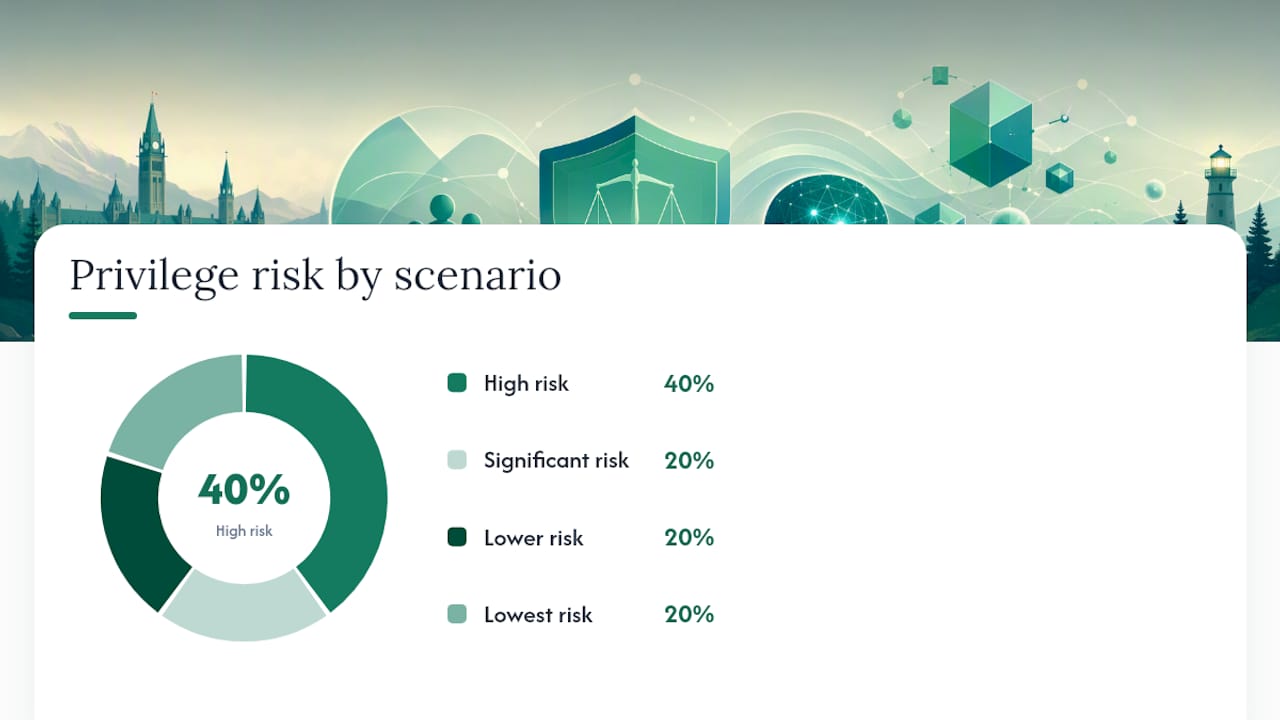
    Scenario Platform Type Counsel Direction Data Retention / Training Privilege Outcome
    Employee queries public chatbot on client matter Public consumer (e.g., free-tier ChatGPT) None Inputs may be retained and used for training High risk of waiver
    Lawyer uses public chatbot to draft legal memo Public consumer Partial (lawyer is user) Inputs may be retained Significant risk; confidentiality element likely fails
    Lawyer uses enterprise AI with no-training contract Enterprise (e.g., Microsoft 365 Copilot for M365 tenant) Yes No retention; no training on client data Lower risk; privilege more likely to survive
    In-house counsel directs IT to run AI analysis on privileged docs Enterprise, isolated tenant Yes, documented Logs escrowed; no external training Lowest risk with proper documentation
    Any user shares AI output via public “share” link Any Irrelevant Output indexed by web archives High risk of permanent waiver

    Comparison matrix of AI use and privilege risk

    The last row deserves particular attention. Share and export features that generate public URLs are a silent privilege killer. The NYC Bar Association’s report flags these features explicitly: links can be archived by services like the Wayback Machine and persist even after the original user deletes them. A single accidental “share” click can create a permanent public disclosure.

    Vendor privacy and training policies are not boilerplate. Courts in Heppner treated the platform’s terms as direct evidence that the user had no reasonable expectation of confidentiality. Before any AI tool touches a privileged matter, someone needs to read those terms and confirm in writing that the vendor does not retain, review, or train on client inputs.

    Pro Tip: The single most effective technical control is deploying AI exclusively within a dedicated Microsoft 365 tenant with data residency set to Canada, training opt-outs confirmed in writing with Microsoft, and a documented counsel-direction policy. That combination addresses the three factors courts have found dispositive in Heppner and Warner simultaneously.


    Concrete steps to reduce privilege risk when using AI

    The following checklist is organized by urgency. Immediate controls can be implemented today. Short-term fixes require a policy sprint. Longer-term governance requires IT and legal working together.

    Immediate controls (this week)

    1. Audit which AI tools your firm currently uses on client matters. Include free-tier tools, browser extensions, and any AI features embedded in existing software.
    2. Suspend use of any public consumer AI tool for privileged work until a platform review is complete.
    3. Identify all matters where AI has already been used and flag them for a privilege assessment by supervising counsel.
    4. Preserve all existing AI session logs, prompts, and outputs before any auto-deletion window closes.

    Short-term fixes (30 days)

    1. Draft and circulate an AI Acceptable Use Policy that distinguishes permitted enterprise tools from prohibited public tools, and requires counsel direction for any AI use on privileged matters.
    2. Add a short AI disclosure clause to engagement letters: “This firm may use AI tools in the delivery of legal services. All AI use on your matter will be conducted using enterprise-grade platforms that prohibit retention and training on client data, under the direction of supervising counsel.”
    3. Review vendor contracts for every AI tool in use. Confirm no-training, no-retention, and data-deletion provisions in writing. If those provisions are absent, negotiate them or stop using the tool on privileged matters.
    4. Confirm that Microsoft 365 Copilot (if deployed) is configured with your firm’s own tenant isolation, Canadian data residency, and training opt-outs enabled.

    Longer-term governance (90 days)

    1. Implement telemetry and audit logging for all Copilot and AI tool usage, so you can reconstruct who used what tool, on which matter, under whose direction, and when.
    2. Run a structured training session for all lawyers and paralegals covering the Heppner and Warner decisions, the firm’s AI policy, and the specific steps required before using AI on a privileged matter.
    3. Build a privilege-review checkpoint into your matter-opening workflow: before AI is used on any new matter, a supervising lawyer must confirm the tool, the scope, and the data-handling terms.
    4. Establish a vendor-review cycle (at least annually) to reassess AI tool terms as platforms update their privacy and training policies.

    Stikeman Elliott’s guidance for Canadian firms aligns with this checklist: enterprise deployment features, no training on client data, data retention controls, and documented counsel direction are the practical steps that reduce privilege risk. Practical governance, including engagement letters, training, and technical tenancy controls, is the primary way firms can use Copilot productively while reducing that risk, as Hull and Hull’s analysis confirms.
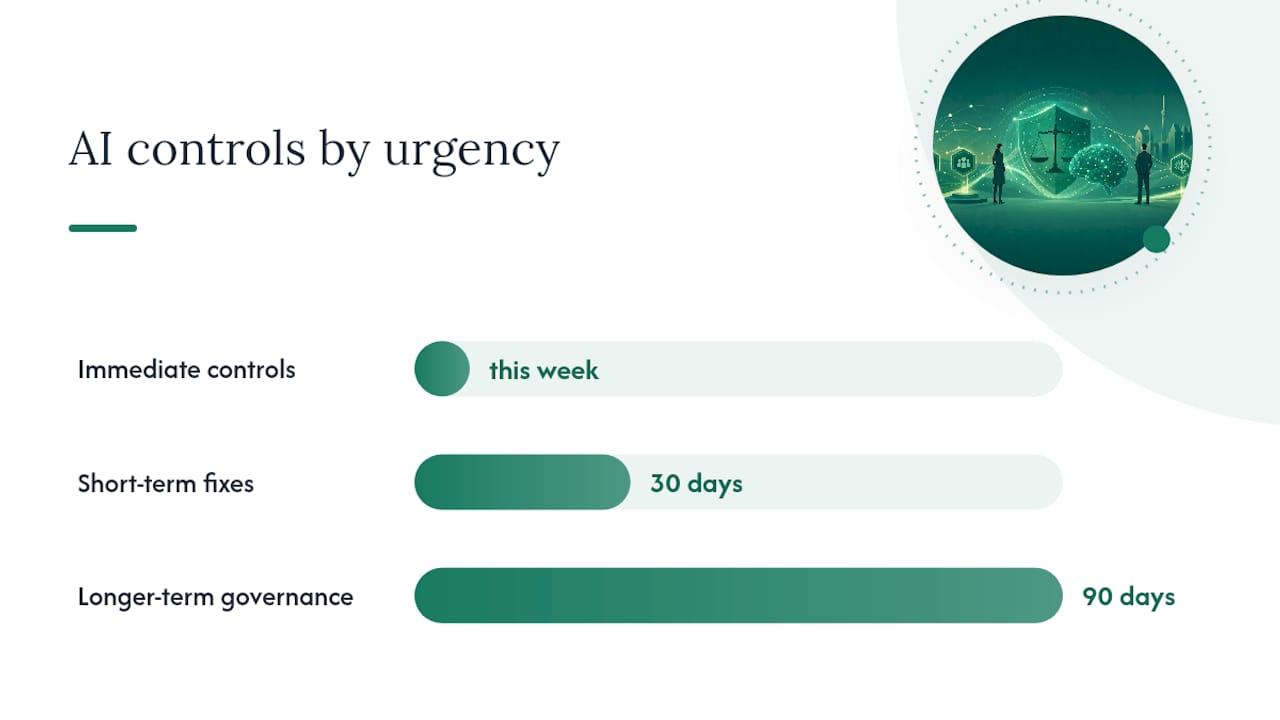

    Concrete steps to reduce privilege risk when using AI — overview diagram

    Implementing Microsoft 365 Copilot safely in Canadian law practices

    Enterprise AI deployed correctly is not the enemy of privilege. It is the answer to the public-chatbot problem. The key is that “deployed correctly” requires deliberate configuration, not just a license purchase.

    For mid-market Canadian law firms, a safe Copilot implementation follows four phases.

    Phase 1: Governance design (before any rollout)

    Confirm Canadian data residency in your Microsoft 365 tenant settings. Verify that the Microsoft Product Terms for your subscription include the commercial data protection commitments that prohibit Microsoft from training on your tenant data. Document this confirmation in writing and store it in your matter management system as a privilege-preservation record.

    Phase 2: Pilot with telemetry

    Run a controlled pilot on non-privileged administrative tasks first. Use Microsoft 365 usage analytics and Copilot telemetry to establish a baseline of what the tool is being used for, by whom, and on which document types. This baseline serves two purposes: it lets you measure productivity gains, and it creates the audit trail that supports a privilege argument if a dispute arises later.

    Governance Control Implementation in Microsoft 365 Copilot Privilege Benefit
    Tenant isolation Dedicated M365 tenant; no cross-tenant data sharing Limits disclosure to adversarial parties
    Training opt-out Commercial data protection terms with Microsoft Removes vendor-retention argument courts used in Heppner
    Data residency Canada region set in tenant admin Supports Canadian privacy law compliance (PIPEDA)
    Audit logging Microsoft Purview audit logs enabled Documents counsel direction and scope for privilege claims
    Access controls Role-based access; Copilot restricted to licensed, supervised users Prevents unauthorized employee use on privileged matters

    Phase 3: Counsel-direction documentation

    Every privileged matter where Copilot will be used needs a short written record: the supervising lawyer’s name, the scope of permitted AI use, the date, and a confirmation that the tool meets the firm’s approved platform criteria. This record does not need to be long. One paragraph in the matter file is enough. What it does is create contemporaneous evidence that AI use was counsel-directed, which is the factor that distinguished the losing party in Heppner from the winning party in Warner.

    Phase 4: Ongoing optimization and review

    Review telemetry quarterly. Track which workflows are generating the most productivity gains, and which users are still defaulting to non-approved tools. A Copilot workflows guide for professional services can help identify the highest-value use cases for law firms specifically.

    Pro Tip: Create a one-page “AI Use Authorization” form that lawyers complete before using Copilot on any privileged matter. The form captures: matter number, supervising lawyer, permitted scope, platform confirmation, and date. File it in the matter record. If privilege is ever challenged, that form is your first line of defense.


    If privileged material was shared with an AI vendor: what to do immediately

    Incident response for a potential privilege waiver follows the same logic as any data breach: contain first, assess second, document everything.

    Immediate steps (within 24 hours)

    1. Stop all further uploads or queries to the platform on the affected matter.
    2. Capture forensic screenshots or exports of all sessions, prompts, and outputs before any auto-deletion window closes. Do this before contacting the vendor, because vendor notification can sometimes trigger automated data-handling processes.
    3. Identify every piece of privileged material that was shared: document names, dates, content categories, and the name of the person who made the upload.
    4. Notify supervising counsel and, if applicable, the firm’s privacy officer. This step is not optional. The privilege assessment and any waiver argument must be led by a lawyer.
    5. Check the platform’s privacy policy and terms of service as they stood on the date of disclosure. Screenshot and preserve the current version as well, in case terms have changed.

    Short-term steps (within 72 hours)

    1. Contact the vendor in writing and request: (a) confirmation of whether the material was retained; (b) whether it was used for training; © deletion or isolation of all copies; and (d) a written certification of deletion. Keep all correspondence.
    2. Check whether any “share” or “export” links were generated during the session. If so, disable them immediately and check whether the URLs have been indexed. The NYC Bar’s guidance is explicit: archived links can persist even after deletion, so speed matters.
    3. Prepare a privilege-hold memorandum documenting: who authorized the AI use, whether counsel directed it, what the platform’s data terms were, what steps were taken to contain the disclosure, and the timeline of events.

    Documentation that strengthens a privilege argument after the fact

    • Contemporaneous notes from the lawyer who directed (or should have directed) the use.
    • Written confirmation from the vendor of no retention or training.
    • Evidence that the platform was enterprise-grade with contractual data protections.
    • The firm’s AI Acceptable Use Policy, showing the incident was a deviation from policy rather than standard practice.

    A court assessing whether privilege was waived will look at the totality of circumstances. Prompt containment, vendor cooperation, and thorough documentation all support an argument that any disclosure was inadvertent and that reasonable steps were taken to remedy it.


    The governance gap most firms are ignoring

    The conversation about AI and privilege tends to focus on the dramatic scenario: a lawyer accidentally uploads a confidential memo to ChatGPT and opposing counsel finds out. That scenario is real, but it is not where most Canadian firms are actually losing privilege.

    The more common failure is quieter. A paralegal uses a free AI writing tool to draft a discovery summary. An associate pastes a client email into a public chatbot to check grammar. An in-house analyst uses a consumer AI tool to summarize board minutes. None of these people think they are doing anything wrong, because no one has told them the rules.

    The Heppner decision did not turn on bad intent. It turned on the absence of governance. The defendant used a public tool, the tool’s terms permitted disclosure, and no lawyer was directing the work. Three ordinary facts, each individually unremarkable, combined to defeat privilege entirely.

    Canadian firms that have deployed Microsoft 365 Copilot under proper enterprise controls are in a materially better position than firms relying on ad hoc consumer tools. But even a well-configured Copilot deployment fails if lawyers and staff are not trained on when and how to use it, and if no one is monitoring actual usage against policy. Telemetry is not just an ROI tool. It is a privilege-preservation tool. Knowing that a user queried Copilot on a specific matter, under a specific lawyer’s supervision, using a platform with confirmed no-training terms, is exactly the kind of contemporaneous record that supports a privilege argument in court.

    The firms that will navigate this well are not the ones that ban AI entirely. They are the ones that treat governance as a first-class deliverable of any AI deployment, not an afterthought.


    Gozera helps Canadian law firms deploy Copilot with privilege protection built in

    Law firms that want the productivity gains from Microsoft 365 Copilot without the privilege exposure need more than a license. They need a deployment that is configured correctly from day one, with telemetry to prove it.

    Gozera

    Gozera works with mid-market Canadian law firms and professional-services practices to audit existing Copilot deployments, identify governance gaps, rebuild workflows with privilege-safe configurations, and deliver the audit logs and documentation that support privilege claims if they are ever challenged. The engagement covers tenant isolation, training opt-outs, counsel-direction documentation, and staff enablement, all tied to measurable productivity outcomes. For firms with dormant Copilot licenses, Gozera’s telemetry-first approach identifies exactly where value is being left on the table and what it would take to recover it.

    If your firm is using AI on privileged matters without a documented governance framework, the risk is real and the fix is not complicated. Book a Copilot governance audit with Gozera to get a clear picture of your current exposure and a prioritized remediation plan.


    Selected primary sources and further reading

    The sources below are the primary authorities cited in this article. They are listed for reference and further reading. This list is not legal advice. Firms should consult qualified counsel for guidance on their specific circumstances.

    This article provides general information only and does not constitute legal advice. Canadian firms should consult qualified legal counsel for guidance on their specific privilege and AI-use circumstances, and should verify current platform terms and regulatory requirements directly with their providers.

    This article is general information, not a substitute for advice from a qualified lawyer. Consult a qualified legal professional about your own circumstances before acting on anything here.

    Sources

    • Attorney-client privilege and work product in the age of generative AI | White & Case
    • AI Chatbots, Privilege, and Pitfalls: Lessons for Keeping Generative AI Exchanges Out of the Hands of Legal Adversaries | Goodwin
    • Generative AI and Privilege: Practical Lessons from Two Early Decisions and What Comes Next | Data Matters Privacy Blog (Sidley)
    • The Intersection of Artificial Intelligence, Privacy, and Privilege | New York City Bar Association
    • The Probater, Vol. 32, No. 2, June 2026: Preserving solicitor-client privilege in the age of generative AI: Emerging lessons from abroad and potential implications for Canadian law – Hull and Hull LLP
    • Privilege and AI-generated Documents: Lessons for Canada from Recent U.S. Rulings | Stikeman Elliott

  • Copilot Integration with CRM: IT Leaders’ Guide

    Copilot Integration with CRM: IT Leaders’ Guide

    Yes, you can integrate Microsoft Copilot with CRM systems. Copilot works natively inside Dynamics 365 (backed by Dataverse) and extends to external CRMs like Salesforce, ServiceNow, and Zendesk through Microsoft 365 Copilot connectors, embedded Service widgets, or custom connectors built in Copilot Studio.

    Your immediate next steps:

    • Check licensing and region availability in the Power Platform admin center before touching any connector settings. Missing a license SKU or being outside a supported region is the most common reason pilots stall on day one.
    • Choose your integration path: native Copilot in Dynamics 365 if you’re already on that platform, or the connector/embedded-agent route for Salesforce and other external CRMs.
    • Stand up a limited pilot group of 10–20 users before any org-wide rollout. Validate identity mapping through Microsoft Entra ID, confirm field-level security (FLS) settings, and capture baseline telemetry before you expand.

    Three entities you need to know from the start: Copilot in Dynamics 365 (the native experience), the Salesforce CRM connector (the fastest path to indexing Salesforce records into Microsoft 365), and Microsoft Entra ID (the identity layer that controls what each user can see across CRM boundaries).

    Pro Tip: Don’t try to enable every Copilot feature at once. Pick one high-value use case — record summarization or meeting prep — and prove ROI on that before expanding scope.


    Key Takeaways

    Copilot integrates natively with Dynamics 365 and extends to Salesforce, ServiceNow, and Zendesk via connectors, embedded widgets, or custom agents — but ROI depends on choosing the right path, validating governance before launch, and measuring adoption with real telemetry.

    Point Details
    Choose the right integration path Native Dynamics 365 for fastest deployment; Salesforce connector for read-only indexing; embedded widget or custom connector for write-back.
    Validate licensing and region first Missing license SKUs or unsupported Azure OpenAI regions are the top pilot blockers; check the Power Platform admin center before any configuration.
    Identity mapping is non-negotiable Configure Microsoft Entra ID identity mapping before enabling any connector; skipping it causes empty results or cross-user data exposure.
    Instrument telemetry from day one Capture active users, queries per user, and time-to-first-answer during the pilot to build a defensible ROI calculation for stakeholders.
    Gozera accelerates time-to-ROI Gozera’s fixed-price audits and workflow integration engagements deliver baseline-to-post-pilot ROI reporting for mid-market professional services firms.

    Table of Contents

    Which integration path fits your CRM environment?

    There are four distinct technical approaches to Copilot integration with CRM, and picking the wrong one costs weeks of rework.

    Path A: Native Copilot in Dynamics 365. If your CRM is Dynamics 365, this is the default choice. Copilot runs directly on Dataverse, which means no connector configuration, no identity mapping complexity, and full read/write capability from day one. Features like record summarization, email assist, and meeting prep are available out of the box.

    Path B: Microsoft 365 Copilot connectors (index-and-search). The Salesforce CRM connector indexes core Salesforce objects — Account, Contact, Opportunity, Lead, Case — so users can discover CRM content inside Outlook, Teams, and SharePoint without leaving Microsoft 365. This is a read-only path. It’s fast to deploy and low-risk, but it does not write back to Salesforce.

    Path C: Embedded Copilot Service widget / Direct Line. Microsoft Copilot for Service can be embedded directly into a third-party CRM desktop console using a preconfigured widget and CTI adapter. Agents get AI assistance inside their existing CRM interface. This path requires more configuration (named credentials, CTI adapter URL, Apex classes for Salesforce), but it delivers the richest in-app experience.

    Path D: Custom connector or agent via Copilot Studio. For write-back, agentic actions, or CRMs not covered by a prebuilt connector, you build a custom connector using the Copilot connectors API or Graph connectors, often with Azure middleware for secure write operations. This is the highest-effort path and the one that delivers the most operational value once it’s running.

    Dimension Path A: Native Dynamics 365 Path B: Connector (index) Path C: Embedded widget Path D: Custom connector
    Implementation speed Fast Medium duration Medium-high duration Slow, several weeks
    Read capability Full Full (indexed objects) Full (via CRM API) Configurable
    Write capability Full None Limited Full (with middleware)
    Security surface Low (Dataverse native) Medium (FLS risk) Medium (named credentials) High (custom auth)
    Admin skill required Power Platform admin M365 admin + connector config CRM admin + CTI config Developer + architect
    ROI timing Immediate Few weeks post-index Several weeks A few months

    Pro Tip: Start with Path B (read-only connectors) for a fast win. Reserve write-back and agentic actions for a second phase after you’ve completed a thorough security review of your permission model.


    What Copilot actually does inside a CRM

    The feature set matters because it determines which user roles benefit most and which workflows to redesign first.

    Copilot in Dynamics 365 Sales delivers these core capabilities natively:

    • Record summarization: a plain-language summary of an account, opportunity, or case without opening every related record
    • Recent changes / catch-up: surfaces what changed on a record since you last viewed it
    • Meeting preparation: pulls relevant account data, open opportunities, and recent interactions before a call
    • Email assist: drafts context-aware emails using CRM record data
    • Case summaries and resolution notes: auto-generates a summary of a support case and a draft resolution note
    • Knowledge retrieval: queries SharePoint and internal knowledge bases to surface relevant articles during a case
    • Cross-app news enrichment: pulls external news about an account into the record view

    For sellers, meeting prep is the highest-ROI feature. Instead of spending significant time pulling together account history before a call, a seller gets a structured brief in seconds. For service agents, auto-generated case resolution notes cut the time spent on after-call work. For managers, pipeline summaries give a snapshot of deal health across the team without running manual reports.

    The real business case for mid-market professional services firms isn’t any single feature. It’s the reduction in context switching — the constant movement between CRM, Outlook, Teams, and SharePoint that fragments attention and erodes billable time. When Copilot surfaces CRM data inside the tools people already use, that switching drops and recoverable time goes up.


    Prerequisites and licensing before you start

    Run this checklist before touching any admin settings. Skipping it is the single most reliable way to delay your pilot by two weeks.

    License requirements:

    • Copilot in Dynamics 365 Sales requires a Dynamics 365 Sales Enterprise or Premium license plus a Microsoft 365 Copilot add-on (check the current Dynamics 365 licensing guide for exact SKU combinations, as these change with each wave release).
    • Microsoft Copilot for Service requires its own license and a base Microsoft 365 license.
    • The Salesforce CRM connector requires Microsoft 365 Copilot licenses for the users who will query indexed content.
    • Admin roles needed: Power Platform admin, Dynamics 365 System Administrator, and Microsoft 365 global admin (or delegated admin with connector permissions).

    Platform prerequisites:

    • Dataverse is required for all native Dynamics 365 Copilot features. If your Dynamics environment isn’t backed by Dataverse, that’s a migration task before anything else.
    • Azure OpenAI availability: some Copilot features depend on Azure OpenAI services, which are not available in every region. Check the Power Platform admin center for your environment’s region status and whether cross-region data movement must be enabled.
    • Microsoft Entra ID must be configured for identity mapping if you’re connecting an external CRM. Users’ Microsoft 365 identities need to map to their CRM identities for Copilot to return only the records they’re authorized to see.

    Rollout-readiness checklist:

    1. Confirm all target users have the correct license SKUs assigned in the Microsoft 365 admin center.
    2. Verify your Dynamics 365 environment is Dataverse-backed (Settings > Advanced Settings > System).
    3. Check region availability and Azure OpenAI service status in the Power Platform admin center.
    4. Confirm Microsoft Entra ID is configured and user identity mapping is complete.
    5. Create a dedicated pilot security group (10–20 users) for staged rollout.
    6. Document your current FLS settings in Salesforce before enabling any connector.
    7. Set up a test tenant or sandbox environment to validate connector behavior before production.
    8. Define your opt-in/opt-out governance policy for Copilot data movement.

    How Salesforce, ServiceNow, and Zendesk connect to Copilot

    Each external CRM has a slightly different integration story, and the technical constraints vary enough that it’s worth understanding them before you commit to an approach.

    Salesforce has the most mature integration path. You have two options: the Salesforce CRM connector (index-and-search, read-only) or the embedded Copilot Service widget using Direct Line and CTI integration. The connector indexes Account, Contact, Opportunity, Lead, and Case objects. The embedded widget, documented step-by-step in Microsoft’s Salesforce embedding guide, puts a Copilot panel directly inside the Salesforce console using a CTI adapter URL, named credentials, and Apex classes for Direct Line connectivity.

    Key constraints for Salesforce:

    • FLS-restricted fields are not indexed by default. You can opt in to index them, but doing so exposes those fields to all Microsoft 365 users unless you’ve carefully reviewed access controls first.
    • Custom fields require explicit mapping. They don’t appear automatically.
    • API quotas matter during initial crawls. A full index of a large Salesforce org can consume a significant portion of your daily API limit.
    • Identity mapping must be configured so each Microsoft 365 user maps to their Salesforce counterpart. Without this, Copilot either returns no results or returns results the user shouldn’t see.

    ServiceNow and Zendesk follow a similar pattern. Microsoft Copilot for Service supports both platforms through connectors or the embedded Copilot Service experience, letting agents access case summaries, draft responses, and resolution notes without migrating to Dynamics 365. Feature availability may vary by region, and some capabilities remain in preview outside North America per Microsoft’s documentation.

    Custom connectors via Copilot Studio handle CRMs not covered by prebuilt connectors. You build the connector using the Copilot connectors API or Graph connectors, then add Azure middleware if write-back is required. This path also supports plugin-based embedding for organizations that want Copilot inside a CRM desktop console without a full CTI setup.

    Pro Tip: For Salesforce specifically, run a Salesforce API usage report before you start the connector crawl. If you’re already near your daily API limit, schedule the initial full crawl for off-peak hours and set incremental crawl frequency to match your actual data-change rate.


    Admin setup: the step-by-step configuration sequence

    This is the sequence that works. Deviating from the order — particularly enabling features before confirming identity mapping — is the most common source of “access denied” errors in production.

    Step-by-step admin sequence:

    1. Confirm licensing and region availability. In the Microsoft 365 admin center, verify all pilot users have the correct Copilot license assigned. In the Power Platform admin center, confirm your environment’s region and whether cross-region data movement needs to be enabled for Azure OpenAI.
    2. Enable Copilot features in the Power Platform admin center. Navigate to Environments > [your environment] > Settings > Features. Toggle on the Copilot features relevant to your deployment. For Customer Service, use the Copilot Service admin center to enable specific capabilities and configure experience profiles.
    3. Create the connector or embedded instance. For the Salesforce connector, go to the Microsoft 365 admin center > Settings > Search & Intelligence > Data sources > Add a connector. Select Salesforce CRM, enter your Salesforce instance URL, configure OAuth 2.0 authentication, and set the connector display name (this is what users see in search results — make it recognizable).
    4. Map identities and permissions. Configure identity mapping so Microsoft Entra ID user accounts map to their Salesforce (or other CRM) counterparts. Use the minimum-privilege principle: the integration service account should have read access to only the objects you intend to index.
    5. Configure experience profiles and rollout scope. In the Copilot Service admin center, assign experience profiles to your pilot security group. This limits Copilot exposure to your test cohort before org-wide rollout.
    6. Validate in the pilot environment. Run test queries against indexed records. Verify that a user with restricted CRM permissions cannot retrieve records they shouldn’t see. Check that custom fields you mapped appear correctly.
    7. Staged expansion. After pilot validation, expand the security group in phases — department by department — rather than all at once.

    Common rework triggers:

    • Permission mapping errors (the integration account has too many or too few permissions)
    • Custom fields not appearing because they weren’t explicitly included in the connector configuration
    • Identity mapping mismatches causing empty results or cross-user data leakage

    Pro Tip: Set the connector display name to something your users will recognize — “Salesforce Accounts” rather than “CRM Connector 1.” Discoverability in Microsoft 365 search depends on users knowing what to look for.


    Data residency, privacy, and governance controls

    Governance is where most mid-market firms underinvest, and it’s where the most serious compliance risks live.

    Region availability and data movement. Azure OpenAI, which powers several Copilot features, is not available in every Azure region. If your Power Platform environment is in a region without Azure OpenAI coverage, you must explicitly opt in to cross-region data movement in the Power Platform admin center. That opt-in means your prompts and CRM data may be processed in a different Azure region. For law firms and accounting practices handling client confidential data, this requires a deliberate review against your data residency commitments before you enable it.

    Field-level security and indexing risk. The Salesforce CRM connector deployment guide is explicit: opting in to index FLS-restricted fields can expose that data to all Microsoft 365 users unless access controls are carefully reviewed first. The default behavior excludes FLS fields from indexing. Leave that default in place until you’ve audited exactly which fields are FLS-restricted and confirmed that indexing them won’t violate your internal access policies.

    Governance checklist:

    • Apply the minimum-privilege principle to all integration service accounts. The account used to crawl Salesforce should have read access to indexed objects only, with no write permissions.
    • Enable audit logging in both the Power Platform admin center and Salesforce before the pilot starts. You need a record of what Copilot queried and when.
    • Document your opt-in decisions for cross-region data movement and FLS indexing. These decisions should be reviewed by your security and compliance team, not made unilaterally by the CRM admin.
    • Configure staged opt-ins: enable features for the pilot group first, review audit logs after two weeks, then expand.
    • Train pilot users on what Copilot can and cannot access, and establish a process for reporting unexpected data exposure.
    • For professional services firms, add a specific check: confirm that client matter data stored in CRM fields is not being indexed and surfaced to users who don’t have matter-level access.

    Pilot planning and a realistic rollout timeline

    Budget this correctly and you avoid the most common failure mode: a pilot that runs indefinitely because no one defined what “done” looks like.

    Suggested milestones and effort:

    1. Environment prep (Week 1–2): IT + Power Platform admin. Confirm licensing, region, Dataverse status, and Entra ID configuration. Estimated effort: 8–16 hours.
    2. Connector setup and identity mapping (Week 2–3): CRM admin + security team. Configure OAuth 2.0, run initial crawl, validate identity mapping. Estimated effort: 16–24 hours.
    3. Pilot training and enablement (Week 3–4): IT + trainers. Onboard 10–20 pilot users, run a 60-minute enablement session, distribute a one-page quick-reference guide. Estimated effort: 8–12 hours.
    4. Feedback loop and telemetry review (Week 4–6): IT + business owner. Collect qualitative feedback surveys, review Copilot admin logs and Microsoft 365 telemetry, identify adoption blockers. Estimated effort: 4–8 hours per week.
    5. Phased expansion (Week 6–12): IT + department leads. Expand by department, address permission issues, add additional objects or fields as validated. Estimated effort: 4–8 hours per expansion wave.
    Milestone Owner Duration Effort
    Environment prep IT / Power Platform admin 1–2 weeks 8–16 hours
    Connector setup + identity mapping CRM admin + security 1–2 weeks 16–24 hours
    Pilot training IT + trainers 1 week 8–12 hours
    Feedback + telemetry review IT + business owner 2 weeks 4–8 hrs/week
    Phased expansion IT + department leads 4–6 weeks 4–8 hrs/wave

    Minimum telemetry to capture during the pilot: active user count per week, queries per user, time-to-first-answer on record summarization, draft email usage count, case summarization counts, and any write-back events if you’ve enabled agentic actions. Without this baseline, you can’t make a credible ROI case to stakeholders.


    Troubleshooting common integration problems

    Most integration failures fall into five categories. Here’s what causes them and how to fix them quickly.

    • Authentication failures (OAuth 2.0 errors). Usually caused by an expired OAuth token or a misconfigured callback URL. Verify the Salesforce Connected App settings match the redirect URI in your Microsoft 365 connector configuration exactly. Regenerate the OAuth token if it’s expired and re-authenticate the connector.
    • Missing records in Copilot responses. Almost always an identity mapping problem. The Microsoft 365 user’s Entra ID account isn’t mapped to their Salesforce identity, so the connector returns zero results. Check the identity mapping configuration in the connector settings and confirm the email addresses match on both sides.
    • “Access denied” responses. The integration service account lacks permission to the object or field being queried. Review the Salesforce permission set assigned to the integration user and add read access to the specific objects. Per Microsoft’s admin guidance, misconfigured permissions and changing custom fields are the most frequent causes of this error.
    • API quota exhaustion during full crawls. A large Salesforce org can hit daily API limits during the initial index. Schedule full crawls during off-peak hours, reduce crawl scope to high-priority objects first, and monitor Salesforce API usage in Setup > System Overview.
    • Mixed-language or garbled output. Typically caused by CRM records containing data in multiple languages. Copilot generates output in the language of the prompt, but source data in a different language can produce inconsistent summaries. Set a consistent language expectation in your pilot training.

    For embedded widget issues specifically:

    • Verify the CTI adapter URL is saved correctly in the Salesforce Softphone Layout settings.
    • Confirm named credentials are configured in Salesforce Setup and match the Direct Line endpoint.
    • Check that pop-up blockers aren’t suppressing the Copilot widget panel in the Salesforce console.
    • If the widget loads but shows no data, recheck the Apex class configuration for Direct Line connectivity per the Microsoft Salesforce embedding guide.

    To validate connector health, go to the Microsoft 365 admin center > Search & Intelligence > Data sources and check the connector status. A “Partial success” status usually means some objects failed to index — drill into the error log to identify which objects and why. Recreate the connection only if the error log shows persistent authentication failures that token refresh doesn’t resolve; for most other issues, updating the connector settings is faster.


    How to measure Copilot adoption and prove ROI

    Adoption without measurement is just spend. Here’s the telemetry architecture and the ROI calculation framework that gives you something to show stakeholders.

    Key telemetry to capture:

    • Active users per week (from Copilot admin logs in the Microsoft 365 admin center)
    • Queries per active user per week
    • Time-to-first-answer on record summarization (baseline vs. post-deployment)
    • Draft email usage count (emails drafted with Copilot assist vs. manually written)
    • Case summarization counts per agent per day
    • Write-back events (if agentic actions are enabled)
    • Qualitative satisfaction scores from bi-weekly pulse surveys

    Sources: Copilot admin logs, Microsoft 365 usage analytics, Dataverse usage reports, and Salesforce API usage logs for connector activity.

    ROI calculation framework:

    1. Establish a baseline: how many minutes per day does a seller or service agent spend on context switching (moving between CRM, Outlook, Teams, and SharePoint to assemble information before a call or case)?
    2. Set a target reduction: a realistic target for mid-market professional services is a meaningful reduction in that context-switching time during the pilot phase.
    3. Calculate recovered time: multiply the daily time reduction by the number of active users and the number of working days in the measurement period.
    4. Assign a value: for a billable professional, recovered time has a direct dollar value. For a non-billable role, use a loaded hourly rate.
    5. Compare against license cost: divide the recovered-time value by the monthly Copilot license cost per user to get a payback ratio.

    For Copilot workflows in professional services, the most defensible ROI metric is billable time recovered per licensed user per month. It’s concrete, auditable, and directly tied to revenue.

    Microsoft frames Copilot adoption in sales as primarily driven by the ability to query CRM data in natural language, which reduces manual query time and speeds seller workflows. The productivity case is strongest when you can show that reduction in a specific workflow, not as an aggregate estimate.

    Pro Tip: Run a two-week pre-pilot time-tracking exercise with your pilot cohort. Ask them to log time spent on CRM-related context switching. That baseline is the denominator in your ROI calculation and the most persuasive number you’ll have when presenting results to leadership.


    What most implementations get wrong

    The three mistakes I see most often in Copilot CRM deployments aren’t technical. They’re sequencing errors.

    The first is skipping identity mapping until something breaks. Teams get excited about the connector features, rush through the OAuth setup, and defer identity mapping because it feels like a detail. It isn’t. When a user queries Copilot and gets back records belonging to a colleague — or gets nothing at all — the pilot loses credibility fast. Identity mapping through Microsoft Entra ID is a prerequisite, not an afterthought.

    The second is underestimating FLS impact. In Salesforce environments with mature security models, a significant portion of fields are FLS-restricted. Admins sometimes opt in to index those fields without a full audit, assuming the connector will respect existing Salesforce permissions. It does not work that way. Once a field is indexed into Microsoft 365, its visibility is governed by Microsoft 365 permissions, not Salesforce FLS. For law firms and accounting practices, that’s a client confidentiality risk.

    The third is enabling write-back too soon. Agentic write-back — logging meeting outcomes, creating follow-up tasks, updating opportunity stages — is where the real operational value lives for mid-market professional services ROI. But it requires custom Azure middleware, a thorough security review, and a tested rollback plan. Teams that enable it in week two of a pilot almost always hit permission errors or unintended data changes that set the whole program back.

    The right sequence is: read-only connector first, prove adoption and ROI on that, then add write-back in a second phase with proper governance. Treating Copilot for Service as an extension on top of your existing CRM — not a replacement — is the framing that keeps expectations realistic and pilots on track.


    Gozera turns Copilot licenses into measurable billable time

    Most mid-market firms that come to Gozera have the same problem: Copilot licenses assigned, adoption flat, and no clear picture of what’s actually being used. The gap isn’t the technology. It’s the absence of a structured implementation and measurement process.

    Gozera

    Gozera’s consulting engagements are fixed-price and built around your specific CRM environment. The work includes a Copilot readiness audit (licensing, region, Dataverse, identity mapping), connector and identity-mapping setup, pilot design with telemetry instrumentation, workflow rebuilds using Python and n8n where Copilot has gaps, and ongoing optimization retainers. Every engagement ends with a baseline-to-post-pilot ROI report that shows exactly how much billable time was recovered per licensed user.

    For IT directors and managing partners at law, accounting, and consulting firms, that report is what secures budget for the next phase. If you’re ready to stop guessing at adoption numbers and start measuring them, book a Copilot readiness audit with Gozera to get a clear picture of where your licenses stand today.


    Sources

    These are the canonical Microsoft admin docs to follow step-by-step during deployment:

  • How to Build a Copilot Business Case That Wins Approval

    How to Build a Copilot Business Case That Wins Approval

    Yes, a defensible Copilot business case is achievable, and finance will approve it when you bring three things: role-level time-savings estimates, a scoped pilot with defined success criteria, and telemetry-based measurement through the Copilot Dashboard and Business Impact Report.

    Here is the short formula that works with CFOs:

    • Role-level savings: Identify two or three roles where Copilot affects repeatable, high-frequency tasks. Assign conservative time-savings assumptions (start at 15–30 minutes per user per day for document-heavy roles). Convert to dollars using fully loaded hourly rates.
    • Pilot evidence: Run an 8–12 week cohort pilot before committing to a broad rollout. Define success criteria upfront (assisted hours, cycle time, win rate). No pilot data means no credible projection.
    • Measurement plan: Commit to monthly telemetry reporting via Copilot Dashboard and Viva Insights. Finance needs checkpoints at months 3, 6, and 12 to make go/no-go decisions.

    The payback math is straightforward. Forrester’s guidance shows that as few as four hours of saved time per user per month can justify the license cost under conservative hourly rate assumptions. For a professional-services firm billing at a conservative hourly rate, even a 10% productivity recapture on document work covers the annual license spend many times over.

    Pro Tip: Don’t pitch a firm-wide rollout. Lead with a single high-impact pilot in Sales, Finance, or Client Service. One cohort with clean data beats a broad deployment with no measurement.


    Key Takeaways

    A defensible Copilot business case requires role-level time-savings math, a scoped 8–12 week pilot with defined success criteria, and telemetry-based measurement through Copilot Dashboard and the Business Impact Report.

    Point Details
    Three evidence pillars Role-level savings math, pilot data with defined KPIs, and monthly telemetry reporting are what finance requires.
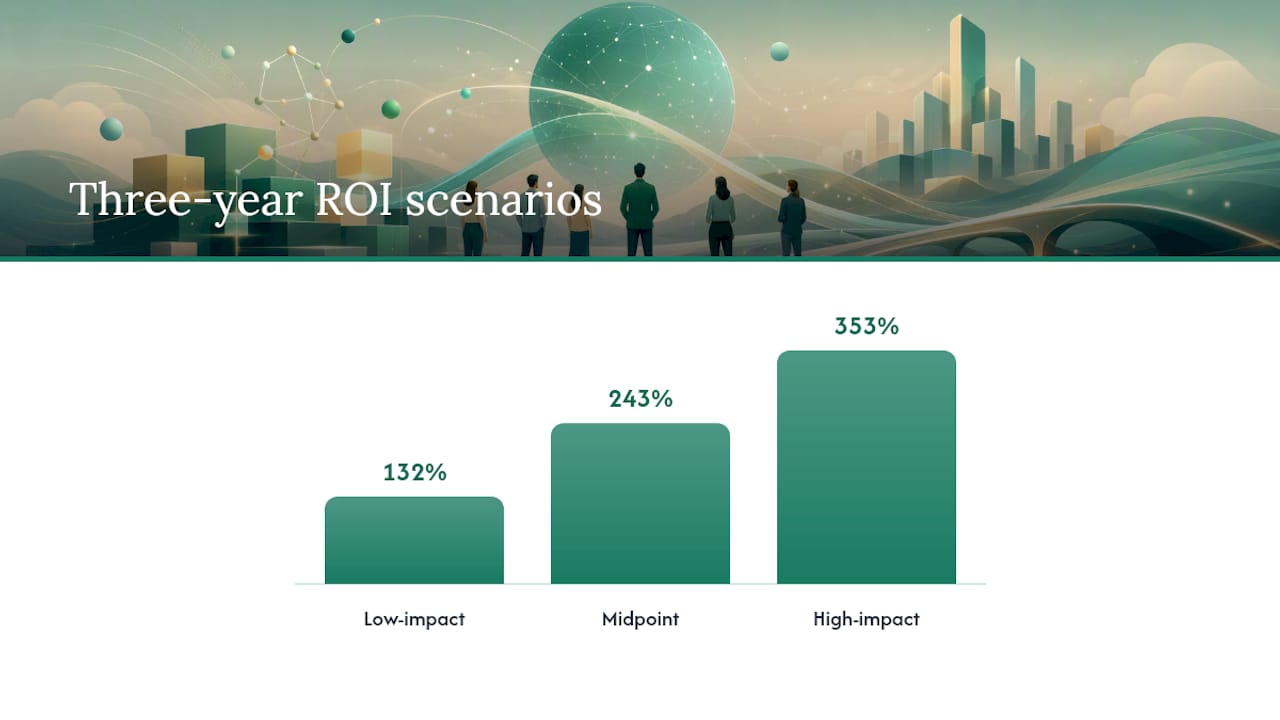
    Forrester ROI range A Forrester TEI study commissioned by Microsoft projects three-year ROI for Microsoft 365 Copilot in SMBs ranging from 132% (low-impact), 243% (midpoint), to 353% (high-impact); cite the 132% scenario as your CFO anchor.
    14 minutes per day Saving 14 minutes per user per day compounds to roughly 56 hours per year; at a reasonable fully loaded hourly rate, that exceeds license cost per user.
    Pilot before broad rollout An 8–12 week cohort of 15–30 users with a strong active-user target produces the credible data finance needs to approve scale.
    Gozera’s approach Gozera delivers readiness audits, pilot design, telemetry configuration, and CFO-ready ROI reports for mid-market professional-services firms.

    Table of Contents

    Why Microsoft 365 Copilot matters for mid-market professional services

    Mid-market professional-services firms carry a structural disadvantage: their revenue is almost entirely people-dependent. Every hour a lawyer, accountant, or consultant spends on internal coordination, formatting, or meeting recaps is an hour not billed. Copilot attacks that gap directly.

    The core value pillars for this audience are specific:

    • Billable time recovery: Copilot drafts meeting summaries, generates first-pass client reports, and pulls variance analysis from Excel. Partners and senior associates reclaim 30–90 minutes per day on tasks that don’t require their judgment.
    • Faster proposal turnaround: Sales and business development teams use Copilot in Word and PowerPoint to compress proposal drafting from days to hours. Faster proposals mean more bids submitted per quarter.
    • Lower onboarding friction: New hires get up to speed faster when Copilot can surface relevant precedents, summarize prior client files, and draft initial work product for review.
    • Shadow AI containment: Without a sanctioned tool, staff use consumer AI on client data. Microsoft 365 Copilot keeps that activity inside the tenant boundary, under your governance controls.

    On the analyst side, a Forrester TEI study commissioned by Microsoft projects three-year ROI for Microsoft 365 Copilot in SMB scenarios ranging from 132% (low-impact), 243% (midpoint), to 353% (high-impact), with high-impact NPV scenarios shown. These are vendor-commissioned projections, not independent audits, so treat them as external benchmarks rather than guarantees. For a mid-market firm, the conservative end of the modeled range (132%) is the number to put in front of a CFO.

    Statistic to anchor your deck: The commissioned model’s low-impact scenario still projects 132% three-year ROI. That is the floor, not the ceiling, and it is the number worth defending in a finance meeting.

    The business outcomes that matter most for professional services map cleanly to Copilot’s strengths: billable hours recovered from administrative work, faster proposal and report cycles, fewer internal review rounds, and reduced outsourcing of routine document production.


    Why Microsoft 365 Copilot matters for mid-market professional services — overview diagram

    What are the highest-impact Copilot use cases by function?

    Picking the right pilot use case is the single biggest variable in whether your business case holds up. The following table maps priority use cases by function to the KPI each affects and the easiest measurement approach.

    Function Priority use case KPI impacted How to measure
    Sales Draft follow-up emails and proposals in Copilot for Word/Teams Win rate, proposal cycle time CRM deal velocity, time-to-proposal
    Finance Variance analysis summaries in Excel, board pack drafts Monthly close cycle time, analyst hours Close calendar, hours logged per close
    Legal Contract review first-pass, clause flagging in Word Review cycle time, attorney hours per matter Matter management system, time entries
    HR Job description drafts, onboarding document generation Time-to-hire, onboarding completion rate HRIS, onboarding checklist completion
    Operations Meeting recap generation, status report drafts in Teams Meeting follow-up time, project update frequency Teams telemetry, project management tool

    Microsoft’s Scenario Library provides stepwise playbooks for each function, including example prompts and KPI definitions. The Finance scenario alone walks through defining the opportunity, gathering financial data, producing forecasts, and testing the business case, which is a ready-made pilot task list.

    A few principles for selecting your first pilot use case:

    • Data cleanliness matters. Copilot’s accuracy depends on the quality of documents and SharePoint content it can access. Start with a team whose files are organized and consistently named.
    • Repeatability beats novelty. Choose a task the team does at least weekly. One-off projects don’t produce enough data to measure impact in an 8–12 week window.
    • Measurable KPI required. If you can’t baseline the metric before the pilot starts, you can’t prove the outcome after it ends. Sales follow-ups and finance close cycles both have clean baselines.

    For a law firm, contract review first-pass is often the fastest win. For an accounting practice, variance summary generation during close week is the clearest time-saver. For a consulting firm, proposal drafting is where the hours are.


    How do you quantify the value of Copilot for a CFO?

    The core metrics the Copilot Analytics whitepaper defines are Copilot assisted hours (total time Copilot contributed to completed tasks) and Copilot assisted value (those hours converted to dollars at the user’s fully loaded rate). These two figures are the backbone of any ROI model.

    Sample calculation template

    Start with this structure:

    1. Users in scope: Number of licensed users in the pilot cohort.
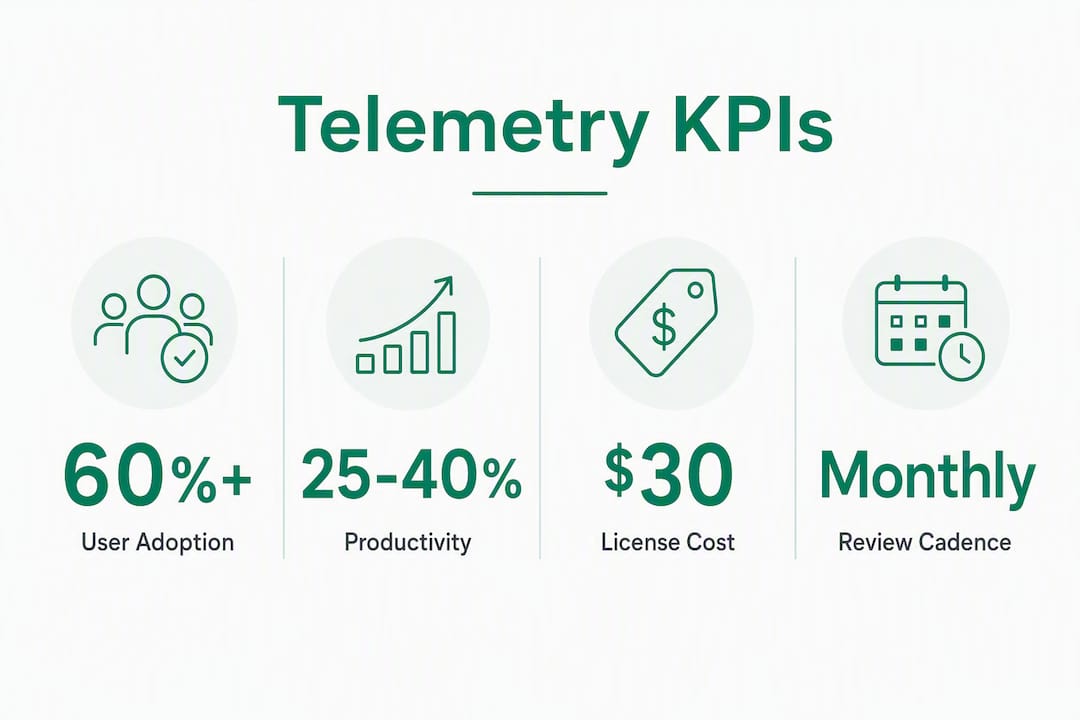
    2. Active user rate: Percentage who use Copilot at least three times per week (target 60–70% for a well-run pilot).
    3. Average time saved per active user per day: Conservative assumption, 15–30 minutes for document-heavy roles.
    4. Annual hours saved: Active users × daily minutes saved × 220 working days ÷ 60.
    5. Dollar value: Annual hours saved × fully loaded hourly rate.
    6. Net benefit: Dollar value minus annual license cost minus implementation and change management cost.

    Statistic to use in your model: Practitioner analysis shows that 14 minutes of saved time per user per day translates to roughly 56 hours per year per user. At a $100 fully loaded hourly rate, that is $5,600 in recovered capacity per user annually, against a license cost well below that figure.

    Conservative, midpoint, and upside scenarios

    These figures use the Forrester-modeled range as context. The conservative scenario is what you defend in front of finance. The upside is what you show to demonstrate ceiling.

    The biggest sensitivity drivers in any model are: (1) the active user rate after the first 60 days, (2) the average time saved per active user (which varies sharply by role), and (3) the share of total work hours that Copilot can actually affect. For a 200-person consulting firm, a 10-percentage-point drop in active user rate cuts projected value by roughly the same proportion. That is why adoption management is not optional.

    Forrester’s full business-case report provides models for both tangible and intangible benefits, and is worth citing directly in your CFO deck as an independent analytical framework.


    How do you build a step-by-step business case to win finance approval?

    Finance will not approve a Copilot investment based on vendor benchmarks alone. They need pokeable assumptions, a measurement plan, and defined checkpoints. Advisory experience confirms that CFOs expect role-level time-savings estimates, a monthly measurement cadence, and go/no-go decisions at months 3, 6, and 12.

    Here is the checklist:

    1. Define the opportunity. Name the specific roles, tasks, and business outcomes you are targeting. Avoid “productivity improvement” as a goal. Use “reduce proposal drafting time from 3 days to 1 day for the BD team.”
    2. Establish baselines. Measure current cycle times, hours per task, and relevant KPIs before the pilot starts. No baseline means no proof.
    3. Model costs fully. Include Microsoft 365 Copilot license cost per user per month, Microsoft 365 E3 or E5 base license (required), implementation and integration costs, change management and training, and ongoing optimization.
    4. Build the financial model. Use the role-level calculation template above. Show conservative, midpoint, and upside scenarios. Cite Forrester as an external benchmark, but lead with your own assumptions.
    5. Define the pilot plan. Cohort size, duration, success criteria, and measurement tools. Commit to a go/no-go decision at week 8.
    6. Address risks explicitly. Accuracy, data governance, adoption, and cost overrun. Each needs a mitigation and a checkpoint.
    Slide Content
    Executive summary One-page verdict: opportunity, projected ROI range, pilot plan, ask
    Financial model Role-level assumptions, conservative/midpoint/upside scenarios, payback timeline
    Pilot plan Cohort, duration, success criteria, measurement tools, go/no-go date
    Risk and controls Risk table with mitigations, governance checklist, checkpoint schedule

    The Forrester decision tool and the Microsoft Copilot Success Kit both provide templates that slot directly into this structure.

    Risk table

    Risk Likelihood Mitigation
    Low adoption after launch High Champions program, role-specific training, weekly usage reporting
    Accuracy/hallucination errors Medium Human review requirement for client-facing output; QA checkpoint in workflow
    Data governance exposure Medium Sensitivity labels, DLP policy, tenant permissions audit before pilot
    License cost exceeds value Low (with pilot) Go/no-go at week 8; scale only cohorts that hit active-user threshold

    How should you design a Copilot pilot and measure its impact?

    A well-designed pilot is the difference between a business case that survives scrutiny and one that collapses at the first CFO question. Microsoft’s internal deployment experience across 300,000+ users points to the same conclusion: start with governance, run cohort pilots, and measure with Copilot Dashboard and Viva Insights before scaling.

    Pilot scope template

    1. Team size: 15–30 users in a single function. Small enough to manage closely; large enough to generate statistically meaningful telemetry.
    2. Duration: 8–12 weeks. Eight weeks is the minimum to separate novelty effect from sustained usage.
    3. Active user threshold: Target 60% of licensed users actively using Copilot at least three times per week by week 4. Below 40% is a signal to pause and diagnose before continuing.
    4. Success criteria: Define three KPIs before day one. Example: proposal cycle time reduced by 20%, meeting recap time reduced by 50%, and Copilot assisted hours above 10 per user per week.
    5. Baseline collection: Capture current-state metrics in the two weeks before the pilot starts.

    Measurement checklist

    • Activate Copilot Dashboard in Microsoft 365 admin center before the pilot starts.
    • Configure Viva Insights to track meeting time, after-hours work, and focus time for the pilot cohort.
    • Download and configure the Business Impact Report Power BI template from the Copilot Analytics whitepaper to correlate assisted hours with business KPIs.
    • Connect CRM or ERP data (deal velocity, close cycle time) to the Power BI report for function-specific KPI tracking.
    • Schedule a weekly 30-minute review of telemetry data with the pilot team lead.

    Integration notes

    SharePoint cleanliness is the most common early hurdle. If the pilot team’s documents are scattered across personal OneDrives or unstructured SharePoint sites, Copilot’s retrieval accuracy drops and early results will underperform. Fix permissions and file organization before the pilot starts, not during it.

    The Microsoft Copilot Success Kit includes adoption planning checklists, stakeholder worksheets, and license allocation guidance that reduce pilot setup time considerably. Use it alongside the Microsoft 365 Copilot implementation guide for a complete technical and organizational readiness checklist.


    What governance and compliance controls do US organizations need?

    Governance is not a post-launch concern. Executives will ask about data exposure before they approve the budget, and the right answer is a checklist, not a reassurance.

    Minimum governance checklist before pilot launch

    1. Tenant permissions audit: Review who has access to what in SharePoint and OneDrive. Copilot surfaces content the user is already permitted to see. Overly permissive sharing means Copilot can surface files users should not access.
    2. Sensitivity labels (Microsoft Purview): Apply labels to confidential client files, financial data, and PII before the pilot starts. Labeled content can be scoped out of Copilot responses.
    3. DLP integration: Confirm that existing Data Loss Prevention policies extend to Copilot interactions. Data Loss Prevention policies apply to Copilot by default in E5 configurations.
    4. Audit logging: Enable unified audit logging in the Microsoft 365 compliance center. This creates the record finance and legal will ask for.
    5. Copilot Studio access controls: If you are deploying custom agents via Copilot Studio, define agent scopes and approval gates before any agent goes live.

    Pro Tip: Run a data hygiene sprint before the pilot, not after. Clean SharePoint structure and correct sensitivity labels directly improve Copilot’s accuracy and reduce the risk of surfacing confidential content to the wrong user. Readiness assessment findings consistently show that permission sprawl is the top cause of early pilot underperformance.

    On privacy: Microsoft 365 Copilot operates within your tenant boundary. Microsoft does not use your tenant data to train foundation models, and conversation data is not retained beyond the session by default. For the authoritative statement, review Microsoft’s published privacy documentation directly, as these policies are updated periodically.

    For firms with specific compliance requirements (SOC 2, HIPAA, state bar rules for law firms), confirm that your configuration meets those standards before extending Copilot to regulated workflows.


    How do you handle the most common objections to Copilot adoption?

    Every executive presentation on Copilot hits the same five objections. Here are direct answers and mitigation actions for each.

    “The AI makes things up.”
    Copilot can produce inaccurate output, particularly when source documents are ambiguous or missing. Mitigation: require human review for all client-facing output during the pilot. Build a QA step into the workflow. Track accuracy errors as a pilot KPI. The goal is not zero errors; it is a known, manageable error rate.

    “We’re paying for licenses nobody uses.”
    This is the most common failure mode in Copilot deployments. Mitigation: use Copilot Dashboard telemetry to identify dormant licenses weekly. Reallocate unused licenses to high-frequency users before the 90-day mark. A workflow-focused approach that embeds Copilot into existing processes drives sustained usage far better than standalone training sessions.

    “There are vendor litigation headlines.”
    Microsoft has faced IP-related legal questions around AI-generated content. Mitigation: use Copilot for drafting and summarization, not for verbatim reproduction of third-party content. Apply the same review standards you would to any junior associate’s work product.

    “Our data could be exposed.”
    Addressed by the governance checklist above. The tenant boundary, sensitivity labels, and DLP policies are the answer. Have the IT lead walk the executive team through the configuration before the pilot starts.

    “We can’t prove it worked.”
    This is a measurement problem, not a Copilot problem. Mitigation: baseline before the pilot, measure weekly, and present the Business Impact Report at the go/no-go checkpoint.

    Signals to act on after the pilot

    • Expand: Active user rate above 60%, at least two KPIs hit or exceeded, no material governance incidents.
    • Hold and diagnose: Active user rate below 40%, KPIs flat, or data quality issues surfaced. Fix the root cause before scaling.
    • Abandon the use case (not the tool): If a specific use case shows no measurable impact after 10 weeks, pivot to a different function rather than concluding Copilot doesn’t work.

    How Gozera operationalizes a Copilot business case

    Gozera’s consulting process follows four steps, each with defined deliverables and a clear handoff to the next phase.

    Step 1: Readiness assessment. Gozera audits your Microsoft 365 tenant for license utilization, SharePoint structure, permissions, and data hygiene. The output is a prioritized list of pilot candidates ranked by expected ROI and data readiness, plus a governance remediation list.

    Step 2: Role mapping and pilot design. Gozera maps your highest-value roles to specific Copilot use cases, defines success criteria, and builds the baseline measurement framework. This includes configuring Copilot Dashboard, Viva Insights, and the Business Impact Report Power BI template.

    Step 3: Telemetry and measurement. During the pilot, Gozera monitors assisted hours, active user rates, and function-specific KPIs weekly. At the go/no-go checkpoint, the team delivers a CFO-ready report with conservative, midpoint, and upside scenarios grounded in your actual pilot data, not vendor benchmarks.

    Step 4: Optimization and scale. After a successful pilot, Gozera rebuilds high-value workflows to embed Copilot natively, automates gaps using Python and n8n where Copilot alone doesn’t cover the full process, and optimizes license allocation to eliminate dormant seats.

    Deliverable What it includes
    Readiness assessment report Tenant audit, license utilization, data hygiene score, pilot candidate ranking
    Pilot design package Use case map, success criteria, baseline metrics, measurement configuration
    CFO-ready ROI report Assisted hours, KPI outcomes, conservative/midpoint/upside financial model
    License optimization plan Dormant seat identification, reallocation recommendations, cost-per-active-user analysis
    Workflow integration Copilot-native workflow rebuilds, Python/n8n automation for process gaps

    For mid-market professional-services firms, typical engagements move from readiness assessment to a live pilot within four to six weeks. The ROI models Gozera uses are built on actual telemetry from your tenant, which means the numbers you present to finance are defensible against scrutiny.


    A consultant’s perspective on where to start

    The most common mistake ops leaders make with Copilot is treating it as a software deployment rather than a workflow change. You can configure every setting correctly and still end up with 80% of licenses sitting idle at month three, because nobody rebuilt the actual process around the tool.

    Three prioritized starter moves for a mid-sized firm:

    1. Run a readiness audit first. Before you buy a single additional license or schedule a training session, understand what your tenant looks like. Permission sprawl and disorganized SharePoint are not minor inconveniences; they are the primary reason early pilots underperform.
    2. Pick one pilot use case and go deep. Sales follow-up drafting, finance variance summaries, and client reporting are the three highest-return starting points for professional services. Pick the one where you have the cleanest data and the most motivated team lead.
    3. Set CFO checkpoints before you start. Define the go/no-go criteria at month 2, the scale decision at month 6, and the full ROI review at month 12. Finance will trust a plan with defined decision points far more than an open-ended rollout.

    The pitfalls to avoid are predictable: horizontal rollouts that give everyone a license but nobody a workflow, skipping governance until after an incident forces the issue, and measuring adoption by login count rather than by task completion and KPI movement. Login count tells you nothing. Assisted hours tied to a closed deal or a faster month-end close tells you everything.

    For professional services specifically, the lowest-effort, highest-impact pilots are almost always in the functions where people spend the most time producing documents for others to review. That is where Copilot’s time savings are largest and where the ROI math is easiest to defend.


    Some mid-market firms that struggle with Copilot ROI often encounter the problem: licenses deployed, training delivered, and no measurement in place to show what actually changed. Gozera’s fixed-price consulting engagements are built specifically to close that gap for law firms, accounting practices, consulting firms, and engineering companies with 50–500 employees.

    Gozera

    A typical Gozera engagement delivers a live pilot within four to six weeks, a CFO-ready ROI report grounded in your tenant’s actual telemetry, and a license optimization plan that eliminates dormant seat costs. Services include readiness audits, pilot design and configuration, Copilot Dashboard and Power BI reporting setup, workflow integration, and ongoing optimization retainers. No multi-year contracts, no vague productivity promises. The deliverables are defined upfront, and the ROI report uses your numbers, not Forrester’s.

    If you are preparing a business case for finance or trying to rescue a Copilot deployment that hasn’t delivered, schedule a scoped diagnostic with Gozera to get a clear picture of where the value is and what it will take to capture it.


    Sources

    These are the authoritative references worth including in your executive deck and measurement plan.

    When presenting to finance, lead with your own pilot data and use these sources as corroborating benchmarks. A CFO who sees your actual telemetry alongside an independent Forrester projection has two reasons to believe the model. One without the other is weaker.

  • Copilot ROI Consulting: Mid-Market Firms’ Real Checklist

    Copilot ROI Consulting: Mid-Market Firms’ Real Checklist

    If your firm is searching “varonis vs netwrix” while trying to figure out Microsoft 365 Copilot adoption, the answer you actually need is this: hire a telemetry-first Copilot consultant, run a baseline audit before touching workflows, and set quarterly decision gates at months 3, 6, 9, and 12. That sequence is where the ROI lives.

    • Time-to-value checkpoints: Expect quick wins by month 3 (active-user uplift, first recovered billable hours), an expansion decision at month 6, workflow optimization at month 9, and full-scale ROI reporting by month 12.
    • Top deliverable to demand: A baseline telemetry report identifying dormant licenses, followed by two to four pilot workflows with runbooks and automation scripts.
    • Trust signal: Look for a consultant with hands-on Microsoft 365 Copilot telemetry experience in professional-services verticals. Gozera, led by Cale Werake, specializes in exactly this for mid-market law, accounting, and consulting firms.

    Immediate next step: Request a baseline telemetry audit before committing to any broader engagement.


    Table of Contents

    Is this guide right for your firm?

    This article is for IT leaders, operations directors, and managing partners at professional-services firms with 50–500 staff running Microsoft 365 tenancies. If you’re in law, accounting, consulting, or engineering and your Copilot licenses are sitting idle, this is for you.

    • What this covers: How to scope and evaluate a Copilot adoption consultant, run a telemetry baseline, design a pilot, and track ROI through quarterly checkpoints.
    • What it does not cover: Any comparison of enterprise data-security or file-access governance tools. That’s a different procurement question for a different buyer.
    • One readiness caveat: Firms mid-migration or with unresolved compliance reviews should resolve those prerequisites first before starting a Copilot pilot.

    What does Copilot success actually look like at 3, 6, 9, and 12 months?

    CFO-level guidance is clear: Copilot ROI follows a multi-quarter curve. Plan for it, or you’ll pull the plug too early.

    1. Month 3 — Quick wins: Active users reach a moderate share of licensed seats. At least two pilot workflows are running with measurable output. Recovered billable hours appear in telemetry, even if modest.
    2. Month 6 — Expansion decision: Active-user rate rises above 60%. Cost-per-recovered-hour is calculable. Decision gate: expand licenses, hold, or cut underperforming workflows.
    3. Month 9 — Optimization: Session depth (actions per session) is trending up. Automation glue (Python, n8n) is handling at least one repeating task. Role-based training is complete for all priority roles.
    4. Month 12 — Scale: Full ROI dashboard is live. Recovered billable time is documented against license cost. The firm has a Copilot Owner running monthly telemetry reviews.

    A structured deployment can produce visible time savings and active-user adoption above 60% within 60–90 days for firms that are ready. The firms that miss this mark almost always skipped the baseline audit.


    What should a consultant actually deliver, phase by phase?

    The engagement blueprint below is also your evaluation standard. If a consultant can’t describe each phase in concrete deliverables, that’s a red flag.

    1. Phase 0: Baseline audit (the first few weeks) — Telemetry pull from Microsoft 365 Admin Center, dormant-license identification, permissions and sensitivity-label gap analysis, and Graph connector inventory. Without this, every subsequent phase is guesswork.
    2. Phase 3: Optimization (ongoing process). Monthly telemetry cadence, KPI dashboard updates, three-month sprint cycles, and cost-per-recovered-hour reporting. See workflow automation examples for the types of Python and n8n tasks that fill gaps Copilot can’t handle natively.

    Pro Tip: Assign a named Copilot Owner on day one. This person owns telemetry reviews monthly and iterates on workflow design. License-utilization rates are a vanity metric — recovered billable hours are the number that matters.


    Project manager leading Copilot workflow discussion in conference room

    How do consultants price this work, and what’s the real first-year cost?

    Understanding the cost structure helps you evaluate proposals without getting surprised.

    Common pricing models:

    • Fixed readiness audit: One-time fee, typically covers telemetry baseline, gap analysis, and a written report.
    • Fixed-price pilot sprint: Covers Phase 1 deliverables (runbooks, workflows, automation scripts) for a defined scope.
    • Fixed-fee rollout: Covers Phase 2 enablement, governance, and SharePoint remediation.
    • Monthly optimization retainer: Ongoing telemetry reviews, KPI reporting, and sprint cycles.

    First-year cost components for a 50-person firm:

    Component Typical Range
    Configuration hours vary by governance scope. Varies by governance scope
    Professional services fees Depends on engagement model
    Monthly optimization retainer Ongoing after rollout

    The headline license price sits at approximately $30/user/month, but all-in year-one costs depend heavily on your M365 baseline (E3 vs. E5) and how much governance work is required. A 50-person firm may need significant configuration hours spread over several months. Recovered billable time enters the breakeven equation fast: at professional-services billing rates, even two recovered hours per professional per week changes the math significantly. For a deeper look at the ROI drivers, see Gozera’s Copilot ROI analysis for mid-market firms.


    Which telemetry signals and KPIs should you track?

    Core metrics to demand from any consultant:

    • Active users: 7-day, 30-day, and 90-day windows. Trend matters more than a snapshot.
    • Session depth: Actions per session. Low depth means users open Copilot and abandon it.
    • Workflow completion rate: What percentage of initiated tasks produce a usable output?
    • Prompt-to-deliverable conversion: How often does a prompt result in a saved document, email sent, or analysis completed?
    • Recovered billable hours: The primary business KPI. Calculate as: (time saved per task × task frequency × billing rate).

    Sample ROI formula: Recovered billable hours per month × average billing rate = monthly value recovered. Divide cumulative professional services fees by monthly value recovered to get months-to-breakeven.

    Reporting Cadence Audience Content
    Weekly operational IT / Copilot Owner Active users, session depth, error flags
    Monthly executive Managing partners Recovered hours, cost-per-recovered-hour, workflow completion
    Quarterly strategic Leadership + finance Checkpoint decision gate, expansion vs. hold recommendation

    Infographic showing key telemetry KPI stats for Copilot adoption


    How do you evaluate and select a Copilot adoption consultant?

    Pre-qualification criteria:

    • Demonstrated Copilot telemetry experience (ask to see a sample baseline report)
    • Professional-services case studies with named verticals (law, accounting, consulting)
    • Graph connector and SharePoint remediation experience
    • Sensitivity-label and permissions expertise
    • Measurable ROI examples, not just deployment counts

    10 questions to ask in the interview:

    1. Can you show us a sample baseline telemetry report?
    2. What does your dormant-license identification process look like?
    3. How do you select pilot workflows for a firm like ours?
    4. What automation tools do you use to fill gaps Copilot can’t handle?
    5. How do you configure Graph connectors for practice-management systems?
    6. What does your Copilot Owner governance model look like?
    7. Can you show a sample ROI dashboard from a prior engagement?
    8. How do you handle sensitivity labels and permissions remediation?
    9. What are your deliverables at the end of the pilot phase?
    10. How do you structure your quarterly checkpoint reviews?

    Red flags: Proposals that lead with seat activation counts, no mention of telemetry baseline, vague deliverables (“training and support”), no role-based training plan, and no automation component for workflow gaps.


    What does a real engagement look like for a 50–150-person firm?

    An anonymized mid-size accounting firm with typical Microsoft 365 licensing ran this sequence:

    • Baseline audit (3 weeks): Telemetry pull revealed a significant portion of Copilot licenses had zero sessions in the prior 30 days. Permissions audit found several SharePoint sites with overly broad access.
    • Pilot (5 weeks): Two workflows deployed: Excel billable-hour analysis grounded against scheduled SharePoint exports, and a client-communication drafting template in Outlook. Both included Python automation scripts for data prep.
    • Rollout (10 weeks): Role-based enablement for five staff groups, Copilot Owner appointed (operations manager), governance playbook delivered, SharePoint remediation completed.
    • Outcomes: Active-user rate rose from 40% to above 60% within 90 days. Two automated tasks saved several hours per week firm-wide. Month-to-breakeven on professional services fees occurred within several months.

    The BPM case study from Microsoft’s customer stories shows a similar pattern at a larger firm: embedding Copilot directly into daily workflows, with agents handling planning and quality checks, freed time for higher-value advisory work. The mechanics scale down cleanly to mid-market.


    What are the data privacy and risk considerations?

    Treating Copilot adoption as process reengineering, not software installation, is the right frame. Without SharePoint permission remediation and sensitivity-label configuration, activating Copilot risks surfacing confidential client data to the wrong staff members.

    Key controls to put in place before go-live: sensitivity labels on all matter files, overly broad SharePoint permissions tightened, and an audit trail for Copilot-generated outputs. For firms in regulated verticals, a compliance and security audit before the pilot phase is worth the investment. Copilot respects Microsoft 365 permissions exactly as configured, which means misconfigured permissions become a Copilot risk, not just a general IT hygiene issue.


    What change management actually works for Copilot adoption?

    The biggest barrier to Copilot ROI is organizational culture, not technical deployment. Firms that create deliberate space for experimentation unlock higher adoption than firms that simply push licenses.

    Three things that move the needle: a named Copilot Owner with authority to iterate on workflows, role-based training tied to specific job tasks (not generic “here’s what Copilot can do” sessions), and visible wins shared internally within the first 30 days. When a partner sees a colleague recover two hours on a client memo, adoption spreads faster than any training program.


    What does post-rollout support look like?

    Post-rollout is where most engagements either compound their gains or stall. Monthly telemetry reviews catch declining session depth before it becomes a license-waste problem. Three-month sprint cycles let the Copilot Owner introduce new workflows without disrupting operations. A good optimization retainer includes KPI dashboard updates, prompt library refreshes, and at least one new workflow per quarter. The benefits of workflow automation compound over time: each automated task frees capacity for the next one.


    Key Takeaways

    Copilot ROI for mid-market professional-services firms requires a telemetry-first audit, a fixed-scope pilot, a named Copilot Owner, and quarterly decision gates at months 3, 6, 9, and 12.

    Point Details
    Start with telemetry A baseline audit identifying dormant licenses and permissions gaps is the non-negotiable first step.
    Use quarterly checkpoints Plan decision gates at months 3, 6, 9, and 12 to expand, hold, or cut specific workflows.
    Measure recovered hours, not seats Active-user rate is a vanity metric; recovered billable hours and cost-per-recovered-hour are the real KPIs.
    Demand concrete deliverables Any consultant should provide runbooks, automation scripts, a governance playbook, and a live ROI dashboard.
    Gozera’s engagement model Gozera delivers the full audit-to-optimization sequence with telemetry reporting and workflow automation for mid-market firms.

    The telemetry-first approach is the only one that holds up

    Most Copilot engagements fail for a predictable reason: the consultant skips the baseline and goes straight to training. You end up with a 30-slide deck on “Copilot tips,” a brief spike in usage, and then silence. The licenses go dormant again, and six months later someone asks why the investment didn’t pay off.

    The firms that get real results treat this as a workflow redesign project. They measure what’s actually happening in their tenant before touching anything. They pick two workflows where the time savings are obvious and the data is already in Microsoft 365. They automate the prep work that Copilot can’t do natively. And they assign someone to own the number, monthly, permanently.

    The EPC Group professional-services framework documents 25–40% billable-hour productivity gains across published case studies. That range is real, but it’s the ceiling for firms that do this right, not the floor for firms that wing it. The difference is almost always the baseline audit and the Copilot Owner.


    Gozera turns idle Copilot licenses into recovered billable time

    Mid-market professional-services firms are paying for Copilot licenses that sit unused while the ROI case erodes. Gozera’s fixed-price engagements start with a baseline telemetry audit, move through a scoped pilot with real workflow deliverables, and land on a live ROI dashboard your managing partners can read in 60 seconds.

    Gozera

    No vague “AI transformation” promises. You get a telemetry report, two to four working pilot workflows with runbooks, a governance playbook, and a Copilot Owner model your operations team can run independently. The optimization retainer keeps the gains compounding after rollout.

    Ready to find out how many of your licenses are dormant and what recovering them is worth? Request a Copilot readiness audit from Gozera and get a fixed-price proposal within a week.


    Useful sources for implementers and procurement teams

    • Microsoft Customer Story: BPM and Microsoft 365 Copilot — Real-world case study on embedding Copilot into daily workflows at a professional-services firm.
    • The Crossing Report: Microsoft Copilot M365 for Law & Accounting — AI maturity stages and adoption benchmarks for professional-services verticals.
    • CFO Dive: Why AI poses a unique ROI challenge for accounting firms — Frames the billable-hour tension and ROI measurement challenge for finance leaders.
    • Virteva: Microsoft Copilot ROI CFO business case — Quarterly checkpoint framework and governance-first approach for CFOs.
    • AI Vortex: Microsoft Copilot pricing and law firm cost analysis — Detailed breakdown of license costs, configuration hours, and year-one cost scenarios.
    • AI Vortex: Excel billable-hours analysis with Copilot — Practical guide to the highest-leverage pilot workflow for professional-services firms.
    • EPC Group: Copilot for professional services — Published productivity benchmarks and engagement tiers across law, accounting, and consulting.
    • Midnight Blue Tech: The real cost of waiting on Copilot — Readiness criteria and the risk calculus for firms delaying adoption.

    This article provides general information about Microsoft 365 Copilot adoption consulting. Confirm current licensing terms, compliance requirements, and pricing directly with Microsoft or a qualified advisor before making procurement decisions.

  • Email to Tasks Automation: A Practical Guide for Professional Services

    Email to Tasks Automation: A Practical Guide for Professional Services

    For mid-market professional services firms, the best approach to email to tasks automation right now is selective inbox rules combined with an integration platform that uses AI parsing to extract metadata and write structured tasks directly into your project management system. That combination captures due dates, assignees, and project context without manual re-entry, and it scales from a single power user to a tenant-wide deployment.

    Three paths exist, and the right one depends on your constraints:

    Method Best fit Governance
    Forward to task address Solo users, quick pilots Low
    Built-in rules / Quick Steps Outlook/Gmail power users, no IT budget Medium
    Integration platform (Zapier, Make, Power Automate, n8n, Relay) IT-led rollouts, multi-system, compliance-sensitive High

    IT leaders should start with a Power Automate or n8n pilot scoped to one practice group within 72 hours. Operations directors can deploy Outlook Quick Steps across a team in under a day with no external connectors. Managing partners who want immediate triage should forward high-priority client emails to Todoist using subject-line tokens while the IT-led flow is built in parallel.

    Table of Contents

    What are the three methods for email to tasks automation?

    Task automation replaces repetitive manual steps and delivers the most value where it reduces administrative burden on billable staff. Each of the three core methods sits at a different point on the effort-versus-capability curve.

    Method 1: Forward to task address

    You forward an email to a unique project inbox address, and the task app creates a task from the subject line and body. Todoist’s forwarding feature is the clearest example: each project has its own address, and Email Assist can extract dates and rewrite task names from the email content. Specialist services like Casso extend this pattern to Jira, ClickUp, Asana, and Monday.com, adding AI-generated summaries, priority extraction, and due date parsing.

    Pros: Zero IT involvement, works from any email client, live in minutes.
    Cons: No conditional logic, every forwarded email becomes a task, attachment handling varies, and audit trails are thin.

    Method 2: Built-in rules and Quick Steps

    Outlook Quick Steps apply multiple actions to a message in one click and can be assigned keyboard shortcuts from the Home tab. A Quick Step can flag, move, categorize, and forward an email simultaneously, making it a practical first layer before a full automation platform. Gmail rules work similarly: a filter on sender domain or subject keyword applies a label, which then triggers a downstream flow.

    Pros: No external connectors, user-level control, fast to configure.
    Cons: Limited parsing, no AI extraction, maintenance falls on individual users.

    Method 3: Integration platforms

    Zapier, Make, Power Automate, n8n, and Relay sit between your inbox and your task system and do the heavy lifting: conditional logic, AI summarization, field mapping, and audit logging. Make’s visual scenario builder lets you chain modules to transform email content into structured tasks with mapped fields. Todoist’s plain-English automations offer a low-code middle ground: rules like “when I star a Gmail message, add it to Todoist for tomorrow” require no developer.

    Dimension Forward to address Built-in rules Integration platform
    Supported inboxes Any Gmail, Outlook Gmail, Outlook, Exchange
    Parsing & AI Basic (Email Assist) None Full AI + regex
    Setup complexity Low Low–Medium Medium–High
    Cost Free–$10/mo Free Free tier to $50+/mo
    Enterprise governance Low Medium High

    How do you set up Gmail, Outlook, and Todoist in under 30 minutes?

    Gmail to Google Tasks via Relay

    Relay’s label-trigger approach is the fastest Gmail start: apply a label to an email and a task appears in Google Tasks automatically.

    1. In Gmail Settings, create a filter for your target criteria (e.g., sender domain @clientname.com or subject contains [ACTION]).
    2. Set the filter action to apply the label To-Do/Client.
    3. In Relay, create a new workflow with trigger: “New labeled email in Gmail” and select To-Do/Client.
    4. Add the action “Create task in Google Tasks,” mapping subject to task title and body snippet to notes.
    5. Add a due-date field: parse the email body for patterns like “by Friday” using Relay’s date extraction step.
    6. Test with a real email before enabling for the full label.

    Pro Tip: Add a second filter condition requiring the email to be unread and not from a mailing list (filter out list-unsubscribe headers). This alone eliminates roughly 80% of false-positive task creation.

    Outlook to Microsoft To Do or Planner

    1. In Outlook, open the Home tab and select “New Quick Step.”
    2. Name it Client Action and add actions: Flag message, Move to folder _Tasks/Client, and Forward to your Microsoft To Do task-capture address.
    3. Assign the keyboard shortcut Ctrl+Shift+1.
    4. In Microsoft To Do, connect your flagged-email list so flagged Outlook messages appear automatically as tasks.
    5. For Planner, use Power Automate: trigger on “When a new email arrives” with a subject filter, then “Create a task” in Planner with title from subject and due date parsed from body.
    6. Add a “Post a message in Teams” step to notify the assignee.

    Pro Tip: The Quick Step handles immediate triage; Power Automate handles the structured task record. Run both in parallel during a 30-day pilot so you can compare which tasks each method captures and which it misses.

    Forward to Todoist

    Each Todoist project has a unique email address under Settings > Integrations > Email. Forward or BCC client emails to that address. Use subject-line tokens to set metadata:

    • !today or !tomorrow sets the due date.
    • #ProjectName assigns the project.
    • @PersonName assigns to a team member.
    • p1 through p4 sets priority.

    Example subject: Review contract draft !tomorrow #LegalMatters @Sarah p1

    Email Assist reads the body and can rewrite the task name into plain language. Toggle it on under project settings.

    Pro Tip: Subject tokens override Email Assist parsing. If your team sends emails with inconsistent subject lines, write a Gmail or Outlook rule that prepends a token before forwarding, so the metadata is always present regardless of how the original email was written.

    Which automation platforms give you the most reliable flows?

    The canonical flow for any platform follows the same spine: trigger (flagged or labeled email) → parse (AI or regex extraction) → validate (filter rules) → create/update task → log audit entry. Where platforms differ is in how much of that spine they handle natively.

    Platform-by-platform breakdown

    Zapier is the fastest to configure for Gmail and Outlook triggers. Use the “New labeled email in Gmail” or “New email matching search” trigger, add an OpenAI or Formatter step to extract due date and summary, then create a task in Todoist, Asana, or Planner. Zapier’s own guidance warns explicitly against converting every email to a task: AI summarization and selective filters are what keep the task system usable.

    Make handles multi-step enterprise flows better than Zapier at comparable price points. Build a scenario with the Gmail or Microsoft 365 module as the trigger, a Text Parser or AI module for extraction, a Router to branch by email type (client vs. internal), and separate task-creation modules for each branch. Make’s visual canvas makes it easier to audit the logic later.

    Power Automate is the natural choice for Microsoft 365 tenants. Use the “When a new email arrives (V3)” trigger with subject and sender filters, then “Create a task” in Planner or To Do. Add a “Create item” step in SharePoint to log the automation event for audit purposes. Power Automate runs inside your Microsoft 365 tenant boundary, which matters for data residency.

    n8n is the right pick when you need self-hosted control or want to integrate with systems that lack prebuilt connectors. An n8n workflow for professional services automation typically chains an IMAP or Gmail node, a Code node for regex parsing, an HTTP Request node to call an AI API for summarization, and a task-platform node. Setup takes longer but the result is fully auditable and runs on your own infrastructure.

    Relay sits between Zapier and Make in complexity and is particularly clean for Gmail-to-Google Tasks flows, as shown in its label-trigger documentation.

    Platform Supported inboxes AI parsing Setup time (template) Setup time (enterprise)
    Zapier Gmail, Outlook Via OpenAI step 20–30 min 2–4 hours
    Make Gmail, Outlook, Exchange Built-in AI module 30–45 min 4–8 hours
    Power Automate Outlook, Exchange Copilot/AI Builder 30–60 min 4–12 hours
    n8n IMAP, Gmail, Outlook Via API call 1–2 hours 1–3 days
    Relay Gmail Basic extraction 15–20 min 1–2 hours

    Pro Tip: Build a dead-letter mailbox: any email that fails parsing or hits an error condition gets forwarded there instead of silently dropped. Review it weekly for the first 30 days. Most parsing failures cluster around a handful of sender formats you can fix with one additional filter rule.

    Platform-by-platform breakdown — overview diagram

    How do you automate without creating inbox noise?

    The most common failure mode in email workflow automation is trigger overload: the task system fills with newsletters, internal status updates, and automated notifications until no one trusts it. Zapier’s task management guidance makes this point directly: selective rules and AI summarization are what separate a useful system from a noisy one.

    Exclusion filters to apply first:

    • Sender matches known newsletter domains or contains unsubscribe in headers.
    • Subject contains [FYI], [No Action], RE:, or FW: without a client name prefix.
    • Sender is an internal address and the email is a CC (not a direct TO).
    • Message is from an automated system (Jira notifications, Salesforce alerts, calendar invites).

    Positive criteria for task creation:

    • Email is from a client domain and addressed directly to a fee earner.
    • Subject contains [ACTION], [APPROVAL], or [DELIVERABLE].
    • Email contains a deadline phrase (“by end of week,” “due date,” “please confirm by”).
    • Email is a reply to a sent proposal or engagement letter.

    Metadata conventions to adopt firm-wide:

    • Task title format: [ClientCode] [Action] [Deliverable] (e.g., ACME Review NDA v3).
    • Due date token: always in ISO format (2026-07-15) when injected programmatically.
    • Assignee: use the firm’s Active Directory display name, not email alias, so tasks route correctly in Planner and To Do.
    • Project tag: match the billing code or matter number from your practice management system.

    Operational governance:

    • Only IT or designated operations leads may create or modify automation credentials.
    • Version automation templates in a shared SharePoint library with change-log comments.
    • Run a 30-day review: pull the dead-letter mailbox report and the task-creation log, identify false positives, and tighten filters before expanding scope.

    Pro Tip: For the first 30 days, route all auto-created tasks into a quarantine project called _Inbox Review rather than live client matters. Have one person spend 10 minutes each morning approving or rejecting tasks. After 30 days, you will have enough data to set filters that need almost no manual review.

    What security and governance checks must IT complete before going live?

    Automation that touches client email in a law firm, accounting practice, or consulting firm carries real compliance exposure. The checklist below covers the minimum before any production deployment.

    OAuth and connector scopes:

    • Request only the minimum Gmail or Outlook scopes needed: read-only access to labeled/flagged messages, not full mailbox read.
    • For Microsoft 365, configure tenant-level app consent policies in Azure AD so users cannot self-authorize third-party connectors without IT approval.
    • Review and restrict which connectors are available in Power Automate via the Data Loss Prevention (DLP) policy in the Power Platform admin center.

    Service accounts and credential rotation:

    • Provision a dedicated service account for each automation (not a named user’s credentials).
    • Set a 90-day credential rotation schedule and store secrets in Azure Key Vault or an equivalent secrets manager.
    • Enable audit logging on the service account so every task-creation event is traceable.

    Data residency and PII handling:

    • Power Automate and Microsoft 365 connectors process data within your tenant’s geographic boundary by default. Zapier and Make route data through their own cloud infrastructure: verify their data processing agreements match your firm’s requirements before connecting client email.
    • Never pass email attachments into a low-governance task app. Strip attachments at the automation layer and store them in SharePoint or your DMS with the task carrying only a link.
    • Apply a PII filter step: if the email body contains Social Security numbers, account numbers, or health identifiers (detectable via regex or an AI classifier), route to the dead-letter mailbox for manual handling instead of auto-creating a task.

    Audit and monitoring:

    • Log every task-creation event: timestamp, source email ID, trigger rule, destination task ID, and assigned user.
    • Store logs in SharePoint or a SIEM for at least 12 months to satisfy most professional services retention requirements.
    • Set an alert for automation failure rates above a small single-digit percentage in any 24-hour window.

    Firms that skip these controls often discover the gap during a client audit or a security review, not before. Bitrix24’s RPA-style task automation illustrates how enterprise task platforms build approval chains and audit trails natively; if your chosen task app lacks those features, the integration layer must supply them.

    When does it make sense to bring in a consultant?

    Self-service automation covers a lot of ground. But several scenarios consistently justify specialist help, particularly for firms where billable time is the revenue engine and compliance exposure is real.

    Scenarios that warrant a consultant:

    • You have more than three source systems (email, CRM, DMS, billing platform) that need to share task context.
    • Your firm handles regulated data (attorney-client privilege, PCAOB-governed workpapers, HIPAA-adjacent records) and needs a defensible audit trail.
    • Copilot licenses are deployed but adoption is low: staff are not using the AI features that would make email triage faster.
    • You need telemetry to prove ROI to a managing partner or board, not just anecdotal time savings.

    What specialist engagement delivers:

    • Telemetry baseline: measure actual Copilot usage before and after workflow changes so ROI is quantified, not estimated.
    • Workflow rebuild: map the full email-to-task-to-billing chain and eliminate manual re-entry at each handoff.
    • Python and n8n automation for gaps that prebuilt connectors cannot fill, such as extracting matter numbers from PDF attachments or syncing tasks back to a legacy practice management system.
    • Governance documentation: data flow diagrams, DLP policy configurations, and credential rotation schedules that satisfy a client security questionnaire.

    Gozera specializes in exactly this work for mid-market professional services firms. The firm’s approach starts with a telemetry audit to identify which Copilot licenses are dormant and which workflows are generating the most manual overhead, then rebuilds those workflows with measurable outcomes. Firms that have gone through this process typically recover billable time that was previously lost to inbox triage and manual task entry. For context on workflow automation ROI in professional services, the productivity case is well-documented across law, accounting, and consulting.

    A typical engagement runs several weeks from audit to optimized production flow, with an optional monthly retainer for ongoing optimization as the firm’s toolset evolves.

    Key Takeaways

    Selective inbox rules combined with an integration platform that parses metadata is the most reliable path to email to tasks automation for professional services firms.

    Point Details
    Start with a 72-hour pilot Scope one practice group, use Power Automate or Outlook Quick Steps, and route tasks to a quarantine project first.
    Lock metadata conventions early Agree on task title format, due date tokens, and assignee syntax before scaling to avoid a disorganized task backlog.
    Apply exclusion filters before inclusion Block newsletters, internal CCs, and automated notifications first; then define positive criteria for client-actionable emails.
    Governance is non-negotiable Minimum-scope OAuth, service accounts, DLP policies, and a 12-month audit log are required before connecting client email in any regulated firm.
    Gozera for complex rollouts Gozera’s telemetry-led audit identifies dormant Copilot licenses and rebuilds email-to-task workflows with measurable ROI for mid-market professional services firms.

    The real problem is not the tool, it is the trigger

    Most firms that struggle with email task integration are not using the wrong platform. They set up Zapier or Power Automate, connect their inbox, and within two weeks the task system is full of forwarded newsletters, internal FYIs, and automated Jira notifications. The tool worked exactly as configured. The configuration was wrong.

    The instinct to automate everything is understandable: if a little automation saves time, more should save more. It does not work that way. A task system that professionals do not trust is worse than no task system at all, because it adds a review burden on top of the original inbox problem.

    The single action I would take first in any mid-market firm is to define the positive criteria for task creation before touching any automation tool. Write down, in plain language, what makes an email worth a task: it is from a client, it is addressed directly to a fee earner, and it contains a request or a deadline. Everything else is noise until proven otherwise. That definition, turned into two or three filter conditions, is worth more than any AI parsing feature.

    The quarantine queue approach described in this article is not a workaround. It is the correct way to calibrate a new automation: let it run, review what it catches, and tighten the rules before the output touches live client matters. Thirty days of that discipline produces a system people actually use.

    Gozera helps professional services firms turn email triage into measurable ROI

    Firms that have already deployed Microsoft 365 Copilot but are not seeing adoption gains often find the gap is not the AI itself. It is the absence of structured workflows that connect inbox activity to billable tasks. Gozera’s engagement model addresses that directly: a telemetry audit identifies which licenses are idle and which email-to-task handoffs are generating manual overhead, followed by a workflow rebuild sprint and a 90-day optimization cycle with documented ROI.

    Gozera

    The result is a task management automation system that captures client approvals, deliverable requests, and deadline-driven emails as structured tasks in your existing Microsoft 365 environment, with audit trails that satisfy client security reviews. No lengthy change management, no ripping out existing tools. If your firm has Copilot licenses that are not earning their keep, schedule a discovery call with Gozera to see what a focused workflow audit typically uncovers.

    Vendor docs and templates to use next

    The sources below are the official starting points for each method. Consult the one that matches your chosen approach before building in production, and always test in a sandbox tenant or a quarantine project first.

    Resource Best for Start here if…
    Microsoft Quick Steps docs Outlook built-in rules You want zero external connectors
    Todoist email forwarding guide Forward-to-task setup You need a working pilot in under 30 minutes
    Todoist automations Low-code Gmail rules You want plain-English trigger rules without a developer
    Relay Gmail-to-Tasks how-to Gmail label triggers You use Google Workspace and want a fast label-based flow
    Zapier task management templates Zapier flows with AI You want prebuilt templates and selective automation guidance
    Make task management scenarios Multi-step enterprise flows You need visual scenario building with branching logic
    Casso forward-to-task service Jira, Asana, Monday.com You need AI parsing without building a custom flow
    Bitrix24 task automation Native platform RPA Your task platform needs built-in approval chains

    For Microsoft 365 tenants, start with the Quick Steps documentation and the Power Automate connector for Outlook before evaluating third-party platforms. For Google Workspace, the Relay how-to and Todoist forwarding guide cover the two most common setups. Teams choosing n8n for self-hosted control should review n8n automation patterns for professional services before configuring IMAP nodes in a production environment.

  • Copilot with iManage: Pilot & ROI Guide for Law Firms

    Copilot with iManage: Pilot & ROI Guide for Law Firms

    Microsoft 365 Copilot with iManage connects your firm’s governed document repository directly to Copilot’s generative AI, so every answer Copilot produces is grounded in your actual matters, contracts, and emails rather than generic training data. The integration respects iManage’s existing permission model, meaning Copilot only surfaces content the signed-in user is already authorized to view.

    Your first move: confirm that your iManage instance has the MCP server enabled and that your Microsoft 365 tenant supports Copilot Studio or Power Platform connectors. Then designate a service account with the narrowest folder and matter permissions your pilot scope requires.

    • The iManage Work MCP connector is available in the Microsoft connector store and as a custom connector in Copilot Studio, and it defaults to read-only access.
    • Documents stay inside iManage. No bulk export, no replication to an external index.
    • Supported operations include search, fetch, get_document_profile, download_document, and get_document_versions.
    • Regional exclusions apply: US Government GCC, GCC High, DoD, and China Cloud tenants are not supported.

    Pro Tip: Before your first test query, verify your iManage subdomain URL. The generic cloudimanage.com endpoint will fail for custom tenant instances. You need the exact format: https://[yoursubdomain].cloudimanage.com/mcp/work.


    Table of Contents

    What does the iManage–Copilot integration actually do?

    The integration grounds Copilot responses in content stored inside iManage Work, covering documents, emails, and matter workspaces. When a user asks Copilot a question, the MCP connector queries iManage in real time, retrieves relevant content the user is permitted to see, and passes it to Copilot as context. The answer reflects your firm’s actual work product, not a generic language model response.

    Woman typing Copilot queries in office

    Architecturally, you have three paths:

    Deployment Path How It Works Best For
    Connector store (prebuilt) Add iManage Work MCP directly from Microsoft’s connector gallery Fastest setup; standard subdomain tenants
    Custom MCP connector in Copilot Studio Configure a custom MCP server URL with your exact subdomain Custom subdomains, bespoke auth flows
    Federated vs. indexed MCP uses federated real-time access; no data sync required Governance-sensitive environments

    Infographic outlining deployment steps for Copilot with iManage

    The Microsoft Connectors gallery lists both Microsoft-built and partner-built connectors, including the iManage Work connector, and distinguishes between federated real-time access (what MCP provides) and synced/indexed models that copy data out of iManage.

    Practical use cases that legal and professional-services teams are already running:

    • Matter research: Ask Copilot to surface relevant precedents or prior work product from a specific matter workspace.
    • Document summarization: Get a plain-language summary of a lengthy contract or due diligence report without leaving Teams or Outlook.
    • Clause extraction: Query for specific clause types (indemnification, limitation of liability) across a set of agreements.
    • Drafting assistance: Reference governed templates and prior drafts stored in iManage while generating a new document.
    • Version history review: Retrieve document version history to understand how a contract evolved before a negotiation.

    The read-only default is not a limitation for these use cases. It is a deliberate governance choice: Copilot reasons over your content without modifying it.


    What licenses and prerequisites do you need before deploying?

    Missing a license or a misconfigured service account is the most common reason deployments stall. Confirm every item below before your first configuration session.

    Microsoft-side requirements:

    Requirement Details
    Microsoft 365 Copilot license Required for each user who will query iManage content through Copilot
    Copilot Studio or Power Platform Premium Required if deploying via custom MCP connector; check tenant entitlements
    Tenant admin access Needed to add connectors and authorize OAuth2 flows
    Supported cloud region US Gov GCC, GCC High, DoD, and China Cloud are excluded

    iManage-side requirements:

    Requirement Details
    iManage Work subscription Active cloud subscription required; on-premises configurations vary
    MCP server enabled Must be activated in your iManage environment by your iManage admin
    Exact environment subdomain You need the precise subdomain, not the generic cloudimanage.com URL
    Service account Least-privilege account scoped to the matters and folders in your pilot

    The four roles that must be in the room before you start:

    • Tenant admin: Adds the connector and manages OAuth2 authorization.
    • iManage admin: Enables MCP, confirms the subdomain, and creates the service account.
    • Security/compliance lead: Reviews permission scoping and audit requirements.
    • Practice lead: Defines pilot scope, selects the matters, and owns success metrics.

    Pro Tip: Check your iManage subscription tier before scheduling the configuration session. Not all iManage plans include MCP server access by default. Confirming this with your iManage account rep takes one email and saves a week of delay.


    How do you deploy the connector, step by step?

    Connector store path (faster, simpler)

    Use this when your iManage instance runs on a standard subdomain and you want the fastest path to a working test query.

    1. Sign in to the Microsoft connector store or the Copilot Studio agent builder.
    2. Search for “iManage Work MCP” and select the prebuilt connector.
    3. Enter your exact iManage environment URL (e.g., https://yourfirm.cloudimanage.com/mcp/work).
    4. Authorize the OAuth2 connection using the service account credentials.
    5. Add the iManage tool to your Copilot agent.
    6. Run a test search query against a known matter to confirm the connection.

    Custom MCP connector path (Copilot Studio)

    Use this when you have a custom subdomain, need bespoke authentication flows, or are building a more advanced agent scenario.

    1. In Copilot Studio, navigate to Settings > AI capabilities > Model Context Protocol.
    2. Select Add MCP server and enter your precise subdomain URL: https://[yoursubdomain].cloudimanage.com/mcp/work.
    3. Configure OAuth2 with the service account. Do not use a personal user account here.
    4. Add the connector as a tool in your agent definition.
    5. Save and publish the agent to a test environment.
    6. Run the testing checklist below before promoting to production.

    Testing checklist before go-live:

    • Verify that search results respect permission scoping (a user should not see matters they are not assigned to).
    • Run fetch and get_document_profile operations on at least three document types (Word, PDF, email).
    • Test get_document_versions to confirm version history retrieval works.
    • Test download_document and verify file integrity.
    • Check connector invocation logs in Copilot Studio for errors or latency spikes.
    • Confirm that the service account cannot write, delete, or modify any iManage content.

    The connector store path is faster and requires less configuration. The custom MCP path gives you control over the exact URL, auth parameters, and agent behavior, which matters for firms with non-standard iManage environments or complex matter structures.


    How does the integration preserve iManage security and governance?

    The short answer: Copilot only returns what the signed-in user is already allowed to see. The iManage MCP connector defaults to read-only access, and the service account’s folder and matter permissions define the outer boundary of what Copilot can retrieve. If a user lacks access to a matter in iManage, Copilot will not surface documents from that matter, regardless of how the query is phrased.

    iManage’s cloud-native Azure architecture supports co-authoring, journaling, and auditable workflows alongside Copilot. That means the integration does not create a shadow copy of your data or bypass your existing records management controls.

    Key governance practices to implement before pilot start:

    • Least-privilege service account: Scope the account to only the workspaces and matter types included in your pilot. Expand scope deliberately as the pilot proves out.
    • Enable journaling and audit trails: iManage’s journaling feature logs document access events. Confirm it is active before Copilot queries begin so you have a complete audit record.
    • Integrate connector logs with your SIEM: Export Copilot Studio connector invocation logs to your security information and event management platform for ongoing monitoring.
    • No bulk replication: MCP provides federated real-time access, so documents remain inside iManage rather than being copied to an external index. This eliminates a significant class of data-leakage risk that older custom API integrations carried.
    • Map responsibilities before day one: Assign explicit ownership of connector logs (IT), audit trail review (records management), and user access review (security) before the pilot starts.

    Pro Tip: Run a permission-boundary test on day one of the pilot: log in as a user who is explicitly excluded from a specific matter and confirm that Copilot returns no results from that matter. Document the test result. Your compliance team will ask for it.


    What are the known limits and how do you fix common errors?

    Documented limitations

    • Regional exclusions: The connector is not available in US Government GCC, GCC High, DoD, or China Cloud tenants. If your firm operates in one of these environments, the MCP connector is not currently an option.
    • Read-only by default: Copilot cannot create, edit, or delete iManage content through this connector. That is by design, but it means any workflow requiring write-back to iManage needs a separate integration layer.
    • Preview status: The iManage Work MCP connector is currently in preview, which means Microsoft may change supported operations or throttling limits before general availability.

    Throttling and API limits

    The connector documentation publishes throttling limits on API calls per connection. Large queries or bulk summarization tasks can hit these ceilings, especially during a pilot when multiple users run concurrent queries.

    Symptom Likely Cause Recommended Fix
    Queries return partial results Throttling ceiling reached Batch queries; add pagination logic
    Authentication failure at setup Wrong subdomain in MCP URL Use exact subdomain URL format
    Connector returns no results MCP server not enabled in iManage Contact iManage admin to activate MCP
    Service account access too broad Over-permissioned service account Rescope to pilot matters only
    Connector invocation errors Insufficient service account permissions Review and adjust folder-level access

    Diagnostics checklist

    • Check Copilot Studio connector invocation logs first. Most authentication and throttling errors appear here within seconds of a failed query.
    • Cross-reference with iManage MCP server logs to confirm whether the request reached iManage at all.
    • Verify the exact subdomain URL in your connector configuration. A single character error causes a silent authentication failure.
    • Confirm the service account has not been locked or had its permissions changed since initial setup.

    How do you run a pilot that proves ROI?

    Pilot design

    Pick 2–3 teams where document-heavy tasks consume measurable time. Litigation, tax, and advisory practices are strong candidates because their work product lives almost entirely in iManage and their time is directly billable.

    Define the tasks you will test before the pilot starts:

    • Document summarization (e.g., summarize a 40-page deposition transcript in under 60 seconds).
    • Clause extraction (e.g., pull all indemnification clauses from a set of vendor agreements).
    • Matter research (e.g., surface prior work product on a specific legal issue from the last three years).

    Establish baseline metrics for each task: how long does it take today without Copilot? That number is your ROI denominator.

    Suggested 6–8 week timeline

    • Weeks 1–2: Planning and configuration. Validate prerequisites, enable MCP, create service account, configure connector, run internal test queries.
    • Weeks 3–4: Controlled user testing. Onboard 5–10 pilot users per team, run scripted test queries, capture telemetry.
    • Weeks 5–6: Early adoption and feedback. Expand to full pilot group, run weekly feedback sessions, log issues.
    • Weeks 7–8: ROI measurement and reporting. Compare time-on-task metrics against baseline, calculate time-to-first-draft reduction, assess license utilization.

    Metrics that matter

    • Query volume: How many Copilot queries are being run against iManage content per user per week?
    • Time-to-first-draft reduction: Minutes saved per document summarization or drafting task.
    • License utilization: What percentage of licensed users are actively using the iManage connector?
    • User satisfaction score: Simple 1–5 rating collected weekly during the pilot.

    Pro Tip: Ask your iManage account team and Microsoft support contact for their SLA commitments on MCP connector uptime and their roadmap for moving the connector from preview to general availability. Both answers affect how you scope the pilot and what you promise to practice leaders.

    For a broader view of Copilot workflows for professional services, including time-savings benchmarks and workflow rebuild patterns, Gozera’s 2026 guide covers the measurement methodology in detail.

    Two men discussing pilot ROI in meeting room


    Key Takeaways

    Deploying Copilot with iManage delivers permission-aware, auditable generative answers grounded in your firm’s governed content, but only if the MCP server is enabled, the service account is correctly scoped, and the pilot is measured against a documented baseline.

    Point Details
    Validate MCP support first Confirm iManage MCP is enabled and your exact subdomain URL before any connector configuration.
    Least-privilege service account Scope the service account to pilot matters only; over-permissioning exposes content Copilot should not surface.
    Regional exclusions apply US Gov GCC, GCC High, DoD, and China Cloud tenants cannot use this connector currently.
    Measure against a baseline Capture time-on-task before the pilot starts so ROI claims are defensible, not estimated.
    Gozera accelerates deployment Gozera’s pilot sprint covers MCP configuration, service account scoping, telemetry setup, and ROI reporting for mid-market firms.

    What the connector docs won’t tell you about adoption

    The technical documentation for the iManage Work MCP connector is thorough on setup steps and sparse on what actually derails deployments. In practice, the failure mode is almost never the connector itself.

    The most common problem is service account scope. Firms configure the account too broadly during setup because it is faster, then discover during the pilot that Copilot is surfacing content from matters the pilot users should not see. That is not a security breach, but it is a governance failure that stops a pilot cold while the security team investigates. Scope narrowly from day one and expand deliberately.

    The second surprise is matter template mismatches. iManage workspaces are organized by matter templates, and if your pilot queries are written against a template structure that does not match how your firm actually organizes matters, you will get poor results that look like a Copilot failure but are actually a metadata problem. Spend thirty minutes with your iManage admin mapping the matter structure before you write a single test query.

    Cross-team coordination is where most mid-market firms underinvest. IT configures the connector, but records management owns the audit trail, security owns the permission review, and practice leaders own the success criteria. When those conversations happen in sequence rather than in parallel, a six-week pilot becomes a twelve-week one. Pull all four roles into a single kickoff call and assign explicit ownership before anyone touches a configuration screen.

    The firms that get the most out of this integration treat the pilot as a workflow redesign exercise, not a technology test. The question is not “does Copilot work with iManage?” It does. The question is “which tasks, in which practice groups, at what volume, justify the license cost?” That answer requires baseline data, a scoped pilot, and someone accountable for measuring the result.


    How Gozera helps you deploy Copilot with iManage and measure the return

    Most firms that license Microsoft 365 Copilot see adoption plateau within the first 90 days because no one owns the workflow integration work. Gozera’s fixed-price consulting engagements are built specifically for mid-market law, accounting, and consulting firms that need the integration done right the first time, with measurable outcomes attached.

    Gozera

    A Gozera engagement covers the full deployment cycle: MCP configuration and service account scoping, connector testing against your actual matter structure, workflow automation for gaps that Copilot alone does not close (using Python and n8n where needed), license utilization telemetry, and an ROI reporting dashboard that shows recovered billable time in hours, not percentages. The Microsoft 365 Copilot implementation guide on Gozera’s site walks through the governance checklist that underpins every engagement.

    For firms that have already licensed Copilot and are watching those licenses sit idle, the audit engagement identifies dormant seats, maps them to high-value workflows, and produces a prioritized integration roadmap within two weeks. No lengthy change management program, no open-ended retainer to start.

    Book a Copilot adoption audit with Gozera to confirm your iManage MCP readiness and get a scoped pilot plan with defined ROI targets.


    Useful sources for your deployment team

    The documentation below covers the technical setup in detail. Read the MCP connector page first if you are using the connector store path; read the iManage Docs setup guide first if you are configuring a custom MCP server in Copilot Studio.

    For firms also evaluating document management integrations beyond iManage, the Microsoft 365 Copilot alternatives guide on Gozera’s blog covers how comparable integrations, including those built for other DMS platforms, compare on governance and deployment complexity.

  • Copilot Training vs Enablement: What Mid-Market Firms Must Prioritize

    Copilot Training vs Enablement: What Mid-Market Firms Must Prioritize

    Enablement wins. If you’re deciding where to put your budget and attention for a Microsoft 365 Copilot rollout, a sustained enablement program produces measurable behavior change and recoverable ROI. One-off training rarely does. That said, short, role-targeted training still belongs in the mix, specifically during pilot onboarding or when a team needs urgent upskilling on a new workflow. The boundary is simple: training transfers knowledge; enablement converts that knowledge into daily habits that show up in your telemetry.

    Two frameworks anchor this distinction. The Microsoft Adoption Framework treats Copilot rollouts as people-change programs, not software deployments. Activation-led programs built on that framework have increased everyday AI use substantially in pilots, with some programs reporting large sustained increases over control groups, according to practitioner data from Cognician. Training completion rates, by contrast, rarely predict those outcomes.

    • Prioritize enablement when you want sustained daily use and measurable ROI.
    • Use targeted training for pilot onboarding, urgent upskilling, or new-hire ramp.
    • Combine both in a hybrid model for the first 90 days, then shift the budget toward ongoing enablement.

    Table of Contents

    What’s the difference between Copilot training and enablement?

    These two terms get used interchangeably, and that confusion is exactly why so many Copilot rollouts stall after the launch event.

    Training is front-loaded and content-led. Think workshops, LMS modules, one-off certification courses, or a vendor-delivered “Copilot 101” session. The unit of change is knowledge. You measure it by completion rates and quiz scores. Typical deliverables: a recorded webinar, a SharePoint learning path, a certification badge.

    Enablement is ongoing and behavior-led. It embeds Copilot into the way people actually work through nudges, in-app guidance, playbooks, champions, and workflow templates. The unit of change is behavior. You measure it by daily active use, repeat rates on trained workflows, and time saved per task. Typical deliverables: a prompt library, a champions program, monthly office hours, and a telemetry dashboard.

    Dimension Training Enablement
    Unit of change Knowledge Behavior
    Timing Front-loaded, event-based Continuous, in-context
    Measurement focus Completion rate, quiz score DAU/WAU, workflow repeat rate
    Typical deliverables Workshops, LMS modules, certs Playbooks, champions, nudges, templates
    ROI signal Attendance Active weekly use, billable time recovered

    Infographic comparing Copilot training and enablement

    When to choose training only: your pilot group is technically confident, the use case is narrow and well-defined, and you need fast ramp in under two weeks.

    When to invest in full enablement: you’re rolling out to 50+ users across multiple roles, licenses are already deployed but underused, or you need to demonstrate ROI to partners or a CFO within 90 days.

    Hybrid approach: run a short role-based training sprint in weeks 1–2, then shift immediately to an enablement cadence (champions, nudges, office hours, measurement) for the remainder of the quarter.


    Why one-off training often fails to move the needle

    The most common Copilot failure pattern isn’t a bad tool. It’s a good tool deployed like a software update.

    Licenses go live. An IT team sends a “Copilot is now available” email. A vendor runs a 90-minute workshop. Completion rates hit 80%. Then nothing changes. Six weeks later, fewer than 20% of users have opened Copilot in the past week. That gap between training completion and sustained use is the core problem, and it’s structural, not motivational.

    Practitioner data from Cognician shows that activation-led programs produce measurable behavior change in 2–4 weeks in targeted pilots, while traditional LMS-based training metrics rarely reflect real workflow value at all. The mechanism is straightforward: training gives people knowledge they can’t immediately apply because there’s no in-work reinforcement, no manager accountability, and no role-specific context telling them which Copilot feature to use on which task today.

    Stat to watch: Everyday AI use rose from 54% to 76% in activation pilots, with some programs reporting sustained increases exceeding 200% over control groups. Training-only cohorts in the same studies showed minimal sustained gains.

    Four failure patterns show up repeatedly in mid-market rollouts:

    • No role mapping. Licenses deployed to everyone with the same generic training, regardless of whether a partner, associate, or analyst has different high-value use cases.
    • Training as a single event. One workshop, no follow-up, no reinforcement loop.
    • No in-work support. Users finish training and return to their desks with no prompt library, no template, and no one to ask.
    • Missing workflow-level measurement. The only metric tracked is license count or training completion, not whether anyone is actually using Copilot to draft proposals or summarize client calls.

    Signals that training has already failed in your firm:

    • Weekly active Copilot use is below 40% of licensed seats.
    • Champions are fielding all the questions because managers aren’t engaged.
    • Users report they “tried it once” but don’t know what to use it for.
    • No one can name a specific workflow where Copilot saved measurable time.

    What does an effective Copilot enablement program actually include?

    A program that moves the needle has six components. Budget and staff for all of them, or expect partial results.

    Hands writing Copilot enablement plan notes

    Role mapping and use-case prioritization. Start by identifying who benefits most from Copilot and on which tasks. In a law firm, that’s associates drafting matter summaries and partners reviewing contracts. In an accounting practice, it’s staff preparing client reports and managers reviewing workpapers. Microsoft’s enablement framework structures this across four phases: Get Ready, Launch, Onboard, and Optimize. Role mapping happens in Get Ready and drives everything downstream.

    In-app and in-context support. Embedded prompts, guided quests, and workflow templates placed inside the tools people already use. The goal is zero friction between “I need to do X” and “here’s how Copilot helps me do X right now.” This is where professional-services workflow templates for proposal drafting, client summaries, and matter intake pay off immediately.

    Playbooks and templates. Role-specific playbooks that show, step by step, how to use Copilot for the three or four tasks that matter most to each job function. Generic “here’s what Copilot can do” documentation doesn’t drive adoption. A one-page prompt card for a paralegal doing matter intake does.

    Champions and manager accountability. Champions are peer advocates who model Copilot use, share wins, and field questions. They work best when managers reinforce the behavior by asking about Copilot use in team meetings and tracking it in their own KPIs. Without manager accountability, champions burn out.

    Ongoing channels. Monthly office hours, a community of practice channel in Teams, a curated prompt library updated with real examples from your own workflows. These keep the program alive past week four.

    Activation mechanics. Small, guided daily challenges (5–10 minutes) beat long workshops for habit formation. A “use Copilot to summarize today’s longest email” challenge repeated for five days builds a habit that a two-hour workshop never will.

    Pro Tip: Design your first activation challenge around a task every participant does every single day. The lower the friction, the higher the completion, and the faster the habit forms.


    How do you design a Copilot enablement program from pilot to scale?

    The 90-day window is the right planning unit. Here’s how to structure it.

    Readiness assessment (pre-pilot, weeks -2 to 0). Audit your Microsoft 365 tenant for data governance gaps, sensitivity labels, and SharePoint permissions before Copilot touches live documents. Identify your pilot cohort: 15–30 users across two or three roles with high-value use cases and managers willing to participate. Pull baseline telemetry now so you have a before-state to compare against. The Microsoft 365 Copilot implementation guide covers the governance checklist in detail.

    Pilot design (weeks 1–4). Run role-based scenarios using real documents and real workflows, not demo data. Assign a short activation challenge each week. Measure daily active use and workflow repeat rates, not just satisfaction scores. Hold a weekly 30-minute debrief with champions to surface friction points fast.

    Rollout (weeks 5–8). Expand to the full user group with role-specific playbooks already refined from the pilot. Launch the champions program formally. Begin manager reporting: each manager receives a weekly one-page summary of their team’s Copilot use by workflow.

    Scale and sustain (weeks 9–12). Run a governance checkpoint: which licenses are dormant, which workflows are producing the most time savings, and where do you need to build small automations to close gaps Copilot can’t cover natively? Reallocate dormant licenses. Start the optimization retainer cadence.

    Phase Weeks Owner Key Output Leading KPI
    Readiness -2 to 0 IT + Operations Baseline telemetry report, governance checklist Data readiness score
    Pilot 1–4 L&D + Champions Role playbooks, activation challenges Weekly active use %
    Rollout 5–8 Line managers + L&D Manager dashboards, expanded playbooks Workflow repeat rate
    Scale 9–12 IT + Consulting partner License optimization, automation gaps closed Recoverable billable hours

    How do you measure Copilot adoption and ROI in a mid-market firm?

    Measure at four layers, in order of increasing business impact.

    Professional reviewing Copilot adoption metrics

    Usage: daily and weekly active users (DAU/WAU) as a share of licensed seats. This is your leading indicator. Below 40% WAU at week eight means the enablement program needs adjustment, not more training.

    Adoption of trained use cases: what percentage of users are using Copilot for the specific workflows you targeted? A firm that trained on proposal drafting should be able to show that Copilot is being used in Word for that task at a measurable rate.

    Productivity: time saved per task, measured by comparing before-and-after task completion times for specific workflows. A partner who spent 45 minutes drafting a client summary now spends 12 minutes reviewing and editing a Copilot draft. That’s 33 minutes recovered per instance.

    Business outcomes: recoverable billable hours and revenue impact. This is the number that gets a CFO’s attention.

    A simple model for a 100-person professional-services firm: if 60 users save an average of 30 minutes per day on Copilot-assisted tasks, that’s 30 hours per day across the firm. At a blended billable rate of $200/hour and a 50% recoverability assumption (not every saved minute becomes a billed minute), that’s $3,000 per day in recoverable billable time, or roughly $750,000 annually. Training vendors have cited substantial three-year ROI ranges in client marketing materials, though those figures depend heavily on assumptions and firm-specific recoverability rates. Build your own model using your actual billing rates and realistic recoverability percentages.

    Pro Tip: Track recoverable billable time at the workflow level, not the license level. A CFO who sees “60 licenses active” is unimpressed. A CFO who sees “33 minutes recovered per client summary, across 40 matters per week” starts asking how to expand the program.

    Measure business value at the workflow level, not just license counts or prompt volumes, to make the ROI case to partners and CFOs.


    Weeks 0–12 checklist: quick wins and red flags

    Week 0: readiness

    1. Pull baseline telemetry from Microsoft 365 admin center (active users, app usage, SharePoint permissions).
    2. Complete data governance and sensitivity-label audit.
    3. Select pilot cohort (15–30 users, 2–3 roles, engaged managers).
    4. Define three target workflows per role with measurable before-states.

    Weeks 1–4: pilot and activation

    1. Deliver role-based training sprint (max 90 minutes, real documents only).
    2. Launch week-one activation challenge (one specific daily task, 5–10 minutes).
    3. Stand up champions channel in Teams.
    4. Run weekly pilot debrief; log friction points and prompt failures.

    Weeks 5–8: role-based enablement

    1. Distribute refined role playbooks to full user group.
    2. Launch manager reporting cadence (weekly one-pager per team).
    3. Open monthly office hours (30 minutes, open Q&A format).
    4. Publish prompt library with real examples from pilot workflows.

    Weeks 9–12: measure and scale

    1. Pull telemetry comparison: baseline vs. current WAU and workflow repeat rates.
    2. Identify dormant licenses and reallocate or remediate.
    3. Close automation gaps with lightweight tools where Copilot alone isn’t enough.
    4. Present ROI report to leadership: time saved, billable hours recovered, next-quarter plan.

    Quick wins to capture early:

    • Prompt libraries for the three most common document types (proposals, summaries, intake forms).
    • A manager-led live demo in a team meeting, using a real current project.
    • License reallocation: move seats from non-users to high-value roles immediately.
    • A “Copilot win of the week” post in the champions channel to build social proof.

    Red flags that signal course correction:

    • WAU below 40% at week six despite training completion above 70%.
    • Champions fielding more than 80% of user questions (managers aren’t engaged).
    • No manager has referenced Copilot use in a team meeting by week four.
    • Prompt library hasn’t been updated since launch (no one owns it).
    • Users are using Copilot for low-value tasks (formatting, spell-check) but not for the target workflows.

    How Gozera turns Copilot licenses into measurable ROI

    Gozera’s methodology for mid-market professional-services firms follows a structured sequence that produces results before the 90-day mark.

    The engagement model:

    • Baseline telemetry audit: — pull actual usage data from the Microsoft 365 tenant to identify dormant licenses, underused features, and the workflows where Copilot is already being used (often without formal enablement).
    • Targeted enablement sprints: — role-specific playbooks, activation challenges, and champions setup, built around real client documents and workflows.
    • Automation gap-fill: where Copilot alone doesn’t cover a workflow, Gozera builds lightweight automations using Python or n8n to close the gap and capture the full time saving.

    Sample outcomes for a 75-person consulting firm:

    Metric Before engagement After 90-day sprint
    Target workflows with repeat use 0 tracked 4 workflows tracked and measured
    Estimated recoverable billable hours/week Not measured —
    Dormant licenses reallocated Unknown 12 licenses moved to high-value roles

    Gozera engages in three stages: a fixed-price Copilot adoption audit, an integration sprint, and an optional ongoing optimization retainer. The audit alone typically surfaces enough dormant license and workflow data to justify the engagement cost within the first 30 days.


    Key Takeaways

    Enablement, not one-off training, is what converts Microsoft 365 Copilot licenses into measurable daily use and recoverable billable time for mid-market professional-services firms.

    Point Details
    Enablement beats training Sustained behavior change requires ongoing, in-context support, not a single workshop or LMS module.
    Measure at the workflow level Track DAU/WAU, workflow repeat rates, and recoverable billable hours, not just license counts or completion rates.
    90-day structure works A readiness audit, 4-week pilot, rollout, and scale phase fits the mid-market budget and timeline.
    Manager accountability is the multiplier Champions programs fail without manager reinforcement; make Copilot use a team-meeting topic from week one.
    Gozera accelerates the process Gozera’s telemetry audit, enablement sprints, and automation gap-fill deliver measurable ROI within 90 days for mid-market firms.

    What actually moves the needle in a Copilot rollout

    Most Copilot rollouts don’t fail because the tool is bad or the training was poorly designed. They fail because the program stops at knowledge transfer and never reaches behavior change. The firms that see real ROI share three things: they measure actual usage from day one (not just license counts), they make managers accountable for their team’s Copilot adoption, and they use small daily activation mechanics instead of relying on a single launch event to carry the program.

    Telemetry is the honest signal. It tells you whether the workshop changed anything, whether the champions are reaching the right people, and whether the workflows you targeted are actually being used. Without it, you’re managing a training program by attendance sheets. With it, you’re managing a productivity program by outcomes.

    The firms that skip the measurement infrastructure in week zero almost always end up repeating the enablement work six months later. The ones that build it first spend less time course-correcting and more time scaling what works.


    Gozera’s Copilot adoption consulting for mid-market firms

    Most mid-market firms have already paid for Copilot licenses. The problem isn’t access. It’s that those licenses are sitting idle while the firm absorbs the cost without the productivity gain.

    Gozera

    Gozera delivers a fixed-price Copilot adoption audit that surfaces exactly which licenses are dormant, which workflows are ready for Copilot integration, and where lightweight automation can close the gaps the tool can’t cover alone. A typical engagement produces a baseline telemetry report, a prioritized workflow map, quick-win automations, and a 90-day activation plan, all before a retainer conversation begins. For a 75-person consulting or law firm, that audit typically pays for itself in recovered billable time within the first month of the sprint.

    If your Copilot licenses have been live for more than 60 days and you can’t point to a specific workflow where the tool is saving measurable time, that’s the signal to act. Book a discovery call with Gozera at gozera.ai to scope your adoption audit.


    Useful sources and further reading

  • n8n vs Make in 2026: Which Platform Fits Your Firm?

    n8n vs Make in 2026: Which Platform Fits Your Firm?

    If your team writes code and cares about data residency, pick n8n. If your team is business-led and needs automations running in days, not weeks, Make.com is the faster path. The decisive factors are billing model and hosting: n8n charges per workflow execution and can run on your own infrastructure, while Make bills per operation (now called credits), which means every step inside a loop counts separately.

    Pick n8n when your firm self-hosts for compliance, runs high-volume or loop-heavy workflows, needs full JavaScript or Python nodes, or is building AI agents that require state and tool-calling. The per-execution billing model keeps costs flat as workflow complexity grows.

    Pick Make when your operations team needs to ship automations without developer support, your workflow volumes are modest and predictable, and you want 2,000+ prebuilt connectors without writing a single HTTP request.

    For mid-market professional-services firms, the ROI math often tips toward n8n once monthly workflow executions exceed a few thousand, especially when those workflows process rows of data in loops. Make’s per-operation credit model can multiply costs quickly in exactly those scenarios.


    Table of Contents

    How do n8n and Make compare across the dimensions that matter?

    Dimension n8n Make.com
    Best for / ideal user Developer-led teams, regulated firms, AI agent builders Citizen developers, ops teams, fast prototypers
    Hosting Self-host (Docker/Kubernetes) or cloud Cloud only
    Pricing model Per execution (cloud) or flat server cost (self-host) Per operation / credits; loops multiply cost
    Custom code support Full JavaScript and Python code nodes Limited inline JS functions
    Connector breadth ~400–500 native nodes + HTTP/GraphQL for any API 2,000+ prebuilt connectors
    Error handling Per-node retries, dedicated error workflows Per-module handlers, rollback options
    AI / agent capabilities Native AI Agent node, LangChain, MCP support AI connectors, Maia assistant, limited autonomous loops
    Ease of use Steeper ramp; developer-friendly canvas Polished visual canvas; low barrier to entry
    Enterprise / security Git export, self-host data control, SSO Cloud-managed team features, enterprise tier available

    Pro Tip: For mid-market professional-services firms, the single biggest cost lever is whether you self-host n8n. Moving from Make’s credit model to a self-hosted n8n instance can convert a variable monthly bill into a predictable server cost, which makes Copilot license ROI calculations far easier to defend to a managing partner.


    What are n8n and Make.com, and why does the difference matter?

    n8n is a fair-code workflow automation platform. You can run it on your own servers (Docker, Kubernetes, or a cloud VM) or use n8n Cloud. On the cloud tier, you pay per workflow execution regardless of how many nodes that workflow contains. Self-hosted, your cost is the server. That architecture matters for law and accounting firms because it means your client data, document content, and Copilot telemetry never leave infrastructure you control.

    Make.com (formerly Integromat, which is why you’ll still see “n8n vs Integromat” in older comparisons) is cloud-only. Its visual canvas is genuinely polished, and its library of 2,000+ prebuilt connectors covers nearly every SaaS tool a professional-services firm uses. The tradeoff is that every step in every scenario consumes credits, and that billing model behaves very differently from n8n’s once your workflows start processing batches of records.

    For context on where these two sit in the broader market: Zapier remains the dominant no-code option for simple point-to-point integrations, and Activepieces is an open-source alternative gaining traction for teams that want self-hosting without n8n’s learning curve. Neither replaces n8n or Make for complex, multi-step professional-services workflows, but they’re worth knowing as you evaluate the full field of n8n alternatives.

    The Copilot connection is direct: if you’re using Microsoft 365 Copilot and want to measure adoption via telemetry, route that telemetry through automation pipelines, or enrich Copilot outputs with external data, your automation platform becomes part of your compliance perimeter. Self-hosting n8n keeps that perimeter tight.


    What are the real feature differences between n8n and Make?

    Hosting and data residency

    n8n’s self-hosting option is its most consequential differentiator for regulated industries. A law firm or accounting practice running n8n on Azure or AWS in a specific region controls exactly where data lands. Make’s cloud infrastructure is managed by Make, and while enterprise tiers offer region selection, you’re still operating within their SaaS boundary. For Copilot adoption telemetry, that distinction affects what you can log, retain, and audit.

    Code and transformation flexibility

    n8n ships full JavaScript and Python code nodes, which means you can write arbitrary transformation logic, call external libraries, and build complex data-shaping steps inline. Make offers custom JavaScript function steps, but the scope is narrower: you can’t install npm packages or run multi-file Python logic. For workflows that ingest documents, normalize time entries, or feed a retrieval-augmented generation (RAG) pipeline, that gap is significant. n8n’s code nodes handle it natively; Make requires workarounds or external services.

    Logic, branching, and agent orchestration

    Both platforms support conditional routing and loops. The difference shows up at the edges. Make’s visual canvas makes simple branching intuitive, but deeply nested conditional logic or dynamic agent loops become brittle as scenario complexity grows. n8n’s node graph handles the same complexity more cleanly because developers can drop into code when the visual approach stops scaling. For AI agent workflows that require tool-calling, memory, or multi-step reasoning, n8n’s architecture is the better fit.

    Error handling and observability

    n8n gives you per-node retry configuration and dedicated error workflows: a separate workflow that triggers when the main one fails, with full access to the error context. That pattern maps well to production operations where you need alerts, logging, and automated recovery. Make’s per-module error handlers and rollback options cover most cases, but the observability story is thinner for teams that want to pipe errors into a monitoring stack like Datadog or PagerDuty.

    Operational maintainability

    Git export and developer-pattern support in n8n means workflows can live in version control alongside application code. CI/CD pipelines can deploy workflow changes the same way they deploy software. Make has no equivalent Git-first workflow. For a consulting firm that treats its automation library as a business-critical asset, that difference compounds over time.

    Pro Tip: Before you commit to either platform, export three of your most complex current automations and map every transformation step. That exercise will tell you whether you need code nodes or whether Make’s visual functions are sufficient. Most firms discover at least one workflow that requires real code.


    How does pricing actually work, and what will it cost your firm?

    Billing mechanics

    n8n Cloud charges per workflow execution. One execution = one run of a workflow, regardless of how many nodes it contains or how many records it processes. Self-hosted n8n has no per-run metering at all; your cost is the server.

    Make bills per operation, now called credits. Every module (step) in a scenario consumes one credit per execution. Loops multiply that: processing 500 invoice records through a 5-step scenario consumes 2,500 credits in a single run. That’s the hidden cost differential that catches teams off guard.

    Worked examples

    Scenario A: Invoice processing automation
    A 5-step workflow that pulls invoices from a billing system, normalizes line items, pushes to a document store, updates a CRM record, and sends a Slack notification. Runs 1,000 times per month.

    Scenario B: Document ingestion with loop
    A workflow that ingests a batch of 200 contracts per run, extracts metadata from each (3 steps per record), and writes to a database. Runs 50 times per month.

    Scenario C: Client onboarding sequence
    A 10-step workflow that runs 500 times per month with no loops.

    Cost comparison summary

    Scenario Monthly volume Make operations n8n executions Primary cost driver
    Invoice processing (5 steps) 1,000 runs 5,000 ops 1,000 executions Step count (Make)
    Document ingestion (loop, 200 records, 3 steps) 50 runs 30,000 ops 50 executions Loop depth (Make)
    Client onboarding (10 steps, no loop) 500 runs 5,000 ops 500 executions Step count (Make)

    Cost comparison chart for n8n and Make

    The loop scenario is where Make’s credit model diverges sharply from n8n’s execution model. At scale, that divergence is the single largest unexpected line item for firms that started on Make and grew their automation library.

    Pro Tip: Run a 30-day credit audit on your Make account before any platform decision. Export your scenario history, identify the top five credit consumers, and calculate what those same workflows would cost on n8n Cloud or self-hosted. That single exercise often produces the business case for migration.


    What can each platform do with AI agents in 2026?

    n8n’s AI story in 2026 is meaningfully ahead of Make’s for teams building autonomous or semi-autonomous workflows. n8n ships a native AI Agent node with LangChain-style orchestration, MCP server/client support, and vector store integrations. You can build a looped agent that calls tools, checks memory, and routes based on model output, all within a single workflow. That architecture maps directly to Copilot-adjacent use cases: document Q&A pipelines, contract review assistants, and time-entry classification agents.

    Make has AI connectors and the Maia assistant, which handles agent-like behavior for simpler tasks. The gap is in autonomous loops: Make’s architecture doesn’t support the kind of iterative tool-calling that production AI agents require. Each AI module call also consumes credits, so a multi-turn agent conversation can burn through a credit allocation quickly.

    For Copilot workflows specifically, the practical consequences are:

    • Data control: — Self-hosted n8n keeps model inputs and outputs on your infrastructure, which matters when those inputs include privileged client documents.

    Pro Tip: If you’re building a RAG pipeline to enrich Copilot outputs with firm-specific knowledge, start with n8n’s vector store nodes and a self-hosted embedding model. You get full control over what gets indexed, and you avoid sending client documents to a third-party API as part of the ingestion process.

    For a broader look at AI automation tools for consultants, the agent architecture question is increasingly the deciding factor.


    Which platform should your team actually choose?

    Choose n8n when:

    • Your firm self-hosts for data residency, client confidentiality, or audit requirements
    • Workflows process large batches of records in loops (the billing math strongly favors n8n)
    • Your team includes developers comfortable with JavaScript or Python
    • You’re building AI agents, RAG pipelines, or Copilot-augmented workflows that need tool-calling
    • You need Git-based version control and CI/CD deployment for your automation library
    • You’re a law firm, accounting practice, or consulting firm with strict data handling obligations

    Choose Make when:

    • Your operations team needs to ship automations without developer involvement
    • Workflow volumes are low to moderate and loops are shallow or absent
    • You need broad connector coverage fast and don’t want to write HTTP requests
    • You’re prototyping Copilot-adjacent workflows before committing to a production architecture
    • Your firm is under 100 people and automation is not yet a core operational dependency

    Real mid-market examples where the choice is clear: a 150-person accounting firm running nightly batch reconciliations across 3,000 client records should be on n8n. A 60-person consulting firm that needs to automate proposal generation and CRM updates with no developer on staff should start with Make.

    For workflow automation examples specific to professional services, the pattern holds: complexity and volume tip toward n8n, simplicity and speed tip toward Make.


    What does migration or deployment actually look like?

    Migration mechanics

    Moving from Make to n8n is non-trivial but manageable because both platforms use node-graph mental models. The main refactor work is in transformations: Make’s inline functions and proprietary formatting need to be rewritten as JavaScript or Python code nodes in n8n. Treat each transformation rule as a discrete task, test it with representative data, and don’t try to migrate everything at once.

    Implementation checklist

    • Map scenarios to workflows: — Document every Make scenario, its trigger, step count, and monthly operation volume before touching n8n.
    • Establish CI/CD: — Export workflows to Git, set up a deployment pipeline, and define a promotion process from dev to production.

    Realistic timeline: A firm migrating 20–30 workflows with moderate complexity should budget 6–10 weeks with a platform engineer and an automation owner. Simpler libraries (under 10 workflows, no loops) can move in 2–3 weeks.

    Required roles: Platform engineer or DevOps (self-hosting setup), automation engineer (JS/Python refactoring), and an automation product owner who tracks Copilot adoption metrics through the transition.

    Pro Tip: Run a three-workflow pilot before committing to full migration. Pick one simple workflow, one loop-heavy workflow, and one AI-enabled workflow. Measure execution cost, error rate, and developer time on each. Those three data points will either confirm the migration case or reveal a gap you hadn’t anticipated.


    How do the two platforms handle security and compliance?

    For U.S. professional-services firms, the compliance question usually comes down to one thing: where does client data go, and who controls it?

    Self-hosting n8n answers that question cleanly. Your data stays on infrastructure you own, in the region you choose, under the logging and retention policies you set. That matters for law firms under attorney-client privilege obligations, accounting firms handling tax data, and any firm subject to state-level data privacy laws. Git-based versioning and developer audit patterns also make it easier to demonstrate to auditors exactly what a workflow does and when it changed.

    Make’s cloud model is not inherently insecure, but it shifts control to Make’s infrastructure team. Enterprise tiers offer region selection and enhanced SLAs. For SOC 2 alignment, Make’s enterprise tier provides the documentation and controls most firms need. SSO is available on both platforms at enterprise pricing.

    On HIPAA and regulated workflows: Neither platform is a HIPAA Business Associate by default. If your workflows touch protected health information, you need a signed Business Associate Agreement with your platform vendor and must verify that the vendor’s infrastructure meets the technical safeguard requirements. Self-hosted n8n on your own HIPAA-compliant infrastructure sidesteps the vendor BAA question entirely, but introduces your own infrastructure compliance obligations. Consult qualified legal counsel before routing regulated data through any automation platform.

    For Copilot telemetry specifically, self-hosting n8n means your adoption metrics, usage logs, and workflow outputs never leave your environment. That’s a meaningful advantage when you’re trying to build a defensible ROI case for Copilot licenses without exposing firm data to a third-party SaaS platform.

    For regulated-industry context, workflow automation guidance for law firms covers the compliance framing in more detail.

    This section provides general information, not legal or compliance advice. Confirm current requirements with a qualified attorney or compliance professional.


    How do the two platforms handle security and compliance? — overview diagram

    How do connectors and extensibility compare?

    Make’s connector library is its strongest card: roughly 2,000+ native integrations covering the full range of SaaS tools a professional-services firm uses, from billing platforms to document management systems to CRM. For most common integrations, you click, authenticate, and you’re done.

    n8n’s native node set is smaller, around 400–500 nodes, but the HTTP Request node covers the gap for any REST API, and the GraphQL node handles structured query APIs. In practice, most professional-services integrations that aren’t in n8n’s native library are reachable via HTTP with a few lines of configuration.

    For Microsoft 365 specifically, both platforms connect to the Graph API, SharePoint, Teams, and Exchange. n8n’s approach requires more manual configuration; Make has polished Microsoft 365 modules that non-developers can configure without reading API documentation. If Copilot-adjacent workflows need to read from SharePoint or write to Teams channels, Make’s modules get you there faster. n8n gets you there with more control over exactly what the request looks like.

    Extension paths differ significantly:

    • n8n: — Build custom nodes as npm packages, publish them to the community node registry, and install them on your self-hosted instance. Long-term maintenance is your responsibility, but you own the code.
    • Make: — Use the Make Developer Hub to build custom apps. The process is more structured and less code-heavy, but you’re building within Make’s ecosystem and subject to their platform changes.

    For teams evaluating Microsoft 365 workflow tools, the connector question is often secondary to the billing model and hosting question. Don’t let a large connector count drive the decision if the billing model will hurt you at scale.


    What skills and team structure does each platform require?

    Make’s polished visual canvas genuinely reduces the ramp time for citizen developers. An operations analyst with no coding background can build a functional Make scenario in a day. That speed is real and valuable for firms that need to automate quickly without hiring a developer.

    n8n requires more. A developer comfortable with JavaScript or Python will be productive within a week. A non-developer will struggle with code nodes, credential configuration, and self-hosting setup. The learning curve is steeper, and the payoff is proportional.

    Recommended team composition by platform:

    For Make:

    • Automation owner (operations background, no coding required)
    • Optional: IT administrator for credential management and enterprise tier configuration

    For n8n:

    • Platform engineer or DevOps (self-hosting, monitoring, patching)
    • Automation engineer (JavaScript or Python, API experience)
    • Automation product owner (tracks Copilot adoption metrics, owns the ROI reporting)

    The product owner role is often overlooked. Someone needs to translate workflow performance into Copilot license utilization data and present that to managing partners. Without that role, automation investment stays invisible to firm leadership.

    Onboarding cadence: Start with a two-day internal workshop to map the firm’s top 10 automation candidates. Assign ownership to each. Run the first three workflows in parallel with manual processes for two weeks before going live. That approach limits disruption to billable work while building team confidence.


    What does the cost and ROI look like for a real mid-market firm?

    Assumptions: A 120-person accounting firm with 80 Copilot licenses. Monthly automation volume: 3,000 workflow executions, including 200 batch document-processing runs that loop through 150 records each with 4 steps per record.

    Monthly operation count under Make:

    • Standard workflows: 2,800 runs × average 6 steps = 16,800 operations
    • Batch loops: 200 runs × 150 records × 4 steps = 120,000 operations
    • Total: approximately 136,800 operations/month

    Monthly cost under n8n Cloud:

    • 3,000 executions/month (loop depth irrelevant to billing)

    Self-hosted n8n:

    • Server cost (a mid-range cloud VM): approximately $80–$150/month depending on provider and configuration, with no per-execution charge
    Model Monthly volume Estimated monthly cost Primary cost driver
    Make (credit model) ~136,800 ops Varies by plan tier; loop-heavy volume pushes into higher tiers Loop depth × step count
    n8n Cloud 3,000 executions Scales with execution count, not step count Execution volume
    n8n self-hosted Flat server cost ~$80–$150/month infrastructure Server + ops labor

    For Copilot ROI, the firm recovers billable time through automation of document ingestion, time-entry normalization, and client onboarding tasks. If automation frees two hours per week per attorney across 40 attorneys at a $300 blended rate, that’s $24,000 in recoverable billable time per month. The workflow automation ROI case for professional services follows that same structure.

    Implementation timeline for this firm: 8 weeks. Weeks 1–2: environment setup and credential migration. Weeks 3–5: workflow refactoring and parallel testing. Weeks 6–7: Copilot pipeline validation. Week 8: cutover and monitoring.

    Pro Tip: Build the business case around recoverable billable hours, not platform cost savings. A managing partner responds to “$24,000 in recovered time per month” far more readily than “we saved $800 on software credits.” Telemetry from n8n’s execution logs gives you the data to make that calculation credible.


    Key Takeaways

    For mid-market professional-services firms, n8n’s execution-based billing and self-hosting option make it the stronger long-term choice when workflow volume is high, loops are common, or data residency is a compliance requirement.

    Point Details
    Billing model is the decisive factor Make’s per-operation credits multiply fast in loop-heavy workflows; n8n’s per-execution model stays flat.
    Self-hosting controls both cost and compliance Self-hosted n8n converts variable credit bills into a predictable server cost and keeps client data on your infrastructure.
    Code flexibility determines AI agent viability Full JavaScript and Python nodes in n8n support RAG pipelines and agent loops that Make’s inline functions cannot replicate.
    Team skill set drives platform fit Make suits citizen developers shipping fast; n8n suits developer-led teams building for scale and auditability.
    Gozera accelerates the ROI case Gozera’s telemetry-driven audit identifies which workflows to migrate first and translates automation savings into a Copilot license ROI report partners can act on.

    What practitioners learn after the first migration

    The conventional wisdom on automation platform selection focuses on connector count and UI polish. Both matter less than you’d expect once you’re six months into production.

    What actually determines whether a platform choice succeeds at a mid-market firm is whether the billing model stays predictable as the automation library grows. Teams that start on Make for its ease of use consistently hit a moment, usually around month four or five, where a new batch-processing workflow causes the monthly credit bill to spike in a way nobody anticipated. That’s not a Make failure; it’s a mismatch between the billing model and the workflow pattern.

    The other thing practitioners consistently underestimate is the ops burden of self-hosting. “Free” self-hosted n8n is not free: it requires patching, monitoring, backup management, and someone who knows what to do when the container crashes at 2 AM during a client deadline. Budget that labor explicitly, or the TCO calculation will look better on paper than it does in practice.

    The firms that get the most from their automation investment are the ones that treat it as a product, not a project. They assign an automation product owner, track execution metrics, and review the library quarterly. That discipline is what turns Copilot license spend from a sunk cost into a measurable productivity asset.


    Gozera turns your automation platform decision into a Copilot ROI result

    Most firms spend weeks comparing platforms and months second-guessing the choice. Gozera skips that cycle. The firm’s managed audit identifies your highest-value automation candidates, measures current Copilot license utilization via telemetry, and delivers a prioritized workflow build plan in weeks, not quarters.

    Gozera

    The engagement runs as a fixed-price sprint: baseline measurement first, then workflow builds using n8n and Python to close the gaps Copilot alone doesn’t cover, then a monthly optimization retainer that tracks recoverable billable hours and keeps license utilization visible to firm leadership. No open-ended change management. No guessing at ROI.

    If you’re evaluating n8n vs Make and want the decision grounded in your firm’s actual workflow volumes and Copilot adoption data, book a Copilot ROI audit with Gozera and get a clear answer in days.


    Useful sources and further reading

  • Graph Connectors for Copilot: IT Leader’s Practical Guide

    Graph Connectors for Copilot: IT Leader’s Practical Guide

    Microsoft 365 Copilot connectors let you bring external line-of-business data into Copilot either by indexing it (synced model) or by fetching it live at query time (federated model). For most mid-market professional-services firms, the right starting point is a focused synced connector proof-of-concept targeting one high-value knowledge repository, such as matter files, client engagement docs, or a billing knowledge base. Reserve the federated model for regulated or live data that legally or operationally cannot leave its source system.

    TL;DR:

    • Synced connectors index external content into Microsoft Graph for semantic search and Copilot reasoning. Best for knowledge repositories, matter files, and searchable documentation.
    • Federated connectors fetch live data at query time via Model Context Protocol (MCP). Best for regulated, real-time, or source-locked data.
    • Start narrow: pick one high-frequency data object type, run a 4–8 week PoC, and measure time-to-answer improvement and recoverable billable hours.
    • Next step: map your top three staff queries that Copilot fails today, then select the connector model and data source that closes that gap.

    Table of Contents

    What connector model should you use for Copilot?

    Microsoft 365 Copilot supports two primary connector models: synced connectors, which ingest and index external content into Microsoft Graph for semantic search and Copilot reasoning, and federated connectors, which perform query-time fetches without indexing. Choosing the wrong model does not just affect performance — it can either expose sensitive data you never intended to index or leave critical information effectively invisible to Copilot.

    Synced vs. federated: what actually differs

    Capability Synced connector Federated connector
    Data movement Ingested into Microsoft Graph index Stays at source; fetched at query time
    Semantic indexing Yes (content, title fields) No
    Copilot grounding quality High (ranked, contextual results) Moderate (real-time, citation-based)
    Authentication model App-level, admin-consented OAuth 2.0, user-level or app-level
    Latency Low (pre-indexed) Higher (live fetch per query)
    Best for Knowledge repos, matter docs, policies Live financial data, regulated records
    Data residency control Data copied to Microsoft Graph Data never leaves source

    The practical decision path is straightforward. Choose synced when your team needs Copilot to discover content across a corpus, when semantic search quality matters, and when the data can be copied to Microsoft Graph under your data governance policy. Choose federated when the data must remain at source for regulatory reasons, when it changes too frequently to index usefully, or when user-level authorization at query time is a hard requirement.

    For a law firm, this often means synced connectors for precedent libraries and standard operating procedures, and federated connectors for live matter billing records in a practice management system. An accounting firm might index client engagement templates via synced while keeping live general ledger data federated.

    Pro Tip: Before committing to a model, run a quick data classification exercise. If any field in the target dataset is subject to attorney-client privilege, HIPAA, or SOC 2 scope, involve your compliance officer before scoping the connector. Federated connectors eliminate the indexing risk entirely for those datasets.


    How do Copilot connectors actually work?

    The architecture flows in one direction: data source to connector to Microsoft Graph to Copilot surface. Understanding each stage tells you where to invest implementation effort and where failures hide.

    Team reviewing connector architecture diagrams

    For synced connectors, the pipeline starts with an externalConnection, which is the logical container registered in Microsoft Graph that holds your schema and ingested items. Inside that connection, you define an externalItem schema — the field definitions, property types, and semantic labels that tell the indexer what each piece of content means. Items are ingested as externalItem objects with a content property (the full text Copilot reasons over), a properties bag (structured metadata), and an ACL (the permission list that controls who can see each item).

    Semantic indexing improves retrieval quality by enabling approximate and contextual matches and understanding relationships between data points. The content and title fields are the primary indexed fields. Semantic labels — like title, url, createdBy, and lastModifiedDateTime — help Copilot interpret metadata correctly, though they affect filtering and display rather than the semantic index itself.

    Copilot connectors act as essential knowledge sources and must be added at the agent level or via generative answers nodes to ground Copilot and custom agents in line-of-business data. Without a connector, Copilot reasons only over standard Microsoft 365 content — emails, Teams messages, SharePoint files the user already has access to. Connectors extend that corpus to proprietary databases, external SaaS tools, and on-premises repositories.

    The urlToItemResolver is a component many teams skip and later regret. Adding a urlToItemResolver allows Copilot to detect shared URLs and user activity data helps improve item ranking in search and Copilot answers. Without it, items may be indexed but rank poorly in Copilot responses.

    For on-premises sources, the Microsoft Graph connector agent sits between your internal network and the Microsoft Graph ingest endpoint. It handles crawl scheduling, delete/difference detection, and identity mapping for ACL stamping. For cloud-to-cloud connectors, no agent is required — the connector calls the Graph API directly.

    Sysadmin typing in server room setup

    Copilot Studio and the Microsoft 365 Agents Toolkit integrate connectors as knowledge sources at the agent level. When a user asks a question, Copilot retrieves semantically relevant items from the index, applies security trimming (ACL check), and surfaces citations inline in its response.


    How to build a custom synced Copilot connector

    This is the implementation path most IT teams at professional-services firms will follow for their first connector PoC. The steps below assume a cloud-hosted data source; on-premises variations are noted where they diverge.

    1. Register an Azure AD application. Create an app registration in Entra ID, grant the ExternalConnection.ReadWrite.OwnedBy and ExternalItem.ReadWrite.OwnedBy Microsoft Graph application permissions, and obtain admin consent. This is the identity your connector uses to write to Microsoft Graph.

    2. Create the externalConnection. POST to /external/connections with a unique id, a display name, and a description. The connection ID cannot be changed after creation, so name it deliberately (e.g., matterfiles-prod).

    3. Define the schema. POST to /external/connections/{id}/schema. Map your source fields to typed properties (String, DateTime, Boolean, Int64). Apply semantic labels where they fit: title, url, createdBy, lastModifiedDateTime, fileName. Mark high-value text fields as isSearchable: true and isContent: true. The content property is what Copilot reads when generating answers — populate it with the richest, most relevant text from each item.

    4. Implement ingestion. PUT each item to /external/connections/{id}/items/{itemId}. Include the content object (type text or html), the properties bag, and the acl array. Batch ingestion in parallel where your source API allows; the Graph API supports concurrent item writes.

    5. Stamp ACLs correctly. Each acl entry specifies a principal (user, group, or everyone), an access type (grant or deny), and an identity source (azureActiveDirectory or onPremisesActiveDirectory). Mirror your source system’s permissions exactly. A mismatch here means users either cannot see content they should or — worse — can see content they should not.

    6. Add urlToItemResolver. Update the connection to include a urlToItemResolver that maps source URLs back to item IDs. This is required for Copilot to surface items when users share links and for improving ranking signals.

    7. Deploy the connector agent (on-premises only). Download the agent from the Microsoft 365 admin center or the SDK docs. Install it on a Windows Server with outbound HTTPS access to Microsoft Graph. Configure it with your app registration credentials — use a certificate, not a client secret, in production.

    8. Enable inline results. In the Microsoft 365 admin center, navigate to Search & Intelligence, find your connection, and enable it for inline results in Copilot. Without this step, indexed content will not surface in Copilot responses even if it appears in Microsoft Search.

    9. Validate and monitor. Run test queries in Copilot and Microsoft Search. Confirm items appear, citations are correct, and ACLs are trimming as expected.

    Pro Tip: The most common reason ingested content stays invisible in Copilot is a missing or misconfigured urlToItemResolver, combined with no user activity signals. Add both before your first validation query. Also, schema changes after initial ingestion require a full re-crawl — plan your schema carefully before the first ingest run, because retrofitting it costs time.

    For SDK and code samples, the Copilot connectors SDK overview covers the agent download, TypeScript and .NET sample repos, and the ingestion SDK. The GitHub samples under microsoft-graph/msgraph-connectors-samples are the fastest starting point for a PoC.


    How do federated connectors handle live data?

    Federated connectors use the Model Context Protocol (MCP) to fetch data at query time. When a user asks Copilot a question, Copilot calls the federated connector’s MCP server, which queries the source system in real time and returns a structured response. That response is included in Copilot’s context window alongside any indexed content, and Copilot cites the MCP server response inline.

    Authentication patterns

    Federated connectors support two auth patterns. Delegated (user-level) auth uses OAuth 2.0 with the signed-in user’s identity, meaning the connector queries the source system as that user and inherits their permissions. This is the right choice when source-system row-level security must be preserved at query time. Application-level auth uses a service principal, which is simpler to implement but requires careful scoping to avoid over-permissioning.

    For most professional-services scenarios involving regulated data, delegated auth is the safer default. It ensures that a partner who queries a federated connector for client billing records sees only the records their source-system role permits.

    Performance and latency

    Because federated connectors fetch live, every Copilot query that triggers the connector adds a round-trip to your source system. For APIs with sub-200ms response times, this is negligible. For slower systems, consider response caching at the MCP server layer with a short TTL (30–60 seconds for near-real-time data). Avoid federated connectors for sources with response times above 2–3 seconds — users will notice the delay in Copilot’s answer latency.

    One limitation worth stating plainly: federated connectors do not benefit from semantic indexing. Copilot cannot perform approximate or contextual matches across a federated corpus the way it can with indexed content. The connector must return well-structured, relevant responses to each query, because Copilot cannot compensate for a poorly scoped MCP response the way the semantic index can compensate for imperfect queries against indexed content.


    Which prebuilt connectors cover common enterprise sources?

    Microsoft and its partners provide more than 100 prebuilt connectors covering file stores, enterprise SaaS apps, and developer platforms. Before scoping a custom connector build, check the connector gallery — a prebuilt connector cuts PoC time from weeks to days.

    Common prebuilt connectors relevant to professional-services firms, mapped to their primary use cases:

    • SharePoint — intranet knowledge bases, policy libraries, engagement templates, and standard operating procedures. Often the first connector to enable because the content is already in Microsoft 365.
    • ServiceNow — IT incident tracking, change management records, and internal service catalog. Useful for IT-heavy consulting and engineering firms.
    • Salesforce — client relationship data, opportunity history, and account notes. Valuable for business development and client-facing teams at consulting firms.
    • Jira — project and issue tracking, sprint history, and engineering backlogs. Relevant for technology consulting and software engineering practices.
    • Azure DevOps — code repositories, work items, pipeline history, and release notes. Primarily useful for internal IT teams and software-focused practices.
    • Google Drive / Box — external file stores for firms that maintain hybrid cloud document environments alongside Microsoft 365.
    • Network file shares and SQL databases — on-premises repositories requiring the connector agent; common in accounting and legal firms with legacy document management systems.

    For HR and payroll systems, prebuilt connectors are less common. Most firms in this category build a custom synced connector against their HRIS API, indexing only non-sensitive fields (role, department, skills) and excluding compensation data entirely.

    The Copilot connectors gallery is the canonical starting point. Filter by category and check whether a Microsoft-built or partner-built connector exists before writing a single line of custom code. For law firms specifically, the intersection of compliance requirements and data sensitivity means it is worth reviewing why specialized data governance matters for legal practices before selecting which sources to index.


    How do you secure connector data and stay compliant?

    Security in Copilot connectors is not a post-deployment concern. It is a design constraint that shapes every schema and ingestion decision.

    ACL stamping is the foundation. Every externalItem must carry an ACL that mirrors the source system’s permissions. Microsoft Graph applies security trimming at query time — users only see indexed items their ACL grants them access to. If you ingest an item with an overly permissive ACL (or no ACL), that item becomes visible to everyone with access to Copilot. For a law firm, that could mean a paralegal seeing a partner’s privileged communication. Map source permissions to Graph ACLs before the first ingest run, not after.

    For cloud connectors, the same principle applies to your app registration: rotate secrets on a schedule if you must use them, but prefer certificate-based auth from day one. Client secrets that live in config files or environment variables are a breach waiting to happen in a professional-services environment where staff turnover is real.

    PII handling requires deliberate scoping. Minimize what you index in the content field. If a source document contains client PII alongside the substantive content Copilot needs, pre-process the content before ingestion to strip or anonymize the PII. Apply Microsoft Purview sensitivity labels to the externalConnection where your data classification policy requires it. Purview integrates with connector workflows to enforce retention and labeling policies on indexed content.

    Data residency is a concern for firms with international clients or cross-border data obligations. Synced connectors copy data into Microsoft Graph, which stores it in the tenant’s data residency region. Confirm your Microsoft 365 tenant’s data residency configuration before indexing content subject to GDPR, state privacy laws, or client contractual restrictions. When data residency is a hard constraint, federated connectors are the correct architectural choice — the data never leaves its source.

    For a governance review checklist before ingestion: confirm data classification, verify ACL mapping, obtain legal sign-off on what can be indexed, document the data flow for your compliance register, and set a retention policy for the externalConnection.


    How do you validate, monitor, and maintain connectors in production?

    A connector that passes initial testing can still degrade quietly. Sync failures, ACL drift, and schema mismatches accumulate over time if you are not watching the right signals.

    Validation checklist for PoC

    Run these checks before declaring a PoC complete:

    • Query Copilot with five representative questions your staff actually ask. Confirm indexed items appear as citations.
    • Verify urlToItemResolver by sharing a source URL in a Teams chat and confirming Copilot recognizes and surfaces the corresponding indexed item.
    • Test ACL trimming: log in as a user who should NOT have access to a specific item and confirm it does not appear in their Copilot results.
    • Check ingestion error logs in the Microsoft 365 admin center under Search & Intelligence. Any items with ingestion errors are invisible to Copilot.

    Telemetry and monitoring

    For Copilot telemetry, track index health (item count vs. expected count), sync latency (time from source update to index update), ingestion error rate, and — for federated connectors — query latency per request. In Copilot itself, track citation frequency: how often does Copilot cite your connector’s content in responses? A low citation rate despite a healthy index usually points to a schema or urlToItemResolver problem.

    Set alerts on ingestion error rate thresholds and on sync jobs that have not completed within their expected window. The connector agent logs are the first place to look for on-premises sync failures; check them before escalating to Microsoft support.

    Schema updates and versioning

    Schema changes in production require care. Adding a new property to an existing schema is generally safe and triggers an incremental re-index. Changing a property type or removing a property requires deleting and recreating the externalConnection, which means a full re-ingest. Plan schema changes during low-usage windows and maintain a staging externalConnection for testing schema updates before applying them to production.

    For version control, treat your connector code and schema definition as you would any production application: source control in Git, change review process, and a documented rollback procedure.


    Gozera’s implementation checklist for your first connector PoC

    This is the rollout template Gozera uses with mid-market professional-services clients. It is scoped for a 4–8 week PoC that produces a measurable result, not a proof of technology.

    1. Week 1: Source selection and data classification. Identify the top three questions staff ask that Copilot currently cannot answer. Map each to a data source. Run data classification on each source to determine connector model (synced vs. federated) and governance requirements.

    2. Week 2: Schema design and app registration. Define the externalItem schema for your chosen source. Map source fields to Graph properties, apply semantic labels, and plan the ACL mapping. Register the Azure AD app and obtain admin consent.

    3. Week 3: Ingestion pipeline build. Implement the ingestion code using the Copilot connectors SDK. Run a small-batch test ingest (100–500 items). Validate schema, ACLs, and urlToItemResolver in a non-production connection.

    4. Week 4: Full ingest and validation. Run the full ingest. Execute the validation checklist above. Fix any schema or ACL issues before user testing.

    5. Weeks 5–6: User testing and telemetry baseline. Enable the connector for a pilot group (10–20 users). Collect baseline telemetry: time-to-answer for target queries, citation frequency, and user-reported confidence in Copilot responses. For Copilot workflow integration, map connector outputs to specific billable tasks.

    6. Weeks 7–8: ROI measurement and production decision. Measure time-to-answer improvement against baseline. Estimate recoverable billable hours based on time saved per query type and query frequency. Calculate license utilization uplift. Present findings to stakeholders and make the go/no-go decision for production deployment.

    ROI metrics to track during PoC:

    • Time-to-answer improvement for target query types (before vs. after connector)
    • Citation-driven task completion rate (did Copilot’s answer include a connector citation that led to task completion?)
    • Recoverable billable hours per week (time saved × billing rate × query frequency)
    • Copilot license utilization rate (active users / licensed users, measured via telemetry)

    Pro Tip: Pick your first connector target based on query frequency and billable impact, not data volume. A connector that answers 50 high-value queries per day for a team of 10 attorneys delivers more measurable ROI than one that indexes 500,000 documents nobody searches for. Start small, measure fast, and expand.

    For production deployment, the checklist adds: governance sign-off documentation, agent hardening (certificate auth, network firewall rules), SLA definition for sync frequency, telemetry baseline established, and runbooks written for the operations team. Schedule month-1 and month-3 ROI check-ins against the PoC baseline. The Microsoft 365 Copilot implementation guide covers the broader governance and deployment framework if you need it alongside the connector-specific steps.


    Key Takeaways

    Graph connectors for Copilot deliver measurable ROI only when the connector model matches the data’s governance requirements, the schema is designed for semantic retrieval, and ACLs mirror source permissions exactly.

    Point Details
    Choose the right model first Use synced connectors for searchable knowledge repos; use federated for regulated or live data that cannot be indexed.
    Schema and ACLs are non-negotiable Missing urlToItemResolver and misconfigured ACLs are the two most common reasons indexed content stays invisible or leaks to wrong users.
    Start narrow in your PoC Target one high-frequency data object type; measure time-to-answer and recoverable billable hours before expanding scope.
    Prebuilt connectors save weeks Check the connector gallery first — SharePoint, ServiceNow, Salesforce, Jira, and Azure DevOps are available prebuilt and cut PoC time significantly.
    Gozera accelerates PoC delivery Gozera’s fixed-price PoC sprints include schema design, connector build, agent installation, telemetry setup, and ROI measurement for mid-market professional-services firms.

    The part most teams get wrong about connector projects

    The technical implementation of a Copilot connector is genuinely not that hard. Microsoft’s SDK is well-documented, the Graph API is consistent, and the prebuilt connector gallery covers most common enterprise sources. What trips teams is everything that happens before and after the code.

    Schema decisions made in week two become expensive constraints in week eight. I have seen firms ingest 200,000 documents with a schema that omitted semantic labels on the title field, then wonder why Copilot was not citing their content. The fix required a full re-ingest. That is a week of work that a 30-minute schema review would have prevented.

    The governance gap is just as common. A team gets excited about indexing client matter files, builds the connector, and then discovers in week six that legal has concerns about what is being indexed and who can see it. The PoC stalls for a compliance review that should have happened in week one. Bring legal and compliance into the scoping conversation before writing any code.

    The organizational challenge underneath all of this is that connector projects require cross-functional sponsorship. IT builds the connector. Legal approves what gets indexed. Operations defines the target queries. The managing partner signs off on the ROI case. When any one of those stakeholders is not engaged from the start, the project either stalls or delivers a technically correct connector that nobody uses.

    The firms that get this right treat the connector project as a workflow reengineering initiative with a technical component, not a technical project with a workflow component. That framing changes who is in the room, what gets prioritized, and how success is measured. Telemetry-driven KPIs — citation frequency, time-to-answer, recoverable billable hours — keep the conversation grounded in outcomes rather than features.


    Gozera’s Copilot connector services: PoC to production

    Mid-market professional-services firms that have tried to run connector projects internally often hit the same wall: the technical work is manageable, but the combination of schema design, governance review, agent configuration, and ROI measurement is more than an already-stretched IT team can absorb alongside their day job.

    Gozera

    Gozera runs fixed-price connector PoC sprints that cover the full stack: source selection and data classification, schema and semantic label design, connector build using the Microsoft Graph SDK, agent installation for on-premises sources, ACL mapping and governance review, telemetry setup, and a documented ROI measurement report at the end of the engagement. The typical engagement runs 6–8 weeks and delivers a production-ready connector with a measurable baseline for time-to-answer improvement and license utilization uplift. There are no open-ended retainers required to start — the PoC is a fixed scope with a defined output.

    If your Copilot licenses are sitting idle because the out-of-the-box experience does not reach your firm’s actual knowledge, a connector PoC is the fastest path to changing that. Request a Copilot connector assessment and Gozera will scope a PoC against your highest-value data source within one week.


    The resources below are the canonical references for planning and executing a Copilot connector implementation:

    Save these links to your implementation ticket before your first sprint planning session. The SDK samples and the connector agent docs are the two you will return to most often during build.

  • NetDocuments vs iManage: Which DMS Fits Your Firm?

    NetDocuments vs iManage: Which DMS Fits Your Firm?

    NetDocuments is the faster, lower-overhead choice for cloud-first mid-market law firms. iManage is the deeper, more configurable platform for large firms with dedicated IT and complex governance requirements. The deciding factor is rarely features — it’s your deployment model, IT capacity, and how tightly you need Microsoft 365 and Copilot woven into daily workflows.

    • Cloud-first, mid-market firms: NetDocuments deploys faster, demands less IT overhead, and its browser-first architecture reduces the friction that kills Copilot adoption.
    • Large firm or enterprise legal (300+ seats, complex governance): iManage Work gives you granular ethical walls, advanced records management, and private-cloud or on-prem control that NetDocuments cannot match.
    • Microsoft 365 / Copilot priority: Both platforms integrate with Outlook and Office, but the quality of that integration in real daily workflows — not in a vendor demo — determines whether your Copilot licenses pay for themselves or sit idle.

    One TCO caveat worth stating upfront: implementation, reseller fees, and ongoing admin routinely dwarf the per-user license cost for both platforms. Budget accordingly before you compare sticker prices.


    Table of Contents

    How do NetDocuments and iManage compare on the dimensions that matter?

    The table below maps the core decision dimensions IT buyers actually use. Read it alongside your firm’s must-have list, not as a scorecard.

    Dimension iManage / iManage Work NetDocuments
    Deployment model On-prem, private cloud, or iManage Cloud Cloud-native SaaS only
    Best for Large firms, enterprise legal, AmLaw 200 Mid-to-large cloud-first firms, professional services
    Admin complexity High — dedicated IT or reseller typically required Moderate — lighter admin, more self-service
    Migration difficulty High — folder structure, security policies, metadata mapping Moderate — re-architecture still needed; faster cutover
    Pricing & TCO shape Higher implementation and consultant costs; modular add-ons Lower infrastructure cost; add-ins and storage can add up
    Microsoft 365 / Outlook integration Deep via iManage Work add-ins; desktop-first Strong via ndOffice/ndMail; Windows-first desktop add-ins
    AI / automation RAVN engine: document classification, search, analytics Built-in AI search; lighter automation compared to RAVN
    Security & certifications SOC 2, ISO 27001; granular ethical walls SOC 2; cloud-native encryption; SaaS resilience
    Customization & integrations Extensive — APIs, third-party connectors, configurable governance Good — growing connector ecosystem; less deep customization
    User experience / adoption Steeper learning curve; mandatory profiling affects save times Faster adoption; browser-first UX reduces onboarding friction
    Search & document retrieval Powerful full-text search with RAVN-enhanced classification Strong cloud search; workspace model aids retrieval
    Email management Robust Outlook integration; drag-and-drop filing ndMail handles email filing; Windows-first limitation applies

    The most consequential difference: iManage’s desktop-first architecture means per-machine installs and configuration at every workstation. NetDocuments’ browser-first model sidesteps that overhead — which matters enormously when you’re trying to get Copilot prompts surfacing in the same window where lawyers actually work.

    Pro Tip: Before committing to either platform, instrument a sample workflow — search, open, edit, save, email — and count the clicks and app switches required. That “toggle tax” translates directly into lost billable minutes per attorney per day. Run the math on your seat count before you sign anything.


    Legal team discussing DMS features in meeting

    What makes iManage the right call — and when it isn’t

    Infographic comparing NetDocuments and iManage features

    iManage, and specifically iManage Work, is built for firms that treat document governance as a compliance function, not just a filing convenience. Ethical walls, matter-level security, and granular access controls are native to the platform — not bolted-on modules. For AmLaw 200 firms, financial services legal teams, or any organization subject to strict information barrier requirements, that depth is genuinely hard to replicate elsewhere.

    Where iManage leads:

    • Granular governance and ethical walls configurable at the matter, workspace, and document level
    • Private-cloud and on-prem deployment for firms that cannot or will not move everything to a shared SaaS environment
    • RAVN AI engine for document classification, predictive search, and knowledge automation at scale
    • Advanced records management with retention schedules and disposition workflows
    • Broad third-party ecosystem — practice management, billing, and e-discovery integrations

    Where it costs you:

    • Implementation timelines run long. A full enterprise rollout can span several months, often requiring a certified reseller or implementation partner.
    • Mandatory document profiling (matter, client, document type fields on every save) is a governance win but a UX friction point. Attorneys who skip or misfile create downstream search problems.
    • Some desktop add-ins require per-machine installation, which hits Mac users harder and adds IT overhead at every refresh cycle.
    • Administrative overhead is real. Without a dedicated DMS admin or a managed-service arrangement, configuration drift accumulates.

    Migration into iManage: Plan for folder-structure mapping, metadata schema design, and security policy rewrite — not just a file copy. Firms migrating from a legacy system or from SharePoint should budget 3–6 months minimum for a phased rollout, with a pilot cohort of 20–50 users before full cutover. Reseller involvement is almost always necessary, and that cost belongs in your TCO model from day one.

    On the Copilot side, iManage’s desktop add-in architecture creates the toggle tax problem directly. Attorneys switching between the iManage Work pane, Outlook, and a Copilot prompt lose context with every switch. Mitigating that requires deliberate workflow design — not just installing the add-in and hoping for adoption.

    Hands typing migration plans in co-working space


    What makes NetDocuments the right call — and where it falls short

    NetDocuments is the platform that actually gets used. Its browser-first, cloud-native architecture means attorneys can access documents from any device without IT touching a workstation, and the workspace model groups matters, documents, and emails in a way that maps naturally to how legal work is organized. For mid-market firms that want fast time-to-value and don’t have a full-time DMS administrator, that matters more than a feature checklist.

    Where NetDocuments leads:

    • Faster deployment — cloud-native SaaS removes server procurement and on-prem configuration from the critical path
    • Browser-first UX that reduces onboarding friction and accelerates adoption across the firm
    • Workspace model that organizes matters intuitively, reducing misfiled documents
    • Lower infrastructure overhead, which directly reduces IT burden for firms without dedicated DMS staff
    • Strong Microsoft 365 integration via ndOffice and ndMail, with a growing connector ecosystem

    Where it costs you:

    • Cloud-only. If your firm has regulatory, client, or jurisdictional requirements that mandate on-prem data residency, NetDocuments is off the table.
    • ndOffice and ndMail are Windows-first. Mac users get a less complete desktop experience, which matters if your attorneys or staff are on Apple hardware.
    • Governance depth is lighter than iManage. Ethical walls and matter-level security exist, but firms with complex information barrier requirements may find the controls less granular.
    • Migration still requires folder-structure re-architecture and security policy rewriting — the cloud-native destination doesn’t eliminate that planning work.

    Migration into NetDocuments: Cloud-to-cloud migrations run faster than on-prem-to-cloud, but don’t underestimate the re-architecture work. Folder structures that made sense in a legacy system often need to be rebuilt around the workspace model. OCR processing and version history can inflate storage costs during migration. Budget 6–12 weeks for a phased pilot-to-full-rollout cycle for a firm under 200 seats, longer for larger or more complex environments.

    The Copilot integration story is genuinely better here. Because NetDocuments runs in the browser, it’s easier to surface document context alongside Copilot prompts without forcing attorneys to toggle between applications. That said, out-of-the-box M365 add-ins still need fine-tuning in real workflows — validate the actual UX with pilot users in their daily work, not in a training demo.


    How do you choose between iManage and NetDocuments?

    Start with the three questions that eliminate one platform immediately for most firms, then work through the detail.

    The three eliminating questions

    1. Do you require on-prem or private-cloud deployment? If yes, NetDocuments is out. Full stop.
    2. Do you have a dedicated DMS administrator or a managed-service partner? If no, iManage’s administrative overhead will create problems within 12 months.
    3. Are more than 30% of your attorneys on Mac? If yes, both platforms have desktop add-in limitations, but iManage’s are more acute — factor that into your pilot design.

    Decision checklist

    Priority Requirement iManage NetDocuments
    Must-have On-prem or private cloud ✓ ✗
    Must-have Granular ethical walls ✓ (native) Partial
    Must-have Cloud-native SaaS Partial ✓
    Must-have Fast deployment Difficult Achievable
    Nice-to-have Advanced AI/RAVN classification ✓ Lighter
    Nice-to-have Mac desktop parity Partial Partial
    Nice-to-have Lower IT overhead ✗ ✓
    Deal-breaker No dedicated DMS admin Risk Manageable
    Deal-breaker Strict data residency requirements Manageable Risk

    Questions to ask vendors and resellers

    • What does your standard implementation methodology look like, step by step? Who owns each phase?
    • What is the reseller’s role post-go-live, and what does ongoing support cost?
    • Can you provide a documented migration methodology and a reference client who migrated from a similar environment?
    • What are your pilot success criteria, and how do you measure them?
    • How does your platform integrate with Microsoft 365 Copilot today — specifically, which APIs or connectors expose document context to Copilot prompts?
    • What are your SLAs for uptime, support response, and data recovery?
    • Can you provide your current SOC 2 Type II report and ISO 27001 certificate?

    Pricing and TCO: what to actually budget

    Per-user license fees are the visible number. The real cost is everything else. Implementation, reseller fees, add-on modules, and ongoing admin consistently dominate total cost of ownership for both platforms. Build your model around these line items:

    • Implementation and data migration (consultant hours, reseller fees)
    • Desktop add-in deployment and ongoing workstation management
    • Storage overages (especially during migration with OCR and versioning)
    • User training and change management
    • Ongoing DMS administration (internal FTE or managed service)
    • Annual license escalation clauses

    Neither vendor publishes standard list pricing publicly. Require itemized quotes that separate license, implementation, and support costs. Any vendor or reseller who bundles these into a single number is making comparison difficult by design.

    Timeline estimates

    Phase Scope Realistic timeline
    Pilot Small user group, a few practice groups Several weeks
    Phased rollout Mid-sized user group, full matter migration Several months
    Full cutover Large user base, all data, all integrations Several months up to a year

    Pro Tip: Build your Copilot integration test into the pilot phase, not after go-live. Instrument three high-value workflows — matter search, document drafting, and email filing — and measure clicks, app switches, and time-to-complete before and after. That data is your Copilot ROI baseline, and it’s the number that justifies the platform investment to partners.

    Red flags to watch for

    • Reseller quotes that bundle license and implementation without line-item separation
    • Vendor unable to produce a current SOC 2 Type II report on request
    • No documented pilot program or pilot success criteria
    • M365/Copilot integration described only in marketing terms, with no API or connector documentation
    • Migration methodology described as “we’ll handle it” with no written plan

    A unified search layer that surfaces results from the DMS, SharePoint, and email simultaneously often delivers more measurable productivity lift than the platform choice alone. Ask both vendors how their platform participates in a unified search architecture.


    Key Takeaways

    NetDocuments wins on deployment speed and Copilot integration simplicity for mid-market firms; iManage wins on governance depth and deployment flexibility for large or enterprise legal teams.

    Point Details
    Deployment model is the first filter If you need on-prem or private cloud, iManage is the only option; NetDocuments is cloud-only.
    TCO goes beyond license fees Implementation, reseller costs, and ongoing admin routinely exceed per-user license costs for both platforms.
    Toggle tax kills Copilot ROI Measure app-switching friction in a pilot before full rollout; browser-first NetDocuments typically reduces this friction.
    Governance depth favors iManage Ethical walls and granular records management are native to iManage Work; NetDocuments is lighter on this axis.
    Gozera validates Copilot ROI Gozera’s telemetry-based audits measure actual Copilot usage and DMS integration friction, giving mid-market firms a data-backed go/no-go before full platform commitment.

    Why the DMS decision is really a Copilot ROI decision

    Most firms treat the DMS selection as a document management problem. It isn’t. It’s a productivity infrastructure decision, and the variable that determines whether your Copilot licenses generate recoverable billable time or sit idle is how cleanly the DMS integrates into the workflows where attorneys actually spend their day.

    The toggle tax concept is not abstract. Every unnecessary application switch between a DMS, Outlook, and a Copilot prompt costs seconds. Multiply that by the number of document interactions per attorney per day, across a 100-seat firm, and you’re looking at a material number of billable hours lost annually. The platform that minimizes that switching cost for your specific device mix and workflow patterns is the right platform — regardless of which vendor has the longer feature list.

    For mid-market firms in the 50–300 seat range, the evidence points toward NetDocuments as the faster path to measurable Copilot ROI, primarily because the browser-first architecture reduces the integration surface area that needs to be configured and maintained. For larger firms with complex governance requirements, iManage Work’s depth justifies the overhead — but only if the implementation is resourced properly from day one.

    The one action worth taking this quarter: design a 6–8 week pilot that tests your chosen platform against three specific high-value workflows, with Copilot integration active from week one. Measure toggle tax, time-to-complete, and user-reported friction. That pilot data is more valuable than any vendor comparison document, including this one.


    Gozera helps you measure Copilot ROI before you commit

    Choosing between iManage and NetDocuments is the visible decision. The less visible one — whether your Copilot licenses will actually generate measurable productivity gains after go-live — is where most mid-market firms lose money.

    Gozera

    Gozera’s Copilot adoption consulting gives IT leaders and managing partners a telemetry-based baseline before full platform commitment. The engagement covers actual usage measurement across your Microsoft 365 environment, identification of dormant licenses, workflow rebuilds that embed Copilot into your highest-value legal processes, and a clear ROI report that partners can read in five minutes. Automation gaps get closed with Python and n8n integrations, not workarounds. A typical engagement runs 6–8 weeks and delivers a documented ROI baseline tied to recoverable billable time — the number that makes the platform investment defensible.

    If you’re in the evaluation phase and want to validate whether your DMS shortlist will actually support Copilot-driven workflows at your firm’s scale, book a Copilot adoption audit with Gozera and get the data before you sign a multi-year contract.


    Useful sources for vendor evaluation and RFP planning

    Use these resources to validate vendor claims, build your RFP, and pressure-test migration methodology before you commit.

    Third-party reviews and comparisons:

    • NetDocuments vs. iManage Work — G2: Side-by-side user reviews across enterprise content management; useful for sentiment patterns and feature-level feedback from practitioners.
    • iManage vs. NetDocuments — Capterra: Aggregated ratings with filter by firm size and use case.
    • iManage vs. NetDocuments — BigMode Consulting: Practitioner-level comparison with deployment and adoption notes.
    • iManage vs. NetDocuments — LexWorkplace: Strong on TCO and migration planning considerations.
    • Toggle Tax and unified search — Powell Software: Useful framing for measuring productivity friction between DMS and M365.

    Vendor documentation:

    What to request in vendor RFP responses:

    • Current SOC 2 Type II report and ISO 27001 certificate (not a marketing summary — the actual report)
    • Documented migration methodology with a reference client from a comparable environment
    • Itemized pricing that separates license, implementation, storage, and support costs
    • API and connector documentation for Microsoft 365 Copilot integration
    • Pilot program structure, success criteria, and go/no-go decision framework
    • SLA documentation covering uptime, support response tiers, and data recovery objectives